giriiş
The Logitech M337 Bluetooth Mouse is a versatile wireless mouse designed for seamless connectivity and comfortable use. It features a 10-meter wireless range, a laser-grade optical sensor for precise tracking, and an LED indicator light. Powered by a single AA battery, it offers extended battery life for up to 10 months.
This manual provides detailed instructions for setting up, operating, and maintaining your M337 Bluetooth Mouse, along with troubleshooting tips and product specifications.
Paket İçeriği
- Logitech M337 Bluetooth Fare
- 1 adet AA pil (önceden takılı veya dahil)
- Kullanıcı Belgeleri
Kurmak
1. Pil Kurulumu
The Logitech M337 mouse uses one AA battery. If the battery is not pre-installed, follow these steps:
- Farenin alt tarafındaki pil bölmesi kapağını bulun.
- Kapağı kaydırarak açın.
- Bir adet AA pil takın ve pozitif (+) ve negatif (-) kutupların bölmenin içindeki göstergelerle doğru şekilde hizalandığından emin olun.
- Pil bölmesi kapağını sıkıca kapatın.

Resim: Alt taraf view of the Logitech M337 mouse, illustrating the location of the battery compartment and power switch.
2. Fareyi Açma
Locate the On/Off switch on the underside of the mouse. Slide the switch to the "On" position. An LED indicator light on the top of the mouse will illuminate briefly.
3. Bluetooth Eşleştirme
The M337 mouse connects via Bluetooth. Follow these steps to pair it with your device:
- Ensure your device (computer, tablet, smartphone) has Bluetooth enabled.
- Farenin alt tarafında, basılı tutun. Bağlan düğmesi (often located near the optical sensor or power switch) for a few seconds until the LED indicator on the top of the mouse starts blinking rapidly. This indicates the mouse is in pairing mode.
- Cihazınızda Bluetooth ayarlarına gidin ve yeni cihazları arayın.
- Select "Logitech M337" from the list of available devices.
- Follow any on-screen prompts to complete the pairing process. Once successfully paired, the LED indicator on the mouse will stop blinking and remain solid for a moment, then turn off.
Fare artık kullanıma hazırdır.
Fareyi Çalıştırma
Temel Fonksiyonlar
- Sol tık: Primary button for selecting items, opening links, etc.
- Sağ tık: Bağlam menüleri ve ek seçenekler için ikincil düğme.
- Kaydırma tekerleği: Belgeler arasında yukarı veya aşağı kaydırın ve web Sayfalar. Kaydırma tekerleği aynı zamanda orta tıklama düğmesi olarak da işlev görür.
- Çok İşlevli Düğme: Located below the scroll wheel. This button's function can vary depending on your operating system and installed Logitech software. It often defaults to a gesture button for Windows (e.g., Task View) or Mac (e.g., Mission Control).
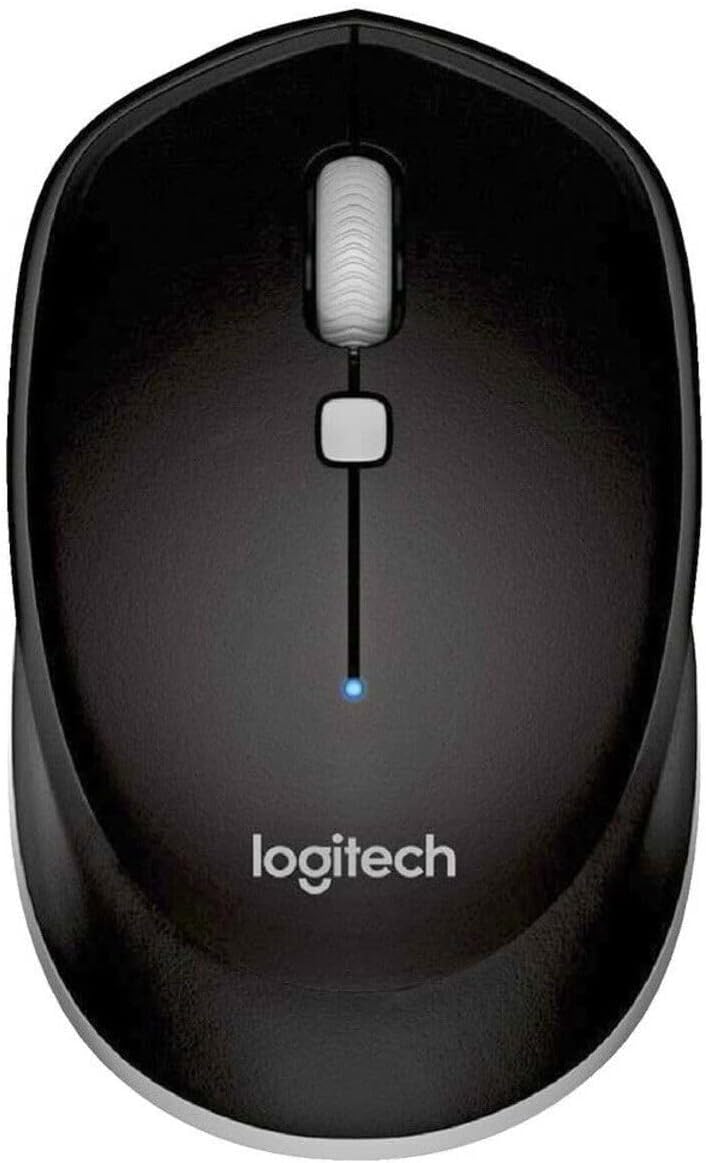
Resim: Yukarıdan aşağıya view of the Logitech M337 mouse, highlighting the left and right click buttons, scroll wheel, and multi-function button.
Ambidextrous Tasarım
The M337 mouse features a symmetrical design, making it comfortable for both left-handed and right-handed users. Its contoured shape fits naturally in the palm of your hand.

Image: A person using the Logitech M337 mouse alongside a laptop on a wooden desk, demonstrating its compact size and comfortable grip.

Image: A woman using the Logitech M337 mouse with her laptop at a cafe table, showcasing its portability and suitability for various environments.
Bakım
Temizlik
To clean your mouse, gently wipe it with a soft, damp Bez kullanın. Yüzeye zarar verebileceğinden sert kimyasallar veya aşındırıcı temizleyiciler kullanmaktan kaçının.
Pil Ömrü
The M337 mouse is designed for long battery life, up to 10 months with typical use. Battery life may vary based on usage and computing conditions. When the battery is low, the LED indicator on the mouse may flash to alert you. Replace the AA battery when necessary.
Depolamak
When not in use for extended periods, it is recommended to turn off the mouse using the On/Off switch on the underside to conserve battery life.
Sorun giderme
- Fare yanıt vermiyor:
- Farenin açık olduğundan emin olun.
- Pili kontrol edin. Gerekirse değiştirin.
- Cihazınızda Bluetooth'un etkin olduğundan emin olun.
- Fareyi cihazınızla yeniden eşleştirmeyi deneyin.
- Move the mouse closer to your device to ensure it's within the 10-meter range.
- Gecikmeli veya düzensiz fare imleci hareketi:
- Farenin temiz ve yansıtmayan bir yüzeyde olduğundan emin olun.
- Diğer kablosuz cihazlardan kaynaklanan paraziti kontrol edin.
- Re-pair the mouse.
- Update your device's Bluetooth drivers.
- Cannot pair the mouse:
- Farenin eşleştirme modunda olduğundan emin olun (LED hızlı bir şekilde yanıp sönüyorsa).
- Remove any previous pairings of the M337 from your device's Bluetooth settings and try again.
- Cihazınızı ve farenizi yeniden başlatın.
Özellikler
| Özellik | Detay |
|---|---|
| Model Numarası | M337 |
| Bağlantı | Bluetooth Kablosuz |
| kablosuz Menzil | 10 metreye (33 feet) kadar |
| Sensör Teknolojisi | Lazer Kalitesinde Optik İzleme |
| Pil Türü | 1 x AA Pil |
| Pil Ömrü | 10 aya kadar |
| Boyutlar (U x G x Y) | 7.32 x 4.96 x 3.27 inç |
| Ağırlık | 2.89 ons |
| Renk | Siyah |
| Üretici | GAXIWILO (Brand: Logitech) |
| İlk Mevcut Tarih | 21 Ocak 2016 |
Garanti ve Destek
Garanti bilgileri ve teknik destek için lütfen resmi Logitech web sitesine başvurun. website or contact Logitech customer service. Keep your proof of purchase for warranty claims.
You can find additional support resources, FAQs, and driver downloads by visiting the Logitech Destek Sayfası.


