1. Giriş
This manual provides essential information for the safe and efficient operation of your NEC X555UNS 55-inch 1080p LED TV. Please read these instructions thoroughly before installation and use, and retain them for future reference.
The NEC X555UNS is designed for professional signage applications, particularly for building video walls, offering superior off-angle viewing and minimal color shift due to its S-IPS panel technology. It supports 24/7 operation with advanced heat management and localized dimming for improved brightness uniformity.

Image: The NEC X555UNS 55-inch LED TV displaying vibrant, colorful content, showcasing its high-quality visual output.
2. Güvenlik Bilgileri
Ürünün hasar görmesini önlemek ve kullanıcı güvenliğini sağlamak için lütfen aşağıdaki güvenlik önlemlerine daima uyun:
- Ensure the product is installed by qualified personnel.
- Havalandırma açıklıklarını kapatmayın.
- Üniteyi yağmura veya neme maruz bırakmaktan kaçının.
- Use only the power cord supplied with the unit or a suitable replacement.
- Temizlik veya servisten önce gücü kesin.
- Cihazı kendiniz tamir etmeye çalışmayın. Tüm servis işlemlerini yetkili servis personeline yaptırın.
3. Paket İçeriği
Paketin içinde tüm öğelerin mevcut olduğundan emin olun:
- NEC X555UNS 55-inch LED TV Unit
- Durmak
- Güç Kablosu
- Uzaktan kumanda
- Kullanım Kılavuzu (bu belge)

Resim: Ön view of the NEC X555UNS 55-inch LED TV, showing its sleek, dark display panel when powered off.
4. Kurulum ve Kurulum
4.1 Fiziksel Kurulum
The NEC X555UNS is designed for video wall applications. Ensure proper mounting hardware is used for secure installation. The unit weighs approximately 81 pounds (36.7 kg).
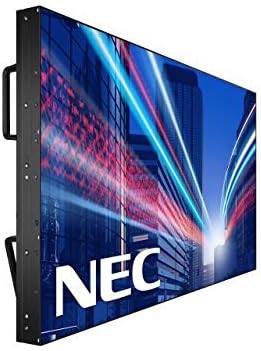
Resim: Yan view of the NEC X555UNS 55-inch LED TV, highlighting its robust construction and integrated handles for easier installation in video wall configurations.
4.2 Bağlantı
Connect your video sources and network cables to the appropriate ports on the display. The X555UNS offers various connectivity options:
- HDMI: Yüksek çözünürlüklü video ve ses girişi için.
- DVI-D: For digital video input.
- LAN: For network control and content distribution.
- Ekran Bağlantı Noktası: Supports UHD pass-through for daisy-chaining multiple displays in a video wall setup.
- OPS Slot: Allows for integration of single board computers.
For video wall configurations, utilize the DisplayPort for UHD daisy-chaining to achieve a high-resolution display across the entire wall.
4.3 İlk Güç Açma
- Connect the power cord to the display and a suitable power outlet.
- Press the power button on the display or remote control.
- The display will power on and show the NEC logo.
- Use the on-screen menu to configure initial settings such as language, input source, and display mode.
The Auto ID feature can simplify installation time, especially in multi-display setups, by reducing configuration steps to a single button press.
5. Kullanım Talimatları
5.1 Temel İşlemler
Use the remote control or the buttons on the display to navigate the on-screen menu (OSD). Adjust settings such as brightness, contrast, color temperature, and input source.
5.2 Ekran Özellikleri
- S-IPS Panel Technology: Provides excellent off-angle viewing and minimizes color shift, making it ideal for public viewing and video walls.
- Direct LED Backlighting with Localized Dimming: Enhances brightness uniformity and achieves a higher dynamic contrast ratio.
- 24/7 Operasyon: Designed for continuous use with advanced thermal protection, internal temperature sensors, and fan-based cooling.
- 700 cd/m² Brightness: Ensures clear visibility even in brightly lit environments.
6. Bakım
6.1 Ekranın Temizlenmesi
Ekranı temizlemek için yumuşak, tiftiksiz bir bezle hafifçe silin. İnatçı lekeler için,ampen the cloth slightly with water or a mild, non-abrasive screen cleaner. Do not spray liquid directly onto the screen.
6.2 Genel Bakım
- Aşırı ısınmayı önlemek için ekranı iyi havalandırılan bir alanda tutun.
- Ekranın üzerine ağır nesneler koymaktan kaçının.
- Kablo bağlantılarının sağlam olduğundan emin olmak için düzenli olarak kontrol edin.
7. Sorun Giderme
If you encounter issues with your NEC X555UNS, refer to the following common problems and solutions:
| Sorun | Olası Neden | Çözüm |
|---|---|---|
| Güç Yok | Güç kablosu bağlantısı kesilmiş; Elektrik prizi arızalı. | Check power cord connection; Test power outlet with another device. |
| Resim yok | Incorrect input source selected; Video cable loose or faulty. | Select correct input source; Check video cable connections. |
| Kötü Görüntü Kalitesi | Resolution mismatch; Display settings incorrect. | Adjust resolution on source device; Calibrate display settings (brightness, contrast). |
If the problem persists, contact NEC customer support.
8. Özellikler
| Özellik | Detay |
|---|---|
| Model Adı | X555UNS |
| Ekran Boyutu | 55 inç |
| Ekran Teknolojisi | LED, S-IPS Panel |
| Çözünürlük | 1080p (Tam HD) |
| En Boy Oranı | 16:9 |
| Yenileme Hızı | 60 Hz |
| Parlaklık | 700 cd/m² (nits) |
| Bağlantı | HDMI, DVI-D, LAN, DisplayPort |
| Özel Özellikler | Flat, S-IPS Panel, Auto ID, UHD Daisy Chain, OPS Slot, 24/7 Operation, Advanced Thermal Protection |
| Ürün Boyutları | 54 x 12 x 34 inç (yaklaşık) |
| Ürün Ağırlığı | 81 pound (yaklaşık) |
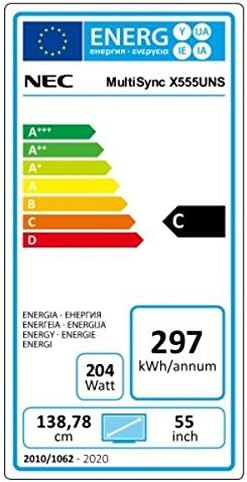
Image: Energy efficiency label for the NEC MultiSync X555UNS, showing energy consumption details and efficiency class.
9. Garanti ve Destek
Garanti bilgileri ve teknik destek için lütfen resmi NEC sayfasına başvurun. website or contact your local NEC representative. Keep your purchase receipt as proof of purchase.
Çevrimiçi Kaynaklar: Ziyaret etmek www.necdisplay.com for product documentation, drivers, and support contact information.
Müşteri Desteği: For direct assistance, please contact NEC customer service.


