1. Giriş
This manual provides comprehensive instructions for the installation, operation, and maintenance of the Veracity VHW-HW01 Single Ethernet Over Coax Device. The VHW-HW01 is designed to extend Ethernet network connections over existing coaxial cable infrastructure, providing a reliable and cost-effective solution for long-distance data transmission without the need for new cabling.
The device facilitates high-speed Ethernet communication, making it ideal for applications such as IP camera installations, network extensions in older buildings, or any scenario where running new Ethernet cable is impractical.

Şekil 1: Ön view of the Veracity VHW-HW01 device, showing the Ethernet port, power input, and coaxial connector.
2. Temel Özellikler
- Ethernet Over Coax: Extends 100Mbps Ethernet connections over standard coaxial cable.
- Yüksek Bant Genişliği: Supports up to 100 Megabits Per Second (Mbps) data transfer rate.
- Basit Kurulum: Plug-and-play operation with minimal configuration required.
- Kompakt Tasarım: Small form factor for easy deployment in various environments.
- Güvenilir Bağlantı: Provides stable and secure data transmission over long distances.
3. Paket İçeriği
Please verify that all items are present and in good condition upon opening the package. If any items are missing or damaged, please contact your supplier.
- Veracity VHW-HW01 Single Ethernet Over Coax Device (1 unit)
- Power Adapter (may be sold separately or included depending on region/kit)
- Hızlı Başlangıç Kılavuzu / Kullanıcı Kılavuzu (bu belge)
4. Kurulum ve Kurulum
The VHW-HW01 operates in pairs, with one unit at each end of the coaxial cable run. Ensure you have two units for a complete link (this product listing is for a single unit).
- Bağlantı Noktalarını Belirleyin: Determine the location for each VHW-HW01 unit. One unit will connect to your network device (e.g., router, switch, NVR) and the other to the remote Ethernet device (e.g., IP camera, PC).
- Koaksiyel Kabloyu Bağlayın: Connect a standard coaxial cable (e.g., RG59, RG6, RG11) to the BNC connector on the VHW-HW01 unit. Ensure the connection is secure.
- Ethernet Kablosunu Bağlayın: Connect a standard RJ45 Ethernet cable from your network device to the Ethernet port on the VHW-HW01 unit.
- Güç Uygula: Connect the appropriate 12V DC or 24V AC power adapter (if not already integrated) to the power input terminals on the VHW-HW01. Observe the polarity for DC power.
- Bağlantı Durumunu Doğrula: Once power is applied to both units and the coaxial cable is connected, observe the LED indicators on the device. A solid link light indicates a successful coaxial connection, and Ethernet activity lights will show data flow.
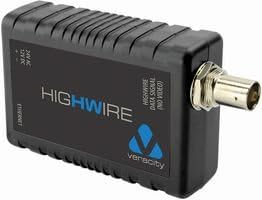
Şekil 2: Taraf view of the Veracity VHW-HW01, highlighting the power input terminals and Ethernet port.
5. Operasyon
The Veracity VHW-HW01 is a transparent Ethernet extender. Once properly installed and powered, it operates automatically without requiring any user configuration. Data packets are seamlessly transmitted over the coaxial cable, appearing as a direct Ethernet connection to connected devices.
- Güç Açık: Ensure both VHW-HW01 units are powered on.
- Link Establishment: The devices will automatically establish a high-speed Ethernet link over the coaxial cable. This is indicated by the link status LEDs.
- Veri İletimi: Network traffic from the connected Ethernet devices will flow through the VHW-HW01 units over the coaxial cable.
6. Bakım
The Veracity VHW-HW01 is designed for maintenance-free operation. However, following these guidelines can help ensure its longevity and reliable performance:
- Temizlik: Cihazı temiz ve tozdan arındırılmış halde tutun. Temizlik için yumuşak, kuru bir bez kullanın. Sıvı temizleyiciler veya aerosoller kullanmayın.
- Çevre: Operate the device within its specified environmental conditions (temperature, humidity). Avoid exposing it to extreme temperatures, direct sunlight, or excessive moisture.
- Kablo Bağlantıları: Periodically check all cable connections (coaxial, Ethernet, power) to ensure they are secure and free from damage.
- Havalandırma: Ensure adequate airflow around the device to prevent overheating, although passive cooling is typically sufficient for this low-power device.
7. Sorun Giderme
If you encounter issues with your VHW-HW01 device, refer to the following common problems and solutions:
| Sorun | Olası Neden | Çözüm |
|---|---|---|
| Güç gösterge ışığı yok. | No power supply, incorrect power adapter, or faulty power connection. |
|
| Coaxial link light is off or blinking. | No coaxial connection, faulty coaxial cable, or only one unit powered. |
|
| Ethernet activity light is off. | No Ethernet connection, faulty Ethernet cable, or connected device is off. |
|
| Ağ hızı yavaş. | Poor coaxial cable quality, excessive cable length, or network congestion. |
|
8. Özellikler
| Bağlanmak | Değer |
|---|---|
| Marka | Doğruluk |
| Model Numarası | VHW-HW |
| Donanım Arayüzü | Ethernet, Coaxial (BNC) |
| Veri Bağlantı Protokolü | Ethernet |
| Veri Aktarım Hızı | Saniyede 100 Megabit |
| Ürün Ağırlığı | 3.52 ons (yaklaşık 100 gram) |
| Paket Boyutları | 4 x 2.1 x 0.9 inç (yaklaşık 10.16 x 5.33 x 2.29 cm) |
| Üretici | Doğruluk |
| İlk Mevcut Tarih | 12 Şubat 2012 |
9. Garanti ve Destek
Veracity products are designed for reliability and performance. For specific warranty terms and conditions, please refer to the warranty information provided with your purchase or visit the official Veracity webalan.
For technical support, troubleshooting assistance beyond this manual, or inquiries regarding product returns and repairs, please contact Veracity customer support through their official channels. Ensure you have your product model number (VHW-HW01) and purchase details ready when contacting support.
Çevrimiçi Kaynaklar: For the latest documentation, FAQs, and software updates, please visit the official Veracity webalan.


