1. Giriş
This manual provides comprehensive instructions for the installation, operation, and maintenance of your Commax Audio Intercom Doorbell and Doorphone Kit. This kit includes one DP-2S Doorphone unit and one DR-201D Doorbell unit, designed to provide a reliable 1-to-1 audio communication system for your home or office entrance.
2. Ürün Bittiview
The Commax intercom system facilitates clear audio communication between an indoor station (doorphone) and an outdoor station (doorbell). The DP-2S doorphone allows you to speak with visitors and remotely release an electric door strike (sold separately). The DR-201D doorbell unit enables visitors to initiate a call to the indoor unit.

Figure 2.1: Commax DP-2S Doorphone and DR-201D Doorbell Kit. This image displays both the indoor doorphone unit and the outdoor doorbell unit, providing a visual representation of the complete system.
Temel Özellikler:
- Kit includes one doorphone DP-2S and doorbell DR-201D.
- Easy installation with 2-wires to the door station and 2-wires to the electric door strike (optional).
- DP-2S doorphone to talk with visitor and release door (electric strike not included).
- DR-201D door unit to make house call and talk. (Door bell unit is not weatherproof rated).

Figure 2.2: Commax DP-2S Doorphone Unit. This image shows the indoor doorphone unit, which features a handset for communication and a button for door release.

Figure 2.3: Commax DR-201D Doorbell Unit. This image displays the outdoor doorbell unit, equipped with a speaker grille and a call button.
3. Kurulum ve Kurulum
Before beginning installation, ensure all power is disconnected from the installation area. This system requires 2-wire connections for communication and an additional 2-wire connection for an optional electric door strike.
3.1 Montaj
- Both the DP-2S Doorphone and DR-201D Doorbell units are designed for yüzeye monte kurulum.
- Select a suitable location for each unit, ensuring the DR-201D is protected from direct weather exposure as it is not weatherproof rated.
- Securely mount the units using appropriate screws and anchors for your wall type.
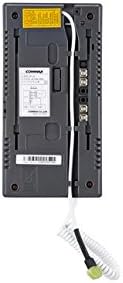
Şekil 3.1: Arka view of Commax DP-2S Doorphone Unit showing wiring terminals and connection points. This image illustrates the back of the indoor unit, detailing where the wiring connections are made.

Şekil 3.2: Arka view of Commax DR-201D Doorbell Unit showing wiring terminals and model label. This image shows the back of the outdoor unit, indicating its wiring terminals and product identification label.
3.2 Kablolama Şeması
The system requires a 2-wire connection between the DP-2S doorphone and the DR-201D doorbell for audio communication. If an electric door strike is used, an additional 2-wire connection is needed from the DP-2S to the strike. Ensure proper polarity when connecting wires.

Figure 3.3: Wiring diagram for Commax DP-2S Doorphone, illustrating connections for room station, sub station, adapter power, and electric door key. This diagram provides a detailed guide for connecting the DP-2S unit.

Figure 3.4: Overall wiring diagram for Commax intercom system, showing connections between DR-201D doorbell, DP-2S doorphone, and optional electric door strike with power source. This comprehensive diagram shows the complete system wiring, including the optional electric door strike.
The maximum connection distance between the doorphone and doorbell is 100m (using 0.65Ø copper wire) or 50m (using 0.8Ø copper wire).
4. Kullanım Talimatları
4.1 Making a Call from the Doorbell (DR-201D)
- A visitor presses the call button on the DR-201D doorbell unit.
- The DP-2S doorphone inside will ring, indicating an incoming call.
4.2 Answering a Call and Communication (DP-2S)
- When the DP-2S rings, lift the handset to establish two-way audio communication with the visitor at the doorbell unit.
- Speak clearly into the handset.
- To end the conversation, replace the handset on the cradle.
4.3 Door Release Function (DP-2S)
If an electric door strike is connected to the DP-2S unit:
- During an active conversation with a visitor, press the door release button on the DP-2S unit.
- This will momentarily activate the electric door strike, allowing the visitor to enter.
5. Bakım
To ensure the longevity and optimal performance of your Commax intercom system, follow these maintenance guidelines:
- Temizlik: Wipe the units with a soft, dry cloth. Do not use abrasive cleaners, solvents, or strong detergents, as these can damage the surface.
- Çevre Koruma: The DR-201D doorbell unit is not weatherproof rated. Ensure it is installed in a location protected from rain, snow, and direct sunlight to prevent damage.
- Kablolama Denetimi: Kablo bağlantılarını aşınma, korozyon veya gevşek bağlantı belirtileri açısından düzenli olarak kontrol edin. Tüm bağlantıların güvenli olduğundan emin olun.
- Güç Kaynağı: Ensure the power supply to the DP-2S unit (AC 110V 50/60Hz) is stable and within the specified range.
6. Sorun Giderme
If you encounter issues with your Commax intercom system, refer to the following troubleshooting guide:
| Sorun | Olası Neden | Çözüm |
|---|---|---|
| No sound from doorphone or doorbell. | Loose or incorrect wiring; No power to DP-2S. | Check all 2-wire connections between units for proper polarity and secure fit. Verify DP-2S is receiving AC 110V power. |
| Doorbell rings but no communication. | Handset not properly seated; Wiring issue. | Ensure the DP-2S handset is fully seated. Re-check the 2-wire communication lines. |
| Kapı açma mekanizması çalışmıyor. | Incorrect wiring to electric strike; Faulty strike; No power to strike. | Verify the 2-wire connection from DP-2S to the electric strike. Ensure the electric strike has its own power source if required. Test the strike independently if possible. |
| Intermittent communication. | Loose connections; Wire degradation; Exceeded maximum wire distance. | Inspect all wiring for damage or loose points. Ensure wire gauge is appropriate for the distance (0.65Ø for 100m, 0.8Ø for 50m). |
7. Özellikler
Detailed technical specifications for the Commax Audio Intercom Doorbell and Doorphone Kit:
| Özellik | Şartname |
|---|---|
| Ürün Model Numarası | DP-2S/DR-201D |
| Ürün Ölçüleri (Genel) | 12 x 7 x 5 inç |
| Ürün Ağırlığı (Toplam) | 3 pound |
| DP-2S Doorphone: | |
| Güç Kaynağı | AC 110V 50/60Hz |
| Wiring (Call) | 2 tel |
| Wiring (Door Release) | 2 wires (1.6Ø Copper wire recommended) |
| Montaj Tipi | Surface-mounted type |
| Boyutlar (G×Y×D) | 4.25" × 8.3" × 1.3" (2.4") |
| DR-201D Doorbell: | |
| Güç Kaynağı | 9V (supplied by DP-2S) |
| Montaj Tipi | Surface-mounted type |
| Boyutlar (G×Y×D) | 3.8" × 5.5" × 1.7" |
| Distance of Connection (Doorphone to Doorbell) | 100m (0.65Ø wire) / 50m (0.8Ø wire) |
| UPC | 730957987238 |
8. Garanti ve Destek
For information regarding product warranty, technical support, or service, please contact the manufacturer, Commax, or your authorized reseller. Retain your proof of purchase for warranty claims.


