PRORECK Party 15 Portable PA Speaker System
Kullanıcı Kılavuzu
Model: PARTY 15
giriiş
Satın aldığınız için teşekkür ederizasing the PRORECK Party 15 Portable PA Speaker System. This system is designed to deliver powerful and clear audio for various applications, including parties, DJ events, home studios, and social gatherings. Featuring Bluetooth connectivity, USB/SD card playback, FM radio, and integrated LED lights, the Party 15 offers versatile audio solutions. Please read this manual thoroughly before operating the system to ensure proper use and to maximize its performance and longevity.
Önemli Güvenlik Bilgileri
Yangın, elektrik çarpması ve yaralanma riskini azaltmak için bu ürünü kullanırken her zaman temel güvenlik önlemlerine uyun.
- Bu ekipmanı yağmura veya neme maruz bırakmayın.
- Hoparlörün kasasını açmayın. İçinde kullanıcı tarafından onarılabilecek hiçbir parça yoktur. Tüm servis işlemlerini yetkili servis personeline yaptırın.
- Güç kaynağı hacmini sağlayıntage, vol ile eşleşirtagÜnite üzerinde belirtilmiştir.
- Güç kablosunun, özellikle fişlerde, prizlerde ve cihazdan çıktığı noktalarda üzerine basılmasını veya sıkışmasını önleyin.
- Yıldırımlı havalarda veya uzun süre kullanılmayacaksa bu cihazın fişini çekin.
- Havalandırma açıklıklarını kapatmayın. Üreticinin talimatlarına uygun şekilde kurulum yapın.
- Yalnızca üretici tarafından belirtilen veya cihazla birlikte satılan araba, stand, tripod, braket veya masayı kullanın.
Kutuda Neler Var?
Carefully unpack your PRORECK Party 15 system and ensure all items listed below are present and in good condition. If any items are missing or damaged, please contact your retailer immediately.

Image: Complete PRORECK Party 15 system with all included accessories.
- 1 x Aktif Hoparlör
- 1 x Pasif Hoparlör
- 2 x Hoparlör Standları
- 1 x Kablolu Mikrofon
- 1 x Speakon Cable (for connecting active to passive speaker)
- 1 x Güç Kablosu
- 1 x Uzaktan Kumanda

Resim: Ayrıntılı view of the wired microphone, remote control, and various cables.
Kurmak
Follow these steps to set up your PRORECK Party 15 speaker system.
1. Hoparlör Sehpası Montajı
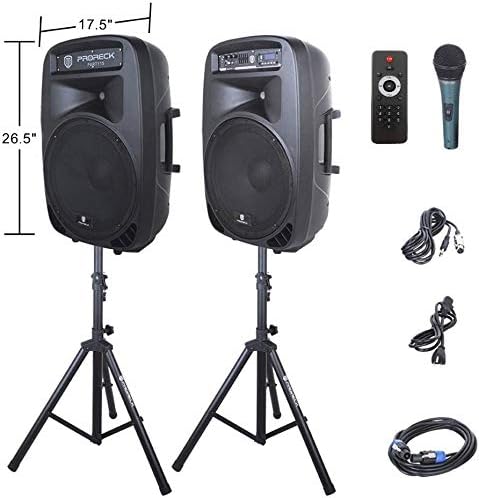
Image: The two included speaker stands.
- Unfold the tripod legs of each speaker stand until they are fully extended and stable.
- Loosen the height adjustment knob on the stand and extend the pole to your desired height. Ensure the safety pin is inserted through the appropriate hole to secure the height.
- Yükseklik ayar düğmesini iyice sıkın.
2. Hoparlör Yerleşimi
- Carefully lift each speaker and place it onto the top pole of a speaker stand. Ensure the speaker is securely seated.
- Position the active speaker (the one with the control panel) near a power outlet.
- Place the passive speaker within reach of the included Speakon cable from the active speaker.
Image: PRORECK Party 15 speakers set up on their stands.
3. Hoparlörleri Bağlama
- Locate the Speakon output on the rear panel of the active speaker and the Speakon input on the rear panel of the passive speaker.
- Connect one end of the Speakon cable to the active speaker's Speakon output and the other end to the passive speaker's Speakon input. Ensure a secure connection.

Image: Rear panels of the active and passive speakers, highlighting the Speakon connection.
4. Güç Bağlantısı
- Ensure the master volume knob on the active speaker is turned down to its minimum setting.
- Connect the power cable to the active speaker's power input and then plug it into a suitable electrical outlet.
Kullanım Talimatları
This section details how to operate your PRORECK Party 15 speaker system and utilize its various features.
Kontrol Paneli Bittiview

Resim: Ayrıntılı view of the active speaker's control panel.
The active speaker features a comprehensive control panel with an LCD display, various input options, volume controls, and an equalizer.
1. Güç Açma/Kapatma
- After connecting the power cable, locate the power switch on the rear panel of the active speaker.
- Flip the switch to the "ON" position to power on the system. The LCD display will illuminate.
- To power off, flip the switch to the "OFF" position.
2. Mod Seçimi
Basın MOD button on the control panel or remote control to cycle through available input modes: Bluetooth, USB, SD Card, FM Radio, and Line Input.
3. Bluetooth Bağlantısı
- Select "Bluetooth" mode using the MOD button. The LCD display will show "BLUE".
- Bluetooth özellikli cihazınızda (akıllı telefon, tablet vb.) mevcut Bluetooth cihazlarını arayın.
- Select "PRORECK PARTY 15" from the list. Once paired, the speaker will emit a confirmation sound.
- You can now play audio from your device through the speakers.
4. USB/SD Karttan Oynatma
- MP3 ses dosyaları içeren bir USB sürücü veya SD kart takın. files'yi kontrol panelindeki ilgili yuvaya yerleştirin.
- The system will automatically switch to USB or SD mode and begin playing the first compatible audio fileDeğilse, basın. MOD Doğru girişi seçmek için düğme.
- Kullanın OYNAT/DURDUR, ÖNCESİ, Ve SONRAKİ buttons on the control panel or remote to manage playback.
5. FM Radyo
- Select "FM Radio" mode using the MOD düğme.
- Basın OYNAT/DURDUR button to initiate an automatic scan for available FM stations. The system will save detected stations.
- Kullanın ÖNCESİ Ve SONRAKİ Kaydedilmiş istasyonlar arasında gezinmek için düğmeler.
6. Mikrofon Kullanımı
- Connect the wired microphone to the 1/4'' MIC input on the control panel.
- Adjust the "MIC VOL" knob to control the microphone's volume level.
- Ensure the main volume is set appropriately to avoid feedback.
7. Uzaktan Kumanda İşlevleri
Image: The included remote control.
The remote control allows for convenient operation from a distance (up to 20 feet). Functions include:
- TARİFİ: Giriş modları arasında geçiş yapın.
- OYNAT/DURDUR: Ses oynatmayı oynatın veya duraklatın.
- ÖNCEKİ SONRAKİ: Skip tracks or navigate FM stations.
- SES+/SES-: Ana sesi ayarlayın.
- EQ: Ekolayzır ön ayarları arasında geçiş yapın.
- Numeric buttons for direct track selection (in USB/SD mode).
8. Ekolayzır Ayarı
The control panel features a 5-band graphic equalizer. Adjust the sliders to fine-tune the audio output to your preference. Experiment with different settings to achieve the desired sound for various music genres or vocal performances.
9. LED Işıklar

Image: PRORECK Party 15 speakers demonstrating various LED light colors.
The PRORECK Party 15 speakers are equipped with built-in LED lights that activate with sound. These lights enhance the party atmosphere. There is a dedicated switch on the rear of the active speaker to turn the LED lights on or off.
Bakım
Doğru bakım, hoparlör sisteminizin uzun ömürlü olmasını ve en iyi performansı göstermesini sağlar.
- Temizlik: Use a soft, dry cloth to clean the exterior of the speakers. Do not use abrasive cleaners, waxes, or solvents.
- Depolamak: When not in use for extended periods, store the speakers in a cool, dry place, away from direct sunlight and extreme temperatures.
- Havalandırma: Aşırı ısınmayı önlemek için havalandırma açıklıklarının toz ve kirden arındırılmış olduğundan emin olun.
- Kablolar: Tüm kabloları düzenli olarak aşınma veya hasar belirtileri açısından kontrol edin. Hasarlı kabloları derhal değiştirin.
Sorun giderme
If you encounter issues with your PRORECK Party 15 system, refer to the following common problems and solutions.
| Sorun | Olası Neden | Çözüm |
|---|---|---|
| Güç yok | Power cable not connected; Power switch off; Outlet malfunction. | Ensure power cable is securely connected and plugged into a working outlet. Check power switch on rear panel. |
| Hoparlörlerden ses gelmiyor | Volume too low; Incorrect input mode; Speakon cable loose/damaged; Audio source issue. | Increase master volume. Select correct input mode. Check Speakon cable connection between active and passive speakers. Verify audio source is playing. |
| Bluetooth eşleştirmiyor | Hoparlör Bluetooth modunda değil; Cihaz çok uzakta; Cihaz zaten başka bir hoparlörle eşleştirilmiş. | Ensure speaker is in Bluetooth mode ("BLUE" on display). Move device closer to speaker. Disconnect device from other Bluetooth connections. |
| Mikrofon çalışmıyor | Mic volume too low; Microphone not connected properly; Microphone faulty. | Increase "MIC VOL" knob. Ensure microphone is fully inserted into the 1/4'' input. Test with another microphone if available. |
| Bozuk ses | Volume too high; Input signal too strong; Equalizer settings. | Reduce master volume or input source volume. Adjust equalizer settings. |
| LED ışıklar çalışmıyor | LED switch off; Volume too low for activation. | Ensure the LED switch on the rear panel is in the "ON" position. Increase volume to activate sound-reactive lights. |
Özellikler
| Model Adı | PARTİ 15 |
| Hoparlör Tipi | Woofer |
| Hoparlör Boyutu | 15 inç |
| Hoparlör Maksimum Çıkış Gücü | 2000 Watts P.M.P.O (Peak Music Power Output) |
| Bağlantı Teknolojisi | Kablolu, Kablosuz (Bluetooth) |
| Kablosuz İletişim Teknolojisi | Bluetooth |
| Bluetooth Menzili | 10 metre (yaklaşık 33 fit) |
| Özel Özellikler | LED Light, FM Radio, USB Port, SD Card Reader, Digital LCD Display |
| Girişler | 1/4'' Mic, RCA Line Inputs, USB, SD Card |
| Çıktılar | Speakon Output (for passive speaker), RCA Line Output |
| Malzeme | Akrilonitril Bütadien Stiren (ABS) |
| Ürün Boyutları (her bir hoparlör için) | 19"D x 30"W x 29"H (approximate, likely including handles/feet) |
| Ürün Ağırlığı (toplam) | 81.6 Pound |
| Güç Kaynağı | Kablolu Elektrik |
Garanti ve Destek
PRORECK products come with a limited warranty. For specific warranty terms and conditions, please refer to the warranty card included with your product or visit the official PRORECK website. For technical support, troubleshooting assistance, or parts inquiries, please contact PRORECK customer service through their official channels.
Manufacturer: PRORECK AUDIO


