giriiş
Satın aldığınız için teşekkür ederizasing the SENTRY HPXBT150 Bluetooth Flat Cord Earbuds. This manual provides detailed instructions on how to set up, operate, and maintain your new wireless earbuds. Please read this manual thoroughly before use to ensure optimal performance and longevity of your device.
Paket İçeriği
- SENTRY HPXBT150 Bluetooth Flat Cord Earbuds
- Koruyucu Kılıf
- USB Charging Cable (Micro-USB)
- Removable Ear Hooks
- Kullanıcı Kılavuzu
Ürün Bittiview
The SENTRY HPXBT150 earbuds feature Bluetooth wireless technology, allowing for a cord-free listening experience. They include an in-line microphone for hands-free calls and media control buttons for easy operation. Removable ear hooks provide a secure fit, especially during physical activity.
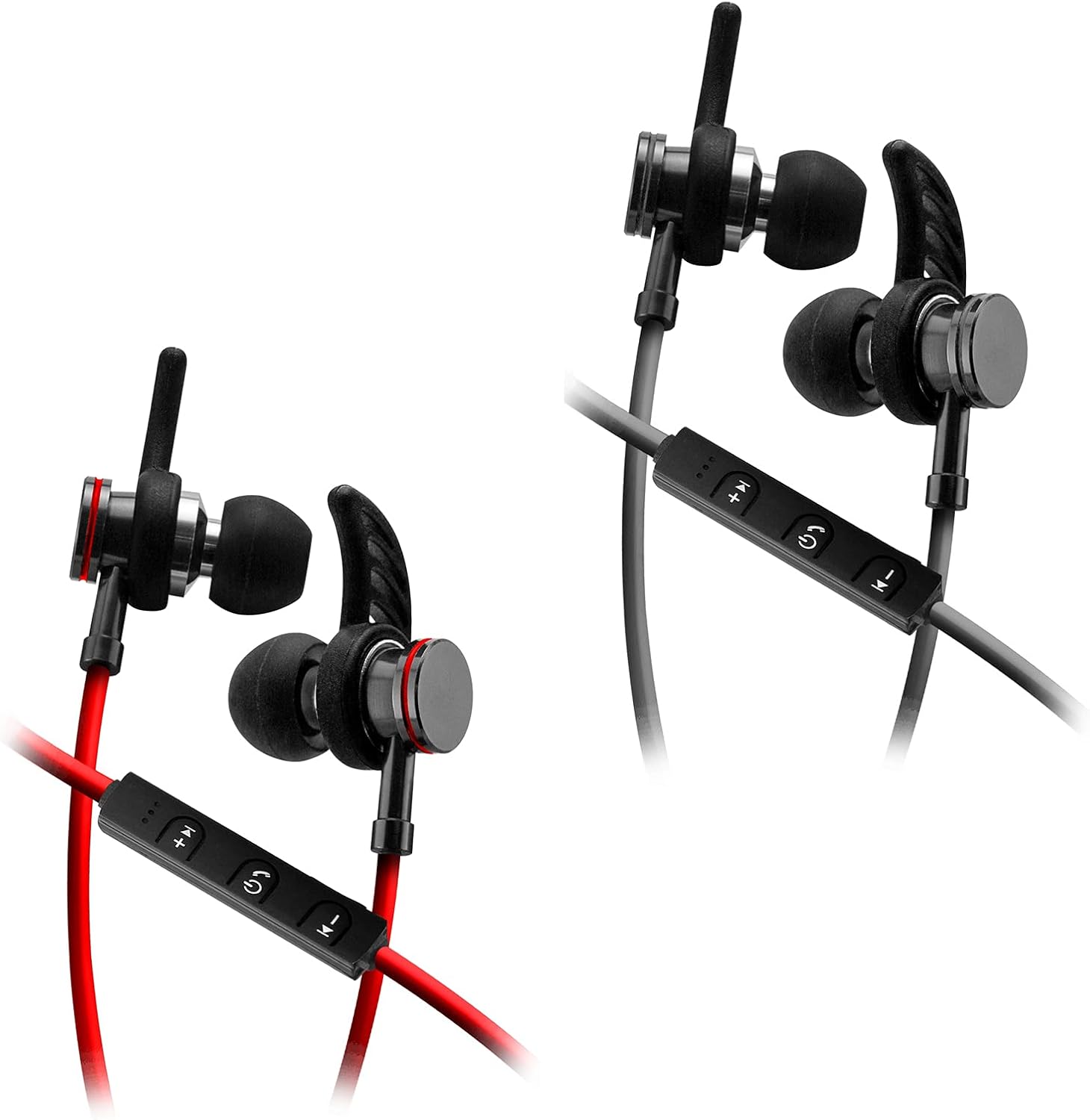
Image: SENTRY HPXBT150 Bluetooth Earbuds showing the in-line control panel and ear hooks. The control panel features volume up/next track, power/multifunction, and volume down/previous track buttons.
Kurmak
1. Kulaklıkları Şarj Etme
- Locate the Micro-USB charging port on the in-line control unit.
- Kutuda bulunan USB şarj kablosunu kulaklıkların şarj portuna bağlayın.
- Plug the other end of the USB cable into a compatible USB power source (e.g., computer USB port, USB wall adapter).
- The LED indicator light will illuminate during charging. It will change color or turn off once charging is complete. A full charge typically takes approximately 1-2 hours.
2. Bluetooth Eşleştirme
- Ensure the earbuds are fully charged before initial pairing.
- Press and hold the multi-function button (usually the center button on the in-line control) for approximately 5-7 seconds until the LED indicator light flashes red and blue alternately. This indicates the earbuds are in pairing mode.
- On your Bluetooth-enabled device (smartphone, tablet, computer), go to the Bluetooth settings menu.
- Bluetooth'u etkinleştirin ve mevcut cihazları arayın.
- Select "HPXBT150" or a similar name from the list of found devices.
- Once successfully paired, the LED indicator on the earbuds will typically flash blue slowly or turn off, and you will hear an audible confirmation.
- Şifre sorulursa "0000" girin.
Kullanım Talimatları
Güç Açık/Kapalı
- Güç Açık: LED göstergesi mavi renkte yanıp sönene ve açılış sesi duyulana kadar çok fonksiyonlu düğmeyi yaklaşık 3 saniye basılı tutun.
- Kapat: Press and hold the multi-function button for approximately 3-5 seconds until the LED indicator flashes red and you hear a power-off tone.
Müzik Çalma
- Oynat/Duraklat: Çok işlevli düğmeye bir kez basın.
- Sesi aç: '+' tuşuna basın.
- Sesi kıs: '-' tuşuna basın.
- Sonraki Parça: '+' tuşuna basılı tutun.
- Önceki parça: '-' tuşuna basılı tutun.
Yönetim Çağrı
- Çağrıyı Cevapla/Sonlandır: Çok işlevli düğmeye bir kez basın.
- Çağrıyı Reddet: Çok fonksiyonlu düğmeye yaklaşık 2 saniye basılı tutun.
- Son Numarayı Tekrar Ara: Çok fonksiyonlu düğmeye iki kez basın.
Bakım
- Temizlik: Use a soft, dry cloth to clean the earbuds. Do not use harsh chemicals or abrasive materials.
- Depolamak: When not in use, store the earbuds in the provided protective case to prevent damage.
- Pil Bakım: To preserve battery life, avoid fully discharging the earbuds frequently. Charge them regularly, even if not used for extended periods.
- Nemden Kaçının: Kulaklıkları sudan ve aşırı nemden uzak tutun.
Sorun giderme
| Sorun | Olası Çözüm |
|---|---|
| Kulaklıklar açılmıyor. | Ensure the earbuds are fully charged. Connect to a power source and allow time to charge. |
| Cihazla eşleştirilemiyor. | Ensure earbuds are in pairing mode (flashing red/blue). Turn off and on Bluetooth on your device. Move earbuds closer to your device. Forget previous pairings on your device and try again. |
| Ses yok veya ses seviyesi düşük. | Check volume levels on both the earbuds and your connected device. Ensure earbuds are properly paired. Try re-pairing the earbuds. |
| Bağlantı kesintisi. | Kulaklıklar ve cihazınız arasında herhangi bir engel olmadığından emin olun. Cihazınıza daha yakın durun. Güçlü Wi-Fi veya diğer kablosuz parazitlerin olduğu ortamlardan kaçının. |
Özellikler
- Modeli: HPXBT150
- Bağlantı Teknolojisi: Kablosuz (Bluetooth)
- Sürücü Ünitesi: 10mm
- Empedans: 32+/-3 Ohm
- Hassasiyet: 103db +/- 3db
- Frekans Tepkisi: 20Hz - 20kHz
- Uyumlu Cihazlar: Phones, Tablets, MP3 Players, Computers, Gaming Consoles
- Kontrol Türü: Medya Kontrolü
- Özel Özellikler: Microphone Included, USB Connectivity, Removable Ear Hooks
- Ürün Ağırlığı: 2.08 ons
Güvenlik Bilgileri
- Do not expose the earbuds to extreme temperatures, direct sunlight, or fire.
- Do not disassemble or modify the earbuds. This may void the warranty and cause damage.
- İşitme hasarını önlemek için uzun süre yüksek ses seviyesinde dinlemekten kaçının.
- Çocukların ve evcil hayvanların erişemeyeceği yerde saklayınız.
- Ürünü yerel düzenlemelere uygun olarak sorumlu bir şekilde atın.
Garanti ve Destek
For warranty information and technical support, please refer to the documentation included with your purchase or contact SENTRY customer service directly. Keep your proof of purchase for warranty claims.


