1. Giriş
The VILTROX JY120-S2 is a wireless remote shutter release system designed to control your camera's shutter function remotely. It utilizes a 2.4 GHz radio frequency (RF) signal, allowing operation without direct line-of-sight between the transmitter and receiver. This system is ideal for preventing camera shake, taking self-portraits, group photos, or capturing wildlife from a distance.
The system includes a transmitter and a receiver, both powered by AAA batteries. It supports various shooting modes, including single shot, bulb mode for long exposures, and a 3-second delay time-lapse mode.
2. Paket İçeriği
Lütfen paketinizde tüm öğelerin mevcut olduğundan emin olun:
- 1 x JY120-S2 Transmitter Unit
- 1 x JY120-S2 Receiver Unit
- 1 x Camera Connection Cable (S2 type for Sony cameras)
- 1 x Kullanım Kılavuzu (bu belge)
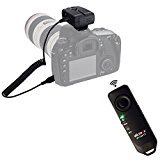
Image: The VILTROX JY120-S2 wireless remote shutter release system, showing both the handheld transmitter and the camera-mounted receiver unit, along with the connection cable.
3. Kurulum
3.1 Pil Kurulumu
Both the transmitter and receiver units require AAA batteries (not included). To install:
- Open the battery compartment cover on the back of both the transmitter and receiver units.
- Insert the AAA batteries, paying close attention to the polarity markings (+ and -). For the receiver, if no polarity label is visible, insert the battery with the positive (+) end first into the slot with the bump on the cover. The other battery should be inserted in the opposite direction.
- Pil bölmesi kapaklarını sıkıca kapatın.
3.2 Connecting the Receiver to Your Camera
- Locate the remote control port on your camera. This is typically a small jack, often used for wired shutter releases or GPS units.
- Connect one end of the provided S2 camera connection cable to the receiver unit.
- Connect the other end of the cable firmly into your camera's remote control port. Ensure the plug is fully seated to establish a reliable connection.
- Mount the receiver unit onto your camera's hot shoe or attach it to a strap if preferred.
3.3 Açma
Locate the ON/OFF switch on both the transmitter and receiver units. Slide the switches to the "ON" position. An indicator light on each unit will illuminate briefly to confirm power is on.
4. Kullanım Talimatları
The JY120-S2 offers three primary shooting modes:
4.1 Half-Press for Autofocus
Similar to your camera's shutter button, a half-press on the transmitter's shutter button will engage your camera's autofocus and exposure metering. Fully press the button to take a picture.
4.2 Single Shot Mode
This is the standard mode for taking individual photos. Press the shutter button on the transmitter fully to capture a single image.
4.3 BULB Mode (Long Exposure)
BULB mode is used for exposures longer than your camera's standard shutter speed settings, ideal for night photography or light painting.
- Set your camera to BULB mode (refer to your camera's manual for specific instructions).
- On the transmitter, select BULB mode (if applicable, some models automatically detect BULB from camera).
- Press the transmitter's shutter button once to open the shutter.
- Press the shutter button a second time to close the shutter and complete the exposure.
4.4 Time-Lapse Shot (3-Second Delay)
This mode allows for a 3-second delay before the shutter fires, which can be useful for reducing camera shake or for the photographer to get into position.
- On the transmitter, select the time-lapse or 3-second delay mode.
- Press the shutter button fully. The camera will wait for 3 seconds before taking the picture.
5. Bakım
- Temizlik: Cihazları temizlemek için yumuşak, kuru bir bez kullanın. Sıvı temizleyiciler veya çözücüler kullanmayın.
- Depolamak: When not in use for extended periods, remove the batteries from both the transmitter and receiver to prevent leakage. Store in a cool, dry place.
- Pil Değişimi: Replace batteries when the indicator lights dim or the units fail to respond.
6. Sorun Giderme
- Cihaz açılmıyor:
- Pillerin doğru kutuplara sahip olacak şekilde doğru şekilde takıldığından emin olun.
- Yeni AAA pillerle değiştirin.
- Check that the ON/OFF switch is in the "ON" position.
- Camera not responding to shutter release:
- Hem vericinin hem de alıcının açık olduğundan emin olun.
- Ensure the camera connection cable is securely plugged into both the receiver and the camera's remote port. A loose connection can prevent operation.
- Check your camera's settings to ensure it is configured to accept remote shutter input.
- Confirm the camera's battery is charged.
- Test the range; while designed for 50-80m, environmental interference (Wi-Fi, cordless phones, microwaves) can reduce effective range.
- Inconsistent range or signal:
- Move closer to the camera.
- Avoid areas with high radio frequency interference.
- Her iki ünitedeki pilleri değiştirin.
- Shutter fires continuously or unexpectedly:
- Turn off both units and then turn them back on.
- Check for any stuck buttons on the transmitter.
7. Özellikler
- Modeli: JY120-S2
- Bağlantı: FSK 2.4 GHz Wireless Radio Frequency
- Çalışma Mesafesi: Approximately 50-80 meters (164-262 feet)
- Güç Kaynağı: AAA Batteries (Transmitter and Receiver)
- Boyutlar (Ürün): 5.4 x 5 x 1.5 inç (yaklaşık)
- Ürün Ağırlığı: 3.19 ons (yaklaşık)
- İnsan Arayüzü Girişi: Düğmeler
- Özellik: Ergonomik tasarım
- Uyumlu Cihazlar: Sony cameras with S2 remote port, including a58, A-77M2, A-7RM2, A5000, A5100, A6000, A7, A-7M2, A7R, A7S, a9, a6500, a6300, a99M2. (Compatibility with other brands possible with different cables, sold separately).
8. Garanti ve Destek
For warranty information and technical support, please refer to the VILTROX official webSiteden satın alabilir veya perakendecinizle iletişime geçebilirsiniz. Satın alma belgenizi satın alma belgesi olarak saklayın.
Üretici: JYC Technology (HK) Co.,Ltd


