giriiş
The Electro-Harmonix KEY9 Electric Piano Machine Pedal is designed to emulate a variety of classic electric pianos and other keyboard instruments. This pedal allows guitarists to transform their instrument's sound, offering a versatile range of tones from iconic Wurlitzer and Rhodes sounds to mallets and steel drums. Each of the 9 presets provides control over fundamental parameters that define the instrument's sound, often including adjustable modulation effects such as tremolo, phaser, and chorus. The KEY9 is a powerful tool for expanding your sonic palette.

Figure 1: The KEY9 Electric Piano Machine Pedal positioned on a keyboard.
Kurmak
To begin using your KEY9 pedal, follow these steps:
- Güç Bağlantısı: Connect the included 9.6VDC 500mA power supply to the 9V power jack on the pedal.
- Giriş Bağlantısı: Connect your guitar to the INPUT jack on the right side of the pedal using a standard 1/4-inch instrument cable.
- Çıkış Bağlantısı: Connect the KEYS OUTPUT jack on the left side of the pedal to your amplifier or mixer using a standard 1/4-inch instrument cable. An additional DRY OUTPUT jack is available to send your unaffected guitar signal to a separate amplifier or input.
- Başlangıç ayarları: Ensure all control knobs (DRY, VOL, KEYS, CTRL 1, CTRL 2) are set to their minimum positions before powering on to avoid sudden volume changes.

Şekil 2: Yukarıdan aşağıya view of the KEY9 pedal showing input and output connections.
Kullanım Talimatları
The KEY9 pedal features intuitive controls for shaping your sound. Familiarize yourself with the knobs and presets to unlock its full potential.
Kontroller:
- KURU Düğme: Controls the volume of your unaffected guitar signal at the KEYS OUTPUT.
- VOL Düğmesi: Controls the overall volume of the selected KEY9 preset sound.
- KEYS Knob: Controls the volume of the selected KEY9 preset sound at the KEYS OUTPUT.
- CTRL 1 & CTRL 2 Knobs: These controls adjust different parameters depending on the selected preset. They typically modify aspects like modulation speed/depth, tone, or attack characteristics.
- Preset Selector Knob: A 9-position rotary switch to select between the different electric piano and keyboard sounds.
- Baypas Ayak Pedalı: Toggles the effect on/off. When the effect is active, the LED illuminates red.
Çıktılar:
- KEYS OUTPUT: Delivers the processed KEY9 sound, mixed with the dry signal if the DRY knob is raised.
- DRY OUTPUT: Provides a buffered bypass of your guitar signal, allowing you to send your unaffected signal to a separate destination.
Ön ayarlar:
The KEY9 offers 9 distinct presets, each emulating a unique keyboard or percussive instrument. The CTRL 1 and CTRL 2 knobs will have different functions for each preset.
- Dynamo: Emulates a classic Fender Rhodes electric piano, known for its smooth, ambient tones. CTRL 1 and CTRL 2 adjust overtones and low-end response.
- Wurli: Recreates the distinct sound of a Wurlitzer electric piano, often featuring a built-in tremolo. CTRL 1 and CTRL 2 typically control tremolo speed and depth.
- Bavul: A variation of the electric piano sound, often characterized by a phase shifter effect. CTRL 1 and CTRL 2 adjust phaser speed and depth.
- Mallets: Produces marimba-like or other mallet percussion sounds. This preset is highly responsive to playing dynamics.
- Eighty Eight: Another Rhodes electric piano emulation, often with a bright, bell-like quality and tremolo. CTRL 1 and CTRL 2 adjust tremolo and tone.
- Tri-Glorious: Emulates a three-voice chorus rack effect, providing lush, swirling textures. CTRL 1 and CTRL 2 control chorus depth and rate.
- Vibes: Recreates the sound of a vibraphone, typically with a distinct tremolo. CTRL 1 and CTRL 2 adjust tremolo speed and depth.
- Organ: A classic organ sound, offering rich, sustained tones. CTRL 1 and CTRL 2 may adjust attack and decay or modulation.
- Steel Drums: Produces the bright, percussive sound of steel drums. This preset is highly dynamic and responsive.
Video 1: Official demonstration of the Electro-Harmonix KEY9 Electric Piano Machine Pedal, showcasing its various presets and controls.
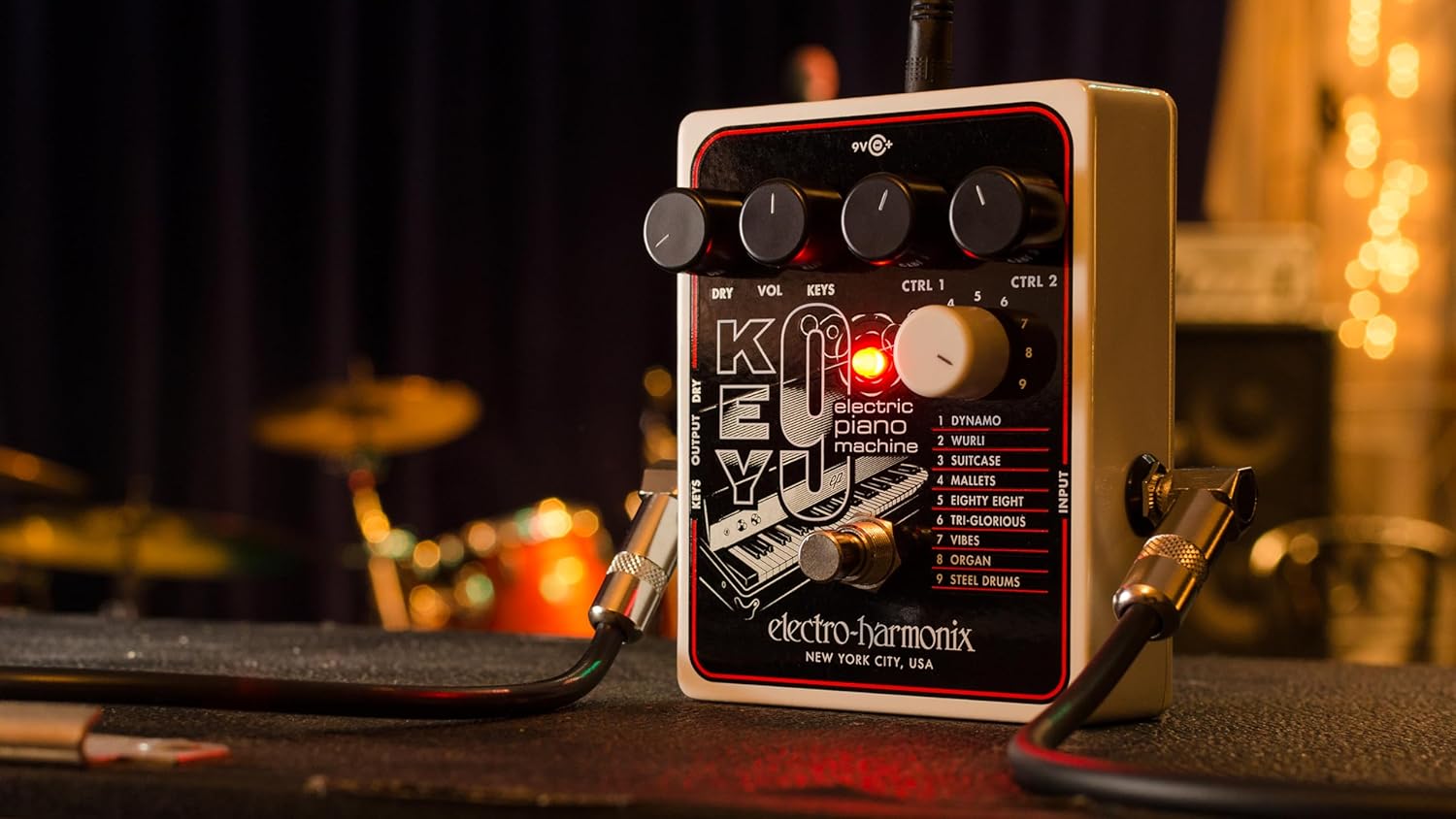
Şekil 3: Açısal view of the KEY9 pedal, highlighting the control knobs and jacks.
Bakım
To ensure the longevity and optimal performance of your Electro-Harmonix KEY9 pedal, follow these maintenance guidelines:
- Temizlik: Pedalların dış yüzeyini temizlemek için yumuşak, kuru bir bez kullanın. Aşındırıcı temizleyicilerden veya çözücülerden kaçının.
- Depolamak: Kullanılmadığı zamanlarda pedalı serin, kuru ve doğrudan güneş ışığından ve aşırı sıcaklıklardan uzak bir yerde saklayın.
- Güç Kaynağı: Always use the included 9.6VDC 500mA power supply or a compatible, regulated power supply to prevent damage.
- Bağlantılar: Tüm kablo bağlantılarını periyodik olarak aşınma ve yıpranma açısından kontrol edin. Jakların toz ve kirden arındırılmış olduğundan emin olun.
Sorun giderme
If you encounter issues with your KEY9 pedal, consult the following common troubleshooting steps:
- Ses Yok:
- Tüm kablo bağlantılarını (giriş, çıkış, güç) kontrol edin.
- Güç kaynağının doğru şekilde bağlandığından ve çalıştığından emin olun.
- Şunu doğrulayın: amplifier or mixer is powered on and its volume is up.
- Adjust the DRY and KEYS/VOL knobs on the pedal.
- Kötü Ses Kalitesi/Gürültü:
- Ensure you are using a proper, regulated 9.6VDC power supply.
- Kablo arızalarını kontrol edin.
- Experiment with different guitar pickups or guitar settings.
- Adjust the CTRL 1 and CTRL 2 knobs, as some settings may introduce unwanted artifacts depending on your guitar and playing style.
- Etkileyici Değil:
- Press the footswitch firmly to ensure it engages. The LED should illuminate.
- If the LED does not light up, check the power supply.
Özellikler
| Ürün Ağırlığı | 1.1 Pound |
| Ürün Boyutları | 4.75"U x 4"G x 2.25"Y |
| Ürün Model Numarası | ANAHTAR9 |
| Güç Kaynağı | Corded Electric (9.6VDC 500mA power supply included) |
| Donanım Arayüzü | 1/4 inç Ses |
| Sinyal Biçimi | Analog |
| Malzeme Türü | Plastic (brushed aluminum finish) |
| Yeterlilik Seviyesi | Orta, İleri |
Garanti ve Destek
Electro-Harmonix ürünleri güvenilirlik ve performans için tasarlanmıştır. Garanti bilgileri, teknik destek veya servis talepleri için lütfen resmi Electro-Harmonix web sitesine başvurun. webSite üzerinden veya müşteri hizmetleri departmanıyla iletişime geçin. Satın alma fişinizi, olası garanti talepleri için satın alma belgesi olarak saklayın.


