1. Başlarken
1.1 Paket İçeriği
Verify that all items are present in your Ultimate Ears Boom 2 package:
- Ultimate Ears Boom 2 Bluetooth Speaker
- Mikro-USB Şarj Kablosu
- Güç Adaptörü (bölgeye göre değişiklik gösterebilir)
1.2 Hoparlörünüzü Şarj Etme
Before initial use, fully charge your Ultimate Ears Boom 2 speaker. Connect the micro-USB cable to the charging port on the speaker and the other end to the power adapter, then plug into a wall outlet. The LED indicator will show charging status.

The Ultimate Ears Boom 2 speaker, ready for charging.
1.3 Bluetooth Eşleştirme
Hoparlörünüzü Bluetooth özellikli bir cihaza bağlamak için:
- Press and hold the Power button on the top of the speaker until you hear a tone and the LED flashes white.
- Mobil cihazınızda Bluetooth ayarlarına gidin.
- Select 'UE Boom 2' from the list of available devices.
- Once connected, you will hear a confirmation tone from the speaker.

Tepe view of the speaker, highlighting the power and Bluetooth pairing buttons.
1.4 Ultimate Ears App
For enhanced control and additional features, download the Ultimate Ears app from your device's app store (iOS 9.0 or later required for Apple devices, Android compatible). The app allows for remote power control, equalizer adjustments, and PartyUp mode.
2. Speaker Operation
2.1 Güç Açma/Kapatma
Press the Power button located on the top of the speaker to turn it on or off. A distinct sound will indicate the power status.
2.2 Ses Kontrolü
Adjust the volume using the large '+' and '-' buttons located on the side of the speaker. You can also control the volume from your connected Bluetooth device.
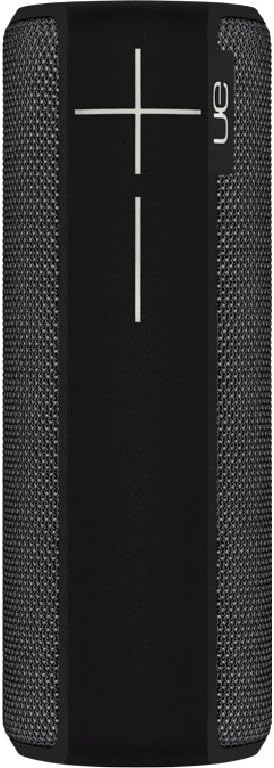
Taraf view of the speaker, featuring the prominent volume control buttons.
2.3 Music Control (Tap Gestures)
The Boom 2 features tap controls for music playback:
- Tek Dokunuş: Tap the top of the speaker once to play or pause the current track.
- Çift Dokunma: Tap the top of the speaker twice to skip to the next track.
2.4 Pil Durumu
To check the battery level, press both the '+' and '-' volume buttons simultaneously. The speaker will announce the remaining battery percentage.
2.5 Waterproof and Durability Features
The Ultimate Ears Boom 2 is designed to be waterproof (IPX7 rated) and shockproof. It can be immersed in water up to 1 meter for 30 minutes. Ensure the charging port cover is securely closed before exposing the speaker to water.

The speaker's waterproof design allows for use in various environments.

The Ultimate Ears Boom 2 demonstrating its water resistance.
2.6 PartyUp Mode (Connecting Multiple Speakers)
Use the Ultimate Ears app to connect multiple Boom speakers together for a more expansive sound experience. Follow the instructions within the app to activate PartyUp mode.
3. Bakım ve Onarım
3.1 Temizleme Talimatları
Hoparlörünüzü temizlemek için yumuşak, tozlu bir bez kullanın.amp cloth. Avoid using harsh chemicals or abrasive cleaners, as these can damage the speaker's finish or waterproof seals. Ensure the charging port is dry before charging.
3.2 Pil Ömrü
To maximize battery life, avoid fully discharging the speaker frequently. Charge the speaker regularly, and if storing for an extended period, ensure it has at least a 50% charge.
3.3 Depolama
Store the speaker in a cool, dry place away from direct sunlight and extreme temperatures. Ensure the charging port cover is closed to prevent dust and debris from entering.
4. Sorun Giderme Kılavuzu
4.1 Güç Yok
- Ensure the speaker is charged. Connect it to the power adapter and allow it to charge for at least 15 minutes before attempting to power on.
- Press and hold the Power button firmly for a few seconds.
4.2 Bluetooth Bağlantı Sorunları
- Ensure the speaker is in pairing mode (flashing white LED).
- Mobil cihazınızda Bluetooth'u kapatıp tekrar açın.
- Forget 'UE Boom 2' from your device's Bluetooth list and attempt to re-pair.
- Move the speaker closer to your device; the maximum range is approximately 33 meters (100 feet).
4.3 Ses Yok veya Düşük Ses
- Hem hoparlörün hem de bağlı cihazınızın sesini artırın.
- Hoparlörün Bluetooth aracılığıyla düzgün bir şekilde bağlandığından emin olun.
- Check if the audio source on your device is playing correctly.
4.4 Sound Distortion
- Lower the volume on both the speaker and your connected device.
- Sesi sağlayın file or streaming quality is not low.
- Olası parazit kaynaklarından (örneğin, Wi-Fi yönlendiriciler, diğer Bluetooth cihazları) uzaklaşın.
4.5 Uygulama Bağlantı Sorunları
- Ensure your mobile device's operating system meets the app's requirements (iOS 9.0+).
- Uygulamayı yeniden başlatın veya yeniden yükleyin.
- Ensure the speaker's firmware is up to date via the app.
5. Teknik Özellikler
| Özellik | Şartname |
|---|---|
| Model Adı | Patlama 2 |
| Model Numarası | 984-000557 |
| ASIN | B0141208EA |
| Bağlantı Teknolojisi | Bluetooth, USB |
| Kablosuz İletişim Teknolojisi | Bluetooth |
| Uyumlu Cihazlar | Bilgisayarlar, Akıllı Telefonlar (Android, iOS) |
| Pil Ömrü | 15 saate kadar |
| Su Geçirmezlik Derecesi | IPX7 (30 dakika boyunca 1 metreye kadar) |
| Maksimum Menzil | 33 metre (100 fit) |
| Hoparlör Çıkış Gücü | 25 Watt |
| Ürün Boyutları | 6.7D x 6.7W x 18H cm (approx. 15 x 5 x 5 cm; 0.54 grams) |
| Ses Çıkışı Modu | Çevrelemek |
| Güç Kaynağı | Pille Çalışan (1 Lityum Polimer pil dahil) |
6. Garanti ve Müşteri Desteği
6.1 Sınırlı Garanti
The Ultimate Ears Boom 2 comes with a Limited Warranty. For specific details regarding warranty coverage, terms, and conditions, please refer to the warranty documentation included with your product or visit the official Ultimate Ears webalan.
6.2 Müşteri Desteği
If you encounter any issues not covered in this manual or require further assistance, please contact Ultimate Ears customer support through their official website. For return policies or issues related to your purchase, consult the retailer's (e.g., Amazon.it) help pages.


