1. Giriş
Satın aldığınız için teşekkür ederizasing the Marvo G904 6D Optical Wired Gaming Mouse. This manual provides essential information for the proper setup, operation, and maintenance of your new gaming mouse. Please read this manual thoroughly before use to ensure optimal performance and longevity of the product.
2. Ürün Bittiview
The Marvo G904 is a high-performance 6D optical wired gaming mouse designed for precision and comfort. It features an AVago3050 sensor, adjustable DPI settings, and programmable buttons to enhance your gaming experience.

Figure 1: Marvo G904 Gaming Mouse with blue LED lighting, showcasing its ergonomic design and illuminated accents.

Figure 2: Marvo G904 Gaming Mouse displaying green LED lighting, indicating different lighting modes or DPI settings.
3. Kurulum
Follow these steps to set up your Marvo G904 gaming mouse:
- Fareyi Paketinden Çıkarın: Carefully remove the mouse and any accessories from its packaging.
- Bilgisayara Bağlan: Plug the USB connector of the mouse into an available USB port on your computer. The mouse is plug-and-play for basic functionality.
- Install Driver (Optional for Advanced Features): For full functionality, including macro programming and advanced DPI settings, insert the provided CD driver into your computer's optical drive and follow the on-screen instructions to install the software. If your computer does not have an optical drive, please visit the official Marvo webSürücü indirme sitesi.

Figure 3: Marvo G904 Gaming Mouse packaging, which includes the driver CD.
4. Kullanım Talimatları
The Marvo G904 mouse features 6 buttons and adjustable DPI settings for versatile control.
4.1 Düğme Fonksiyonları
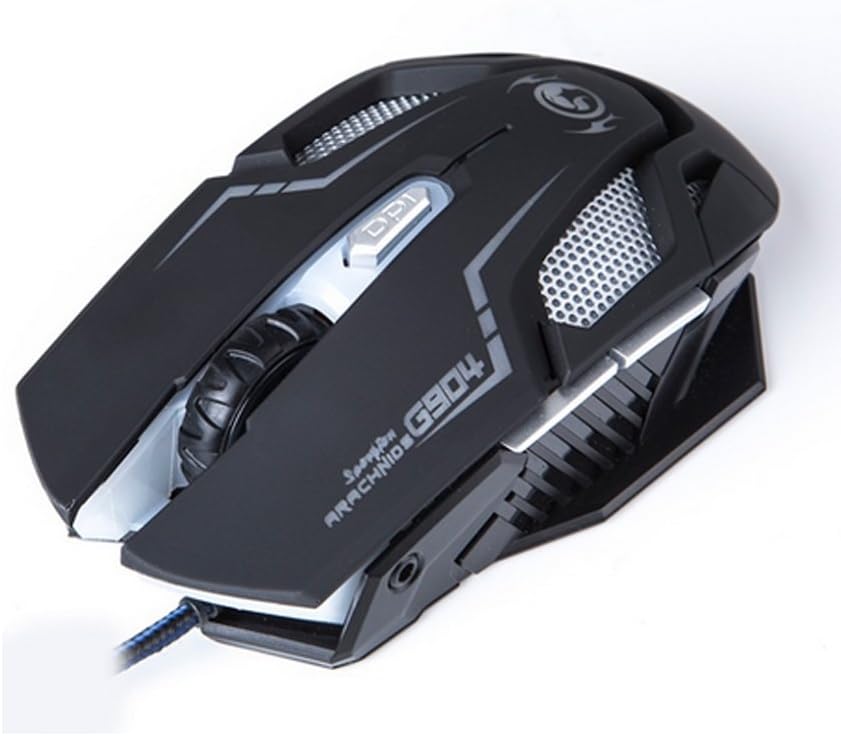
Şekil 4: Üst view of the Marvo G904 Gaming Mouse, highlighting the placement of its 6 buttons.
- Sol Tıklama Düğmesi: Standart birincil tıklama işlevi.
- Sağ Tıklama Butonu: Standart ikincil tıklama fonksiyonu.
- Kaydırma tekerleği: Scrolls up/down. Can also be pressed for a middle click function.
- DPI Shift Button: Cycles through DPI settings (1000, 2000, 3000, 4000).
- Yan Düğmeler (2): Typically function as 'Forward' and 'Back' in web tarayıcılar ve file explorers. These can be programmed using the driver software.
4.2 DPI Ayarı
Basın DPI Shift Button (located behind the scroll wheel) to cycle through the available DPI settings: 1000, 2000, 3000, and 4000 DPI. Each DPI level may be indicated by a change in the mouse's LED lighting color or pattern, depending on the current light mode.
4.3 Macro Programming (with Light Mode)
Utilize the included CD driver software to customize button functions and create macros. The software also allows you to configure the mouse's LED lighting modes. Refer to the software's help section for detailed instructions on macro creation and light mode customization.
5. Bakım
Doğru bakım, oyun farenizin uzun ömürlü olmasını ve optimum performans göstermesini sağlar.
- Temizlik: Farenin yüzeyini silmek için yumuşak ve kuru bir bez kullanın. İnatçı kirler için hafifçe silin.ampBezi su veya hafif bir temizleme solüsyonuyla silin. Sert kimyasallar veya aşındırıcı malzemeler kullanmaktan kaçının.
- Sensör Bakımı: Farenin altındaki optik sensörü temiz tutun ve toz veya kirden arındırın. Gerekirse pamuklu çubuk veya basınçlı hava kullanın.
- Kablo yönetimi: USB kablosunun hasar görmesini önlemek için keskin bükümlerden veya aşırı çekmelerden kaçının.
- Depolamak: Kullanılmadığı zaman fareyi aşırı sıcaklıklardan uzak, temiz ve kuru bir ortamda saklayın.
6. Sorun Giderme
If you encounter issues with your Marvo G904 mouse, refer to the following common problems and solutions:
| Sorun | Çözüm |
|---|---|
| Fare yanıt vermiyor. |
|
| DPI settings not changing. |
|
| Buttons not functioning correctly. |
|
| Mouse cursor movement is erratic or jumpy. |
|
7. Özellikler
Detailed technical specifications for the Marvo G904 Gaming Mouse:

Şekil 5: Alt view of the Marvo G904 Gaming Mouse, displaying model number, DPI range, and certification marks.
| Özellik | Detay |
|---|---|
| Örnek | G904 |
| Sensör Tipi | Optical (AVago3050) |
| DPI Ayarları | 1000 / 2000 / 3000 / 4000 Çözünürlük |
| Düğmeler | 6D (6 Düğme) |
| Rapor Oranı | 1000 Hz |
| Temel Dayanıklılık | 10 milyon tıklama |
| Kablo Uzunluğu | 1.5 metre |
| Boyutlar (U*G*Y) | 143*76*42mm |
| Anma Hacmitage | 5V |
| Anma Akımı | 10mA |
| Uyumluluk | PC |
| Renk | Siyah |
8. Garanti ve Destek
For warranty information and technical support, please refer to the documentation provided with your purchase or contact your retailer. You may also visit the official MARVO website for further assistance and updated driver software.


