giriiş
Satın aldığınız için teşekkür ederizasing the Madison FREESOUND-VR40R Vintage Portable Radio. This device combines a classic retro design with modern audio technology, offering versatile listening options. This manual provides detailed instructions on how to set up, operate, and maintain your radio to ensure optimal performance and longevity.
The FREESOUND-VR40R is a portable, USB-rechargeable radio designed for those who appreciate a vintage aesthetic combined with modern audio technologies. It features an analog dial tuner, Bluetooth, USB, AUX, and FM connectivity, bass enhancement, and a convenient dual metal handle for portability.
Güvenlik Talimatları
Please read these safety instructions carefully before using the device and keep them for future reference. Incorrect use may result in electric shock, fire, or other hazards.
- Yangın veya elektrik çarpmasını önlemek için cihazı yağmur veya neme maruz bırakmayın.
- Cihazı doğrudan güneş ışığına veya aşırı sıcaklıklara maruz bırakmayın.
- C'yi açmayınasing. İçerisinde kullanıcı tarafından bakımı yapılabilecek parça bulunmamaktadır. Tüm bakımlar için yetkili personele başvurun.
- Use only the specified power adapter/charging cable.
- Cihazı güçlü manyetik alanlardan uzak tutun.
- Cihazı yalnızca kuru, yumuşak bir bezle temizleyin. Sıvı temizleyiciler kullanmayın.
- Cihazın çevresinde yeterli havalandırma olduğundan emin olun. Havalandırma açıklıklarını hiçbir şekilde kapatmayın.
Ürün Bittiview
Familiarize yourself with the components and features of your Madison FREESOUND-VR40R radio.

Şekil 1: Ön View. Shows the analog dial tuner, speaker grille, Madison logo, and control knobs for volume and source selection.
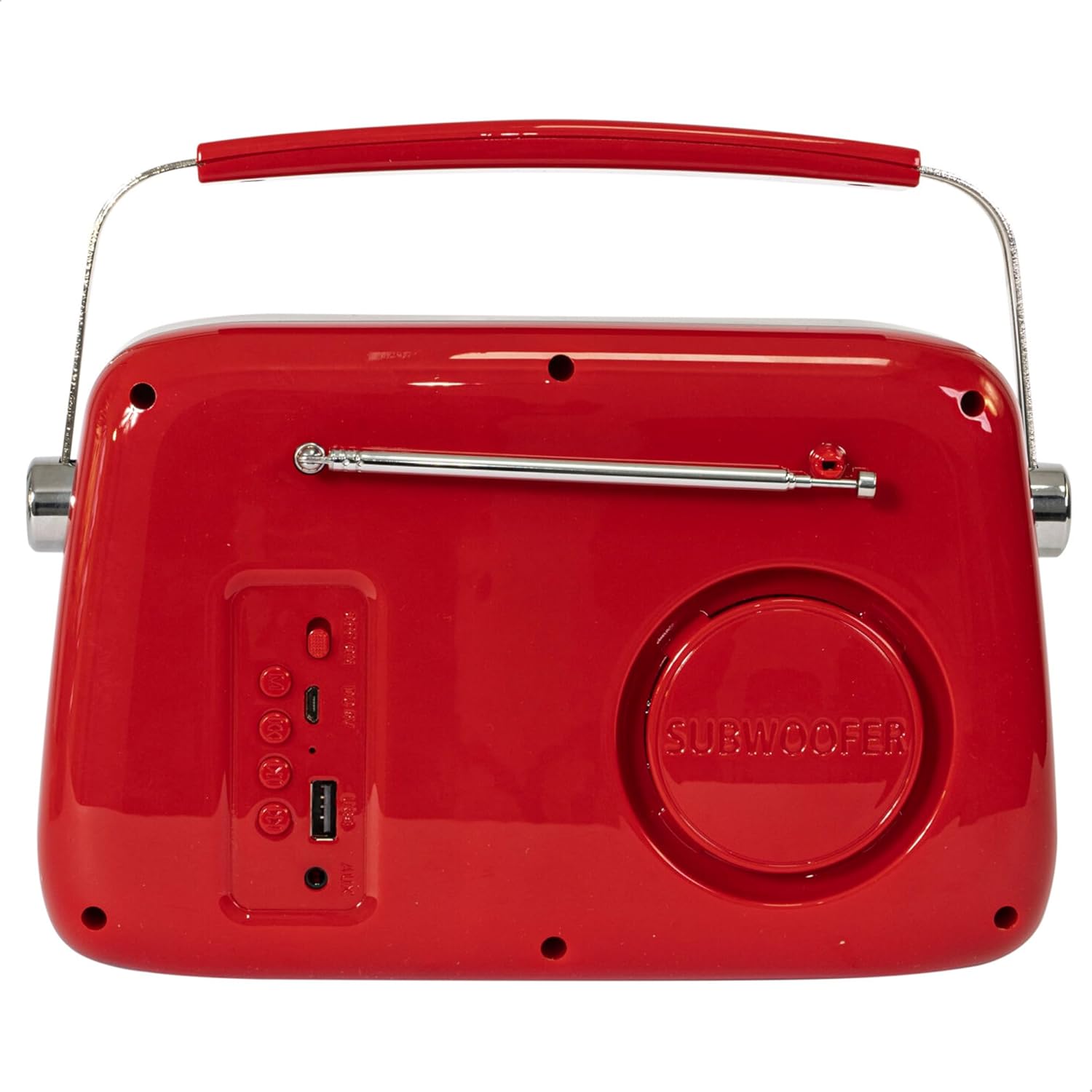
Şekil 2: Arka View. Displays the subwoofer, USB port, AUX input, and power/mode buttons.
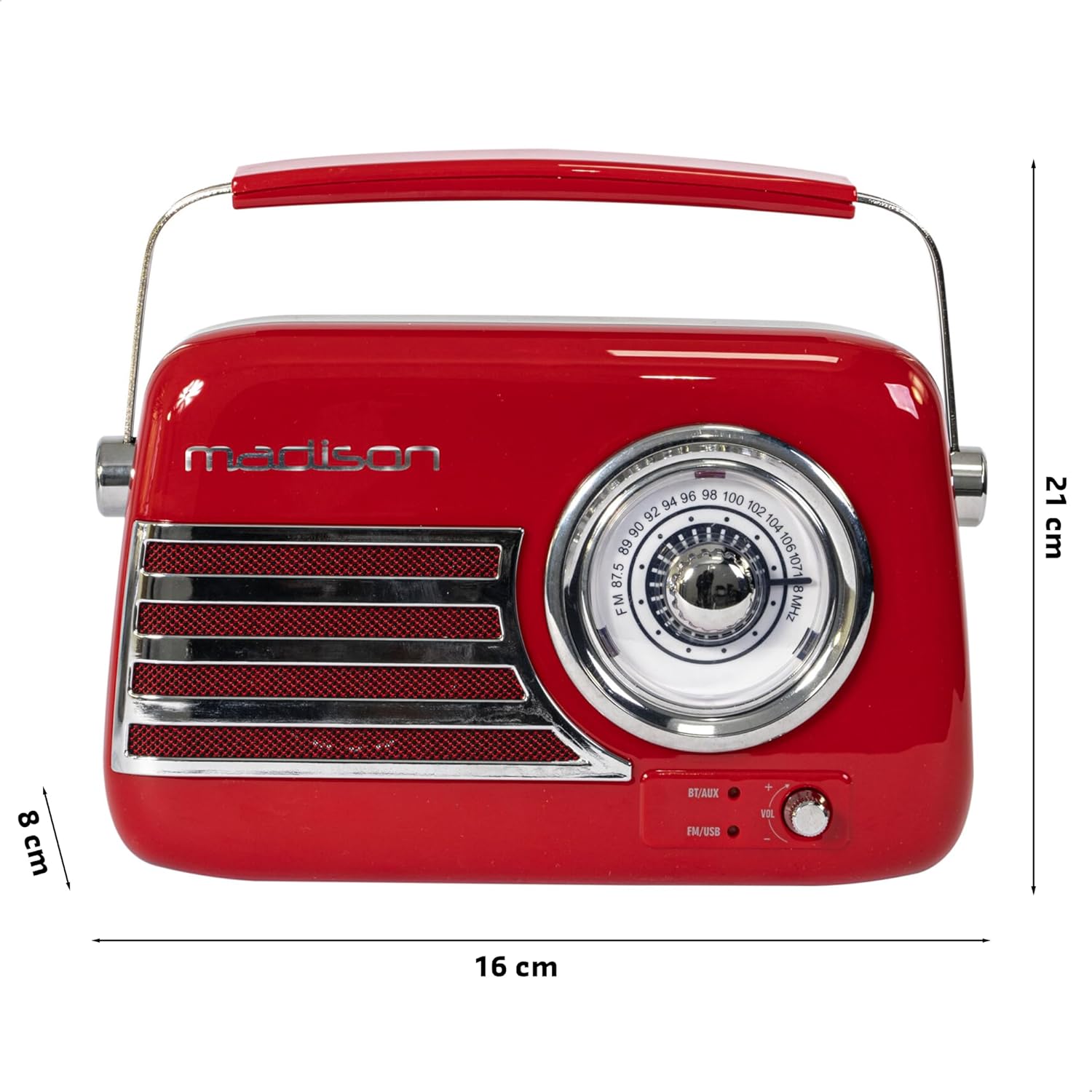
Şekil 3: Ürün Boyutları. Illustrates the radio's approximate dimensions: 21 cm length, 8 cm width, and 16 cm height.

Şekil 4: Arka View with Antenna Extended. Shows the telescopic antenna fully extended for improved FM reception.
Temel Özellikler:
- Analog Dial Tuner: For classic FM radio tuning.
- Bluetooth Bağlantısı: Stream audio wirelessly from your smartphone or tablet.
- USB Oynatma: USB bellekten doğrudan müzik çalın.
- AUX Girişi: Harici ses cihazlarını 3.5 mm ses kablosuyla bağlayın.
- FM Radyo: Enjoy your favorite FM stations with the retractable antenna.
- Bas Geliştirme: Integrated subwoofer for richer bass sound.
- Şarj Edilebilir Pil: Built-in long-lasting battery for portable use.
- Taşınabilir Tasarım: Lightweight with a dual metal handle for easy carrying.
Kurmak
Pilin Şarj Edilmesi:
- Locate the USB charging port on the rear of the radio.
- Connect the provided USB charging cable to the radio's USB port.
- USB kablosunun diğer ucunu uyumlu bir USB güç adaptörüne (dahil değildir) veya bilgisayarın USB portuna bağlayın.
- Şarj gösterge ışığı yanacaktır. Tamamen şarj olduğunda, modele bağlı olarak ışığın rengi değişebilir veya sönebilir.
- Tam şarj işlemi genellikle birkaç saat sürer.
İlk Güç Açma:
- Ensure the radio is sufficiently charged.
- Press and hold the Power/Mode button (usually located on the rear or front panel) to turn on the radio.
- The front indicator lights will show the currently selected source.
Kullanım Talimatları
Ses Kontrolü:
Döndür Hacim knob (VOL) on the front panel to adjust the sound level. Turn clockwise to increase volume, counter-clockwise to decrease.
Selecting a Source:
Basın Kaynak/Mod button (often labeled BT/AUX or FM/USB) repeatedly to cycle through the available input modes: Bluetooth, AUX, FM Radio, and USB.
- Bluetooth Modu:
- Switch the radio to Bluetooth mode. The Bluetooth indicator light will blink, indicating it's ready for pairing.
- Akıllı telefonunuzda veya tabletinizde Bluetooth'u etkinleştirin ve kullanılabilir cihazları arayın.
- Select "FREESOUND-VR40R" (or similar name) from the list.
- Once paired, the Bluetooth indicator light will become solid, and you can stream audio from your device.
- FM Radyo Modu:
- Switch the radio to FM mode.
- En iyi sinyal alımı için teleskopik anteni tamamen açın.
- Döndür Ayar Kadranı on the front panel to manually select your desired FM radio station.
- USB Oynatma Modu:
- MP3 ses dosyası içeren bir USB flash sürücü takın fileKabloyu radyonun arkasındaki USB portuna takın.
- Switch the radio to USB mode. The radio will automatically begin playing the audio files.
- Use the playback controls (if available, usually on the rear panel) to skip tracks or pause/play.
- AUX Giriş Modu:
- Connect one end of a 3.5mm audio cable (not included) to the AUX input port on the rear of the radio.
- Connect the other end of the cable to the headphone jack or audio output of your external device (e.g., MP3 player, CD player).
- Switch the radio to AUX mode. Audio from your external device will now play through the radio.
Bakım
Temizlik:
To maintain the appearance and functionality of your radio:
- Dış yüzeyleri yumuşak, kuru ve tüy bırakmayan bir bezle silin.
- Cilaya zarar verebileceğinden aşındırıcı temizleyiciler, cilalar veya çözücüler kullanmayın.
- Avoid spraying liquids directly onto the radio.
Depolamak:
If you plan to store the radio for an extended period:
- Saklamadan önce pili tam olarak şarj edin.
- Radyoyu serin, kuru bir yerde, doğrudan güneş ışığından ve aşırı sıcaklıklardan uzakta saklayın.
- For optimal battery health, recharge the battery every 3-6 months, even if not in use.
Sorun giderme
| Sorun | Olası Neden | Çözüm |
|---|---|---|
| Elektrik yok / Radyo açılmıyor. | Pil bitmiş. | Radyoyu, kutu içeriğinde bulunan USB kablosuyla şarj edin. |
| Ses yok. | Ses çok düşük veya sessiz. Yanlış kaynak seçildi. | Increase the volume. Ensure the correct input source (Bluetooth, FM, USB, AUX) is selected. |
| Zayıf FM alımı. | Antenna not extended. Weak signal. | Teleskopik anteni tamamen açın. Daha iyi sinyal almak için radyoyu yeniden konumlandırmayı deneyin. |
| Bluetooth cihazı eşleştirilemiyor. | Radio not in pairing mode. Device too far. Bluetooth disabled on source device. | Ensure radio is in Bluetooth pairing mode (blinking light). Move device closer. Enable Bluetooth on your smartphone/tablet. |
| USB üzerinden oynatma çalışmıyor. | USB drive not inserted correctly. Unsupported file Biçim. | Ensure USB drive is fully inserted. Check if audio fileMP3 formatındadır. |
Özellikler
| Model Numarası: | 10-5567MA |
| Ürün Ölçüleri (U x G x Y): | 21x8x16 cm |
| Ağırlık: | 635 gram |
| Renk: | Kırmızı |
| Malzeme: | Plastik |
| Güç Kaynağı: | Internal Rechargeable Battery (via USB) |
| Pil Tipi: | 1 Lityum-polimer (dahil) |
| Bağlantı: | Bluetooth, USB, Auxiliary (AUX) |
| Radyo Bantları: | FM |
| Özel Özellikler: | Telescopic antenna, Analog dial tuner, Bass enhancement |
| Dahil Bileşenler: | USB Şarj Kablosu |
| Üretici: | Lotronic S.A. |
| Menşei ülke: | Çin |
Garanti ve Destek
For warranty information and customer support, please refer to the warranty card included with your product or visit the official Madison webSite. Satın alma belgenizi herhangi bir garanti talebi için saklayın.
For technical assistance or troubleshooting beyond this manual, please contact Madison customer service.
Note: Availability of spare parts is not specified in the product information.


