1. Giriş
This manual provides detailed instructions for the setup, operation, and maintenance of your Peavey PV 14 AT 14 Channel Compact Mixer. The PV 14 AT is designed for professional audio applications, featuring 14 channels, integrated Bluetooth connectivity, and Antares Auto-Tune pitch correction technology. Please read this manual thoroughly to ensure proper use and to maximize the performance and longevity of your mixer.
2. Önemli Güvenlik Talimatları
- Güç Kaynağı: Connect the unit only to the type of power supply specified in this manual or on the unit.
- Nem ve Sıvılar: To reduce the risk of fire or electric shock, do not expose this apparatus to rain or moisture. Do not place objects filled with liquids, such as vases, on the apparatus.
- Havalandırma: Yeterli havalandırmayı sağlayın. Havalandırma açıklıklarını kapatmayın. Üreticinin talimatlarına uygun olarak kurulum yapın.
- Sıcaklık: Radyatörler, kalorifer ızgaraları, sobalar veya diğer cihazlar (dahil) gibi herhangi bir ısı kaynağının yakınına kurmayın. amp(ısı üreten)
- Topraklama: Polarize veya topraklama tipi fişin güvenlik amacını bozmayın. Polarize fişin biri diğerinden daha geniş iki bıçağı vardır. Topraklama tipi fişin iki bıçağı ve üçüncü bir topraklama ucu vardır. Geniş bıçak veya üçüncü uç sizin güvenliğiniz için sağlanmıştır. Sağlanan fiş prizinize uymuyorsa, eski prizin değiştirilmesi için bir elektrikçiye danışın.
- Güç Kablosu Koruması: Güç kablosunun, özellikle fişlerde, prizlerde ve cihazdan çıktığı noktalarda üzerine basılmasını veya sıkışmasını önleyin.
- Servis: Tüm servisleri kalifiye servis personeline yaptırın. Cihaz herhangi bir şekilde hasar gördüğünde, örneğin güç kaynağı kablosu veya fişi hasar gördüğünde, cihaza sıvı döküldüğünde veya içine nesneler düştüğünde, cihaz yağmura veya neme maruz kaldığında, normal şekilde çalışmadığında veya düşürüldüğünde servis gereklidir.
3. Ürün Bittiview ve Özellikler
3.1 Ön Panel Kontrolleri
The front panel of the PV 14 AT mixer provides access to all channel inputs, equalization controls, effects, and master output faders. Each channel features dedicated gain, EQ, and auxiliary send controls for precise audio shaping.

Resim: Açısal view of the Peavey PV 14 AT mixer's front panel, showing various knobs, faders, and input jacks.
3.2 Arka Panel Bağlantıları
The rear panel houses essential power and digital audio connections, including the DC power input, power switch, and the Digital Audio Port for USB connectivity to a computer. Bluetooth pairing information is also located here.

Resim: Arka view of the Peavey PV 14 AT mixer, displaying the DC power input, power switch, Digital Audio Port (USB), and Bluetooth pairing information.
3.3 Boyutlar
The compact design of the PV 14 AT makes it suitable for various setups. Refer to the image below for approximate dimensions.
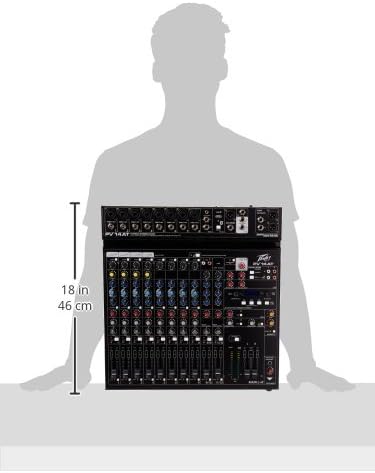
Image: Diagram showing the approximate dimensions of the Peavey PV 14 AT mixer, indicating a height of 18 inches (46 cm).
4. Kurulum
4.1 Paketin açılması
Carefully remove the mixer from its packaging. Retain all packaging materials for future transport or storage. Inspect the unit for any signs of damage incurred during shipping. If damage is found, contact your dealer immediately.
4.2 Güç Bağlantısı
- Mikserin güç düğmesinin KAPALI konumda olduğundan emin olun.
- Kutuda bulunan güç adaptörünü mikserin arka panelindeki DC IN girişine bağlayın.
- Güç adaptörünü uygun bir AC elektrik prizine takın.
4.3 Ses Bağlantıları
Connect your microphones, instruments, and other audio sources to the appropriate input channels. Use XLR cables for microphones and 1/4-inch TRS/TS cables for line-level instruments. Connect your main speakers or recording interface to the MAIN L+R outputs using XLR or 1/4-inch cables.
5. Kullanım Talimatları
5.1 Channel Operation
Each input channel features a GAIN control to adjust input sensitivity, a 3-band EQ (High, Mid, Low) for tone shaping, and AUX SEND controls for monitor mixes or external effects. The channel fader controls the individual channel's level in the main mix. The SOLO button allows you to monitor a single channel without affecting the main output.
5.2 Antares Auto-Tune
The PV 14 AT includes Antares Auto-Tune on select channels. To activate Auto-Tune, locate the dedicated Auto-Tune button on the desired channel and press it. Adjust the Auto-Tune parameters (if available) via the mixer's digital display and controls to achieve the desired pitch correction effect.
5.3 Bluetooth Bağlantısı
- Press the Bluetooth button on the mixer to activate Bluetooth pairing mode. The Bluetooth indicator light will flash.
- On your smart device (phone, tablet, computer), search for available Bluetooth devices and select "PV 14 AT" (or similar name).
- Once paired, the Bluetooth indicator light will become solid. You can now stream audio wirelessly to the mixer.
5.4 Dijital Efekt
The mixer features built-in digital effects. Use the EFFECTS section controls and LCD display to browse and select various effects such as reverb, delay, and chorus. Adjust the effect send levels on individual channels and the master effect return level to blend effects into your mix.
5.5 USB Ses Arabirimi
The Digital Audio Port (USB) on the rear panel allows the PV 14 AT to function as an audio interface for your computer. Connect a USB cable from the mixer to your computer. The mixer will be recognized as an audio input/output device, enabling multi-track recording to a Digital Audio Workstation (DAW) or playback from your computer through the mixer.
6. Bakım
6.1 Temizlik
To clean the mixer, use a soft, dry cloth. Do not use abrasive cleaners, solvents, or waxes. Ensure the unit is powered off and disconnected from the power source before cleaning.
6.2 Depolama
When not in use for extended periods, store the mixer in a cool, dry place, away from direct sunlight and extreme temperatures. It is recommended to use the original packaging for protection during storage or transport.
7. Sorun Giderme
7.1 Güç Yok
- Güç adaptörünün hem miksere hem de çalışan bir elektrik prizine güvenli bir şekilde bağlı olup olmadığını kontrol edin.
- Arka paneldeki güç düğmesinin AÇIK konumda olduğundan emin olun.
- Başka bir cihazı takarak elektrik prizinin çalışır durumda olduğunu doğrulayın.
7.2 Ses Çıkışı Yok
- Confirm that all channel faders and the MAIN L+R faders are raised.
- Tüm ses kablolarının güvenli bağlantı ve düzgün çalışma açısından kontrol edin.
- Ensure input sources (microphones, instruments) are active and producing sound.
- Verify that the connected speakers or headphones are powered on and functioning correctly.
7.3 Uğultu veya Gürültü
- Tüm kabloların uygun şekilde yalıtılmış ve iyi durumda olduğundan emin olun.
- Check for ground loops by ensuring all equipment is connected to the same power circuit or using a ground loop isolator.
- Reduce gain levels if input signals are too hot, causing clipping.
7.4 Bluetooth Bağlantı Sorunları
- Ensure the mixer's Bluetooth is in pairing mode.
- Move your smart device closer to the mixer to ensure it is within range.
- Forget the device from your smart device's Bluetooth settings and attempt to re-pair.
8. Özellikler
| Ürün Ağırlığı | 12 pound |
| Ürün Boyutları | 12 x 12 x 12 inç |
| Ürün Model Numarası | PV14AT |
| Donanım Arayüzü | Bluetooth |
| Malzeme Türü | Paslanmaz çelik |
| Mikser Kanal Adeti | 14 |
| Güç Kaynağı | Kablolu Elektrik |
| Bağlantı Teknolojisi | Bluetooth |
9. Garanti ve Destek
For warranty information and technical support, please refer to the warranty card included with your product or visit the official Peavey website. You can also contact Peavey customer service directly for assistance with product registration, troubleshooting, and service inquiries.


