giriiş
The Logitech Illuminated Living-Room Keyboard K830 is designed to enhance your home entertainment experience. This keyboard combines a full keyboard layout with a built-in touchpad, offering seamless wireless control of your connected TV or computer, even in low-light conditions, thanks to its bright backlit keys.

Figure 1: Logitech K830 Illuminated Living-Room Keyboard, top view.
Paket İçeriği
Paketin içerisinde tüm ürünlerin mevcut olduğundan emin olun:
- Logitech K830 Illuminated Living-Room Keyboard
- Logitech Unifying alıcı
- USB şarj kablosu
- USB range extender
- User information (this manual)
Kurmak
1. Klavyeyi Şarj Etme
Before first use, fully charge the keyboard. Connect the supplied USB recharge cable to the micro-USB port on the keyboard and the other end to a USB power source (e.g., computer USB port, USB wall adapter).
- The battery indicator light will glow green when charging and turn off when fully charged.
- A full charge typically provides several weeks of use.
2. Klavyenin Bağlanması
The K830 keyboard offers two connection methods: Logitech Unifying receiver or Bluetooth Smart technology.
2.1. Using the Logitech Unifying Receiver (Recommended for PCs)
- Locate the Logitech Unifying receiver in the package.
- Plug the Unifying receiver into an available USB port on your computer or smart TV. For optimal range, use the included USB range extender if the receiver is obstructed or far from the keyboard.
- Turn on the keyboard by sliding the power switch located on the top edge of the keyboard to the ON position.
- The keyboard should automatically connect to the receiver. If not, use the Logitech Unifying Software (downloadable from Logitech's website) to pair the devices.

Figure 2: User operating the K830 keyboard from a comfortable distance.
2.2. Using Bluetooth Smart Technology (For compatible devices)
- Ensure your device (e.g., Android TV, tablet) has Bluetooth Smart (Bluetooth Low Energy) enabled.
- Klavyeyi açın.
- Press and hold the Bluetooth pairing button (usually indicated by a Bluetooth icon) on the keyboard until the indicator light starts blinking rapidly, indicating it's in pairing mode.
- On your device, go to Bluetooth settings and select "Logitech K830" from the list of available devices to pair.
- Eşleştirme işlemini tamamlamak için ekrandaki talimatları izleyin.
Kullanım Talimatları
Klavye Düzeni ve İşlevleri
The K830 features a compact layout optimized for living room use, including standard alphanumeric keys, function keys, and dedicated media controls.
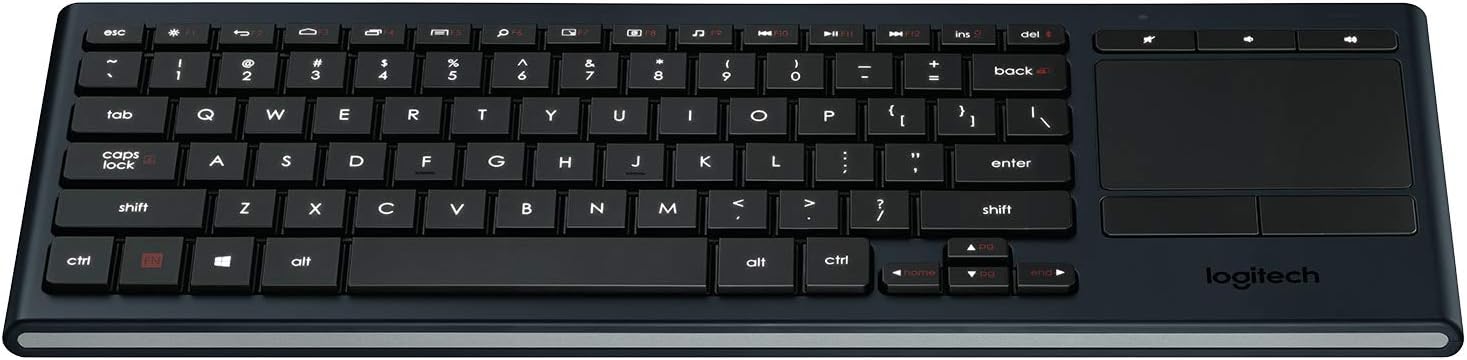
Şekil 3: Üzeriview of the K830 keyboard layout.
Arka aydınlatma
The keyboard features automatic backlighting that adjusts to ambient light conditions. A sensor detects the room's light level and automatically brightens or dims the key backlights for optimal visibility. The backlighting also activates when your hands approach the keyboard and turns off when not in use to conserve battery.
Entegre Dokunmatik Yüzey
The large, responsive touchpad provides precise cursor control and supports multi-touch gestures. The two physical buttons below the touchpad function as left-click and right-click.
- Tek Parmakla Dokunma: Sol tık.
- İki Parmakla Dokunma: Sağ tık.
- İki Parmak Kaydırma: Drag two fingers up or down to scroll vertically.
- Pinch Zoom: Pinch in or out with two fingers to zoom.

Şekil 4: Yan view highlighting the integrated touchpad and power indicator.
Media Keys and Shortcut Keys
The top row of keys includes dedicated media controls and shortcut keys for quick access to common functions. These keys are optimized for Windows and Android operating systems.
- Ses Kontrolleri: Sesi kapat, Sesi kıs, Sesi aç.
- Medya Oynatma: Oynat/Duraklat, Önceki Parça, Sonraki Parça.
- Windows/Android Shortcuts: Home, Back, Search, etc. (specific functions may vary by OS).
To use the F1-F12 functions, press the Fn İstediğiniz F tuşuyla aynı anda tuşa basın.
Bakım
Klavyeyi Temizleme
To clean your K830 keyboard:
- Temizlemeden önce klavyeyi kapatın.
- Yumuşak, tiftiksiz bir bez kullanın ve hafifçe kurulayın.ampsu veya hafif bir temizleme solüsyonu ile sonlandırıldı.
- Aşırı nemden kaçının ve temizleyicileri doğrudan klavyenin üzerine püskürtmeyin.
- For the touchpad, use a dry, soft cloth to remove fingerprints and smudges.
Pil Bakımı
The K830 uses a built-in rechargeable Lithium Polymer battery. To maximize battery life:
- Charge the keyboard regularly, but avoid leaving it plugged in constantly after it's fully charged.
- If storing the keyboard for an extended period, charge it to about 50% before storage.
- Klavyeyi aşırı sıcaklıklara maruz bırakmaktan kaçının.
Sorun giderme
| Sorun | Olası Neden | Çözüm |
|---|---|---|
| Klavye yanıt vermiyor | Low battery; Keyboard off; Receiver not plugged in; Out of range; Pairing issue. | Charge the keyboard. Ensure the keyboard is ON. Plug the Unifying receiver into a working USB port. Move closer to the receiver (within 10 meters/33 feet). Re-pair the keyboard using Logitech Unifying Software or Bluetooth pairing process. |
| Arka aydınlatma çalışmıyor | Low battery; Ambient light too bright; Sensor obstruction. | Charge the keyboard. The backlighting automatically adjusts; it may not activate in bright environments. Ensure the light sensor (located near the top edge) is not covered. |
| Touchpad erratic or unresponsive | Dirty touchpad surface; Software issue; Interference. | Clean the touchpad surface with a dry, soft cloth. Restart your computer/device. Ensure no other wireless devices are causing interference. |
| Keys not typing correctly | Software issue; Physical obstruction under key. | Restart your computer/device. Gently check for any debris under the affected key. |
Özellikler
| Özellik | Detay |
|---|---|
| Model Numarası | 920-007182 |
| Bağlantı | Logitech Unifying (2.4 GHz RF), Bluetooth Smart (Bluetooth Low Energy) |
| kablosuz Menzil | 10 metreye (33 feet) kadar |
| Pil Türü | Şarj Edilebilir Lityum Polimer |
| Arka aydınlatma | Automatic, single color |
| Entegre Dokunmatik Yüzey | Yes, with multi-touch gesture support |
| İşletim Sistemi Uyumluluğu | Windows 7, Windows 8, Windows 10 or later; Android 5.0 or later; Chrome OS |
| Boyutlar (UxGxY) | 15.1 x 5.59 x 1.65 inç (38.35 x 14.2 x 4.19 cm) |
| Ağırlık | 1.09 pound (0.49 kg) |
Garanti ve Destek
Garanti bilgileri, teknik destek ve ek kaynaklar için lütfen resmi Logitech destek sayfasını ziyaret edin. website or refer to the user guide PDF:
- Logitech Desteği Webalan: www.logitech.com/support
- Kullanıcı Kılavuzu (PDF): PDF'yi indir
Garanti talepleri için lütfen satın alma belgenizi saklayın.


