1. Giriş
Thank you for choosing the Baseus Time Desktop Evaporative Cooler. This device is designed to provide instant cooling and humidification, enhancing comfort in various environments such as offices, dormitories, and bedrooms. Please read this manual carefully before use to ensure proper operation and maintenance.
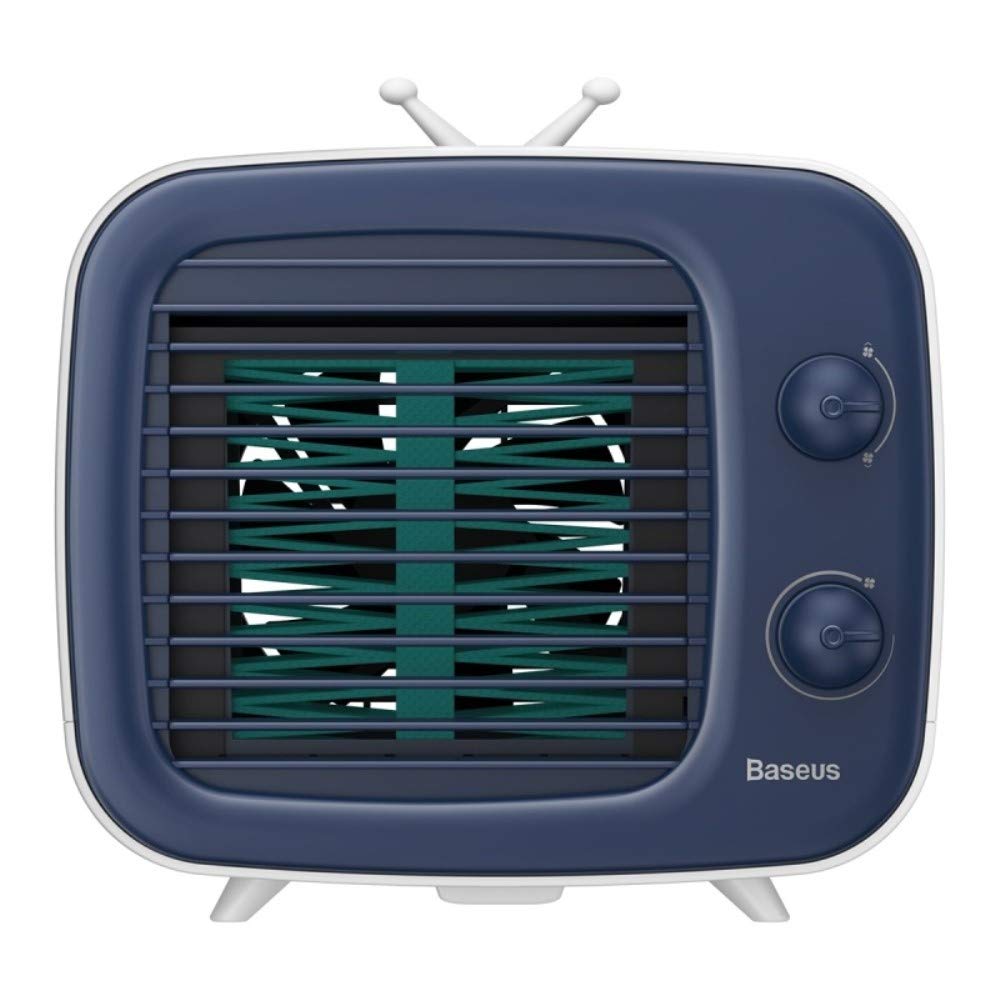
Resim: Ön view of the Baseus Time Desktop Evaporative Cooler.
2. Önemli Güvenlik Talimatları
- Always place the cooler on a stable, flat surface to prevent tipping.
- Cihazı suya veya başka sıvılara daldırmayın.
- Güç kablosunun hasarlı olmadığından ve uygun bir güç kaynağına düzgün şekilde bağlı olduğundan emin olun.
- Çocukların ve evcil hayvanların erişemeyeceği yerde saklayınız.
- Unplug the cooler before cleaning, refilling, or when not in use for extended periods.
- Hava giriş ve çıkışlarını tıkamayın.
- Use only clean water. For enhanced cooling, ice cubes may be added.
3. Paket İçeriği
Paketin içinde tüm öğelerin mevcut olduğundan emin olun:
- Hava Soğutma Ünitesi
- USB kablosu

Image: The Baseus Time Desktop Evaporative Cooler and its included accessories, such as the USB cable.
4. Ürün Bittiview
The Baseus Time Desktop Evaporative Cooler features a compact design with intuitive controls. It operates by drawing in hot air, passing it through a water-soaked curtain for purification and humidification, and then releasing cool, moist air. The device is designed for quiet operation, making it suitable for various personal spaces.
Temel Özellikler:
- Buharlaştırıcı Soğutma: Utilizes water evaporation to cool and humidify the air.
- Ayarlanabilir Hava Akışı: Offers 3 fan speeds and adjustable air supply angles (45° upward, 45° downward, and vertical 90°).
- Sessiz Çalışma: Engineered for low noise levels, comparable to a gentle breeze.
- Nemlendirme Fonksiyonu: Adds moisture to the air, beneficial for skin hydration.
- Taşınabilir Tasarım: Compact and lightweight for easy placement and movement.

Image: Diagram illustrating the operating principle of the cold fan, showing air intake, water curtain, and cool air output.
5. Kurulum
Follow these steps to set up your Baseus Time Desktop Evaporative Cooler:
- Place the Cooler: Position the cooler on a flat, stable surface in your desired location.
- Su Tankını Doldurun:
- Open the top water injection cap.
- Pour clean water into the tank. The maximum capacity is 320ml. Observe the water level bar to avoid overfilling.
- For enhanced cooling, you may add ice cubes to the water tank.
- Optionally, add spray or aromatherapy liquids for a different environment.

Image: A hand pouring water into the top-fill water tank of the cooler, showing the water level bar.
- Gücü bağlayın:
- Connect the provided USB cable to the cooler's power input port.
- Plug the other end of the USB cable into a compatible power source such as a USB charger, computer, power bank, or vehicle USB port.

Image: Illustration of various power supply options including USB charger, computer, power bank, and vehicle USB.

Image: A visual guide demonstrating the setup steps: 1. Open water injection cap, 2. Insert ice water or ice, 3. Plug in power supply, 4. Turn on and adjust wind.
6. Kullanım Talimatları
Once the cooler is set up and powered, you can begin operation:
- Güç Açık: Turn the lower rotary knob to power on the device.
- Fan Hızını Ayarlayın: Use the lower rotary knob to select one of the three fan speeds:
- Hız 1: Soft wind for a comfortable breeze.
- Hız 2: Medium-speed wind for moderate cooling.
- Hız 3: Strong wind for rapid cooling.
- Hava Akış Yönünü Ayarlayın: The cooler offers three air supply angles:
- 45 degrees upward
- 45 degrees downward
- Dikey 90 derece
- Nemlendirme: The device automatically humidifies the air as it cools. If you added aromatherapy liquids, the scent will also be diffused.

Image: A woman relaxing near the cooler, highlighting the spray humidification feature.
- Enhanced Cooling with Ice: If ice cubes were added to the water tank during setup, the cooling effect will be stronger and more immediate.

Image: A hand adding ice cubes to the cooler, demonstrating how to enhance the cooling effect.
7. Bakım
Regular cleaning ensures optimal performance and longevity of your cooler.
- Su Deposunun Temizlenmesi: Regularly empty and clean the water tank to prevent mold or mildew buildup. Use a soft cloth and mild detergent if necessary, then rinse thoroughly.
- Cleaning the Water Curtain: The water curtain is removable for cleaning. Carefully remove it and rinse under running water to clean any dust or debris. Ensure it is dry before reinserting.

Resim: Yakın çekim view of the removable water curtain, indicating it can be easily cleaned to remove dust.
- Dış Temizlik: Soğutucunun dış yüzeyini yumuşak bir bezle silin.amp bezle silin. Aşındırıcı temizleyiciler veya çözücüler kullanmayın.
- Depolamak: If storing the cooler for an extended period, ensure the water tank and water curtain are completely dry. Store in a cool, dry place.
8. Sorun Giderme
| Sorun | Olası Neden | Çözüm |
|---|---|---|
| Güç yok | Power cable not connected; Power source faulty | Ensure USB cable is securely connected; Try a different USB port or power adapter. |
| Zayıf hava akışı | Fan speed set too low; Air inlets/outlets blocked | Increase fan speed using the rotary knob; Clear any obstructions from air inlets/outlets. |
| Soğutma etkisi yok | Water tank empty; Water curtain dry | Refill the water tank with clean water; Ensure the water curtain is properly saturated. |
| Olağandışı gürültü | Device not on a flat surface; Foreign object inside | Place the cooler on a stable, flat surface; Unplug and check for any foreign objects. |
9. Özellikler
| Özellik | Detay |
|---|---|
| Marka | Bazus |
| Model Numarası | TW-Sony Xperia E4g |
| Ürün Boyutları (UxGxY) | 18 x 16.4 x 15.8 Santimetre |
| Ürün Ağırlığı | 960 gr |
| Malzeme | ABS |
| Anma Hacmitage | DC 5V 0.84A |
| Anma Gücü | 4.2W |
| Fan Hızı | 3000 RPM |
| Su Tankı Kapasitesi | 320 ml |
| Özel Özellik | Taşınabilir |
| Renk | Beyaz |

Image: Visual representation of the cooler's dimensions (180mm x 164mm x 158mm) and key technical specifications.
10. Garanti ve Destek
For warranty information or technical support, please refer to the documentation provided with your purchase or contact Baseus customer service through their official webSite. Satın alma belgenizi garanti talepleriniz için saklayın.