giriiş
This manual provides detailed instructions for the installation, operation, and maintenance of your VDO TR711U-BU Car Radio. Please read this manual thoroughly before using the product to ensure proper functionality and safety.
Güvenlik Bilgileri
Her zaman aşağıdaki güvenlik önlemlerine uyun:
- Hasar görmüşse cihazı çalıştırmayın.
- Ünite çevresinde uygun havalandırmanın olduğundan emin olun.
- Installation should be performed by a qualified professional to avoid damage to the vehicle's electrical system.
- Cihazı sökmeyin. Tüm servis işlemlerini yetkili personele yaptırın.
- Keep the volume at a safe level to remain aware of traffic conditions.
Paket İçeriği
Paketi açtıktan sonra tüm eşyaların eksiksiz olduğundan emin olun:
- VDO TR711U-BU Car Radio Unit
- Kullanım Kılavuzu (bu belge)
- 2 Montaj Kancaları
- Montaj çerçevesi
- Ön çerçeve
- ISO Antenna Adapter
- DIN-ISO Connector
Kurulum ve Yükleme
The VDO TR711U-BU is designed for easy installation with its low mounting depth. Professional installation is recommended.
Kablolama Şeması
The unit uses a standard DIN-ISO connector for power and speaker connections. Ensure correct polarity and secure connections to prevent damage.
| Pin | İşlev | Color (Typical) |
|---|---|---|
| A4 | +12V Constant (Battery) | Sarı |
| A7 | +12V Switched (Ignition) | Kırmızı |
| A8 | Zemin | Siyah |
| B1 | Arka Sağ Hoparlör (+) | Mor |
| B2 | Arka Sağ Hoparlör (-) | Mor/Siyah |
| B3 | Ön Sağ Hoparlör (+) | Gri |
| B4 | Ön Sağ Hoparlör (-) | Gri/Siyah |
| B5 | Ön Sol Hoparlör (+) | Beyaz |
| B6 | Ön Sol Hoparlör (-) | Beyaz/Siyah |
| B7 | Arka Sol Hoparlör (+) | Yeşil |
| B8 | Arka Sol Hoparlör (-) | Yeşil/Siyah |
Note: Always refer to your vehicle's specific wiring diagram for accurate connections.
Ünitenin Montajı
- Insert the mounting frame into the vehicle's DIN slot until it clicks into place.
- Connect the wiring harness and antenna cable to the rear of the radio.
- Slide the radio unit into the mounting frame until it locks securely.
- Attach the front frame for a finished look.

Kullanım Talimatları
Temel Kontroller
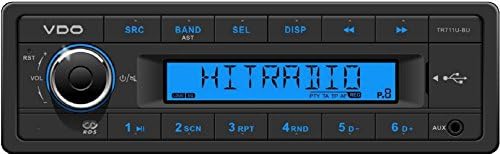
- Güç Açma/Kapatma: Basın VOL/ Üniteyi açıp kapamaya yarayan düğme.
- Ses Kontrolü: Döndür VOL/ ses seviyesini ayarlamak için düğme.
- Source Selection (SRC): Basın Kaynak button to cycle through available sources: Radio, USB, AUX.
- Sessiz İşlevi: Kısaca basın VOL/ knob to mute/unmute the audio.
Radyo Operasyonu
- Band Selection (BAND/AST): Basmak BAND/AST to switch between FM1, FM2, FM3, MW, and LW bands.
- Automatic Store (AST): Basılı tutun BAND/AST Güçlü istasyonları otomatik olarak tarayıp depolamak için.
- Manuel Ayarlama: Kullanın ◀◀ Ve ▶▶ buttons for manual frequency adjustment.
- Ayarlama Arayın: Basılı tutun ◀◀ or ▶▶ to automatically seek the next strong station.
- Önceden Ayarlanmış İstasyonlar: Düğmeleri kullanın 1 ile 6 to select stored stations. To store a station, tune to the desired frequency, then press and hold a preset button until you hear a beep.
- RDS Fonksiyonları: The unit supports RDS (Radio Data System) features like AF (Alternative Frequencies), TA (Traffic Announcement), EON (Enhanced Other Networks), and PTY (Program Type). These functions operate automatically when available.
USB/MP3/WMA Playback
Insert a USB storage device (up to 8 GB) into the front USB port. The unit will automatically switch to USB mode and begin playback.
- Oynat/Duraklat: Basın 1/▶▶ düğme.
- Sonraki / Önceki Parça: Basmak ▶▶ or ◀◀ düğmeler.
- Repeat (RPT): Basmak 3/RPT to cycle through repeat modes (e.g., repeat track, repeat folder).
- Random (RND): Basmak 4/RND to enable/disable random playback.
- Klasör Gezintisi: Kullanmak 5D- Ve 6D + to navigate between folders on the USB device.
AUX Girişi
Connect an external audio device (e.g., smartphone, MP3 player) to the 3.5mm AUX input jack on the front panel. Select AUX as the source using the Kaynak düğme.
Ses Ayarları
- Ses Ön Ayarları: Basın SEL button repeatedly to cycle through audio settings (Bass, Treble, Balance, Fader, Loudness, EQ). Rotate the VOL/ knob to adjust the selected setting.
- Ses Yüksekliği: Activates a bass and treble boost at low volumes.
- EQ Ön Ayarları: The unit includes 4 sound presets: Classic, Pop, Rock, Jazz. Select these via the SEL düğme.
Bakım
- Temizlik: Cihazın ön panelini temizlemek için yumuşak, kuru bir bez kullanın. Aşındırıcı temizleyiciler veya çözücüler kullanmayın.
- USB Bağlantı Noktası: USB bağlantı noktasını toz ve kirden uzak tutun.
- Kalıcı Bellek: The unit features permanent storage of settings, meaning your radio presets and audio settings will be retained even if the car battery is disconnected.
Sorun giderme
| Sorun | Olası Neden | Çözüm |
|---|---|---|
| Güç yok | Yanlış kablolama; Sigorta atmış; Bağlantı gevşek. | Check wiring connections (constant 12V, switched 12V, ground). Check vehicle's fuse box and the unit's fuse. Ensure connections are secure. |
| Ses yok | Volume too low; Mute function active; Incorrect speaker wiring; Speakers damaged. | Increase volume. Press VOL/ to deactivate mute. Check speaker wiring. Test with different speakers if possible. |
| Zayıf radyo alımı | Anten bağlı değil; Hasarlı anten; Zayıf sinyal alanı. | Ensure antenna is securely connected to the ISO antenna adapter. Check antenna for damage. Try tuning to stronger stations. |
| USB device not recognized or slow playback | Unsupported format; USB device too large (>8GB); Corrupted files; USB device not properly inserted. | Emin olmak files are MP3/WMA. Use a USB device up to 8GB. Reformat USB device or try a different one. Reinsert USB device firmly. |
| Unit freezes or malfunctions | Geçici yazılım hatası. | Press the RST (Reset) button (usually a small pinhole, refer to diagram if available). This will reset the unit to factory defaults. |
Özellikler
| Özellik | Detay |
|---|---|
| Örnek | TR711U-BU |
| Marka | VDO (Continental) |
| Çalışma Hacmitage | 12 V (10.8 V - 16 V) |
| Maks. Müzik Gücü | 4 x 41 Watt |
| RMS Gücü | 4 x 25 Watt |
| Ayarlayıcı | Worldwide FM RDS-tuner / AF / TA / EON / PTY, LW, MW, FM with AST |
| USB Ana Bilgisayarı | Front USB port (2.0), supports USB 1.1/USB 2.0, supports MP3/WMA, supports storage media up to 8 GB |
| AUX Girişi | Ön AUX girişi |
| Görüntülemek | LCD display, Blue illumination |
| Ses Ön Ayarları | 4 (Classic, Pop, Rock, Jazz) |
| Boyutlar (GxYxD) | 188x58.5x114.7 mm |
| Kalıcı Bellek | Yes (settings retained) |
| CD çalar | HAYIR |
Garanti Bilgileri
Specific warranty terms and conditions for the VDO TR711U-BU are provided by the manufacturer, Continental, or your point of purchase. Please retain your proof of purchase for any warranty claims. Warranty typically covers defects in materials and workmanship under normal use.
Destek ve İletişim
For technical support, service, or further inquiries regarding your VDO TR711U-BU car radio, please contact your authorized VDO dealer or the manufacturer, Continental. You may also refer to the official VDO or Continental automotive electronics webGüncel destek bilgileri için siteyi ziyaret edin.
A datasheet for this product is available at: http://bbg-automotive.de/shop/out/media/datasheet VDO_TR711U_BU.pdf