giriiş
The Apple Watch Series 1 is designed to be an essential part of your daily life, providing immediate notifications and convenient access to information directly from your wrist. It measures your workouts, tracks your activity, and encourages healthy routines. This manual provides essential information for setting up, operating, and maintaining your Apple Watch.

Figure 1: Apple Watch Series 1 with activity rings on display.
Başlarken
Kutunun Açılması ve İlk Kurulum
Your Apple Watch package includes the watch unit, a Sport Band, and a magnetic charging cable with a USB power adapter. Carefully remove all components from the packaging.
Attaching the Sport Band
To attach the band, slide it into the watch case until you hear a click. Ensure both ends of the band are securely fastened. The Sport Band features a stainless steel pin for secure closure.

Şekil 2: Yakın çekim view of the Sport Band.
Apple Watch'unuzu Şarj Etme
Connect the magnetic charging cable to the USB power adapter, then plug the adapter into a power outlet. Place the back of your Apple Watch on the magnetic charger. The watch will align itself and begin charging. A charging indicator will appear on the screen.
iPhone ile eşleştirme
The Apple Watch Series 1 is designed to work with iOS operating system devices. To pair, ensure your iPhone is running the latest iOS version and has Bluetooth enabled. Open the Apple Watch app on your iPhone and follow the on-screen instructions to pair your devices.
Apple Watch'unuzu Kullanma
Görüntüleme ve Etkileşim
The Apple Watch features a Retina display with Force Touch, allowing for different responses based on pressure. Navigation is primarily done using the touchscreen and the Digital Crown located on the side of the watch.
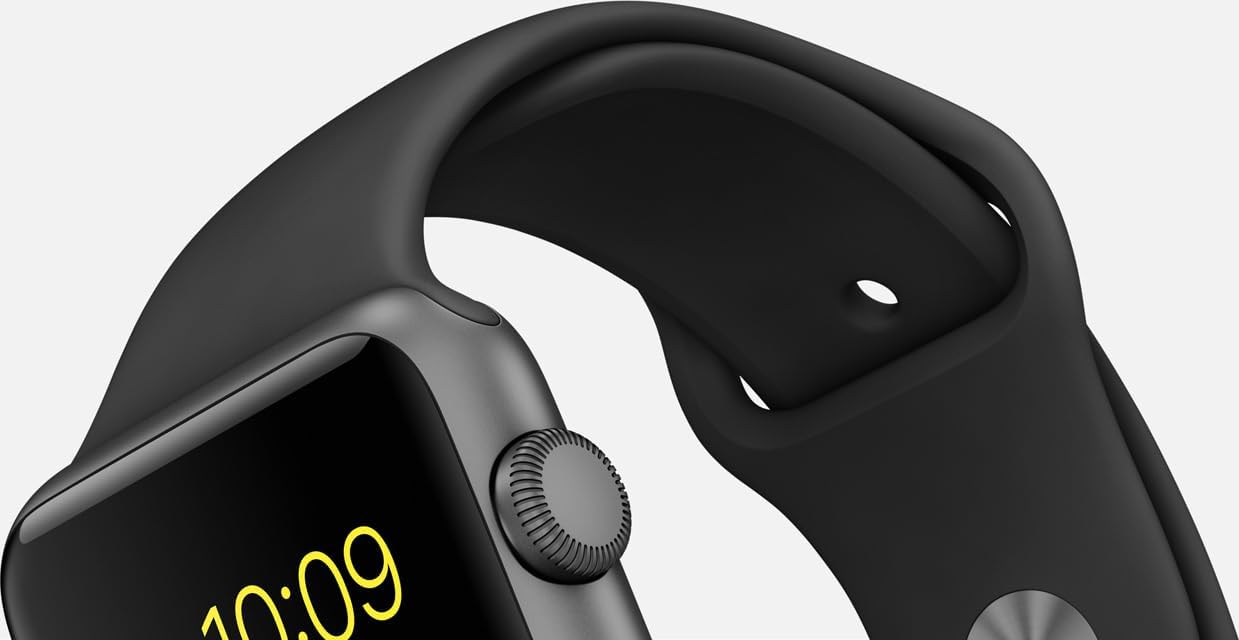
Figure 3: Digital Crown and side button for interaction.
Sağlık ve Fitness Takibi
Your Apple Watch is equipped with a heart rate sensor, accelerometer, and gyroscope to track your physical activity and monitor your well-being. It measures workouts, tracks daily activity, and encourages healthy routines.
İletişim Özellikleri
Receive notifications immediately and conveniently with a gentle tap. The built-in microphone and stereo capabilities allow for communication directly from your wrist.
Özelleştirme
Personalize your Apple Watch by switching bands and changing watch faces. This allows you to adapt its appearance to your preferences and style.
Diğer Fonksiyonlar
The watch supports Bluetooth and 802.11b/g/n Wi-Fi connectivity for seamless integration with your devices and network.
Video 1: Bittiview of Apple Watch Series 1 features.
Bakım ve Onarım
Suya Dayanıklılık
The Apple Watch Series 1 is splash and water resistant, making it suitable for activities like exercising in the rain. However, it is not waterproof and should not be submerged in water.
Temizlik
To clean your Apple Watch, wipe it with a soft, lint-free cloth. If necessary, dampBezi temiz suyla yıkayın. Sabun, temizlik ürünleri, aşındırıcı malzemeler veya basınçlı hava kullanmayın.
Bant Bakımı
Regularly clean your Sport Band with a soft, damp cloth. Allow it to air dry completely before reattaching it to your watch. Avoid exposing the band to harsh chemicals or extreme temperatures.
Sorun giderme
If you experience issues with your Apple Watch, try the following:
- Saati yeniden başlatın: Press and hold the side button until the Power Off slider appears, then drag the slider. To turn it back on, press and hold the side button until you see the Apple logo.
- Bağlantıyı kontrol et: Apple Watch'unuzun iPhone'unuzla doğru şekilde eşleştirildiğinden ve Bluetooth ile Wi-Fi'nin etkinleştirildiğinden emin olun.
- Yazılımı Güncelle: Hem Apple Watch'unuzun hem de iPhone'unuzun en son yazılım sürümlerini kullandığından emin olun.
- Ayarları Sıfırla: Sorunlar devam ederse, iPhone'unuzdaki Apple Watch uygulaması aracılığıyla Apple Watch ayarlarınızı sıfırlamanız gerekebilir.
Özellikler
| Özellik | Detay |
|---|---|
| Model Adı | Apple Watch Serisi 1 |
| Marka | Elma |
| Ekran Boyutu | 1.5 inç |
| İşletim Sistemi | iOS |
| Bağlantı Teknolojisi | Bluetooth, 802.11b/g/n Wi-Fi |
| Özel Özellikler | Microphone, Stereo, Heart Rate Sensor, Accelerometer, Gyroscope, Ambient Light Sensor, Retina Display with Force Touch |
| Bellek Depolama Kapasitesi | 8 GB |
| Ürün Boyutları | 12 x 3 x 2.5 inç |
| Ürün Ağırlığı | 1.12 ons |
| Pil Hücresi Kompozisyonu | Lityum İyon |
| Renk | Space Gray Aluminum Case/Black Band |
Garanti ve Destek
Your Apple Watch Series 1 is covered by a limited manufacturer's warranty. For detailed warranty information, service options, and technical support, please refer to the official Apple support website or contact Apple customer service directly. Proof of purchase may be required for warranty claims.


