1. Ürün Bittiview
The LB-link BL-MP01 is a compact and versatile 150 Mbps Wireless N Pocket Travel Router designed for easy internet access and sharing on the go. It supports multiple operating modes and features for convenient wireless connectivity.

Şekil 1: Ön view of the LB-link BL-MP01 Wireless N Router, showing the WPS/RESET button and indicator lights for WiFi, LAN, and Power.
Temel Özellikler:
- Supports random selection of switching between Router, Client, and AP modes.
- WPS (Wi-Fi Protected Setup) support for one-key encryption, eliminating the need for manual password entry.
- Plug and Play functionality for easy wireless access and internet sharing.
- Built-in device for scanning wireless hotspots, remembering SSID names, and automatically bridging/relaying for convenient use.
- Equipped with RJ45 and USB ports for versatile connectivity.
2. Kurulum Kılavuzu
2.1 İlk Güç Açma
- Connect the LB-link BL-MP01 to a power source using the provided USB cable.
- Cihazın açıldığını gösteren güç gösterge ışığının sabit yanmasını bekleyin.
2.2 Yönlendiriciye Bağlanma
- Kablosuz Bağlantı: On your computer or mobile device, search for available Wi-Fi networks. Select the network name (SSID) broadcast by the BL-MP01 (e.g., "LB-link_XXXX"). Enter the default password if prompted (refer to the label on the device or packaging for default credentials).
- Kablolu Bağlantı: Connect an Ethernet cable from the RJ45 port of the BL-MP01 to your computer's Ethernet port.
2.3 Basic Configuration (Router Mode)
- Bir tane aç web tarayıcınıza gidin ve varsayılan IP adresini girin (örn.
192.168.16.1) adres çubuğunda. - Log in using the default username and password (e.g.,
admin/admin). - Follow the on-screen setup wizard to configure your internet connection type (e.g., PPPoE, Dynamic IP, Static IP).
- Set a new Wi-Fi network name (SSID) and a strong password for your wireless network.
3. Çalışma Modları
The BL-MP01 supports multiple operating modes to suit various networking needs:
- Yönlendirici Modu: Connects to a modem (DSL/Cable) and creates a private wireless network for multiple devices.
- İstemci Modu: Allows a wired device (e.g., a desktop computer) to connect to an existing wireless network.
- AP (Erişim Noktası) Modu: Transforms a wired network connection into a wireless hotspot, allowing wireless devices to connect.
To switch between modes, access the router's web management interface and navigate to the operating mode settings. Select the desired mode and save the changes. The device may restart to apply the new settings.
4. WPS İşlevselliği
The Wi-Fi Protected Setup (WPS) feature allows for quick and secure connection to your wireless network without manually entering the password.
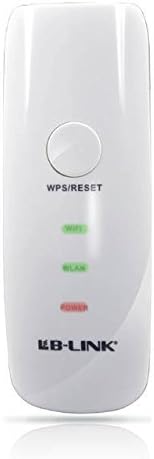
Şekil 2: Yakın çekim view of the LB-link BL-MP01 Wireless N Router, highlighting the WPS/RESET button at the top.
WPS Kullanımı:
- Basın WPS/SIFIRLAMA button on the BL-MP01 for approximately 1-3 seconds. The Wi-Fi indicator light will start blinking.
- Within two minutes, activate the WPS function on your client device (e.g., laptop, smartphone). Refer to your client device's manual for specific instructions on activating WPS.
- The devices will automatically establish a secure connection. The Wi-Fi indicator light on the router will become solid when connected.
5. Wireless Hotspot Scanning and Bridging
The BL-MP01 features a built-in function to scan for available wireless hotspots, remember their SSID names, and automatically bridge or relay the connection. This is particularly useful for extending Wi-Fi coverage or connecting to public hotspots.
Steps for Hotspot Connection:
- Yönlendiriciye erişin web yönetim arayüzü.
- Şuraya gidin:
İlgili Belgeler - BL-MP01

LB-LINK Yönlendirici Kurulum Kılavuzu
LB-LINK yönlendirici için donanım bağlantıları, internet kurulumu, LED göstergeleri ve arayüz açıklamalarını kapsayan kapsamlı kurulum kılavuzu. Cihazınızı nasıl bağlayacağınızı ve hızlıca internete nasıl erişeceğinizi öğrenin.
BL-M35343XS1 802.11ax 150Mbps WLAN + BLE Combo SDIO Modülü Özellikleri
Bu belge, entegre 2.4 GHz WLAN+BLE+SLE Kombo modülü LB-LINK BL-M35343XS1'in teknik özelliklerini açıklamaktadır. Bu yüksek performanslı kablosuz modülün özelliklerini, elektriksel ve termal özelliklerini, RF performansını, mekanik boyutlarını ve uygulama bilgilerini ayrıntılı olarak açıklamaktadır.
LB-LINK BL-M8189NS1: 150Mbps WLAN SDIO Modülü Özellikleri
150Mbps 802.11n WLAN SDIO modülü LB-LINK BL-M8189NS1'in ayrıntılı teknik özellikleri. Özellikleri, pin tanımlarını, elektriksel ve RF özelliklerini, mekanik boyutlarını ve uygulama devrelerini kapsar.
LB-LINK BL-M8800DS2-40: 802.11ax 287Mbps WLAN + BT v5.4 SDIO/USB Module Specification
Technical specification and integration guide for the LB-LINK BL-M8800DS2-40, a high-performance Dual-band 802.11ax WLAN and Bluetooth v5.4 combo module. Features 287Mbps PHY rate, SDIO/USB interfaces, and detailed electrical, RF, and mechanical specifications for OEM integration.
LB-LINK BL-M8733BS2 802.11n 150Mbps WLAN + BT v5.2 Combo SDIO Modülü Özellikleri
802.11a/b/g/n standartlarını ve 150Mbps'ye kadar PHY hızını destekleyen, yüksek düzeyde entegre Çift Bantlı WLAN + Bluetooth v5.2 Combo SDIO modülü olan LB-LINK BL-M8733BS2 için elektrik, RF, mekanik ve düzenleyici bilgileri içeren teknik özellik belgesi.
LB-LINK BL-R8812AF1 Ürün Özellikleri - IEEE 802.11ac WiFi Modülü
LB-LINK BL-R8812AF1, WLAN 11ac Çift Bantlı USB 2.0 WiFi Modülü için ayrıntılı ürün özellikleri. RF'yi kapsarview, sistem fonksiyonları, elektriksel özellikler ve uyumluluk.