1. Giriş
The Aputure Amaran HR672S is a high-performance LED video light panel designed for professional photography and videography. Featuring a high Color Rendering Index (CRI) of 95+, it ensures accurate and vibrant color reproduction. This light panel operates at a fixed color temperature of 5500K, providing a daylight-balanced output. It includes a wireless remote control for convenient adjustments and can be powered by either an AC adapter or NP-F series batteries.
2. Güvenlik Bilgileri
- Do not operate the light panel with wet hands or in damp ortamlar.
- Güç kaynağı hacmini sağlayıntage matches the product's requirements (110-240V).
- Avoid direct eye exposure to the LED light, as it can cause discomfort or damage.
- Keep the light panel away from flammable materials.
- Do not disassemble or modify the product. Refer servicing to qualified personnel.
- Always use the provided power adapter and recommended batteries.
- Aşırı ısınmayı önlemek için çalışma sırasında uygun havalandırma sağlayın.
3. Paket İçeriği
Aşağıda listelenen tüm öğelerin paketinizde bulunduğunu doğrulayın:
- 1 x Aputure Amaran HR672S LED Light Panel
- 1 x Kablosuz Uzaktan Kumanda
- 1 x Power Adapter (AC 110-240V to DC 15V)
- 1 x Light Bracket with 1/4 to 3/8 Screw
- 1 x White Diffusion Filter
- 1 x Orange Diffusion Filter
- 1 x Taşıma Çantası
- 1 x Kullanım Kılavuzu (İngilizce)
- 2 x NP-F970 Batteries (if included in specific kit)
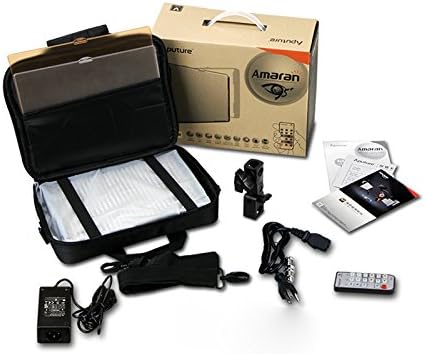
Image: All components included in the Aputure Amaran HR672S LED Video Light Panel package, neatly arranged.
4. Ürün Bittiview
4.1 Ön View
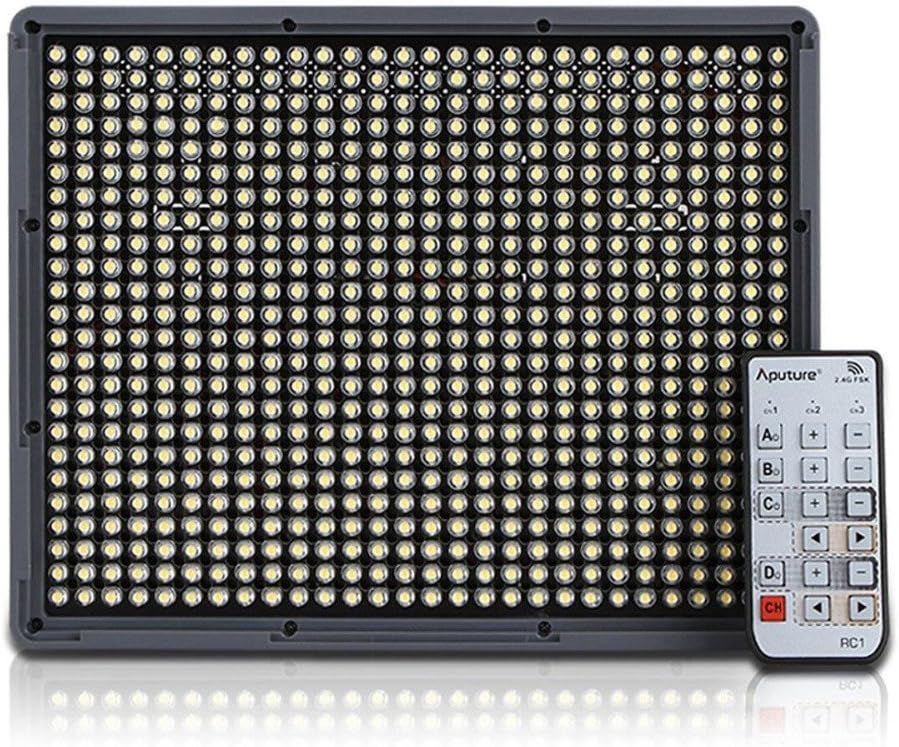
Image: The front face of the Aputure Amaran HR672S LED light panel, showing the array of 672 LED bulbs.
4.2 Back Panel Controls and Battery Slots

Image: The rear of the light panel, displaying the digital display, power switch, dimmer knob, channel/group buttons, and dual NP-F battery slots.
4.3 Diffusion Filter Installation

Image: A hand demonstrating the process of sliding a diffusion filter into the designated slot on the light panel.
5. Kurulum
5.1 Mounting the Light Panel
- Attach the provided light bracket to the 1/4-inch screw thread at the bottom of the HR672S light panel.
- Secure the light bracket onto a standard light stand or tripod using the 1/4-inch or 3/8-inch screw adapter. Tighten securely.
- Adjust the angle of the light panel using the tilt mechanism on the bracket.
5.2 Powering the Light Panel
The HR672S can be powered in two ways:
- AC Gücü: Connect the DC 15V power adapter to the DC input port on the back of the light panel. Plug the adapter into a suitable wall outlet (110-240V).
- Pil Gücü: Insert two fully charged NP-F series batteries (e.g., NP-F970) into the battery slots on the back of the light panel. Ensure they click into place. The light will automatically draw power from the batteries when AC power is not connected or is interrupted.
5.3 Attaching Diffusion Filters
Slide either the white or orange diffusion filter into the grooves on the front of the light panel. The white filter provides softer light, while the orange filter can be used for color correction or creative effects.
6. Operasyon
6.1 Güç Açma/Kapatma
Locate the power switch on the back of the light panel. Flip it to the 'ON' position to power on the device. Flip it to 'OFF' to power off.
6.2 Parlaklığın Ayarlanması
Rotate the dimmer knob on the back panel to adjust the light intensity. The brightness level will be displayed on the digital screen.
6.3 Kablosuz Uzaktan Kumandanın Kullanımı
The HR672S comes with a 2.4GHz wireless remote control for convenient operation.
- Setting Channels: Press the 'Channel' button on the light panel to cycle through available channels (1-3). Ensure the remote control is set to the same channel.
- Grupların Ayarlanması: Press the 'Group' button on the light panel to assign it to a group (A, B, C, D). The remote control can then control lights assigned to specific groups or all groups simultaneously.
- Uzaktan çalışma: Use the corresponding buttons on the remote to power on/off, adjust brightness, and select channels/groups.
6.4 Renk Sıcaklığı
The Aputure Amaran HR672S has a fixed color temperature of 5500K. No adjustment is needed or possible for color temperature on this model.
7. Bakım
- Temizlik: Use a soft, dry cloth to clean the light panel. Do not use abrasive cleaners or solvents.
- Depolamak: When not in use, store the light panel in its carrying bag in a cool, dry place, away from direct sunlight and moisture.
- Pil Bakım: If using batteries, remove them if the light will not be used for an extended period. Store batteries in a cool, dry place.
- Kablo Denetimi: Regularly inspect power cables and connections for any signs of damage. Replace damaged cables immediately.
8. Sorun Giderme
| Sorun | Olası Neden | Çözüm |
|---|---|---|
| Işık yanmıyor | No power supply; Batteries depleted; Power switch off | Check AC adapter connection; Replace/recharge batteries; Ensure power switch is 'ON' |
| Uzaktan kumanda çalışmıyor | Incorrect channel/group; Remote battery depleted; Obstruction | Match channel/group on light and remote; Replace remote battery; Ensure clear line of sight |
| Işık titriyor | Unstable power; Faulty connection; Overheating | Ensure stable power source; Check all cable connections; Allow light to cool down |
| Light output is too harsh | No diffusion filter used | Attach the white diffusion filter to soften the light |
9. Özellikler
| Özellik | Detay |
|---|---|
| Örnek | Amaran HR672S |
| CRI | 95+ |
| Güç | 45W |
| Işın Açısı | 25 derece |
| Renk Sıcaklığı | 5500K |
| Güç Girişi | AC 110-240V |
| Güç Kaynağı | Doğru Akım 15V |
| Uzak Frekans | 2.4 GHz |
| Uzak Kanallar | 3 |
| Remote Groups | 4 (A/B/C/D) |
| Luminous Flux (0.5m) | 18800 lüks |
| Luminous Flux (1m) | 6040 lüks |
| Ürün Ağırlığı | 4 pound (yaklaşık 1.81 kg) |
| Paket Boyutları | 10.9 x 8.8 x 4.8 inç (yaklaşık 27.7 x 22.4 x 12.2 cm) |
| Piller Gerekli | 2 Lithium Ion (NP-F series) |
10. Garanti ve Destek
Aputure products are covered by a limited warranty. For specific warranty terms and conditions, please refer to the warranty card included with your product or visit the official Aputure website. For technical support, troubleshooting assistance, or service inquiries, please contact Aputure customer support through their official channels.
Çevrimiçi Kaynaklar:
- Official Aputure Webalan: www.aputure.com
- Ürün Destek Sayfası: Lütfen resmi sayfaya bakın. webBelirli ürün destek sayfaları için site.


