1. Giriş
This manual provides detailed instructions for the installation, operation, and maintenance of your ASUS X99-DELUXE motherboard. The ASUS X99-DELUXE is an ATX motherboard designed for high-performance computing, supporting Intel LGA 2011-3 processors and DDR4 memory.

Şekil 1: Yukarıdan aşağıya view of the ASUS X99-DELUXE Motherboard, showing the CPU socket, RAM slots, and heatsinks.
2. Temel Özellikler
- ASUS OC Socket: Designed to enhance 8-core CPU and DDR4 performance beyond standard X99 expectations.
- DDR4 Bellek Desteği: Features a special memory overclocking design, supporting DDR4 memory speeds up to 3200MHz (O.C.).
- Dual M.2 X4 Support: Provides two M.2 slots with PCIe 3.0 x4 interface, enabling data transfer speeds up to 32Gb/s for compatible NVMe SSDs.
- Fan Extension Card: Includes an extension card for advanced PC cooling management.
- 5 Yönlü Optimizasyon: Utilizes Dual Intelligent Processors 5 for system optimization, including performance tuning, power saving, digital power control, and fan control.
- UEFI BIOS'u: Features a media-acclaimed Unified Extensible Firmware Interface (UEFI) BIOS for intuitive system configuration.
- SATA Express: Supports SATA Express for storage speeds up to 10Gb/s.
3. Kurulum ve Kurulum
Kuruluma başlamadan önce sisteminizin kapalı olduğundan ve güç kaynağından çıkarıldığından emin olun. Statik deşarjı önlemek için anakartı kenarlarından tutun.
3.1. CPU Installation (LGA 2011-3 Socket)
- CPU soketi tutma mekanizmasını dikkatlice açın.
- CPU üzerindeki üçgen işaretini soket üzerindeki karşılık gelen işaretle hizalayın.
- CPU'yu zorlamadan yavaşça sokete yerleştirin.
- Close the retention mechanism to secure the CPU. Ensure no pins are bent during this process.

Şekil 2: Açısal view of the ASUS X99-DELUXE Motherboard, highlighting the LGA 2011-3 CPU socket.
3.2. Bellek (DDR4) Kurulumu
The motherboard supports DDR4 memory modules. Refer to the motherboard manual for specific memory configurations and supported speeds.
- DIMM yuvasının her iki ucundaki klipsleri açın.
- DDR4 bellek modülündeki çentiği DIMM yuvasındaki anahtarla hizalayın.
- Modülü, klipsler yerine oturana kadar sıkıca yuvaya yerleştirin.
3.3. Storage Device Installation (M.2, SATA)
Install M.2 SSDs into the dedicated M.2 slots and SATA drives to the SATA ports. The motherboard supports SATA 3 (6Gb/s) and SATA Express.
3.4. Çevre Birimlerini Bağlama
Connect your display, keyboard, mouse, and other peripherals to the rear I/O panel. The motherboard provides various USB ports, Ethernet ports, and audio jacks.
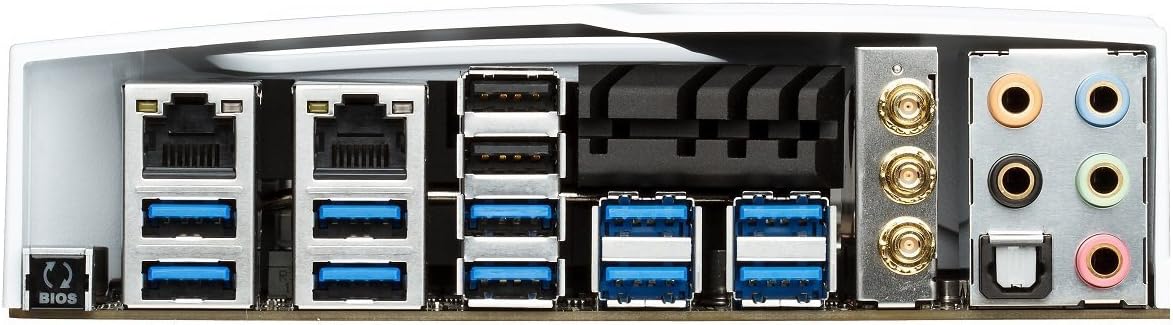
Figure 3: Rear I/O panel of the ASUS X99-DELUXE Motherboard, showing USB ports, Ethernet, and audio jacks.
4. Kullanım Talimatları
4.1. UEFI BIOS Yapılandırması
The UEFI BIOS allows you to configure system settings, boot options, and hardware parameters. To enter the BIOS, press the SİL Sistem başlangıcında tuşa basın.
- EZ Modu: Provides a simplified interface for basic settings.
- Gelişmiş mod: Offers comprehensive control over all motherboard features, including overclocking and fan control.
4.2. Sürücü Kurulumu
After installing your operating system (e.g., Windows XP, as listed in specifications, and newer OS versions), install the necessary drivers for the motherboard chipset, audio, network, and other integrated components. These are typically provided on a support DVD or available for download from the ASUS webalan.
4.3. 5-Way Optimization
The 5-Way Optimization feature, accessible through ASUS software, automatically tunes your system for optimal performance, power efficiency, digital power delivery, and fan acoustics based on your usage. It is recommended to manage overclocking and fan settings directly within the BIOS for more precise control.
5. Bakım
Düzenli bakım anakartınızın uzun ömürlü ve istikrarlı çalışmasını sağlar.
- Toz Giderimi: Anakart ve soğutma bileşenlerindeki tozu basınçlı hava kullanarak düzenli olarak temizleyin. Temizlemeden önce sistemin kapalı ve fişinin çekilmiş olduğundan emin olun.
- Bağlantı Kontrolleri: Verify that all cables and components are securely seated.
- BIOS Güncellemeleri: ASUS desteğini kontrol edin website for the latest BIOS updates to improve compatibility and performance. Follow update instructions carefully.
6. Sorun Giderme
If you encounter issues with your ASUS X99-DELUXE motherboard, consider the following troubleshooting steps:
- Güç Yok/Önyükleme Yok:
- Tüm güç kablolarının (24-pin ATX, 8-pin CPU) güvenli bir şekilde bağlandığından emin olun.
- Güç kaynağı ünitesinin (PSU) doğru çalıştığını doğrulayın.
- Check the front panel power switch connection to the motherboard.
- Görüntü yok:
- Confirm the graphics card is properly seated in its PCIe slot and has adequate power.
- Ensure the monitor cable is securely connected to the graphics card.
- Mümkünse farklı bir ekran kablosu veya monitörle test edin.
- Sistem Kararsızlığı/Çökmeler:
- Check RAM modules for proper seating; try reseating them or testing one module at a time.
- Ensure CPU cooler is correctly installed and making good contact with the CPU. Monitor CPU temperatures.
- BIOS ayarlarını varsayılanlara sıfırlayın.
- Bent CPU Socket Pins:
Bent pins in the CPU socket can cause severe system malfunctions or prevent booting. This type of damage is typically not covered under warranty. Exercise extreme caution during CPU installation to avoid bending pins.
7. Özellikler
| Kategori | Şartname |
|---|---|
| Marka | ASUS |
| Model Adı | X99-DELUXE |
| CPU Soketi | LGA2011-3 |
| Uyumlu İşlemciler | Intel Core i7 (LGA 2011-3) |
| Yonga Seti Türü | Intel X99 |
| RAM Bellek Teknolojisi | DDR4 |
| Bellek Saat Hızı | Up to 3200 MHz (O.C.) |
| Mevcut Bellek Yuvaları | 8 |
| RAM Bellek Maksimum Boyutu | 64 GB |
| Grafik Kartı Arayüzü | PCI Ekspres |
| Total PCIe Ports | 5 |
| Toplam SATA Bağlantı Noktası Sayısı | 8 |
| Sistem Veri Yolu Standardı Destekleniyor | SATA 3 |
| USB 2.0 Bağlantı Noktaları | 2 (internal headers, total ports may vary) |
| Toplam USB Bağlantı Noktaları | Various (including USB 3.0 on rear I/O) |
| Ethernet Bağlantı Noktası Sayısı | 1 (Dual Gigabit LAN) |
| Ana Güç Konektörü Türü | 24 Pinli ATX |
| Uyumlu Cihazlar | Kişisel Bilgisayar |
| Platform | Windows XP (and newer OS versions) |
| Ürün Ağırlığı | 4.44 Pound (yaklaşık 2.01 kg) |
8. Garanti ve Destek
Garanti bilgileri ve teknik destek için lütfen resmi ASUS web sitesine bakın. websitesinden satın alabilir veya ASUS müşteri hizmetleriyle iletişime geçebilirsiniz. Garanti talepleriniz için satın alma belgenizi saklayın.
ASUS Desteği Webalan: https://www.asus.com/support/
Note: Damage resulting from improper installation, misuse, or unauthorized modifications may void your product warranty.


