giriiş
This manual provides essential instructions for the safe and efficient operation of your Yamaha HTR-2067 5.1 Channel AV Receiver. Please read this manual thoroughly before using the unit to ensure proper setup and performance. Keep this manual in a safe place for future reference.
Güvenlik Bilgileri
- Güç Kaynağı: Cihazı yalnızca şebeke elektriğine (AC) bağlı bir prize bağlayın.tage arka panelde belirtilir.
- Havalandırma: Yeterli havalandırma sağlayın. Havalandırma açıklıklarını kapatmayın.
- Su ve Nem: Üniteyi yağmura veya neme maruz bırakmayın. Ünitenin üzerine sıvı dolu nesneler koymayın.
- Yabancı Cisimler: Do not insert foreign objects into the unit's openings.
- Servis: Bu ünitenin bakımını kendiniz yapmaya çalışmayın. Tüm bakım işlemlerini yetkili servis personeline yaptırın.
- Hoparlör Empedansı: Ensure connected speakers have an impedance of 6 ohms or higher. Refer to the "CAUTION: SEE INSTRUCTION MANUAL FOR CORRECT SETTING" label near the speaker terminals.
Kurmak
Arka Panel Üstüview
The following image illustrates the rear panel of the Yamaha HTR-2067 receiver, highlighting various connection points for audio, video, and speakers.
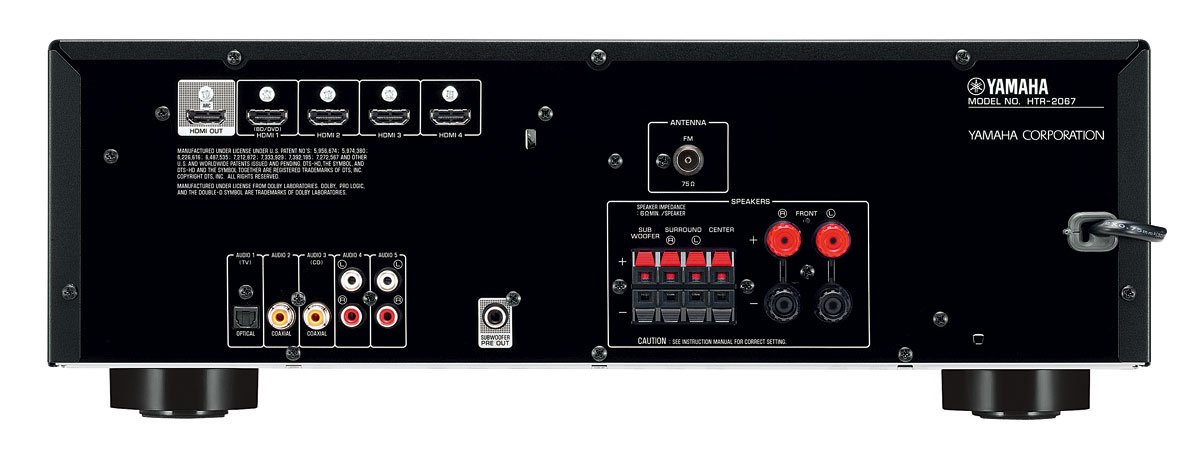
Figure 1: Rear Panel of Yamaha HTR-2067 AV Receiver
1. Paketten çıkarma
Carefully remove the receiver and all accessories from the packaging. Retain the packaging materials for future transport or storage.
2. Hoparlörleri Bağlama
Connect your speakers to the corresponding terminals on the rear panel. Ensure correct polarity (+ to + and - to -) for each speaker. The HTR-2067 supports a 5.1 channel setup.
- Ön Hoparlörler (Sol/Sağ): Connect to the "FRONT" terminals.
- Merkez Hoparlör: Connect to the "CENTER" terminal.
- Çevre Hoparlörleri (Sol/Sağ): Connect to the "SURROUND" terminals.
- Subwoofer: Connect a powered subwoofer to the "SUBWOOFER PRE OUT" RCA jack.
Refer to the speaker impedance warning on the rear panel, which states "SPEAKER IMPEDANCE 6Ω MIN / SPEAKER".
3. Ses/Video Cihazlarının Bağlanması
Use the appropriate cables to connect your source devices (e.g., Blu-ray player, game console, TV) to the receiver.
- HDMI Bağlantıları:
- HDMI ÇIKIŞI (ARC): Connect to your TV's HDMI input (preferably one supporting ARC for audio return).
- HDMI 1 (BD/DVD), HDMI 2, HDMI 3, HDMI 4: Connect your video source devices here.
- Dijital Ses Bağlantıları:
- OPTICAL (AUDIO 1 (TV)): For optical digital audio from a TV or other device.
- COAXIAL (AUDIO 2): For coaxial digital audio from a CD player or other device.
- Analog Ses Bağlantıları:
- AUDIO 3 (CD), AUDIO 4, AUDIO 5: For analog audio devices using RCA cables.
4. Antenlerin Bağlanması
For FM radio reception, connect the supplied FM antenna to the "ANTENNA FM 75Ω" terminal on the rear panel.
5. Güç Bağlantısı
Diğer tüm bağlantılar yapıldıktan sonra, güç kablosunu bir AC duvar prizine takın.
Kullanım Talimatları
1. Güç Açma/Kapatma
Basın GÜÇ Alıcıyı açmak veya kapatmak için ön paneldeki düğmeyi veya uzaktan kumandayı kullanın.
2. Giriş Seçimi
Select the desired input source using the input selector buttons on the front panel or the remote control. For example, basın BD / DVD for a Blu-ray player connected to HDMI 1.
The SAHNE buttons (BD/DVD, TV, CD, Radio) provide one-touch power-on and input selection, along with pre-set sound programs.
3. Ses Ayarı
Ana ses seviyesini ön paneldeki büyük düğmeyi veya diğer düğmeleri kullanarak ayarlayın. HACİM +/- Uzaktan kumandadaki düğmeler.
4. Sound Modes (CINEMA DSP)
The HTR-2067 features CINEMA DSP with 17 DSP programs. Use the PROGRAM buttons on the remote control to cycle through different sound fields and enhance your listening experience.
5. EKO Modu
Activate the ECO mode to reduce power consumption by approximately 20%. This setting can be toggled via the remote control or system menu.
Bakım
- Temizlik: Wipe the unit with a soft, dry cloth. Do not use chemical cleaners or abrasive materials.
- Havalandırma: Havalandırma açıklıklarının toz veya döküntülerle tıkanmadığından periyodik olarak emin olun.
- Güç Kablosu: Güç kablosunu herhangi bir hasara karşı düzenli olarak inceleyin.
Sorun giderme
| Sorun | Olası Neden | Çözüm |
|---|---|---|
| Güç yok | Güç kablosu bağlantısı kesildi; cihaz bekleme modunda. | Ensure power cord is securely plugged in; press POWER button. |
| Ses yok | Yanlış giriş seçildi; hoparlörler bağlı değil; ses seviyesi çok düşük; sessize alma etkinleştirildi. | Doğru girişi seçin; hoparlör bağlantılarını kontrol edin; sesi artırın; sessize alma özelliğini devre dışı bırakın. |
| Video yok | Yanlış giriş seçildi; HDMI kablosu gevşek veya arızalı; TV girişi yanlış. | Select correct input; check HDMI connections; ensure TV is on correct input. |
| Zayıf radyo alımı | Anten bağlı değil veya yanlış konumlandırılmış. | Connect FM antenna; adjust antenna position for better reception. |
Sorun devam ederse, yetkili bir servis teknisyenine danışın.
Özellikler
| Özellik | Detay |
|---|---|
| Marka | Yamaha |
| Örnek | HTR-2067 |
| Kanallar | 5.1 Kanal Surround Ses |
| 4K Pass-through | Yes (4K 24/30p) |
| DSP Programs | CINEMA DSP (17 programs) |
| ECO Modu | Yes (approx. 20% less power consumption) |
| Bağlantı | HDMI, Optical, Coaxial, Analog RCA, FM Antenna |
| Hoparlör Empedansı | Minimum 6 ohm |
| Ürün Ağırlığı | 8.72 kilo |
| Boyutlar (yaklaşık) | 55.7 x 41.4 x 22.4 cm (Paket Boyutları) |
Garanti ve Destek
Garanti bilgileri ve müşteri desteği için lütfen ürününüzle birlikte verilen garanti kartına bakın veya resmi Yamaha web sitesini ziyaret edin. webSite. Satın alma belgeniz olarak satın alma fişinizi saklayın.
For technical assistance or service inquiries, contact your authorized Yamaha dealer or service center.


