giriiş
This manual provides instructions for the proper use and maintenance of the Icom HM-138 Speaker/Microphone. The HM-138 is a waterproof speaker microphone designed for use with compatible Icom marine handheld transceivers, such as the M88. It allows for convenient communication without needing to hold the transceiver directly.
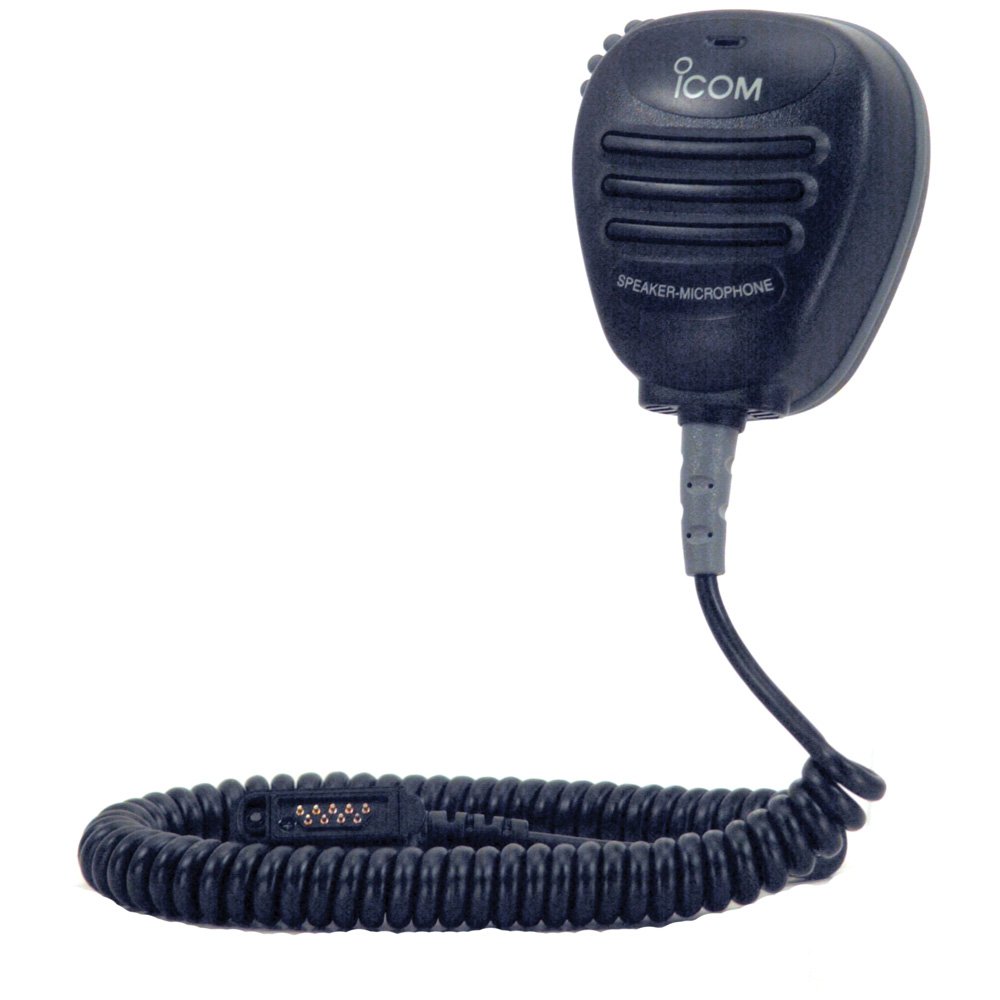
Şekil 1: Icom HM-138 Speaker/Microphone. This image shows the front view of the speaker microphone, highlighting its compact design and the speaker grille.
Paket İçeriği
Aşağıdaki öğelerin pakete dahil olduğunu doğrulayın:
- HM-138 Speaker/Microphone unit
- Alligator-type clip (pre-attached or separate)
Kurmak
- Connecting to the Transceiver:
Ensure your Icom M88 transceiver is powered off. Locate the accessory jack on the side or top of the transceiver. Align the connector of the HM-138 speaker/microphone with the transceiver's accessory jack. Gently push the connector in until it clicks securely into place. Do not force the connection.
- Securing the Speaker/Microphone:
Use the integrated alligator-type clip on the back of the HM-138 to attach it to your clothing, such as a lapel or shoulder strap, for convenient access and hands-free operation. Ensure the clip is firmly attached to prevent accidental detachment.
- Su Geçirmezlik Kontrolü:
Before exposing the unit to water, ensure the connector is fully seated and the transceiver's accessory jack cover (if applicable) is properly closed around the cable to maintain the waterproof integrity of the system. The HM-138 itself is designed to be waterproof to JIS Grade 7 (1 meter for 30 minutes).
Kullanım Talimatları
- Açma:
After connecting the HM-138, power on your Icom M88 transceiver as usual. The audio output will now be routed through the HM-138's speaker, and the microphone on the HM-138 will be active.
- Ses Alınıyor:
Incoming transmissions will be heard through the speaker on the HM-138. Adjust the volume on your transceiver to a comfortable listening level.
- İletim:
To transmit, press and hold the Push-To-Talk (PTT) button located on the side of the HM-138. Speak clearly into the microphone, which is typically located near the speaker grille. Release the PTT button to return to receive mode.
- Emergency Button (if applicable):
If your transceiver and the HM-138 feature an emergency button, refer to your transceiver's manual for specific instructions on its use. Typically, this button activates an emergency signal or distress call.
Bakım
- Temizlik:
To clean the HM-138, wipe it with a soft, damp cloth. Do not use harsh chemicals, solvents, or abrasive cleaners, as these can damage the unit's finish and waterproof seals. For saltwater exposure, rinse thoroughly with fresh water and dry completely.
- Su Yalıtımı:
The HM-138 is waterproof to JIS Grade 7. This means it can withstand immersion in 1 meter of water for 30 minutes. However, ensure the connector is properly attached to the transceiver and the transceiver's seals are intact before exposing the unit to water. Do not intentionally submerge the unit beyond its rated depth or duration.
- Depolamak:
Store the speaker/microphone in a cool, dry place away from direct sunlight and extreme temperatures when not in use. Avoid placing heavy objects on the unit.
Sorun giderme
| Sorun | Olası Neden | Çözüm |
|---|---|---|
| No audio from speaker/microphone. |
|
|
| İletilemiyor. |
|
|
| Bozuk ses. |
|
|
Özellikler
- Model Numarası: HM-138
- Marka: BEN COM
- Bağlantı Teknolojisi: Ek
- Özellik: Klip
- Uyumlu Cihazlar: Icom M88 Transceiver (Speaker)
- Dahil Bileşenler: Mikrofon
- Kutup Deseni: Tek yönlü
- Ürün Ağırlığı: 3.4 Ons (yaklaşık 96 gram)
- Güç Kaynağı: Corded Electric (via transceiver)
- Sinyal gürültü oranı: 76 dB
- Su Geçirmezlik Derecesi: JIS Grade 7 (1 meter for 30 minutes)
- İlk Kullanılabilirlik Tarihi: 30 Nisan 2011
Garanti ve Destek
For warranty information and technical support, please refer to the documentation provided with your Icom M88 transceiver or visit the official Icom website. Contact Icom customer service directly for assistance with product defects or operational issues not covered in this manual.
Not: Unauthorized modifications or repairs to the HM-138 may void the product warranty and compromise its waterproof integrity.


