1. Giriş
This manual provides essential information for the safe and efficient installation, operation, and maintenance of your APEX AL-A300ATX 300W ATX12V Power Supply. Please read this manual thoroughly before installation and retain it for future reference.
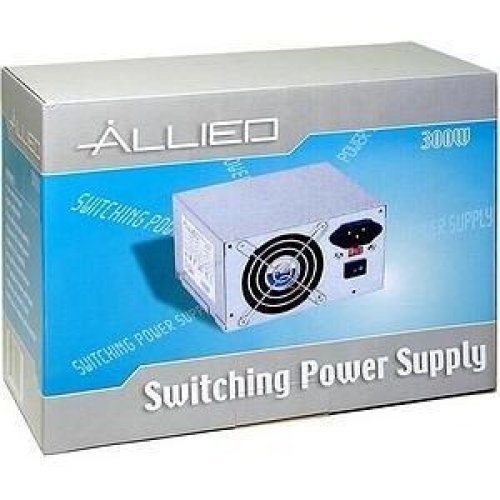
Image: The AL-A300ATX 300W ATX12V Power Supply shown in its retail packaging, indicating it is a "Switching Power Supply" from "ALLIED".
2. Güvenlik Bilgileri
Always observe the following safety precautions to prevent injury or damage to the power supply or other components:
- Ensure the power supply is disconnected from the AC outlet before installation or removal.
- Güç kaynağını açmayınasing. Yüksek hacimtages are present inside, even when disconnected. There are no user-serviceable parts.
- Install the power supply in a well-ventilated area. Do not block ventilation openings.
- Güç kaynağının neme veya aşırı sıcaklıklara maruz kalmasından kaçının.
- Use only the cables provided or approved for use with this power supply.
- If the power supply is damaged or malfunctioning, discontinue use immediately and contact support.
3. Paket İçeriği
Paketin içinde tüm öğelerin mevcut olduğundan emin olun:
- APEX AL-A300ATX 300W ATX12V Power Supply Unit
- AC Güç Kablosu (bölgeye göre değişiklik gösterebilir)
- Montaj Vidaları
- Kullanım Kılavuzu (bu belge)
4. Kurulum ve Kurulum
Follow these steps to install the power supply into your computer system:
- Hazırlık:
- Bilgisayarınızı kapatın ve AC güç kablosunu duvardaki prizden çıkarın.
- Bilgisayar kasasını açın. Ayrıntılı talimatlar için bilgisayar kasanızın kullanım kılavuzuna bakın.
- Mevcut bir güç kaynağını değiştiriyorsanız, eski güç kaynağının tüm kablolarını çıkarın ve kasadan çıkarın.
- PSU'nun montajı:
- Carefully slide the AL-A300ATX power supply into the designated PSU bay in your computer case.
- Güç kaynağındaki vida deliklerini kasadaki vida delikleriyle hizalayın.
- Sağlanan montaj vidalarını kullanarak güç kaynağını sabitleyin.
- Bağlantı Kabloları:
- 24-Pin ATX Main Power Connector: Connect this large connector to the corresponding port on your motherboard. Ensure it clicks into place.
- CPU Power Connector (4-pin or 8-pin): Connect the appropriate CPU power cable to the CPU power port on your motherboard.
- SATA Güç Bağlantıları: Connect these flat connectors to your SATA hard drives, SSDs, and optical drives.
- Molex (Çevresel) Konnektörler: Connect these 4-pin connectors to older drives or case fans if needed.
- PCI-E Power Connectors (if applicable): If your graphics card requires additional power, connect the appropriate PCI-E power cable from the PSU to the graphics card. This model is listed with a "24 Pin" PCI-Express Connector Configuration, implying the main ATX connector.
- Kablo yönetimi: Kasa içindeki hava akışını ve estetiği iyileştirmek için kabloları düzgün bir şekilde yönlendirin.
- Son Kontrol: Güvenli olduklarından emin olmak için tüm bağlantıları iki kez kontrol edin.
- Davayı Kapat: Close your computer case and secure it.
5. Kullanım Talimatları
After successful installation, follow these steps to power on your system:
- AC Gücünü Bağlayın: Plug the AC power cord into the power supply's inlet and then into a grounded wall outlet or surge protector.
- Güç düğmesi: Locate the power switch on the back of the power supply (usually a rocker switch labeled "I" for ON and "O" for OFF). Ensure it is in the "ON" (I) position.
- Power On Computer: Press the power button on your computer case. The system should now power on.
To turn off your computer, always use the operating system's shutdown procedure. Do not use the power supply's switch for regular shutdowns, as this can lead to data loss or system instability.
6. Bakım
Proper maintenance helps ensure the longevity and optimal performance of your power supply:
- Toz Temizleme: Periodically (every 3-6 months, depending on environment) clean dust from the power supply's fan and ventilation grilles using compressed air. Ensure the computer is powered off and unplugged before cleaning.
- Hava akışı: Ensure that the computer case has adequate airflow and that the power supply's fan is not obstructed.
- Kablo yönetimi: Maintain tidy cable routing to prevent obstruction of airflow.
7. Sorun Giderme
Güç kaynağınızla ilgili sorunlarla karşılaşırsanız, aşağıdaki yaygın sorunlar ve çözümlere bakın:
| Sorun | Olası Neden | Çözüm |
|---|---|---|
| Bilgisayar açılmıyor. |
|
|
| Sistem açılıyor ancak hemen kapanıyor. |
|
|
| Fan is noisy or not spinning. |
|
|
If the problem persists after attempting these solutions, contact APEX customer support or a qualified technician.
8. Özellikler
| Özellik | Detay |
|---|---|
| Model Adı | AL-A300ATX |
| Marka | APEX |
| Çıkış Watttage | 300 Watt |
| Form Faktörü | ATX12V |
| Uyumlu Cihazlar | Kişisel Bilgisayar |
| Bağlayıcı Türü | ATX (24 Pin PCI-Express Connector Configuration) |
| Soğutma Yöntemi | Hava |
| Minimum Giriş Hacmitage | 110 Volt (AC) |
| Ürün Ağırlığı | 3.64 pound |
| Paket Boyutları | 9.6 x 7.2 x 4.1 inç |
| İlk Mevcut Tarih | 22 Nisan 2014 |
9. Garanti ve Destek
For information regarding warranty coverage, technical support, or service, please refer to the official APEX webSite üzerinden satın alabilir veya doğrudan müşteri hizmetleriyle iletişime geçebilirsiniz. Satın alma belgenizi saklayın.
APEX Contact Information: Please visit the official APEX webEn güncel iletişim bilgileri ve destek kaynakları için siteyi ziyaret edin.


