giriiş
This manual provides comprehensive instructions for the setup, operation, maintenance, and troubleshooting of your Nixplay Original 18 Inch Digital WiFi Photo Frame, Model W18A. Please read this manual thoroughly before using your device to ensure optimal performance and longevity.

Resim: Ön view of the Nixplay Original 18 Inch Digital WiFi Photo Frame, showcasing a vibrant image of a family.
Kutuda Neler Var?
Upon unboxing your Nixplay Digital Photo Frame, verify that all components are present:
- Digital Photo Frame (Nixplay Original 18 Inch)
- Güç Adaptörü
- Uzaktan kumanda
- Durmak

Resim: Açısal view of the Nixplay Original 18 Inch Digital WiFi Photo Frame, highlighting its slim profile ve görüntüle.
Kurmak
1. Standın Takılması
Locate the circular stand. Align the stand with the mounting point on the back of the frame. Insert and rotate the stand until it securely locks into place. This stand allows for both landscape and portrait orientation.
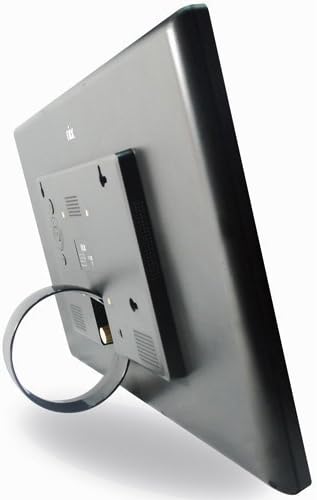
Resim: Arka view of the Nixplay Digital Photo Frame, illustrating the attachment point for the circular stand.
2. Çerçeveyi Çalıştırma
- Güç adaptörünü çerçevenin arkasındaki DC IN bağlantı noktasına bağlayın.
- Güç adaptörünü duvar prizine takın.
- The frame will automatically power on and display the Nixplay logo.
3. İlk Wi-Fi Bağlantısı
Follow the on-screen prompts to connect your frame to a Wi-Fi network. You will need your Wi-Fi network name (SSID) and password. Use the remote control to navigate the on-screen keyboard.
4. Creating a Nixplay Account
To manage your frame and upload photos, you will need to create a Nixplay account. This can be done via the Nixplay mobile app (available for iOS and Android) or through the Nixplay website. Follow the instructions provided by the app or website to link your frame to your account.
Çerçevenin Çalıştırılması
Fotoğraf ve Video Yükleme
Photos and videos can be uploaded to your Nixplay frame through several methods:
- Nixplay Mobile App: Easily upload photos and short videos directly from your smartphone.
- E-posta: Each Nixplay frame has a unique email address. Send photos directly to your frame via email.
- Nixplay Webalan: Access your account online to upload, organize, and manage playlists. Integration with Google Photos, Dropbox, Facebook, and Instagram is supported.
- USB Bellek / SD Kart: The frame supports local playback from USB drives and SD cards. Insert the storage device into the corresponding port on the frame.
Oynatma Listelerini Yönetme
Organize your content into playlists using the Nixplay app or website. You can assign specific playlists to display on your frame. Multiple playlists can be active simultaneously, and you can switch between them using the remote control.
Hareket Sensörü İşlevselliği
The Nixplay W18A features a motion sensor that automatically turns the frame on when motion is detected and off when no motion is detected for a set period. This feature helps conserve energy. You can enable or disable this function and adjust its sensitivity through the frame's settings menu or the Nixplay app.

Image: The Nixplay Digital Photo Frame seamlessly integrated into a home environment, placed on a shelf.
Uzaktan Kumandayı Kullanma
The included remote control allows you to navigate menus, adjust settings, switch playlists, and control playback. Ensure the remote is pointed towards the sensor on the frame for proper operation.
Bakım
Çerçeveyi Temizleme
Ekranı temizlemek için, yumuşak, tüy bırakmayan bir bezle nazikçe silin. İnatçı lekeler için, hafifçe silin.ampen the cloth with water or a screen-safe cleaning solution. Avoid using harsh chemicals or abrasive materials. Clean the frame's body with a dry, soft cloth.
Yazılım Güncellemeleri
Nixplay regularly releases software updates to improve performance and add new features. Ensure your frame is connected to Wi-Fi to receive these updates automatically. You can check for updates manually through the frame's settings menu.
Sorun giderme
| Sorun | Olası Neden | Çözüm |
|---|---|---|
| Çerçeve açılmıyor. | Güç adaptörü bağlı değil veya priz arızalı. | Güç adaptörünün çerçeveye ve çalışan bir elektrik prizine güvenli bir şekilde bağlı olduğundan emin olun. Farklı bir priz deneyin. |
| Wi-Fi'ye bağlanılamıyor. | Hatalı şifre, zayıf sinyal veya ağ sorunu. | Wi-Fi şifresini tekrar kontrol edin. Çerçeveyi yönlendiriciye daha yakın bir yere taşıyın. Yönlendiricinizi yeniden başlatın. |
| Fotoğraflar görüntülenmiyor. | No photos uploaded, incorrect playlist selected, or network issue. | Verify photos are uploaded to your Nixplay account and assigned to an active playlist. Ensure the frame is connected to Wi-Fi. |
| Uzaktan kumanda çalışmıyor. | Low battery or obstructed sensor. | Replace the remote control battery (1 Lithium Metal battery required). Ensure no obstructions between the remote and the frame's sensor. |
Özellikler
- Modeli: W18A
- Ekran Boyutu: 18.5 inç
- Çözünürlük: 720p
- Ürün Ölçüleri: 18.39 x 1.3 x 11.42 inç
- Ürün Ağırlığı: 6.17 pound
- Uyumlu Cihazlar: Smartphone (via Nixplay App)
- Bağlantı: Wifi
- Depolamak: 10GB Online Storage (with Nixplay account), supports USB Drive and SD Card
- Özellikler: Hareket Sensörü
- Güç: AC Güç Adaptörü
- Uzak Batarya: 1 Lithium Metal battery (required for remote)

Image: Technical diagram illustrating the precise dimensions of the Nixplay Digital Photo Frame.
Garanti ve Destek
Garanti Bilgileri
For detailed warranty information regarding your Nixplay Original 18 Inch Digital WiFi Photo Frame, please refer to the warranty card included with your product or visit the official Nixplay webSite. Garanti şartları ve koşulları bölgeye göre değişiklik gösterebilir.
Müşteri Desteği
Should you encounter any issues not covered in this manual or require further assistance, please contact Nixplay Customer Service. Support resources, including FAQs and contact information, are available on the official Nixplay webalan:


