1. Giriş
This manual provides detailed instructions for the installation, operation, and maintenance of your Samsung SHS-P710 Digital Door Lock. Please read this manual thoroughly before using the product to ensure proper function and safety. The SHS-P710 is a keyless touchpad security lock featuring a unique Push Pull design, multiple access methods, and advanced safety features.

Resim 1.1: Ön ve yan görünüm view of the Samsung SHS-P710 Digital Door Lock, showcasinŞık tasarımıyla dikkat çekiyor.
2. Ürün Özellikleri
The Samsung SHS-P710 Digital Door Lock incorporates several innovative features designed for enhanced security and user convenience:
- Push Pull Innovation: The lock features a unique handle design that allows you to open the door by simply pushing or pulling the handle from either side.
- Touch-screen Based Keypad: A responsive touch-screen keypad for entering passwords.
- Çoklu Erişim Yöntemleri: Supports access via password, RFID Key Tags, RFID Cards, and remote control.
- Dual-way Security (Magic Number): Enhances security by requiring a random number input before the main password.
- Otomatik Kilitleme: The door locks automatically upon closing, eliminating concerns about forgetting to lock it.
- Fire Detection Sensor: An integrated sensor detects indoor temperatures of 60 degrees Celsius or above, triggering an alarm and automatically releasing the lock for emergency exit.
- Intrusion Detection Alarm: An alarm sounds upon physical shocks or repeated incorrect authentication attempts to deter unauthorized entry.
- Crime Setting Feature: Activates an alarm if the door lock is operated from inside the home when this feature is enabled, useful when leaving the premises.
- Manual Switchgear: In case of electronic malfunction, the door can be opened using a manual lever.
- Elektrik Çarpması Koruması: Designed with circuit technology to withstand high-voltage electric shocks, enhancing safety.
- Sessiz mod: Allows adjustment of volume or muting of key tones and door opening melodies for quiet entry/exit.
- Pil Bitti Alarmı: Notifies users when batteries are low through a specific melody and keypad LED.
- Hoş Geldiniz Fonksiyonu: The keypad lights up as you approach the door, eliminating the need to touch it with your hands.
- Rastgeleleştirici: Guides users to press two random numbers before entering the password to prevent fingerprint residue patterns.
- Uzakta Modu: A dedicated button to activate an anti-theft mode when leaving home for extended periods.
- Acil Güç Kaynağı: Allows temporary power supply via a 9V battery if the main batteries are fully discharged.
- Şaka Uyarısı: If an incorrect password is entered five times consecutively, the lock disables key authentication for three minutes and sounds an alarm.
- Anormal Yüksek Sıcaklık Uyarısı: In addition to the fire detection sensor, a light on the indoor side of the lock flashes, and the door automatically opens for swift evacuation.

Image 2.1: Visual representation of various operational features like Silent Mode, Battery Alarm, and Emergency Power.

Image 2.2: Icons illustrating key functionalities and safety features of the door lock.
3. Kurulum ve Kurulum
Proper installation is crucial for the optimal performance and security of your digital door lock. It is recommended to have the installation performed by a qualified technician.
3.1 Door Requirements
- Uygulanabilir Kapı Kalınlığı: 38mm - 55mm (1.5 inches - 2.17 inches).
- Mortise Model: SHS-AML240.

Image 3.1: Door thickness compatibility and detailed dimensions of the SHS-AML240 mortise.
3.2 Kurulum Adımları (Üzerinden)view)
The following is a general overview of the installation process. Refer to the detailed installation guide provided with your product for precise instructions.
- Prepare the door by drilling necessary holes according to the template.
- Install the mortise (SHS-AML240) into the door edge.
- Mount the outside main body onto the door, ensuring the handle control shaft and dead bolt latch bolt are correctly aligned.
- Install the inside main body, connecting the necessary cables.
- Secure the inside fixed panel and rubber pad.
- Install the battery cover and insert batteries.
- Install the strike and strike box on the doorframe.
- Test all functions, including locking, unlocking, and alarms.

Image 3.2: Exploded diagram illustrating the installation components and their placement.
4. Kullanım Talimatları
The SHS-P710 offers various methods for accessing and securing your door.
4.1 Accessing the Door
- Şifre Girişi: Touch the keypad to activate. Enter your registered password followed by the '*' button. The door will unlock.
- RFID Anahtarı Tag/Card: Place a registered RFID Key Tag or Card on the reader area of the outdoor unit. The door will unlock.
- Uzaktan kumanda: Press the unlock button on the remote control. Ensure the remote module is installed in the lock.
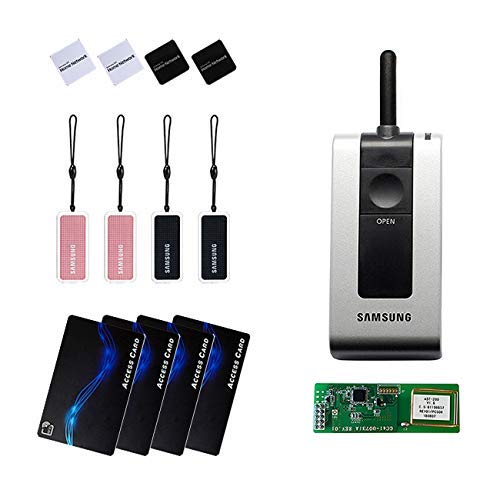
Image 4.1: Included accessories: remote control, RFID cards, and key tags.
4.2 Kapının Kilitlenmesi
- Otomatik Kilitleme: The door will automatically lock a few seconds after closing.
- Manual Locking (from outside): Touch the keypad or press the '*' button after closing the door.
- Manual Locking (from inside): Press the close/lock button on the indoor unit.
4.3 Özel Fonksiyonlar
- Sessiz mod: To activate/deactivate, refer to the detailed programming instructions in the full manual. This mode mutes key tones and opening melodies.
- Away Mode (Anti-theft): Press the 'Home' button on the indoor unit when leaving for an extended period. An alarm will sound if the door is operated from inside.
- Çift Kilitleme: This feature provides additional security by preventing the door from being opened from the outside even with a valid key or password. Activate from the indoor unit.
- Ses Kontrolü: Adjust the lock's sound volume through the settings menu (refer to the full manual for steps).
5. Bakım
Regular maintenance ensures the longevity and reliable operation of your digital door lock.
5.1 Pil Değişimi
- The lock uses AA Alkaline 1.5V batteries (LR6) 8EA (6V).
- When the battery dead alarm sounds, replace all batteries promptly.
- To replace, open the battery cover on the indoor unit, remove old batteries, and insert new ones, observing polarity.
5.2 Acil Güç Kaynağı
- If the batteries are completely drained, you can temporarily power the lock using a 9V battery (6LF22).
- Connect the 9V battery to the emergency power terminals on the outdoor unit.
- While holding the 9V battery, enter your password or use an RFID key to unlock the door.
5.3 Temizlik
- Wipe the lock's surface with a soft, dry cloth.
- Do not use abrasive cleaners, solvents, or harsh chemicals, as these can damage the finish and electronic components.
6. Sorun Giderme
This section addresses common issues you might encounter with your SHS-P710 digital door lock.
| Sorun | Olası Neden | Çözüm |
|---|---|---|
| Kapı otomatik olarak kilitlenmiyor. | Automatic locking feature is disabled or misaligned. | Check settings to ensure automatic locking is enabled. Verify door alignment and strike plate position. |
| Tuş takımı yanıt vermiyor. | Batteries are low or dead; lock is in prank warning mode. | Replace batteries. Wait 3 minutes if prank warning is active. Use 9V emergency power if needed. |
| Alarm beklenmedik bir anda çalar. | Intrusion detected; high temperature detected; crime setting active. | Check for forced entry attempts. Verify indoor temperature. Deactivate crime setting if not needed. |
| Cannot open with remote control. | Remote module not installed; remote batteries dead; remote not paired. | Ensure remote module is correctly installed. Replace remote batteries. Refer to manual for remote pairing instructions. |
| Door is stuck or difficult to operate. | Mechanical obstruction; electronic malfunction. | Check for physical obstructions. If electronic, use the manual switchgear. Contact support if issue persists. |
7. Özellikler
Detailed technical specifications for the Samsung SHS-P710 Digital Door Lock.
| Özellik | Şartname |
|---|---|
| Marka | SAMSUNG |
| Model Adı | SHS-P710 (FBA_SHS-P710R) |
| Kilit Tipi | Biometric (Touchpad), Digital |
| Kontrol Yöntemi | Uzaktan, Dokunmatik |
| İşlem Yöntemi | Electronic Control (Password, Card, Key Tag) |
| Güç Kaynağı | AA Alkaline 1.5 Batteries (LR6) 8EA (6V) (Separately sold) |
| Acil Güç Kaynağı | 9V Pil (6LF22) (Ayrı satılır) |
| Ürün Ağırlığı | 4.1 kg (including both inner and outer bodies) / 10 Pounds |
| Outer Body Dimensions (W x H x D) | 85mm x 346.5mm x 61mm |
| Inner Body Dimensions (W x H x D) | 86mm x 354.8mm x 63mm |
| Uygulanabilir Kapı Kalınlığı | 38 mm - 55 mm |
| Mortise Model | SHS-AML240 |
8. Garanti ve Destek
Information regarding product warranty and customer support was not available in the provided data. Please refer to the product packaging or contact Samsung customer service for details on warranty coverage and support options.


