giriiş
The Tekonsha 119250 ZCI Zero Contact Interface Universal ModuLite is designed to provide power for trailer stop, turn, tail, and running lights without requiring any cutting or splicing into the tow vehicle's electrical system. This module utilizes current sensors that snap over existing vehicle wires, detecting electrical current and activating the corresponding trailer lights. It is compatible with various vehicle types, including those with standard, PWM (Pulse Width Modulation), and multiplexed systems, and supports both 2-wire and 3-wire vehicle systems.
Güvenlik Bilgileri
- UYARI: Do not cut or splice vehicle wiring. This product is designed for zero contact installation.
- Kısa devreleri önlemek için tüm bağlantıların güvenli ve uygun şekilde yalıtıldığından emin olun.
- Always disconnect the vehicle's battery before beginning installation to avoid electrical shock or damage to the vehicle's electrical system.
- Verify proper grounding of the ModuLite module to ensure reliable operation and prevent electrical issues.
- If the trailer lights remain on after the vehicle is turned off, immediately investigate the cause to prevent battery drain. This may indicate an incorrect installation or a fault.
- Montaj sırasında uygun alet ve kişisel koruyucu ekipmanları kullanın.
Paket İçeriği
The Tekonsha 119250 ZCI ModuLite package typically includes the following components:
- Tekonsha ZCI ModuLite Power Module
- Current Sensors (typically 4-5 units)
- 4-Pin Trailer Wiring Connector
- Ground Wire with Ring Terminal
- Enerji kablosu
- Kurulum Talimatları
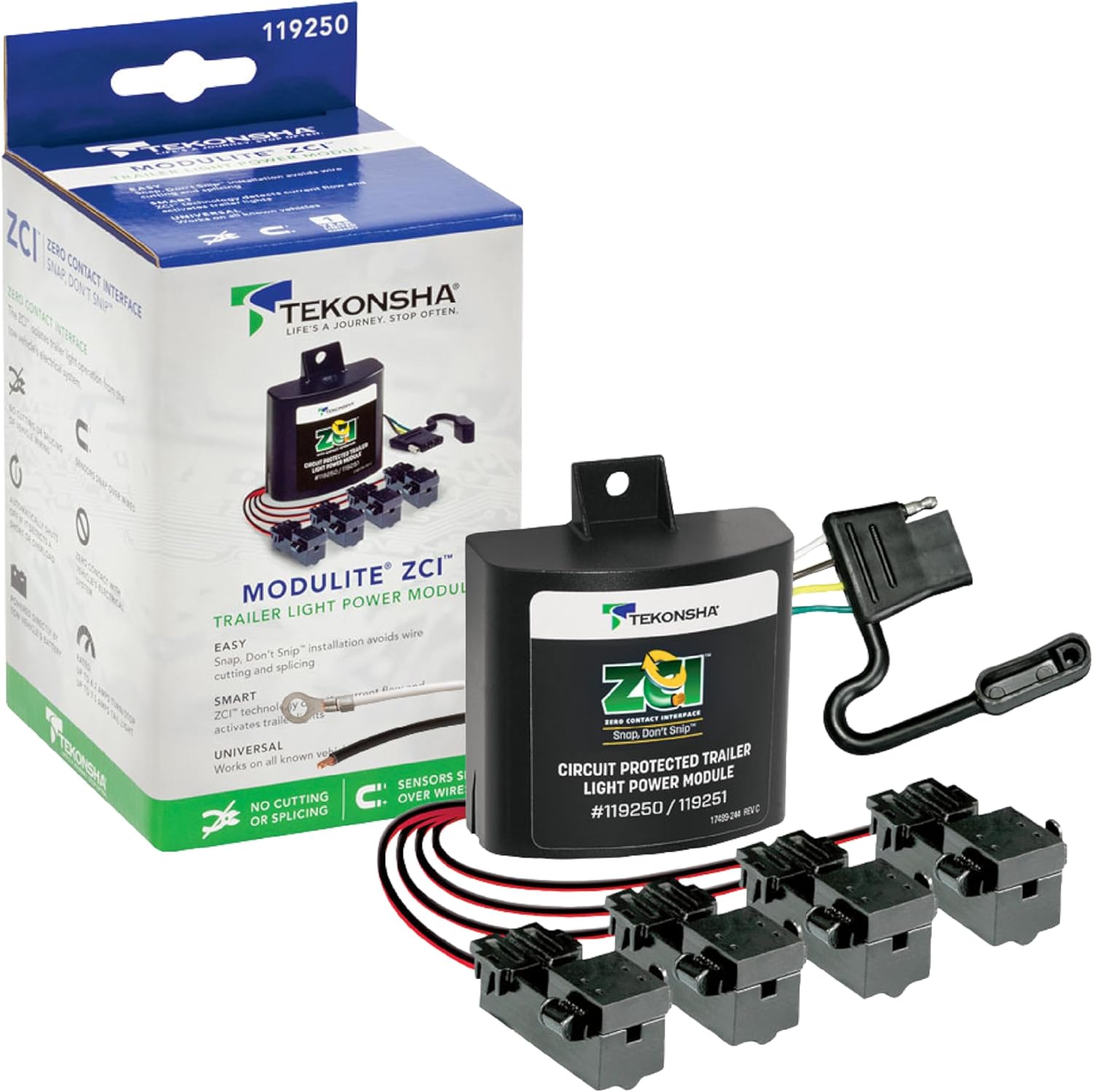
Image: The Tekonsha 119250 ZCI ModuLite box, showing the main module, several current sensors, and the 4-pin trailer connector.
Özellikler
| Özellik | Şartname |
|---|---|
| Model Numarası | 119250 |
| Turn/Stop Circuit Rating | 4.2'e kadar Amps |
| Taillight Circuit Rating | 7.5'e kadar Amps |
| Uyumluluk | Standard, PWM, and Multiplexed Systems (2-wire or 3-wire) |
| Ampul Uyumluluğu | LED and/or Incandescent bulbs (vehicle and trailer) |
| Koruma | Integrated, re-settable short circuit and overload protection |
| Ağırlık | Yaklaşık 1.15 pound |

Image: Diagram illustrating the approximate dimensions of the Tekonsha 119250 ZCI ModuLite packaging, showing a height of 8.9 inches, width of 4.8 inches, and depth of 4 inches.
Kurulum Talimatları (Ayarlar)
The ModuLite ZCI is designed for a non-invasive installation, avoiding any cutting or splicing of your vehicle's wiring. This makes it ideal for leased vehicles or those with sensitive electronics.
Required Tools and Additional Components (Not Included):
- Voltmeter or Test Light
- Kablo Soyucular/Sıkıştırıcılar
- Elektrik Bandı veya Isıyla Daralan Boru
- Fuse Holder (for power wire)
- Crimp Connectors (various types as needed)
- Battery Terminal Connector
- Additional 12-gauge wire (if needed for power/ground extension)
- Zip Ties or Mounting Hardware
Adım Adım Kurulum:
- Aracı Hazırlayın: Ensure the vehicle is turned off and the battery is disconnected. Identify a suitable, dry location in the rear of the vehicle (e.g., trunk, cargo area, or under the vehicle) to mount the ModuLite module.
- Identify Vehicle Wires: Using a voltmeter or test light, identify the vehicle's tail light, stop light, left turn signal, and right turn signal wires. These wires will be used with the current sensors. For vehicles with combined stop/turn signals (2-wire system), the module will adapt this to a standard trailer 2-wire system. For vehicles with separate stop and turn signals (3-wire system), the module will also adapt.
- Güç ve Toprak Bağlantısını Yapın:
- Route the ModuLite's power wire (typically black or red) directly to the vehicle's battery. Install an inline fuse holder (not included) with the specified fuse (usually 15A, one is included) as close to the battery as possible. Connect the power wire to the positive (+) battery terminal.
- Connect the ModuLite's ground wire (typically white) to a clean, unpainted metal surface on the vehicle chassis, ensuring a solid electrical connection. Use the provided ring terminal or a suitable crimp connector.
- Attach Current Sensors: For each identified vehicle light wire (tail, stop, left turn, right turn), snap the corresponding current sensor over the wire. Ensure the wire passes through the sensor in the correct direction as indicated by an arrow on the sensor. If the sensor does not work, reverse its direction or loop the wire through twice if the signal is weak.
- Connect 4-Pin Trailer Connector: Connect the 4-pin trailer wiring harness from the ModuLite module to the location where your trailer connector will be accessed. This typically involves routing it to the exterior of the vehicle near the hitch.
- Modülü Monte Edin: Securely mount the ModuLite module in the chosen dry location using zip ties or other appropriate mounting hardware. Ensure it is protected from moisture and physical damage.
- Sistemi Test Edin: Reconnect the vehicle battery. Connect a trailer or a trailer light tester to the 4-pin connector. Test all trailer light functions: tail lights, brake lights, left turn signal, and right turn signal.
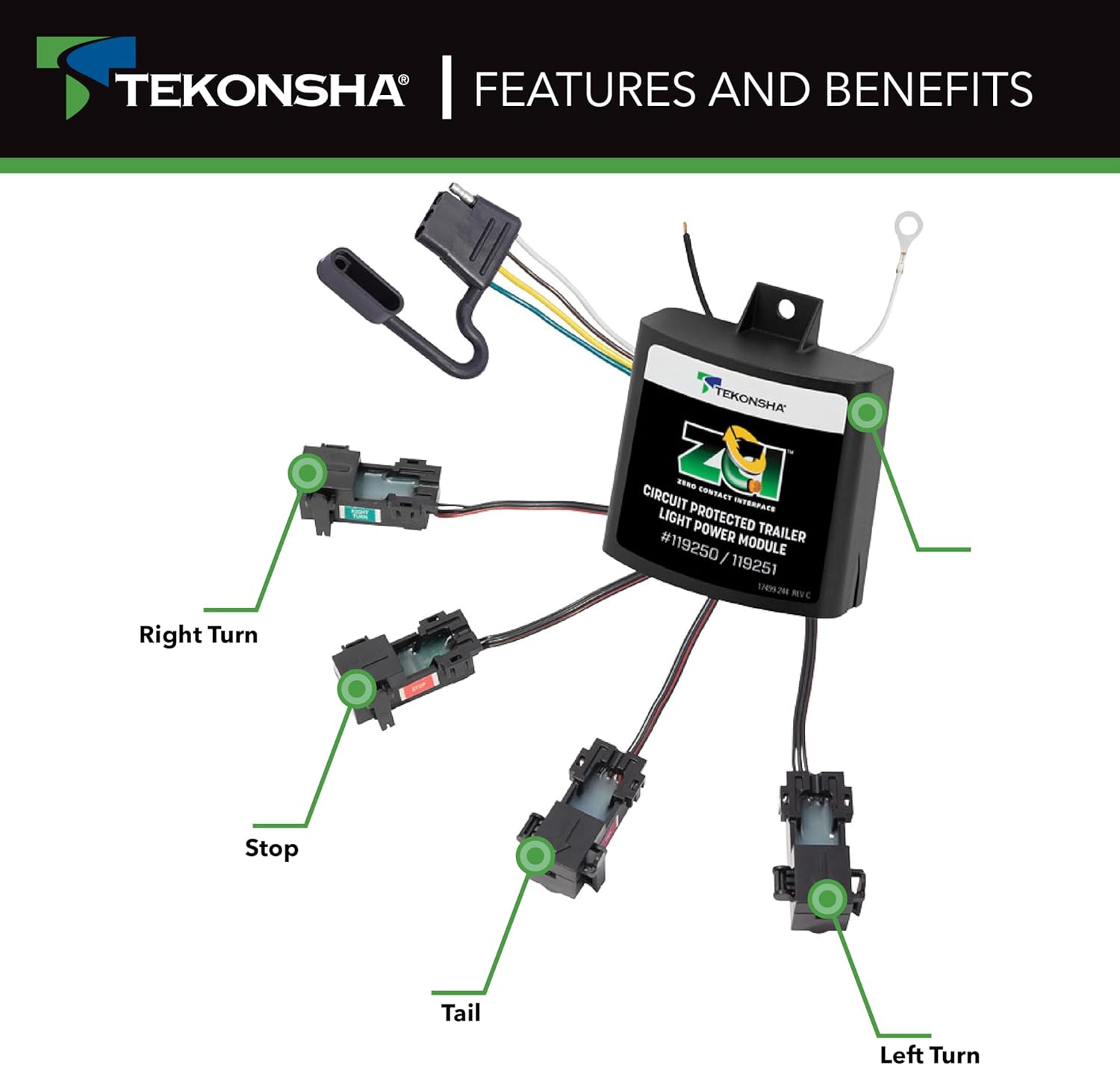
Resim: Bir üstten görünüm view of the Tekonsha 119250 ZCI ModuLite, showing the main module connected to four current sensors, each labeled for Right Turn, Stop, Tail, and Left Turn signals. The 4-pin trailer connector is also visible.

Resim: Yakın çekim view demonstrating the 'Smart Signal Sensing' feature, showing a vehicle wire passing through a current sensor, with an indicator light on the sensor. This illustrates the non-invasive method of detecting electrical signals.

Resim: Ayrıntılı view of the Tekonsha 119250 ZCI ModuLite's included hardware, featuring the main module, multiple current sensors, and the 4-pin trailer connector. A separate red wire with a sensor is also shown, highlighting the components for installation.
Operasyon
Once properly installed, the Tekonsha 119250 ZCI ModuLite operates automatically. When the vehicle's lights (tail, stop, turn signals) are activated, the current sensors detect the electrical flow in the vehicle's wiring. The ModuLite then draws power directly from the vehicle's battery (via the dedicated power wire) to illuminate the corresponding trailer lights. This ensures that the trailer lights receive full brightness and do not interfere with the vehicle's sensitive electrical systems or 'lamp out' sensors.
- The module is compatible with both LED and incandescent bulbs on both the tow vehicle and the trailer.
- It adapts 3-wire vehicle systems (separate turn and stop lights) to standard 2-wire trailer taillight wiring.

Image: A graphic highlighting additional features of the ModuLite ZCI, including circuit protection, ratings of up to 4.2 amps for turn/stop and 7.5 amps for tail lights, the 'no cutting or splicing' installation method, and its battery-powered operation.
Sorun giderme
- No Trailer Lights or Incorrect Function:
- Güç ve Topraklama Bağlantılarını Kontrol Edin: Ensure the power wire is securely connected to the battery (with fuse) and the ground wire has a solid connection to the chassis.
- Verify Sensor Placement: Confirm that each current sensor is correctly snapped over the intended vehicle wire and that the wire passes through in the direction indicated by any arrows on the sensor. Try reversing the sensor or looping the wire through twice if the signal is weak.
- Sigortayı kontrol edin: Check the inline fuse on the power wire. Replace if blown.
- Treyler Bağlantısı: Ensure the 4-pin trailer connector is properly connected to the trailer or tester.
- Trailer Lights Remain On After Vehicle is Off (Battery Drain):
- This indicates the module is still receiving a signal or power when it shouldn't. Re-verify all sensor connections and ensure no vehicle wires are inadvertently providing a constant signal.
- Ensure the power wire is connected to a constant 12V source that is not switched by the ignition, as the module is designed to be battery-powered. The issue might stem from a vehicle's residual power or a faulty sensor connection.
- If the problem persists, consider installing a manual on/off switch on the power line to the ModuLite module to prevent battery drain when not in use.
- Power Wires Reversed (as reported by some users):
- If initial testing shows the trailer ground pin has voltage and light wires are grounded, it's possible the power and ground wires from the module are reversed. Carefully verify the polarity of your connections using a voltmeter before connecting to a trailer.
Bakım
The Tekonsha 119250 ZCI ModuLite requires minimal maintenance. Periodically inspect the following:
- Kablolama ve Bağlantılar: Check all wires for signs of wear, fraying, or damage. Ensure all electrical connections, especially the power and ground connections, remain secure and free of corrosion.
- Module Mounting: Verify that the module is still securely mounted and protected from environmental elements.
- Akım Sensörleri: Ensure the current sensors remain properly clipped onto the vehicle wires and have not shifted.
- 4 Pinli Konnektör: Keep the 4-pin trailer connector clean and free of debris. Use a dielectric grease to protect the terminals from corrosion if exposed to the elements.
Garanti ve Destek
The Tekonsha 119250 ZCI ModuLite is backed by Tekonsha, a trusted name in towing safety. For specific warranty details, claims, or technical assistance, please refer to the official Tekonsha webSite üzerinden satın alabilir veya doğrudan müşteri hizmetleriyle iletişime geçebilirsiniz. Satın alma fişinizi, garanti talepleriniz için satın alma belgesi olarak saklayın.
For additional information and support, you may visit the official Tekonsha store or webalan: Tekonsha Store