1. Giriş
This manual provides essential instructions for the safe and effective use of your Ricoh Compatible Toner Cartridge, Model 8541625508. This high-yield toner cartridge is designed to work seamlessly with Ricoh MP C4501 and MP C5501 series printers, delivering consistent print quality.
2. Güvenlik Bilgileri
- Toner kartuşlarını çocukların erişemeyeceği yerlerde saklayın.
- Toneri yutmayın. Toner yutulursa, derhal tıbbi yardım alın.
- Toner tozunun doğrudan temasından kaçının. Temas halinde, ellerinizi sabun ve suyla iyice yıkayın.
- Do not incinerate used toner cartridges, as this may cause toner to explode and release fine particles.
- Store cartridges in a cool, dry place away from direct sunlight and extreme temperatures.
3. Paket İçeriği
Paketiniz aşağıdakileri içermelidir:
- One (1) Ricoh Compatible Toner Cartridge (Black, Cyan, Magenta, or Yellow, depending on your purchase).
4. Kurulum Talimatları
Follow these steps to install the toner cartridge into your Ricoh MP C4501 or MP C5501 series printer:
- Yazıcıyı Kapat: Kurulum işlemine başlamadan önce yazıcınızın kapalı olduğundan ve güç kaynağından fişinin çekili olduğundan emin olun.
- Ön Kapağı Açın: Yazıcınızın ön kapağını bulun ve açarak toner kartuşu bölmesine erişin.
- Eski kartuşu çıkarın (varsa): Gently pull out the empty toner cartridge by its handle. Place it in a protective bag for recycling.
- Yeni Kartuşu Açın: Carefully remove the new compatible toner cartridge from its packaging.
- Hafifçe çalkalayın: Hold the new cartridge horizontally and gently shake it 5-6 times to distribute the toner evenly inside.
- Koruyucu contaları çıkarın: Remove any orange protective caps, seals, or pull-tabs from the cartridge. Be careful not to touch the green drum surface.
- Yeni Kartuşu Takın: Align the new toner cartridge with the corresponding slot in the printer and slide it in until it clicks firmly into place. Ensure it is fully seated.
- Kapağı Kapat: Yazıcının ön kapağını sıkıca kapatın.
- Yazıcıyı Açın: Plug in and turn on your printer. The printer will typically perform a self-test and recognize the new cartridge.
- Test Sayfasını Yazdır: Doğru kurulumu ve baskı kalitesini doğrulamak için bir test sayfası yazdırın.
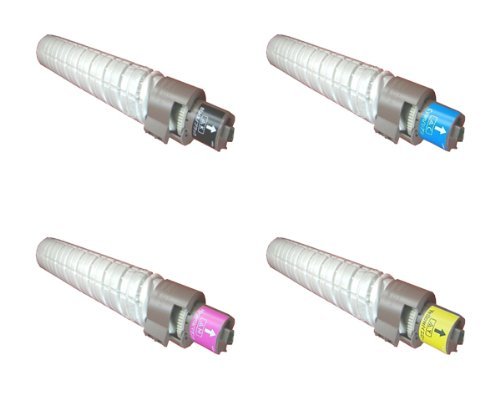
This image displays the compatible toner cartridge, similar to the one you have purchased. Note the packaging and the general shape of the cartridge before installation.
5. Kullanım ve Bakım
- Toner Seviyesini Takip Edin: Your printer's display or software will indicate current toner levels. Replace the cartridge when prompted or when print quality deteriorates significantly.
- Dikkatli Kullanın: Avoid touching the green drum surface on the cartridge, as oils from your skin can affect print quality.
- Çevresel Hususlar: Dispose of empty toner cartridges responsibly through recycling programs.
6. Depolama
For optimal performance and longevity, store unused toner cartridges:
- In their original, unopened packaging.
- In a cool, dry environment (e.g., 10-30°C or 50-86°F).
- Away from direct sunlight, heat sources, and excessive humidity.
- Horizontally, not vertically.
7. Sorun Giderme
If you encounter issues with your toner cartridge, refer to the table below:
| Sorun | Olası Neden | Çözüm |
|---|---|---|
| Poor Print Quality (faded, streaks, spots) | Low toner, uneven toner distribution, dirty drum, incorrect printer settings. | Gently shake cartridge, check printer settings, perform a printer cleaning cycle, or replace cartridge if empty. |
| Kartuş Tanınmadı | Improper installation, protective seals not removed, printer firmware issue. | Reinstall cartridge, ensure all protective seals are removed, check printer's display for error codes, consult printer manual for firmware updates. |
| Toner Leakage | Damaged cartridge, improper installation. | Carefully remove cartridge, inspect for damage. If damaged, replace. Ensure proper installation. Clean any spilled toner with a damp Kumaş. |
8. Özellikler
- Model Numarası: 8541625508
- Uyumlu Yazıcı Modelleri: Ricoh MP C4501, Ricoh MP C5501
- Tip: Uyumlu Toner Kartuşu
- Özellik: Yüksek Getiri
- Dahil Bileşenler: Toner Kartuşu
9. Garanti ve Destek
For information regarding warranty coverage or technical support, please refer to the seller's policies or contact their customer service directly. Keep your purchase receipt as proof of purchase.