giriiş
This manual provides essential information for the proper use and care of your Beats Studio Wireless Over-Ear Headphones. Please read these instructions carefully before using your headphones to ensure optimal performance and longevity. The Beats Studio Wireless headphones offer a premium audio experience with wireless connectivity and Adaptive Noise Canceling technology.
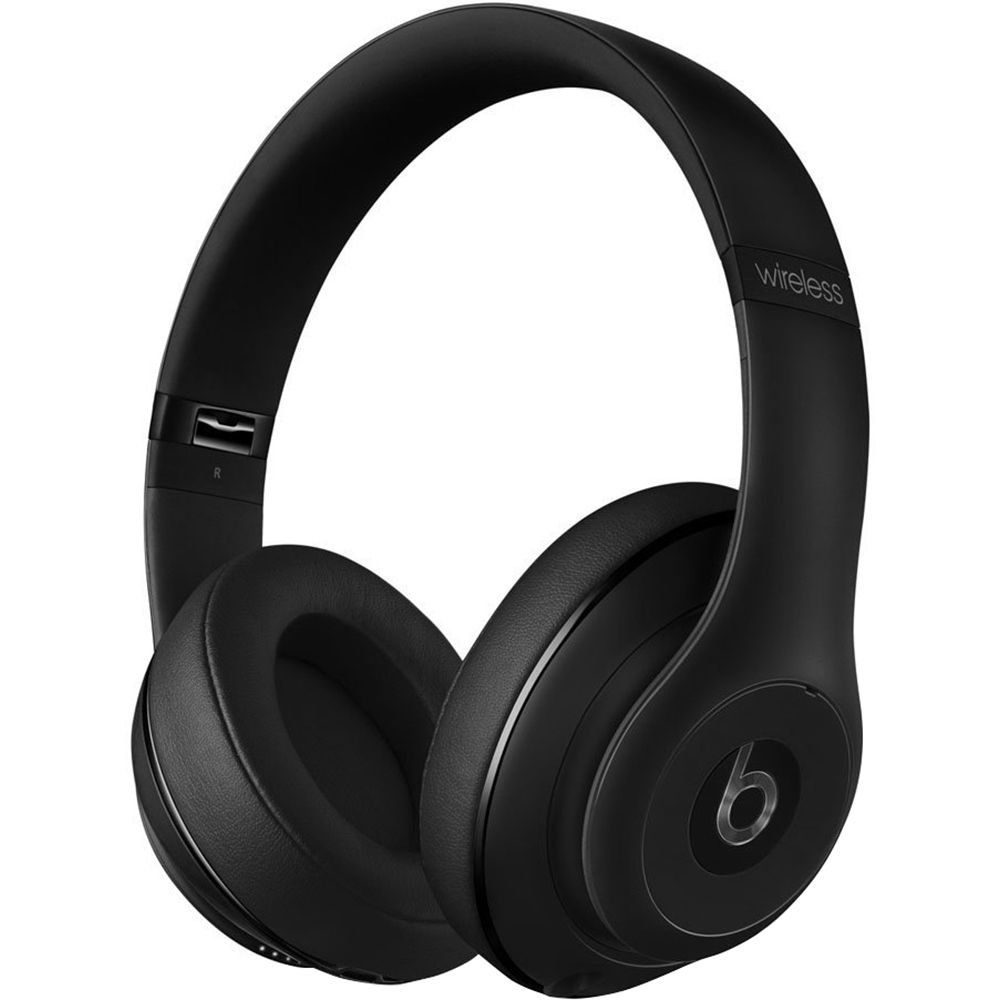
Image: Beats Studio Wireless Over-Ear Headphones in Matte Black, showcasinşık tasarımı.
Kutuda Neler Var?
Paketinizde tüm öğelerin mevcut olduğundan emin olun:
- Beats Studio Wireless over-ear headphones
- 3.5mm audio cable with RemoteTalk (for wired connection and controls)
- Standard 3.5 mm audio cable (for wired connection without RemoteTalk features)
- USB 2.0 cable (USB-A to USB Micro-B) for charging
- Hard-shell carrying case with carabiner clip

Image: The Beats Studio Wireless headphones, hard-shell carrying case, and various cables laid out from the packaging.
Kurmak
1. Kulaklıkları Şarj Etme
Before first use, fully charge your Beats Studio Wireless headphones. A full charge provides approximately 12 hours of wireless playback or 20 hours of wired playback with Adaptive Noise Canceling enabled.
- Connect the small end of the USB 2.0 cable (USB-A to USB Micro-B) to the Micro-USB port on the right earcup of the headphones.
- Connect the larger end of the USB cable to a USB power adapter (not included) or a powered USB port on a computer.
- The Fuel Gauge LEDs on the right earcup will indicate charging status. When all five LEDs are solid white, the headphones are fully charged.
Not: The headphones cannot be used while charging.
2. Bluetooth Eşleştirme
Kablosuz ses için kulaklığınızı Bluetooth özellikli cihazınızla eşleştirin.
- Ensure your headphones are charged and powered off.
- Press and hold the power button on the right earcup for 3-5 seconds until the Fuel Gauge LEDs begin to pulse. This indicates pairing mode.
- Cihazınızda Bluetooth ayarlarına gidin ve Bluetooth'u etkinleştirin.
- Select "Beats Studio Wireless" from the list of available devices.
- Once paired, the Fuel Gauge LEDs will turn solid white.
The headphones have a Bluetooth range of up to 30 feet (9 meters).
3. Kablolu Bağlantı
For a wired connection, use the provided 3.5mm audio cables.
- Plug one end of the 3.5mm audio cable into the audio input port on the left earcup.
- Plug the other end into the 3.5mm audio output jack of your device.
The RemoteTalk cable allows for inline control of music and calls when connected to compatible devices.
Kullanım Talimatları
1. Güç Açma/Kapatma
- Açmak İçin: Press and hold the power button on the right earcup until the Fuel Gauge LEDs illuminate.
- Kapatmak İçin: Press and hold the power button until the Fuel Gauge LEDs turn off.
2. Controls (Wireless Mode)
The "b" button on the left earcup and the volume buttons control playback and calls.
- Oynat/Duraklat: Press the "b" button once.
- Sonraki Parça: Press the "b" button twice quickly.
- Önceki parça: Press the "b" button three times quickly.
- Sesi aç: Üstteki ses düğmesine basın.
- Sesi kıs: Alttaki ses düğmesine basın.
- Çağrıyı Cevapla/Sonlandır: Press the "b" button once during an incoming call or active call.
- Çağrıyı Reddet: Press and hold the "b" button for 2 seconds during an incoming call.
- Voice Assistant'ı etkinleştirin: Press and hold the "b" button for 2 seconds (functionality depends on device).
3. Adaptive Noise Canceling (ANC)
The Beats Studio Wireless headphones feature Dual-Mode Adaptive Noise Canceling. ANC is automatically active when the headphones are powered on. There are two modes:
- Full ANC: Engaged when listening to music or media, providing maximum noise reduction.
- ANC Only: When the audio cable is unplugged and the headphones are powered on, ANC will automatically switch to a more aggressive mode to reduce external noise without playing audio.
Bakım
1. Temizlik
Kulaklıklarınızın görünümünü ve performansını korumak için:
- Kulaklıkların kulaklık kısımlarını ve kafa bandını yumuşak, kuru ve tüy bırakmayan bir bezle silin.
- Aşındırıcı temizleyiciler, alkol veya kimyasal çözücüler kullanmayın.
- Herhangi bir açıklıktan içeriye nem girmesini önleyin.
2. Depolama
When not in use, store your headphones in the provided hard-shell carrying case to protect them from damage.
- Fold the headphones carefully to fit into the case.
- Keep headphones away from extreme temperatures and humidity.
3. Pil Bakımı
Pil ömrünü uzatmak için:
- Pilin sık sık tamamen boşaltılmasından kaçının.
- Kulaklıkları uzun süre kullanmasanız bile düzenli olarak şarj edin.
- Serin ve kuru yerde saklayınız.
Sorun giderme
If you encounter issues with your Beats Studio Wireless headphones, try the following solutions:
Güç Yok / Açılmıyor
- Ensure the headphones are fully charged. Connect them to a power source using the USB cable.
- USB kablosunu ve şarj bağlantı noktasını herhangi bir hasar açısından kontrol edin.
No Sound / Intermittent Audio
- Kablosuz:
- Ensure headphones are paired and connected to your device.
- Check the volume levels on both the headphones and your device.
- Move closer to your device to avoid interference or exceeding Bluetooth range.
- Kulaklıklarınızı cihazınızla eşleştirmeyi kaldırıp tekrar eşleştirmeyi deneyin.
- Kablolu:
- Ensure the 3.5mm audio cable is securely plugged into both the headphones and your audio source.
- Try a different 3.5mm audio cable if available.
Eşleştirme Sorunları
- Ensure the headphones are in pairing mode (pulsing Fuel Gauge LEDs).
- Cihazınızın Bluetooth özelliğini kapatıp tekrar açın.
- Forget "Beats Studio Wireless" from your device's Bluetooth list and attempt to pair again.
- Eşleştirme işlemine başka hiçbir Bluetooth cihazının müdahale etmediğinden emin olun.
Adaptive Noise Canceling (ANC) Not Working
- Ensure the headphones are powered on. ANC requires power.
- Check for any obstructions around the external microphones on the earcups.
Özellikler
Key technical specifications for the Beats Studio Wireless Over-Ear Headphones:
- Model Adı: Stüdyo
- Bağlantı Teknolojisi: Bluetooth (Wireless), 3.5 mm Jack (Wired)
- Kablosuz İletişim Teknolojisi: Bluetooth
- Bluetooth Aralığı: 30 feet'e (9 metre) kadar
- Gürültü kontrolü: Active Noise Cancellation (Dual-Mode Adaptive Noise Canceling)
- Pil Ömrü: Approximately 12 hours (wireless), 20 hours (wired with ANC)
- Pil Tipi: 1 Lityum İyon pil (şarj edilebilir)
- Kontrol Türü: Media Control (on-earcup "b" button, volume buttons)
- Mikrofon: Eller serbest aramalar için yerleşik
- Form Faktörü: Kulak Üstü
- Kulak Yerleşimi: Kulak Üstü
- Malzeme: Plastik
- Ürün Ağırlığı: Yaklaşık 9.2 ons (0.26 kilogram)
- Ürün Ölçüleri: 9.6 x 7.3 x 4.5 inç
- Üretici: Beats Electronics, LLC
- İlk Mevcut Tarih: 1 Aralık 2013

Resim: Yakın çekim view of the headphone's inner band, displaying the model number B0501.
Garanti ve Destek
For warranty information and customer support, please refer to the official Beats webSite üzerinden satın alabilir veya doğrudan müşteri hizmetleriyle iletişime geçebilirsiniz. Satın alma belgenizi garanti talepleriniz için saklayın.
Not: This product is an older model. Specific warranty terms may vary based on purchase date and region. Please consult the manufacturer's official resources for the most accurate and up-to-date information.
Daha fazla yardım için şu adresi ziyaret edin: Beats Desteği