Eurotime LCD Dijital Alarm Saati Model 23708-00 Kullanım Kılavuzu
Model: 23708-00
giriiş
This manual provides instructions for the setup, operation, and maintenance of your Eurotime LCD Digital Alarm Clock, Model 23708-00. Please read this manual thoroughly before using the product to ensure proper function and longevity.
The Eurotime LCD Digital Alarm Clock features an LCD display, 7-color changing LED lighting, multiple natural alarm tones, and displays time, date, day of the week, and indoor temperature. It also includes a snooze function and a countdown feature.
Güvenlik Bilgileri
- Cihazı sudan ve yüksek nemden uzak tutun.
- Cihazı doğrudan güneş ışığına veya aşırı sıcaklıklara maruz bırakmayın.
- Yalnızca belirtilen pil tipini kullanın (3 x 1.5V AAA pil).
- Eski ve yeni pilleri veya farklı pil türlerini karıştırmayın.
- Kullanılmış pilleri yerel düzenlemelere uygun şekilde sorumlu bir şekilde atın.
- Cihazı kendiniz sökmeye veya onarmaya çalışmayın. Servis için yetkili personele başvurun.
Paket İçeriği
- Eurotime LCD Digital Alarm Clock (Model 23708-00)
- 3 x 1.5V AAA Pil
- Kullanım Kılavuzu (bu belge)
Ürün Bittiview
Çalar saatinizin bileşenlerini ve kontrollerini iyice öğrenin.
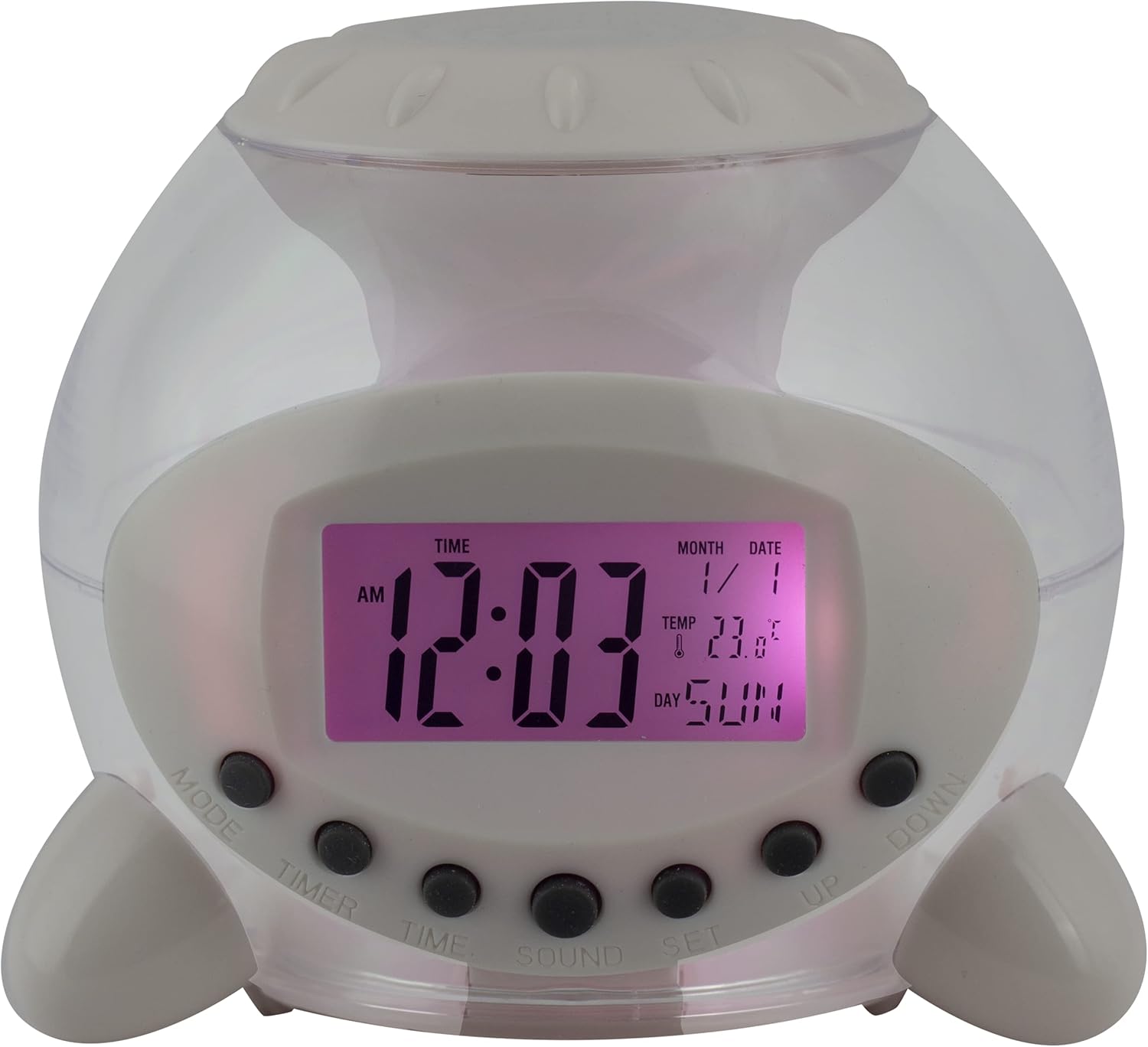
Şekil 1: Ön View Çalar saatin. This image displays the front of the Eurotime LCD Digital Alarm Clock, highlighting its transparent plastic housing and the central LCD screen. The screen shows the time (12:03 AM), month (1), date (1), temperature (23.8°C), and day (SUN). Below the screen are control buttons labeled MODE, TIMER, TIME, SOUND, and SET, along with UP and DOWN buttons.

Şekil 2: Yan View with Control Buttons. This image shows a side perspective of the alarm clock, emphasizing the array of control buttons located on the front-bottom edge. The transparent housing allows a glimpse of the internal structure and the LED lighting effect. The buttons are clearly visible for user interaction.

Şekil 3: Yan View with Internal Lighting. This image provides another side view, illustrating the transparent housing and the internal LED lighting. The light emanates from the base, creating a soft glow within the clock's structure, demonstrating its color-changing feature.
Kontrol Düğmeleri:
- TARİFİ: Switches between time display, alarm setting, and countdown timer.
- ZAMANLAYICI: Activates and sets the countdown timer.
- ZAMAN: Used to set the current time and date.
- SES: Selects alarm tones or natural sounds.
- AYARLAMAK: Confirms settings or enters setting mode.
- YUKARI AŞAĞI: Adjusts values during setting modes.
Kurmak
1. Pil Kurulumu
- Çalar saatin alt kısmında bulunan pil bölmesini bulun.
- Pil bölmesinin kapağını açın.
- Üç (3) adet 1.5V AAA pili, kutupların doğruluğunu (+/-) sağlayarak takın.
- Pil bölmesi kapağını sıkıca kapatın.
Not: The clock will automatically power on after battery installation. The display may flash, indicating it's ready for time setting.
Kullanım Talimatları
1. Saat ve Tarihin Ayarlanması
- Normal saat görüntüleme modunda, tuşuna basın. ZAMAN Düğmeye bir kez basın. Saat rakamları yanıp sönmeye başlayacaktır.
- Kullanın UP or AŞAĞI Saati ayarlamak için düğmeler.
- Basmak ZAMAN again to move to minute setting. Adjust with UP or AŞAĞI.
- Basmaya devam et ZAMAN to cycle through year, month, and date settings, adjusting each with UP or AŞAĞI.
- Tarihi ayarladıktan sonra, basın. ZAMAN one last time or wait a few seconds for the settings to be saved and return to normal display.
2. Alarmı Ayarlama
- Basın MOD button until "ALARM" appears on the display (or an alarm icon).
- Basın AYARLAMAK Düğmeye basın. Alarm saati rakamları yanıp sönecektir.
- Kullanın UP or AŞAĞI alarm saatini ayarlamak için düğmeler.
- Basmak AYARLAMAK again to move to minute setting. Adjust with UP or AŞAĞI.
- Basmak AYARLAMAK one last time to confirm the alarm time.
- Alarmı etkinleştirmek/devre dışı bırakmak için, UP Alarm görüntüleme modundaki düğmeye basın. Bir alarm simgesi görünecek/kaybolacaktır.
3. Erteleme Fonksiyonu
Alarm çaldığında herhangi bir düğmeye basın (hariç) AYARLAMAK or MOD) to activate the snooze function. The alarm will pause and sound again after a few minutes (duration is adjustable, refer to advanced settings if available).
Alarmı tamamen kapatmak için, tuşuna basın. AYARLAMAK button when it is sounding.
4. Color Changing LED Lighting
The alarm clock features a 7-color changing LED light. This function typically activates automatically when the alarm sounds or can be manually toggled. Refer to the MOD or AYARLAMAK button for specific controls related to the lighting, if available.
5. Natural Alarm Tones
To select an alarm tone:
- In alarm setting mode (after pressing MOD to display alarm time), press the SES düğme.
- Kullanın UP or AŞAĞI buttons to cycle through the available natural alarm tones.
- Basmak AYARLAMAK Seçiminizi onaylamak için.
6. Countdown Feature
Geri sayım sayacını kullanmak için:
- Basın MOD button until "TIMER" appears on the display.
- Basın ZAMANLAYICI düğme. Saat haneleri yanıp sönecektir.
- Kullanmak UP or AŞAĞI to set the desired countdown hour.
- Basmak ZAMANLAYICI again to set minutes, then seconds.
- Basmak AYARLAMAK geri sayımı başlatmak için.
- To pause or resume, press AYARLAMAKSıfırlamak için, tuşuna basın MOD.
Bakım
Temizlik
- Saati yumuşak ve kuru bir bezle silin.
- Do not use abrasive cleaners or solvents, as they may damage the plastic housing or display.
Pil Değişimi
When the display dims or functions become erratic, it is time to replace the batteries. Follow the "Battery Installation" steps in the Setup section.
Sorun giderme
| Sorun | Olası Neden | Çözüm |
|---|---|---|
| Ekran boş veya karanlık. | Pillerin zayıf veya bitmiş olması. Pilin yanlış takılması. | Replace batteries with new 1.5V AAA batteries. Ensure correct polarity. |
| Alarm çalmıyor. | Alarm etkinleştirilmedi. Alarm sesi seviyesi çok düşük (ayarlanabiliyorsa). | Ensure the alarm icon is displayed. Check alarm settings. |
| Saat/Tarih yanlış. | Not set correctly after battery installation or power interruption. | Follow "Setting Time and Date" instructions to reset. |
| Color changing light not working. | Feature not activated or malfunction. | Check operating instructions for light activation. If problem persists, contact support. |
Özellikler
- Marka: Eurotime
- Model Numarası: 23708-00
- Ürün Ölçüleri: 8.99x8.99x8 cm
- Ağırlık: 120 gr
- Malzeme: Plastik
- Görüntüleme Türü: Dijital lcd
- Özel Özellikler: Calendar display, Snooze, Alarm, 7-Color Changing LED, Natural Alarm Tones, Countdown Feature, Indoor Temperature Display
- Güç Kaynağı: 3 adet 1.5V AAA pil (dahil)
Garanti ve Destek
For warranty information or technical support, please refer to the retailer where the product was purchased or visit the official Eurotime webSite. Satın alma belgeniz olarak satın alma fişinizi saklayın.


