1. Giriş
This manual provides detailed instructions for the installation, operation, and maintenance of the SDC 1512 Series EMLock Double Modular Electromagnetic Door Lock. This Grade 1 electromagnetic lock is designed for secure access control applications, offering a robust 1650 lbs holding force. It features a surface mount design and autosensing 12/24VDC voltage input for versatile integration into various security systems.
2. Güvenlik Bilgileri
- Elektriksel Güvenlik: Installation must be performed by qualified personnel in accordance with all local and national electrical codes. Disconnect power before performing any wiring or servicing.
- Ağır Ekipman: The EMLock is a heavy device. Use appropriate lifting techniques and tools during installation to prevent injury.
- Güvenli Montaj: Ensure the lock and armature plate are securely mounted to the door frame and door using appropriate hardware to achieve the stated holding force and prevent detachment.
- Uygun Cilttage: Connect the lock to a 12VDC or 24VDC power supply. The unit features autosensing voltage girişi.
3. Ürün Bittiview
The SDC 1512 Series EMLock is a high-security, double modular electromagnetic lock. Its modular design allows for field upgradeable outputs and servicing without requiring removal from the door frame. Key features include:
- ANSI Grade 1 compliant.
- BHMA certified 1650 lbs holding force.
- Autosensing 12/24VDC input.
- UL, CSFM, MEA listed.
- Surface mount installation.
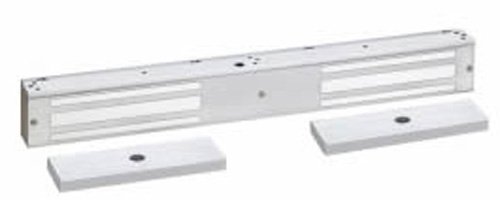
Figure 1: SDC 1512 Series EMLock Double Modular Electromagnetic Door Lock. This image shows the main body of the electromagnetic lock, typically mounted on the door frame, and its corresponding armature plate, which is mounted on the door.
4. Paket İçeriği
Kuruluma başlamadan önce tüm bileşenlerin mevcut olduğundan emin olun:
- SDC 1512 Series EMLock Body (Double)
- Armature Plates (2)
- Mounting Hardware (screws, washers, sex nuts)
- Kurulum Şablonu
- Kullanım Kılavuzu (bu belge)
5. Kurulum ve Kurulum
Professional installation is recommended for optimal performance and safety. Refer to the included installation template for precise drilling and mounting locations.
5.1. Gerekli Araçlar
- Matkap ve matkap uçları
- Tornavidalar (Phillips ve düz uçlu)
- Ölçüm bandı ve kalem
- Tel sıyırıcılar ve kıvırıcılar
- Multimeter (for verifying voltage)
5.2. Mounting the EMLock Body
- Determine the optimal mounting location on the door frame, typically at the top of the door.
- Use the provided template to mark drilling points for the lock body.
- İşaretlenen yerlere pilot delikler açın.
- Securely attach the EMLock body to the door frame using the supplied mounting hardware. Ensure it is level and firmly seated.
5.3. Mounting the Armature Plates
- With the door closed, align the armature plates with the EMLock body. Mark the drilling points on the door.
- Drill holes through the door for the armature plate mounting bolts.
- Install the armature plates using the sex nuts and bolts, ensuring they can pivot slightly to allow for proper alignment with the EMLock body when the door is closed. This slight pivot is crucial for achieving full holding force.
5.4. Kablolama
- Route power wiring from your access control panel or power supply to the EMLock body.
- Connect the power wires to the designated terminals on the EMLock. The unit automatically detects 12VDC or 24VDC input.
- If applicable, connect any optional output wires (e.g., door status sensor) to your access control system.
- Tüm bağlantıların güvenli ve doğru şekilde polarize edildiğini doğrulayın.
6. Kullanım Talimatları
The SDC 1512 Series EMLock operates by energizing the electromagnet to secure the door. When power is applied, the electromagnet creates a strong magnetic field, attracting the armature plate and locking the door. To unlock, power to the EMLock is interrupted, releasing the armature plate.
- Kilitleme: When the access control system or power supply provides power to the EMLock, the door will be secured.
- Kilidi Açma: When power to the EMLock is cut (e.g., by an access control reader, exit button, or fire alarm system), the door will unlock.
7. Bakım
Regular maintenance ensures the longevity and reliable operation of your EMLock.
- Temizlik: Periodically clean the face of the EMLock and the armature plate with a soft, dry cloth. Do not use abrasive cleaners or solvents, as these can damage the finish and performance.
- Denetleme: Annually inspect all mounting hardware for tightness. Check wiring connections for any signs of wear or corrosion.
- Hizalama: Ensure the armature plate remains properly aligned with the EMLock body. Misalignment can reduce holding force and cause premature wear.
8. Sorun Giderme
| Sorun | Olası Neden | Çözüm |
|---|---|---|
| Lock does not engage (door does not secure) | No power to the EMLock Yanlış kablolama Armature plate misalignment | Güç kaynağını ve bağlantıları kontrol edin Kablolamayı şemaya göre doğrulayın. Adjust armature plate for proper contact |
| Azaltılmış tutma kuvveti | Gap between EMLock and armature plate Debris on contact surfaces Yetersiz güç | Ensure armature plate floats freely and makes full contact Clean EMLock and armature plate surfaces Güç kaynağı hacmini doğrulayıntage ve akım |
| Lock does not release | Power not being cut Stuck armature plate | Check access control system for proper signal to cut power Inspect armature plate for obstructions or damage |
9. Özellikler
- Modeli: 1512V
- Tutma Kuvveti: 1650 kilo
- Giriş Voltage: 12/24 VDC (Otomatik algılama)
- Montaj: Yüzey Montajı
- Sertifikalar: ANSI/BHMA Grade 1, UL, CSFM, MEA Listed
- Ürün Ağırlığı: 21.5 pound
- Üretici: SDC
10. Garanti ve Destek
SDC products are manufactured to high standards and are backed by a manufacturer's warranty. For specific warranty terms and conditions, please refer to the documentation provided with your purchase or visit the official SDC website. For technical support, service, or replacement parts, please contact SDC customer service directly.
SDC Contact Information: (Please refer to the official SDC web(En güncel iletişim bilgileri için lütfen siteye veya ürün ambalajına bakın.)


