1. Giriş
Thank you for choosing the Antec HCG-850M 850W Power Supply. This manual provides essential information for the safe and efficient installation, operation, and maintenance of your power supply unit. Please read this manual thoroughly before installation and retain it for future reference.
2. Güvenlik Bilgileri
Sisteminizde yaralanma veya hasar oluşmasını önlemek için aşağıdaki güvenlik önlemlerine her zaman uyun:
- Yapamaz open the power supply casing. Yüksek hacimtagCihazın fişi çekilmiş olsa bile, içeride parazitler mevcuttur.
- Yapamaz insert any objects into the power supply's ventilation openings.
- Ensure the power supply is installed in a well-ventilated area.
- Use only the modular cables provided with this power supply. Using incompatible cables can cause damage.
- Disconnect the AC power cord from the wall outlet before installing or removing the power supply.
- This product is designed for use in personal computers only.
3. Paket İçeriği
Paketinizde tüm öğelerin mevcut olduğundan emin olun:
- Antec HCG-850M 850W Güç Kaynağı
- Modular Cable Set (PCI-E, SATA, Peripheral, CPU)
- AC Güç Kablosu
- Montaj Vidaları
- Kullanım Kılavuzu (bu belge)
4. Ürün Bittiview
The Antec HCG-850M is an 850-watt, 80 PLUS Bronze certified, semi-modular power supply designed for high-performance personal computers. It features a quiet 135mm fan for efficient cooling and robust protection circuits to ensure stable power delivery.
4.1 Temel Özellikler
- 850 Watts Continuous Power
- 80 PLUS Bronze Certified Efficiency
- Semi-Modular Cable Management
- 135mm Sessiz Fan
- ATX Form Faktörü
- Multiple Protection Circuits (OCP, OVP, UVP, SCP, OPP, OTP)
4.2 Güç Kaynağı Ünitesi
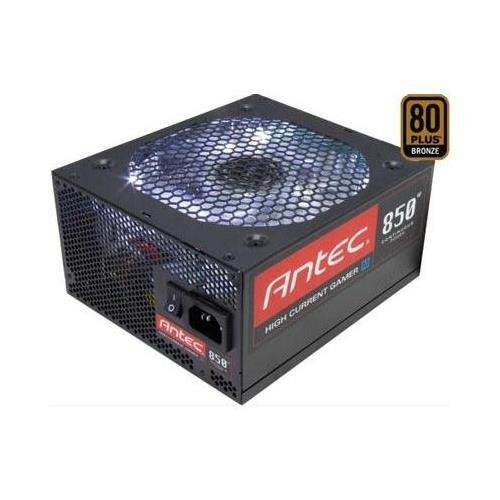
Resim 1: Ön view of the Antec HCG-850M 850W Power Supply, showing the fan grille and modular cable connectors. This unit provides stable power to your computer components.
5. Kurulum ve Kurulum
Follow these steps to install your Antec HCG-850M power supply:
- Sisteminizi Hazırlayın: Bilgisayarınızın tamamen kapalı olduğundan ve prizden çıkarılmış olduğundan emin olun. Bilgisayar kasasını açın.
- Eski PSU'yu çıkarın (eğer varsa): Eski güç kaynağınızın tüm kablolarını çıkarın. Eski güç kaynağını kasadan sökün ve çıkarın.
- Yeni PSU'yu Takın: Carefully place the Antec HCG-850M into the power supply bay of your computer case. Secure it with the provided mounting screws. Ensure the fan is oriented correctly for optimal airflow (typically facing down if there's a bottom vent, or up if not).
- Temel Kabloları Bağlayın:
- 24 pinli ATX anakart güç kablosunu bağlayın.
- Connect the 4+4-pin or 8-pin EPS/CPU power cable to your motherboard.
- Modüler Kabloları Bağlayın: Attach the necessary modular cables for your components (e.g., PCI-E for graphics cards, SATA for hard drives/SSDs, Peripheral for fans/accessories). Connect them securely to both the power supply and the respective components.
- Kablo yönetimi: Hava akışını iyileştirmek ve estetiği artırmak için kabloları düzgün bir şekilde döşeyin.
- Kasayı Kapatın ve Açın: Close your computer case. Connect the AC power cord to the power supply and then to a wall outlet. Flip the power switch on the PSU to the 'ON' position. Power on your computer.
6. Kullanım Talimatları
Once installed, the Antec HCG-850M operates automatically. Here are some general operating guidelines:
- Güç Açma/Kapatma: Use your computer's power button to turn the system on or off. The switch on the power supply itself should generally remain in the 'ON' position during normal operation.
- Sistem Kararlılığı: Ensure your system is stable. If you experience unexpected shutdowns or reboots, refer to the troubleshooting section.
- Havalandırma: Maintain good airflow around your computer case to prevent overheating of components, including the power supply.
7. Bakım
Proper maintenance can extend the lifespan of your power supply:
- Toz Temizleme: Periodically clean dust from the power supply's fan grille and the interior of your computer case using compressed air. Always disconnect the AC power cord before cleaning.
- Kablo Kontrolü: Occasionally check that all power cables are securely connected to the power supply and components.
- Çevre: Operate the power supply in a clean, dry environment with stable temperatures.
8. Sorun Giderme
Güç kaynağınızla ilgili sorun yaşıyorsanız, aşağıdaki adımları deneyin:
8.1 No Power to System
- AC güç kablosunun hem duvar prizine hem de güç kaynağına güvenli bir şekilde takılı olduğundan emin olun.
- Check that the power supply's ON/OFF switch is in the 'ON' position.
- Verify all internal power cables (24-pin ATX, CPU, PCI-E) are correctly and firmly connected.
- Duvar prizinde güç olduğundan emin olmak için başka bir cihazla deneyin.
- If possible, test the power supply in another known working system or with a PSU tester.
8.2 System Instability or Random Shutdowns
- Sisteminizin güç gereksinimlerinin, güç kaynağının 850W kapasitesini aşmadığından emin olun.
- Check for overheating components. Ensure proper case ventilation and clean any dust buildup.
- Verify all power connections are secure. Loose connections can cause intermittent power delivery.
- If the issue persists, it may indicate a fault with the power supply or another component. Consider professional diagnosis.
9. Özellikler
| Özellik | Detay |
|---|---|
| Model Numarası | HCG-850M |
| Çıkış Watttage | 850 Watt |
| Verimlilik Sertifikası | 80 PLUS Bronz |
| Form Faktörü | ATX |
| Soğutma Yöntemi | Hava (135 mm Fan) |
| Modüler Tip | Yarı Modüler |
| Uyumlu Cihazlar | Kişisel Bilgisayar |
| Ürün Ağırlığı | 9 Pound (yaklaşık 4.08 kg) |
| ASIN | B00ESAI3M0 |
10. Garanti ve Destek
Antec ürünleri üretici garantisi kapsamındadır. Garanti şartları ve koşulları için lütfen ürününüzle birlikte verilen garanti kartına bakın veya resmi Antec web sitesini ziyaret edin. website. For technical support or customer service, please contact Antec directly through their official support channels.
Resmi Antec Webalan: www.antec.com