1. Giriş
This manual provides instructions for the installation, programming, and operation of the Galcon 7101D 1-Station Battery Operated Irrigation Controller with a 3/4-inch waterproof valve. The 7101D controller is designed for automated operation of drip and sprinkler systems. It is completely waterproof and can be installed above or below ground, including in valve boxes or areas where it may be submerged up to 3 feet. The controller operates on a single 9V alkaline battery.
2. Güvenlik Bilgileri
- Kurulum ve çalıştırmadan önce tüm talimatları dikkatlice okuyun.
- Use only a 9V alkaline battery. Do not use rechargeable batteries.
- Ensure proper sealing of the battery compartment to maintain waterproofing.
- This product is designed for use only in the USA and Canada.
- Cihazı kendiniz sökmeye veya onarmaya çalışmayın. Yardım için müşteri desteğiyle iletişime geçin.
3. Paket İçeriği
Paketin tüm bileşenlerinin mevcut olduğunu doğrulayın:
- Galcon 7101D 1-Station Battery Operated Controller
- 3/4-inch Inline Irrigation Valve
- Kullanım Kılavuzu (bu belge)
4. Ürün Özellikleri
- Controller, solenoid, and 3/4" valve integrated into one unit.
- Easy programming with 6 large buttons.
- Manual operation and rain delay functions.
- Weekly or Cyclic programming options.
- Completely waterproof and UV resistant construction.
- Designed for use in the USA and Canada.
5. Kurulum ve Kurulum
5.1 Pil Kurulumu
- Locate the battery compartment on the controller.
- Pil bölmesinin kapağını açın.
- Insert one new 9V alkaline battery, ensuring correct polarity.
- Securely close the battery compartment cover to maintain the waterproof seal.
5.2 Controller and Valve Installation
The Galcon 7101D integrates the controller and valve into a single unit.
- Identify the water flow direction. The valve has an arrow indicating the correct flow.
- Connect the inlet side of the valve to your main water supply line.
- Connect the outlet side of the valve to your irrigation system (drip or sprinkler lines).
- Sızıntıları önlemek için tüm bağlantıların sıkı olduğundan emin olun.
- The unit can be installed above ground or submerged in a valve box up to 3 feet deep.

Şekil 1: Galcon 7101D Controller and Valve Assembly. This image shows the integrated controller and valve unit, highlighting its compact design.
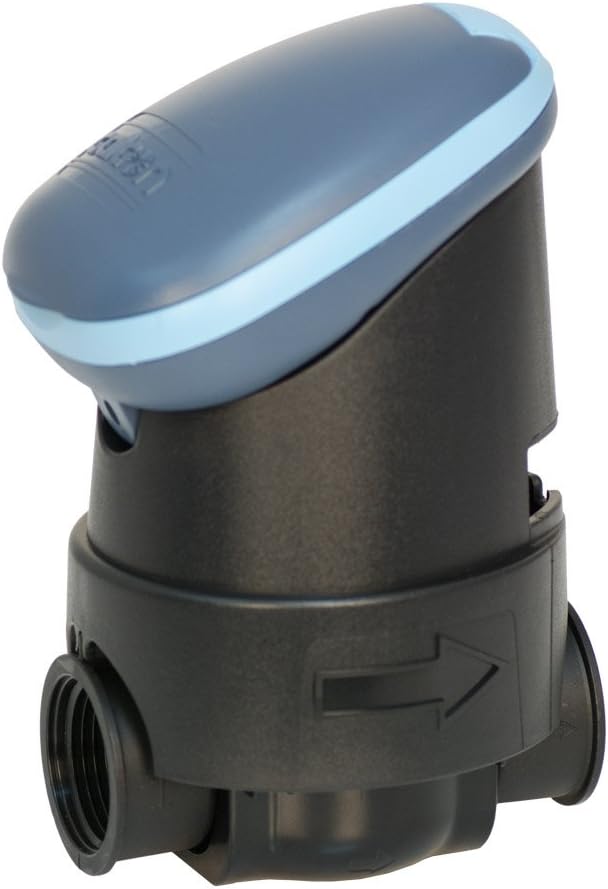
Şekil 2: Galcon 7101D Valve with Flow Direction Arrow. This image illustrates the valve component, showing the arrow indicating the correct water flow direction for installation.
6. Kullanım Talimatları
The Galcon 7101D features 6 large buttons for programming and operation. Refer to the on-screen prompts for specific settings.
6.1 Geçerli Saati ve Günü Ayarlamak
Follow the on-screen instructions to set the current time and day of the week. This is crucial for accurate scheduling.
6.2 Sulama Programlarının Ayarlanması
The controller supports two main programming modes:
- Haftalık Programlama: Set specific days of the week for irrigation.
- Döngüsel Programlama: Set an irrigation cycle (e.g., every 2 days) regardless of the day of the week.
Use the programming buttons to navigate through the menu and set:
- Start Time(s)
- Duration of watering (in minutes)
- Frequency (specific days or cycle interval)
6.3 Manuel Çalıştırma
To manually turn the water on or off, use the dedicated manual operation button. This allows for immediate watering outside of the programmed schedule.
6.4 Yağmur Geciktirme Fonksiyonu
Activate the rain delay function to temporarily suspend irrigation for a set period (e.g., 24, 48, 72 hours) after rainfall. This conserves water and prevents overwatering.
7. Bakım
- Pil Değişimi: Replace the 9V alkaline battery annually, or when the low battery indicator appears on the display.
- Temizlik: Clean the exterior of the controller with a damp bezle silin. Aşındırıcı temizleyiciler veya çözücüler kullanmayın.
- Kışlama: In freezing climates, remove the controller and valve from the irrigation system and store indoors to prevent freeze damage.
8. Sorun Giderme
| Sorun | Olası Neden | Çözüm |
|---|---|---|
| Kontrolör ekranı boş. | Pil bitmiş veya yanlış takılmış. | Replace the 9V alkaline battery, ensuring correct polarity. |
| Valve does not open/close. | Low battery, incorrect programming, or debris in valve. | Check battery, verify programming, or inspect valve for obstructions. |
| Bağlantılardan su sızıyor. | Gevşek bağlantılar veya hasarlı contalar. | Tighten connections. If leaks persist, check for damaged O-rings or seals. |
| Irrigation does not start at scheduled time. | Incorrect time/day setting, rain delay active, or programming error. | Verify current time and day, check if rain delay is active, review sulama programı. |
9. Özellikler
- Modeli: 7101D
- Parça Numarası: GAR6S2312P0
- Vana Boyutu: 3/4 inç
- Güç Kaynağı: 1 x 9V Alkaline Battery (required)
- Su Geçirmezlik Derecesi: IP-68 (submersible up to 3 feet)
- Programlama Seçenekleri: Weekly or Cyclic
- Boyutlar: 4.4 x 3.9 x 7.4 inç (Ürün)
- Ağırlık: 3.2 ons
- Üretici: Galcon USA, LTD
- Operating Region: ABD ve Kanada
10. Garanti ve Destek
For warranty information or technical support, please contact Galcon customer service. Refer to the product packaging or the official Galcon webGüncel iletişim bilgileri için siteyi ziyaret edin.
Not: Ürünün yetkisiz olarak sökülmesi veya değiştirilmesi garantiyi geçersiz kılabilir.


