giriiş
This manual provides comprehensive instructions for the setup, operation, and maintenance of your VTech CS6829-2 2-Handset Cordless Phone with Answering System. This system is designed for home use, offering features such as caller ID, a digital answering machine, backlit keypad, and a full duplex speakerphone for enhanced communication.
Kutuda Neler Var?
Paketinizde tüm öğelerin bulunduğunu doğrulayın:
- Temel ünite
- 2 kablosuz ahize
- Şarj cihazı
- 2 adaptör
- 2 pil paketleri
- Telefon hattı kablosu
- Duvar montaj braketi
- Hızlı başlangıç kılavuzu
Kurmak
Follow these steps to set up your VTech CS6829-2 phone system:
- Ana üniteyi bağlayın:
Plug one end of the telephone line cord into the TEL LINE jack on the back of the base unit. Plug the other end into a telephone wall jack. Plug the small end of the power adapter into the POWER jack on the back of the base unit. Plug the large end of the power adapter into a wall outlet not controlled by a wall switch.
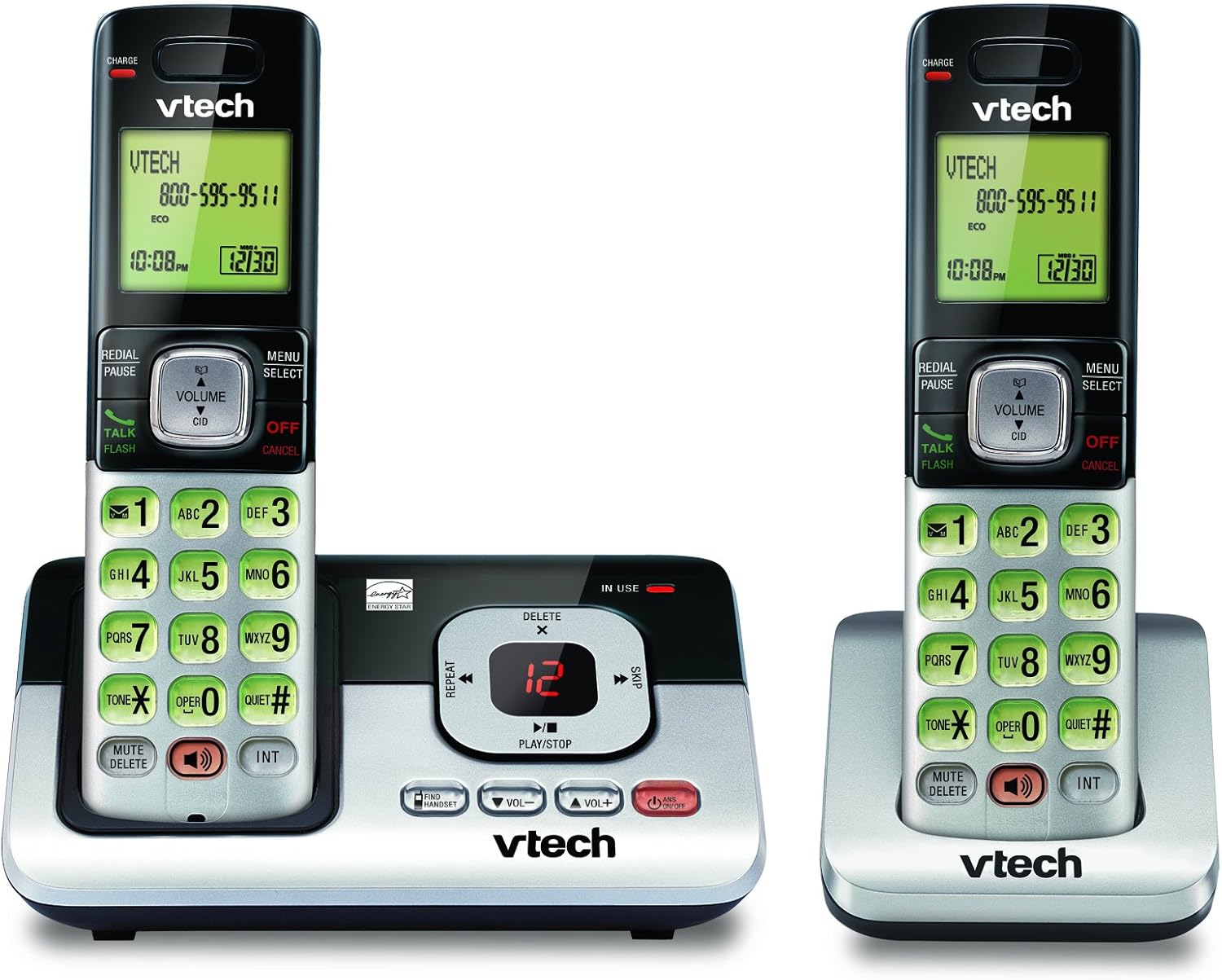
Image: The VTech CS6829-2 base unit with one handset docked, and a second handset with its charging cradle. This illustrates the main components of the phone system.
- El Cihazı Pillerinin Takılması:
Open the battery compartment cover on the back of each handset. Connect the battery pack connector securely into the jack inside the compartment. Place the battery pack with the label facing up and tuck the wires inside the compartment. Close the battery compartment cover.
- Telefonları Şarj Edin:
Place each handset in the base unit or charger with the display facing up. The CHARGE light on the handset will illuminate, indicating proper charging. Allow the handsets to charge for at least 16 hours before initial use for optimal battery performance.

Resim: Açılı bir view of the VTech CS6829-2 base unit with one handset docked, and the second handset in its separate charging cradle. This shows how the handsets are placed for charging.
- Tarih ve Saati Ayarla:
After the handsets are charged, follow the on-screen prompts or refer to the quick start guide to set the date and time. This is important for accurate caller ID and answering system timestamps.
Kullanım Talimatları
Arama Yapma ve Cevaplama
- Telefon çağrısı yapmak: Basmak KONUŞ/FLAŞ or any dialing key to get a dial tone, then dial the phone number.
- Bir Aramayı Cevaplamak için: Telefon çaldığında, tuşuna basın. KONUŞ/FLAŞ veya herhangi bir arama tuşuna basın.
- Aramayı Bitirmek İçin: Basmak KAPALI/İPTAL or place the handset back in the base unit/charger.
Dijital Cevaplama Sistemi
- Mesajları Oynat: Baz ünitede, tuşuna basın. OYNAT/DURDUR. On a handset, press MENÜ/SEÇİM, scroll to "Answering System", then select "Play Messages".
- Recording an Outgoing Announcement: On the base unit or handset, navigate to the answering system menu and select "Record OGM" (Outgoing Message).
- Mesajların Silinmesi: While a message is playing, press SİLMEK Ana ünitede veya el cihazında.
Hoparlör Fonksiyonu
- To Use Speakerphone: Bir arama sırasında tuşuna basın. KONUŞMACI button on the handset. Press it again to switch back to the handset earpiece.
Temel Özellikler
- Digital Answering System with LED Indicator and Volume Control: This system records up to 14 minutes of messages, announcements, and memos. An LED indicator notifies you of new messages. Volume control keys on the base allow easy adjustment of message playback volume.
- Caller ID / Call Waiting — Stores up to 50 Calls: Displays the name, number, time, and date of incoming calls, helping you identify callers before answering.
- Tam Çift Yönlü Hoparlör: The handset features a full duplex speakerphone, enabling natural two-way conversations where both parties can speak and be heard simultaneously.
- Arkadan Aydınlatmalı Tuş Takımı ve Ekran: The entire keypad and LCD screen on the handset illuminate, ensuring clear visibility and easy dialing even in low-light conditions.
- ECO Mode Power-Conserving Technology: This technology optimizes power consumption for extended battery performance and energy efficiency.
- Sessiz Mod: Allows you to silence the ringer on both the handset and base unit immediately or for a set period, providing peace and quiet when needed.
Bakım
- Temizlik: Telefonu ve taban ünitesini yumuşak bir bezle temizleyin.amp Bezle silin. Temizleme spreyleri veya sıvı temizleyiciler kullanmayın.
- Pil Bakım: Replace batteries when they no longer hold a charge. Use only the specified battery type. Dispose of old batteries responsibly according to local regulations.
- Çevresel Koşullar: Avoid placing the phone in direct sunlight, near heat sources, or in areas with excessive moisture.
Sorun giderme
If you experience issues with your phone, try the following solutions:
| Sorun | Çözüm |
|---|---|
| Çevir sesi yok. | Ensure the telephone line cord is securely plugged into both the base unit and the wall jack. Check that the power adapter is plugged into a working electrical outlet. |
| Telefon şarj olmuyor. | Ensure the handset is properly seated in the base unit or charger. Clean the charging contacts on both the handset and base/charger with a dry cloth. Verify the power adapter is connected. |
| Ses kalitesi düşük / Parazit. | Move the handset closer to the base unit. Avoid placing the phone near other electronic devices (e.g., microwaves, computers) that may cause interference. Check the telephone line cord for damage. |
| Cevaplama sistemi mesajları kaydetmiyor. | Cevaplama sisteminin açık olduğundan emin olun. Hafızanın dolu olup olmadığını kontrol edin; gerekirse eski mesajları silin. |
Özellikler
| Özellik | Detay |
|---|---|
| Model Numarası | CS6829-2 |
| Ürün Boyutları | 5.77 x 3.41 x 6.77 inç |
| Ürün Ağırlığı | 1.41 pound |
| Piller | 2 Ürüne Özel pil gereklidir (dahildir) |
| Yanıtlama Sistemi Türü | Dijital |
| Arayan Kimliği Hafızası | Up to 50 calls |
| Cevaplama Sistemi Kayıt Süresi | 14 dakikaya kadar |
| Renk | Siyah/Gümüş |
| Telefon Türü | Kablosuz |
Garanti ve Destek
Garanti bilgileri ve teknik destek için lütfen ürününüzle birlikte verilen garanti kartına bakın veya resmi VTech web sitesini ziyaret edin. webSite. Satın alma fişinizi, garanti talepleriniz için satın alma belgeniz olarak saklayın.
Ayrıca ziyaret edebilirsiniz Amazon'da VTech Mağazası Ek ürün bilgileri ve destek kaynakları için.


