1. Giriş
This manual provides instructions for the APEX LD200RM remote control, designed for use with various APEX LCD and LED television models. This remote control offers full functionality for your compatible APEX television, ensuring convenient operation of all features.
Compatible APEX TV Models:
- LD3249
- LD3288, LD3288T, LD3288M
- LD4077, LE4077M
- LD4088
- LD4688
- LE3212, LE3212D
- LE4012
- LE4612
- LE3242
- LE3942
- LE40B12
- LE4243
- LE4643
- LE5043
2. Kurulum
2.1 Pil Kurulumu
The APEX LD200RM remote control requires two (2) AA batteries for operation. Follow these steps to install the batteries:
- Uzaktan kumandanın arkasındaki pil bölmesi kapağını bulun.
- Tırnağa bastırın ve kapağı kaydırarak çıkarın.
- İki adet AA pil takın ve pozitif (+) ve negatif (-) kutupların bölmenin içindeki işaretlerle doğru şekilde hizalandığından emin olun.
- Pil bölmesi kapağını yerine güvenli bir şekilde oturana kadar kaydırın.
Not: Her zaman iki pili de aynı anda değiştirin. Eski ve yeni pilleri veya farklı pil türlerini karıştırmayın.
2.2 İlk Kullanım
The APEX LD200RM remote control is an original replacement and typically does not require any programming or pairing. Once batteries are installed, point the remote control towards your compatible APEX television and begin operation.
3. Kullanım Talimatları
This section details the functions of the buttons on your APEX LD200RM remote control.
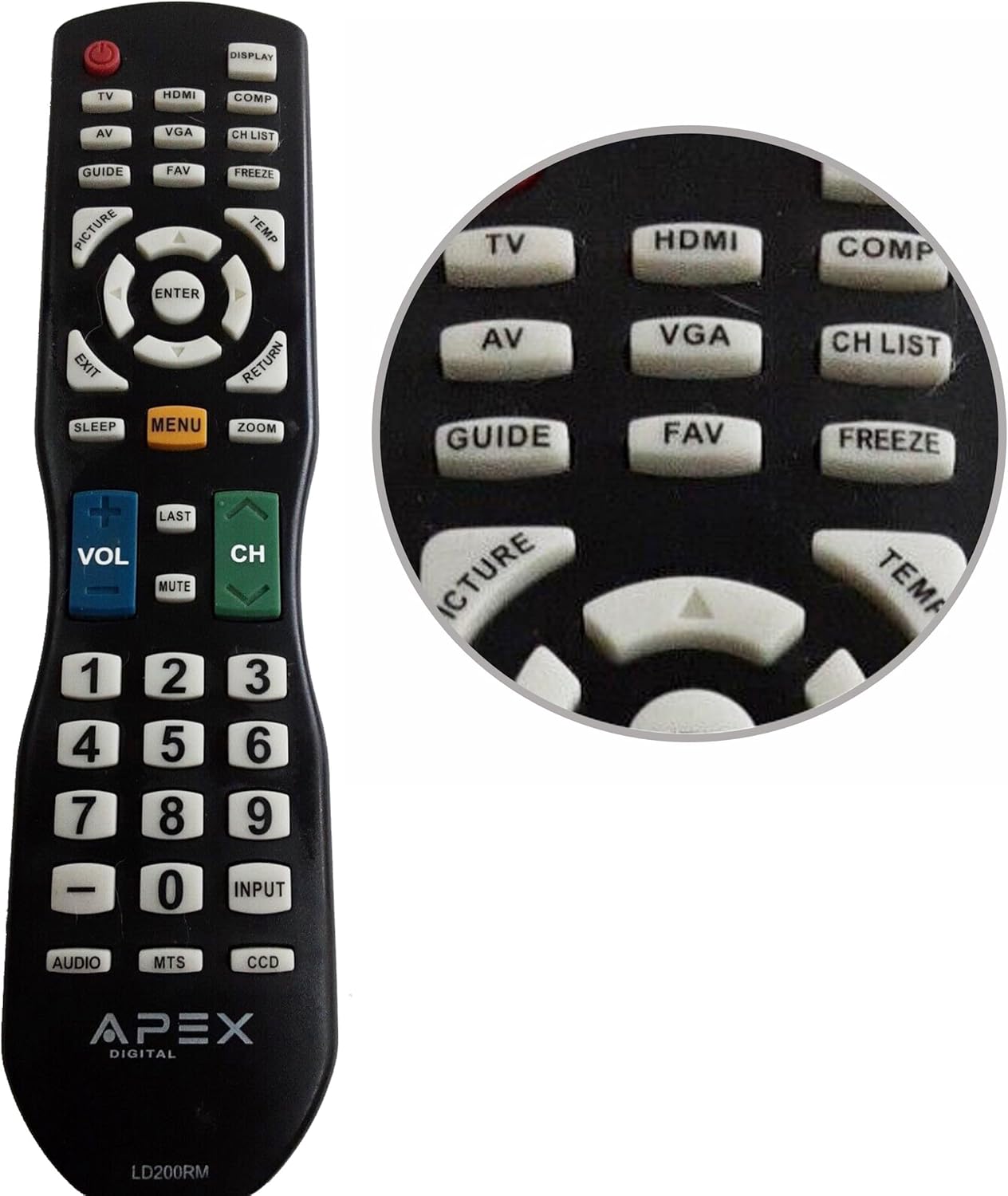
Figure 1: APEX LD200RM Remote Control Layout. This image displays the entire remote control, highlighting the arrangement of its various function buttons, including power, input selection, navigation, volume, channel, and numeric keypad.

Figure 2: Close-up of APEX LD200RM Remote Control Top Buttons. This image provides a detailed view of the upper section of the remote, focusing on buttons such as TV, HDMI, AV, VGA, COMP, CH LIST, DISPLAY, GUIDE, FAV, FREEZE, PICTURE, TEMP, MENU, ENTER, EXIT, RETURN, SLEEP, and ZOOM.
3.1 Power and Input Selection
- GÜÇ (Kırmızı Düğme): Televizyonu açar veya kapatır.
- TV: Selects the TV tuner input.
- HDMI: Selects the HDMI input.
- AV: Selects the Audio/Video input.
- VGA: Selects the VGA input.
- BİLGİSAYAR: Selects the Component video input.
- EKRAN: Ekranda görüntülenen bilgileri gösterir.
3.2 Kanal ve Ses Seviyesi Kontrolü
- SES (+/-): Ses seviyesini artırır veya azaltır.
- CH (Up/Down): Televizyon kanalını yukarı veya aşağı değiştirir.
- GEÇEN: Öncekine geri döner viewed kanalı.
- SESSİZ: Televizyonun sesini kapatır veya açar.
- KANAL LİSTESİ: Kanal listesini görüntüler.
3.3 Menü ve Gezinme
- MENÜ: Opens the television's main menu.
- GİRİŞ: Confirms a selection within the menu.
- Ok Tuşları (Yukarı/Aşağı/Sol/Sağ): Navigates through menu options and adjusts settings.
- ÇIKIŞ: Geçerli menüyü veya ekrandaki görüntüyü kapatır.
- GERİ DÖNMEK: Önceki menüye veya ekrana döner.
3.4 Numeric Keypad and Special Functions
- 0-9 (Numeric Buttons): Doğrudan kanal numaralarını girer.
- GİRİŞ: Mevcut girdi kaynakları arasında döngüsel olarak arama yapar.
- REHBER: Displays the electronic program guide (if available).
- Favori: Favori kanallara erişim sağlar.
- DONMAK: Ekrandaki mevcut görüntüyü dondurur.
- RESİM: Görüntü ayarlarını düzenler.
- SICAKLIĞI: (Function may vary by model, often related to picture temperature or a specific mode).
- UYUMAK: Uyku zamanlayıcısını ayarlar.
- ZOOM: Ekran yakınlaştırma seviyesini ayarlar.
- SES: Selects audio modes or tracks.
- MTS: Multi-channel Television Sound (stereo/SAP).
- DCC: Closed Captioning Display.
4. Bakım
4.1 Pil Değişimi
When the remote control's performance degrades or it stops responding, it is likely time to replace the batteries. Refer to Section 2.1 for detailed battery installation instructions. Always use fresh AA batteries.
4.2 Temizlik
Uzaktan kumandayı temizlemek için yumuşak, kuru bir bez kullanın. İnatçı kirler için hafifçe kurulayın.ampBezi su veya hafif, aşındırıcı olmayan bir temizleyiciyle silin. Kumandanın yüzeyine veya iç bileşenlerine zarar verebileceğinden, sert kimyasallar veya aşındırıcı malzemeler kullanmaktan kaçının.
4.3 Depolama
Uzaktan kumandayı serin, kuru ve doğrudan güneş ışığından ve aşırı sıcaklıklardan uzak bir yerde saklayın. Uzaktan kumanda uzun süre kullanılmayacaksa, sızıntıyı ve olası hasarı önlemek için pilleri çıkarmanız önerilir.
5. Sorun Giderme
- Uzaktan kumanda yanıt vermiyor:
- Ensure the batteries are correctly installed with the correct polarity (+/-).
- Eski pilleri yeni AA pillerle değiştirin.
- Check for any obstructions between the remote control and the television's infrared sensor.
- Ensure you are within the effective range of the television's IR receiver.
- Bazı düğmeler çalışmıyor:
- Bu, pil gücünün düşük olduğunu gösterebilir. Pilleri değiştirin.
- Ensure the remote is clean and there is no debris lodged under the buttons.
- Verify that the button function is applicable to your specific TV model. Some functions may not be supported by all compatible TVs.
- Television is not turning on/off:
- Confirm the television is plugged into a working power outlet.
- Try using the power button directly on the television to rule out a TV issue.
6. Özellikler
| Özellik | Detay |
|---|---|
| Model Numarası | LD200RM |
| Marka | Zirve |
| Uyumlu Cihazlar | APEX LCD & LED Televisions |
| Güç Kaynağı | 2 x AA Pil (dahil değildir) |
| Ürün Boyutları | 10 x 6 x 2 inç (yaklaşık) |
| Ürün Ağırlığı | 3.2 ons (yaklaşık) |
| Renk | Siyah |
| Özel Özellik | Ergonomik tasarım |
7. Garanti Bilgileri
This APEX LD200RM remote control typically comes with a 30-day warranty from the date of purchase. This warranty covers manufacturing defects. For specific details regarding warranty claims, returns, or replacements, please refer to your purchase documentation or contact the seller directly.
8. Destek
If you encounter issues not covered in this manual or require further assistance, please contact the retailer or the manufacturer's customer support. When contacting support, please have your product model number (LD200RM) and your television model number readily available.