Ürün Bittiview
The VTech VTCS6629 DECT 6.0 Expandable Speakerphone with Caller ID & Call Waiting is a single-handset system designed for clear communication. It features DECT 6.0 technology for superior sound quality and range, and is expandable with additional handsets.
Temel özellikler şunlardır:
- Backlit Keypad and Display for easy visibility in various lighting conditions.
- Eco Mode Power-conserving Technology to optimize battery life.
- Quiet Mode to silence ringers for undisturbed periods.
- 50 Name and Number Phonebook Directory for convenient contact storage.
- Digital Answering System with up to 15 minutes of recording capacity.
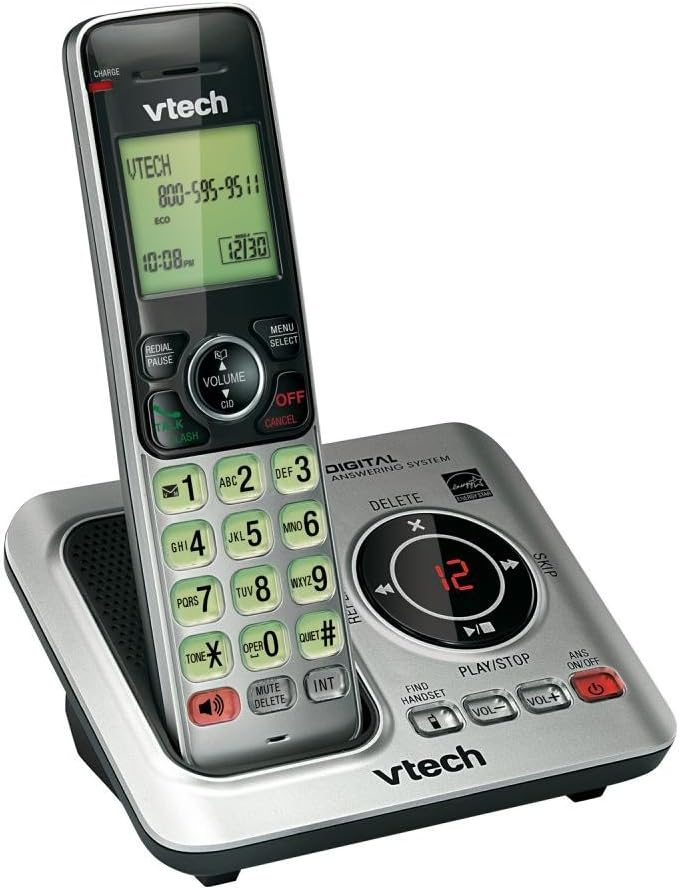
Image: The VTech CS6629 cordless phone handset resting in its charging base. The handset features a backlit display showing "VTECH 800-595-9511" and the time "10:08 PM". The base includes controls for the digital answering system, such as Play/Stop, Skip, Delete, and volume adjustments, along with a message counter displaying "12".
Kurulum Kılavuzu
- Pil Montajı:
The handset requires 1 AAA battery (included). Open the battery compartment cover on the back of the handset, insert the battery according to the polarity markings, and close the cover. Place the handset in the charging cradle to charge for at least 10 hours before initial use.
- Ana üniteyi bağlayın:
Connect the small end of the power adapter to the POWER jack on the back of the telephone base. Plug the large end of the power adapter into a wall outlet not controlled by a wall switch.
- Telefon Hattını Bağlayın:
Plug one end of the telephone line cord into the TEL LINE jack on the back of the telephone base. Plug the other end of the telephone line cord into a telephone wall jack.
- İlk kurulum:
Once powered on and charged, the handset display will prompt you to set the date and time. Follow the on-screen instructions using the navigation and SELECT buttons.
Kullanım Talimatları
Çağrı Yapma ve Alma
- Telefon çağrısı yapmak: Basmak KONUŞ/FLAŞ or KONUŞMACIArdından telefon numarasını çevirin.
- Bir Aramayı Cevaplamak için: Basmak KONUŞ/FLAŞ or KONUŞMACI telefon çaldığında.
- Aramayı Bitirmek İçin: Basmak KAPALI/İPTAL veya telefonu tekrar şarj yuvasına yerleştirin.
Hoparlör Fonksiyonu
Bir arama sırasında tuşuna basın. KONUŞMACI button to switch between handset and speakerphone mode. Press it again to return to handset mode.
Arayanın Kimliği ve Çağrı Bekletme
When a call comes in, the caller's name and number will appear on the handset display if you subscribe to Caller ID service. If you have Call Waiting, a tone will indicate an incoming call while you are on the phone. Press KONUŞ/FLAŞ to switch to the new call.
Telefon Rehberi
The phonebook can store up to 50 names and numbers. To add an entry, press MENÜ/SEÇİM, navigate to "Phonebook", and follow the prompts to add a new entry. To dial from the phonebook, press YÖN (Directory) and scroll to the desired entry, then press KONUŞ/FLAŞ.
Dijital Cevaplama Sistemi
The integrated digital answering system can record up to 15 minutes of messages. The message counter on the base unit displays the number of new messages.
- Mesajları Oynatmak İçin: Basmak OYNAT/DURDUR ana ünite üzerinde.
- Mesajları Silmek İçin: Mesaj oynatma sırasında, tuşuna basın. SİLMEK ana ünite üzerinde.
- To Turn Answering System On/Off: Basmak ANS AÇIK/KAPALI ana ünite üzerinde.
Sessiz Mod
Activate Quiet Mode to silence all ringers on the telephone base and all handsets for a set period. This feature is useful for undisturbed periods. Refer to the handset menu for activation and duration settings.
Ses Kontrolü
Bir çağrı sırasında, tuşuna basın VOLUME ▲ or VOLUME ▼ on the handset to adjust the earpiece volume. On the base unit, use HACİM+ Ve cilt to adjust speaker volume during message playback or speakerphone calls.
Intercom Function (INT)
If you have multiple VTech CS6629 handsets, you can use the intercom feature to communicate between them. Press İÇ on the handset and select the desired handset to call.
Find Handset
If you misplace your handset, press EL CİHAZINI BUL on the telephone base. All registered handsets will ring, allowing you to locate them.
Bakım
- Temizlik: Clean the telephone and base unit with a soft, slightly damp Bez kullanın. Temizlik spreyleri veya sert kimyasallar kullanmayın.
- Pil Bakım: To maintain optimal battery performance, fully charge the handset battery for 10 hours before first use. If the phone will not be used for an extended period, remove the battery to prevent leakage.
- Çevresel Koşullar: Telefonu aşırı sıcaklıklara, doğrudan güneş ışığına veya neme maruz bırakmaktan kaçının.
Sorun giderme
| Sorun | Çözüm |
|---|---|
| Çevir sesi yok. | Ensure the telephone line cord is securely plugged into both the telephone base and the wall jack. Check if other phones on the same line are working. |
| Handset does not charge or hold a charge. | Ensure the power adapter is securely connected. Clean the charging contacts on the handset and base with a dry cloth. The battery may need replacement after extended use (typically 1-2 years). |
| Ses kalitesi düşük (parazit, boğuk ses). | Move the handset closer to the base unit. Avoid placing the base unit near other electronic devices (TVs, microwaves, computers) that may cause interference. Check the telephone line cord for damage. |
| Arama yapılamaz veya alınamaz. | Verify the telephone line is active. Ensure the handset is registered to the base. If the issue persists, try resetting the phone by unplugging the power adapter from the base for a few minutes, then plugging it back in. |
| Cevaplama sistemi mesajları kaydetmiyor. | Ensure the answering system is turned ON. Check if the memory is full; delete old messages to free up space. |
Özellikler
| Özellik | Detay |
|---|---|
| Ürün Boyutları | 6.7 x 4.7 x 3.8 inç |
| Ürün Ağırlığı | 0.317 ons |
| Model Numarası | CS6629 |
| Piller | 1 adet AAA pil gereklidir (dahil) |
| Üretici | VTech |
| Menşei ülke | Amerika |
| Renk | Beyaz/Gri |
| Telefon Türü | Kablosuz |
| Güç Kaynağı | Pil ile çalışır |
| Çevirici Türü | Tek Tuş Takımı |
| Yanıtlama Sistemi Türü | Dijital |
| Uyumlu Cihazlar | VTech CS6609 accessory handset, up to 5 handsets |
| Kayıt Kapasitesi | 15 dakikadır. |
Garanti ve Destek
This VTech product is manufactured by VTech. For warranty information and technical support, please refer to the documentation included with your purchase or visit the official VTech support webSite. Satın alma belgeniz olarak satın alma fişinizi saklayın.
Yasal Uyarı:
Bu ürün, Kaliforniya Eyaleti tarafından kansere, doğum kusurlarına veya diğer üreme zararlarına neden olduğu bilinen kimyasallar içermektedir.


