1. Giriş
Satın aldığınız için teşekkür ederizasing the KLH R5100 Surround Sound Receiver. This receiver is designed to provide high-quality audio and video performance for your home entertainment system. It features multiple audio and video inputs, surround sound processing, and a powerful amplifier to deliver an immersive listening experience. Please read this manual thoroughly before operating the unit to ensure proper setup and optimal performance.
2. Önemli Güvenlik Bilgileri
Elektrik çarpması, yangın veya ünitenin hasar görme riskini azaltmak için lütfen aşağıdaki güvenlik önlemlerine uyun:
- Güç Kaynağı: Connect the unit only to an AC 120V, 60Hz power supply.
- Havalandırma: Yeterli havalandırma sağlayın. Havalandırma açıklıklarını kapatmayın. Uygun hava akışı için ünitenin etrafında yeterli boşluk bırakın.
- Su ve Nem: Cihazı yağmura, neme veya aşırı rutubete maruz bırakmayın. Üzerine vazo gibi sıvı dolu nesneler koymayın.
- Sıcaklık: Üniteyi radyatörler, kalorifer ızgaraları, sobalar veya diğer cihazlar (dahil) gibi ısı kaynaklarından uzak tutun. amp(ısı üreten)
- Temizlik: Temizlemeden önce cihazı prizden çıkarın. Temizlik için kuru bir bez kullanın.
- Servis: Bu ünitenin bakımını kendiniz yapmaya çalışmayın. Tüm bakım işlemlerini yetkili servis personeline yaptırın.
- Kablolar: Güç kablosunun üzerine basılmasını veya özellikle fişlerde, prizlerde ve bunların üniteden çıktığı noktalarda sıkışmasını önleyin.
3. Paket İçeriği
Lütfen paketinizin aşağıdaki öğeleri içerdiğinden emin olun:
- KLH R5100 Surround Sound Receiver
- Uzaktan Kumanda Ünitesi
- Kullanıcı Kılavuzu
- Ses/Video Kabloları (RCA tipi)
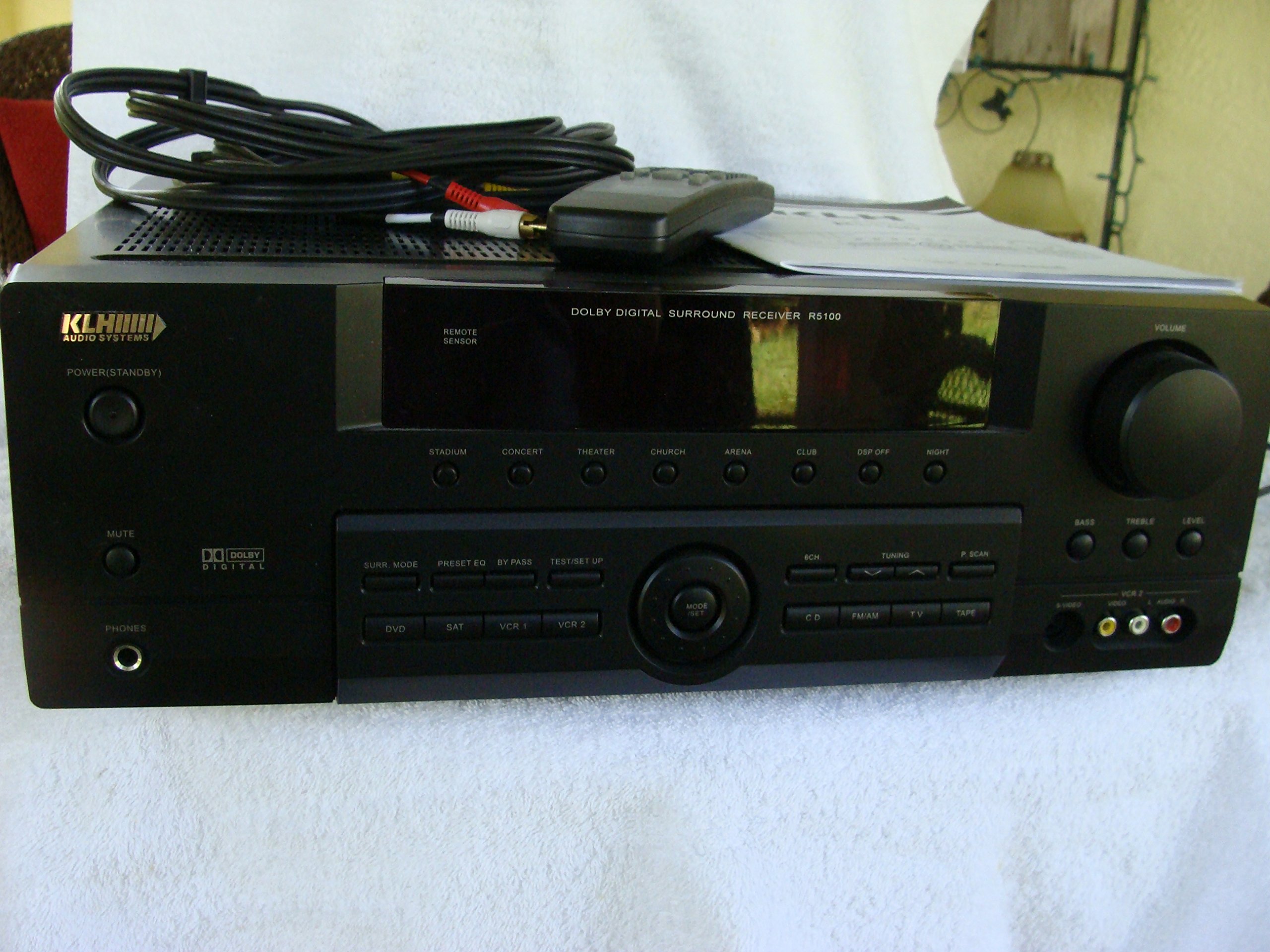
Image: The KLH R5100 receiver, its remote control, user manual, and included audio/video cables.
4. Ürün Bittiview
4.1 Ön Panel Kontrolleri
The front panel provides access to essential controls and indicators for daily operation.

Resim: Ayrıntılı view of the receiver's front panel, highlighting the display, volume control, and input selection buttons.
- Güç Düğmesi: Alıcıyı açar veya kapatır.
- Giriş Seçicileri: Buttons for DVD, SAT, VCR 1, VCR 2, CD, FM/AM, TV, TAPE to choose your audio/video source.
- Ses Düğmesi: Genel çıkış ses seviyesini ayarlar.
- Surround Mode Buttons: Select various sound fields like Stadium, Concert, Theater, Church, Arena, Club, DSP Off, Night.
- Bass/Treble/Level: Controls for adjusting audio tone and individual channel levels.
- Kulaklık girişi: Özel dinleme için.
4.2 Arka Panel Bağlantıları
The rear panel houses all input and output terminals for connecting your audio and video components, as well as speakers.

Image: The full rear panel of the receiver, displaying all connection ports for audio, video, and speakers.
- Hoparlör Terminalleri: Connections for Main (Front Left/Right), Center, and Rear (Surround Left/Right) speakers.
- Ses Girişleri (RCA): For connecting CD players, tape decks, VCRs, TVs, and other stereo audio sources.
- Video Inputs/Outputs (RCA/S-Video): For connecting video sources like DVD players, VCRs, and TVs.
- Dijital Ses Girişleri (Optik/Koaksiyel): For connecting digital audio sources like DVD players or set-top boxes.
- 6CH Direct Input: For connecting external multi-channel decoders or players with 5.1 analog outputs.
- Subwoofer Çıkışı: Aktif subwoofer bağlantısı için RCA çıkışı.
- Anten Terminalleri: For FM and AM antennas.
4.3 Uzaktan Kumanda Ünitesi
The remote control provides convenient access to all receiver functions from your listening position.

Resim: Yakın çekim view of the remote control unit, detailing its buttons for various functions.
- Güç Açma/Kapatma: Alıcıyı açar veya kapatır.
- Giriş Seçicileri: Dedicated buttons for each input source (DVD, CD, TV, etc.).
- Sesi Aç/Kapat: Ana ses seviyesini ayarlar.
- Sesini kapatmak: Ses çıkışını geçici olarak susturur.
- Çevre Modu: Cycles through available surround sound modes.
- Level/Test: For adjusting individual speaker levels and running a test tone.
- Ayarlayıcı Kontrolleri: For FM/AM station tuning and memory functions.
5. Kurulum
5.1 Hoparlörlerinizi Bağlama
Bağlantı yapmadan önce alıcının elektrik prizinden çıkarıldığından emin olun.
- Ön Hoparlörler: Connect your main left and right speakers to the 'MAIN SPEAKERS (8Ω)' terminals. Ensure correct polarity (+ to + and - to -).
- Merkez Hoparlör: Connect your center channel speaker to the 'CENTER SPEAKER (8Ω)' terminals.
- Arka Hoparlörler: Connect your surround left and right speakers to the 'REAR SPEAKERS (8Ω)' terminals.
- Subwoofer: Connect an active subwoofer to the 'SUBWOOFER OUT' RCA jack using a single RCA cable.

Resim: Ayrıntılı view of the speaker connection terminals on the rear panel.
5.2 Ses/Video Kaynaklarını Bağlama
Use appropriate cables (RCA, Optical, Coaxial) to connect your source components to the receiver.
- DVD oynatıcı: Connect the audio output of your DVD player to the 'DVD' audio input jacks (RCA) on the receiver. For digital audio, use either the 'DIGITAL IN OPTICAL' or 'DIGITAL IN COAXIAL' input. Connect the video output to the 'DVD' video input.
- CD Çalar: Connect the audio output of your CD player to the 'CD' audio input jacks (RCA).
- TV/Cable Box: Connect the audio output of your TV or cable box to the 'TV' audio input jacks (RCA). Connect video output to the 'TV' video input.
- Diğer cihazlar: Use 'SAT', 'VCR 1', 'VCR 2', or 'TAPE' inputs for other audio/video components as needed.

Image: A close-up of the digital audio inputs (Coaxial, Optical) and the 6-channel direct input section on the rear panel.
5.3 Anten Bağlantısı
Radyo yayını almak için, birlikte verilen FM ve AM antenlerini arka paneldeki ilgili terminallere bağlayın.
6. Kullanım Talimatları
6.1 Temel İşlemler
- Güç Açık: Press the Power button on the front panel or remote control.
- Girişi Seçin: Press the desired input selector button (e.g., 'DVD', 'CD') on the front panel or remote control to choose your source.
- Sesi Ayarla: Turn the Volume knob on the front panel or use the Volume Up/Down buttons on the remote control.
6.2 Surround Sound Modes
The R5100 offers various sound modes to enhance your listening experience:
- Stadyum: Simulates the acoustics of a large stadium.
- Konser: Creates a concert hall ambiance.
- Tiyatro: Optimized for movie playback, enhancing dialogue and effects.
- Kilise: Replicates the spaciousness of a church.
- Arena: Provides a wide, open sound field.
- Kulüp: Simulates a lively club environment.
- DSP Off: Disables digital sound processing for a direct stereo signal.
- Gece: Reduces dynamic range for late-night listening without disturbing others.
Press the 'SURR. MODE' button on the remote or front panel to cycle through these modes.
6.3 Ton Kontrolü
Use the BASS and TREBLE controls on the front panel or remote to adjust the low and high frequency response. The LEVEL controls allow for fine-tuning of individual speaker output levels.
6.4 Radyo Alıcısının Çalıştırılması
To listen to radio:
- Press the 'FM/AM' input selector.
- Use the 'TUNING' buttons on the front panel or remote to find stations.
- Press 'MEMORY' to store favorite stations, and 'P.SCAN' to scan through presets.
7. Bakım
To ensure the longevity and optimal performance of your KLH R5100 receiver, follow these maintenance guidelines:
- Temizlik: Wipe the exterior surfaces with a soft, dry cloth. Do not use abrasive cleaners, waxes, or solvents as they may damage the finish.
- Havalandırma: Regularly check that the ventilation openings are not obstructed by dust or debris. Use a soft brush or vacuum cleaner to gently remove any build-up.
- Güç Kablosu: Inspect the power cord periodically for any signs of damage. If damaged, discontinue use and contact qualified service personnel.
- Depolamak: Cihazı uzun süre saklayacaksanız, elektrik prizinden çıkarın ve tozdan korumak için üzerini örtün.
8. Sorun Giderme
If you encounter problems with your receiver, refer to the following common issues and solutions before seeking professional service.
| Sorun | Olası Neden | Çözüm |
|---|---|---|
| Güç yok | Güç kablosu takılı değil; Elektrik prizi aktif değil. | Güç kablosunun prize sağlam bir şekilde takılı olduğundan emin olun; başka bir cihaz kullanarak elektrik prizini kontrol edin. |
| Ses yok | Incorrect input selected; Speakers not connected properly; Volume too low; Mute function active | Select correct input source; Check speaker connections and polarity; Increase volume; Deactivate Mute |
| Uzaktan kumanda çalışmıyor | Piller bitmiş; Uzaktan kumanda ile alıcı arasında engel var; Uzaktan kumanda sensörü bloke olmuş. | Replace batteries; Remove any obstructions; Ensure remote sensor on receiver is clear |
| Zayıf radyo alımı | Anten bağlı değil veya yanlış konumlandırılmış. | Connect antennas securely; Adjust antenna position for better reception |
| Bozuk ses | Input signal too high; Speaker impedance mismatch; Damaged cables | Reduce source volume; Ensure speakers match 8Ω impedance; Check and replace damaged cables |
9. Özellikler
The following are the technical specifications for the KLH R5100 Surround Sound Receiver:
- Model Numarası: R5100
- Ürün Ölçüleri: 16.88 x 6.88 x 15.75 inç
- Ürün Ağırlığı: 24.2 pound
- Güç Kaynağı: AC 120V, 60Hz
- Güç Tüketimi: 320W
- Ses Çıkış Modu: Çevrelemek
- Surround Ses Kanalı Yapılandırması: 5.1
- Bağlantı Teknolojisi: RCA, 3.5mm Jack, Optical, Coaxial
- Uyumlu Cihazlar: Konuşmacılar
- Denetleyici Tipi: Uzak
- Özellik: Advanced Room Calibration (as per product listing, though specific details may vary)
- Renk: Siyah
10. Garanti ve Destek
For warranty information and customer support, please refer to the documentation included with your purchase or contact KLH customer service directly. Keep your proof of purchase for any warranty claims.


