1. Giriş
Thank you for choosing the Linq HB-02 Mini Speaker. This portable speaker is designed to provide amplified audio from a variety of devices, including smartphones, MP3/MP4 players, notebooks, and more. Its compact design and rechargeable battery make it ideal for on-the-go use. Please read this manual carefully before using the product to ensure proper operation and longevity.
2. Güvenlik Bilgileri
- Hoparlörü suya veya aşırı neme maruz bırakmayın.
- Aşırı sıcaklıklardan kaçının.
- Hoparlörü kendiniz sökmeyin veya onarmaya çalışmayın. Bu, garantiyi geçersiz kılar.
- Çocukların erişemeyeceği yerde saklayınız.
- Şarj etmek için yalnızca birlikte verilen USB kablosunu kullanın.
- Pili yerel yönetmeliklere uygun şekilde, sorumlu bir biçimde imha edin.
3. Paket İçeriği
The Linq HB-02 Mini Speaker package typically includes:
- Linq HB-02 Mini Speaker
- USB Şarj Kablosu
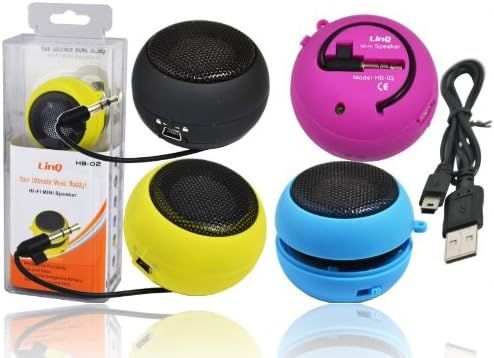
Image: Linq HB-02 Mini Speaker shown in its retail packaging, alongside other speakers and the included USB charging cable. This illustrates the typical contents and appearance of the product.
4. Ürün Özellikleri
- Mini Pocket Speaker: Kolay taşınabilmesi için kompakt ve taşınabilir tasarım.
- Evrensel Uyumluluk: Connects via 3.5mm audio jack to devices like iPhones, iPods, MP3/MP4 players, smartphones, notebooks, PSP, CD players, and more.
- Şarj Edilebilir Pil: Built-in lithium-ion battery for wireless use.
- Retractable Sound Resonator: Features a pneumatic suspension system that allows the acoustic membrane to be extended from one side, enhancing amplification and sound quality.
- USB Şarj: Conveniently recharges via the included USB cable.
- AmpYükseltilmiş Ses: Delivers excellent and pleasant acoustic performance despite its small size.

Image: Four Linq HB-02 Mini Speakers in pink, yellow, purple, and blue, shown with their retractable sound resonators extended, demonstrating the design and color variety.
5. Kurulum
5.1 İlk Şarj
- İlk kullanımdan önce hoparlörü tamamen şarj edin.
- Connect the small end of the included USB charging cable to the mini USB port on the speaker.
- Kablonun standart USB ucunu bir USB güç kaynağına (örneğin, bilgisayarın USB portuna, USB duvar adaptörüne) bağlayın.
- Şarj gösterge ışığı (varsa) şarj sırasında yanacak ve tamamen şarj olduğunda sönecek veya renk değiştirecektir.
5.2 Ses Aygıtına Bağlanma
- Locate the integrated 3.5mm audio jack on the speaker. This jack is often stored neatly within the speaker's body.
- Plug the 3.5mm audio jack into the headphone port of your audio device (e.g., smartphone, MP3 player, notebook).
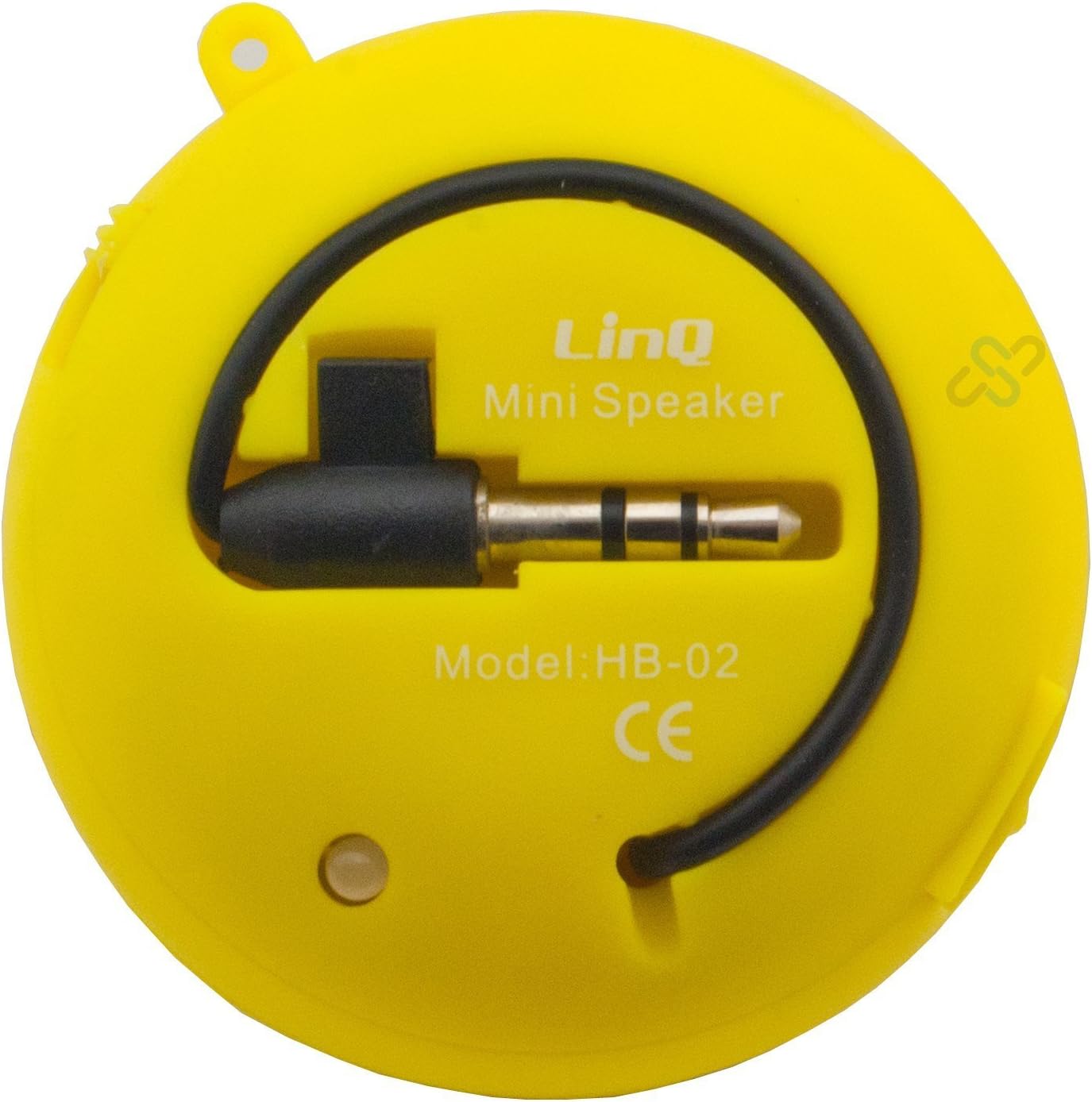
Image: A yellow Linq HB-02 Mini Speaker, viewed from the back, clearly showing the integrated 3.5mm audio jack coiled around the speaker and the model number 'HB-02'.
6. Kullanım Talimatları
6.1 Açma/Kapatma
Locate the power switch on the speaker. Slide it to the 'ON' position to turn on the speaker. Slide it to the 'OFF' position to turn it off.
6.2 Ses Çalma
- Ensure the speaker is connected to your audio device via the 3.5mm jack.
- Hoparlörü açın.
- Start playing audio on your connected device. The sound will now be amplified through the Linq HB-02 speaker.
- Adjust the volume directly from your connected audio device. The speaker itself does not have volume controls.
6.3 Using the Retractable Sound Resonator
Gelişmiş için amplification and sound quality, gently pull and extend the acoustic membrane from one side of the speaker. This engages the 'Retractable Sound Resonator' system. To return to a more compact form, gently push the membrane back into the speaker body.
7. Bakım
- Temizlik: Use a soft, dry cloth to clean the speaker's exterior. Do not use liquid cleaners or aerosols.
- Depolamak: Kullanılmadığı zamanlarda hoparlörü serin, kuru bir yerde, doğrudan güneş ışığından ve aşırı sıcaklıklardan uzakta saklayın.
- Pil Bakım: Pil ömrünü uzatmak için hoparlörün şarjını sık sık tamamen boşaltmaktan kaçının. Uzun süre kullanılmasa bile düzenli olarak şarj edin.
8. Sorun Giderme
8.1 Ses Yok
- Ensure the speaker is turned ON.
- Check if the 3.5mm audio jack is fully inserted into both the speaker and your audio device.
- Verify that your audio device's volume is turned up and not muted.
- Ensure the speaker's battery is charged.
8.2 Zayıf Ses Kalitesi
- Ses kaynağında kalite sorunları olup olmadığını kontrol edin.
- Ensure the 3.5mm audio jack connection is secure.
- Try extending the 'Retractable Sound Resonator' for improved sound.
- Ensure the speaker is fully charged. Low battery can affect sound quality.
8.3 Speaker Not Charging
- Verify that the USB cable is correctly connected to both the speaker and the power source.
- Farklı bir USB bağlantı noktası veya güç adaptörünü deneyin.
- USB kablosunun hasarlı olmadığından emin olun.
9. Özellikler
| Marka | Linq |
| Örnek | HB-02 |
| Maksimum Çıkış Gücü | 2 Vat |
| Bağlantı Teknolojisi | AUX (3.5mm Jack), USB (for charging) |
| Montaj Tipi | Masaüstü |
| Hoparlör Tipi | Taşınabilir Hoparlör |
| Empedans | 8 Ohm |
| Güç Kaynağı | Pille Çalışan (Şarj Edilebilir) |
| Ağırlık | Not specified, designed for portability. |
10. Garanti ve Destek
This product comes with a standard manufacturer's warranty. Please refer to the warranty card included with your purchase or contact your retailer for specific warranty terms and conditions. For technical support or further assistance, please contact the retailer or the manufacturer's customer service.


