1. Giriş
This manual provides essential instructions for the safe and efficient use of your Epson L110 Colour Inkjet Printer. The Epson L110 is designed for personal and work projects, offering efficient performance with low running costs. It features a compact design and an integrated ink tank system.
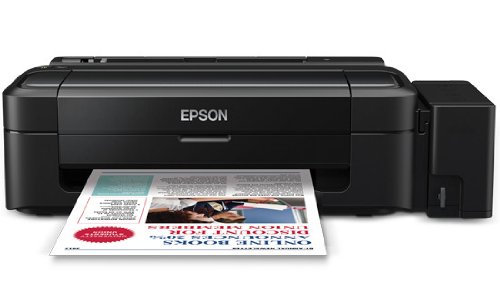
Şekil 1: Ön view of the Epson L110 Colour Inkjet Printer.
2. Kurulum
2.1 Paketin açılması
Carefully remove the printer from its packaging. Ensure all protective tapes and packing materials are removed from the printer's exterior and interior. Retain the packaging for future transport or storage.
2.2 Güç Bağlantısı
- Güç kablosunu yazıcının güç girişine bağlayın.
- Güç kablosunun diğer ucunu topraklı bir elektrik prizine takın.
- Do not power on the printer until ink tanks are filled.
2.3 Mürekkep Tanklarının Doldurulması
The Epson L110 features an integrated ink tank system. Use only genuine Epson ink bottles for optimal performance and to prevent damage.
- Yazıcının yan tarafındaki mürekkep tankı kapağını açın.
- Uncap the ink bottle for the corresponding color (Cyan, Magenta, Yellow, Black).
- Carefully pour the ink into the correct tank, aligning the bottle nozzle with the tank's filling port. The "Fast Ink Top-Up Technology" is designed for mess-free refills.
- Fill each tank to the upper line.
- Close the ink tank unit cover securely.
Figure 2: Illustration of filling the ink tanks. Ensure correct color matching.
2.4 Sürücü Kurulumu
After filling the ink tanks, connect the printer to your computer using a USB cable. Install the printer drivers from the provided CD-ROM or download the latest drivers from the official Epson support webSiteye gidin. Kurulumu tamamlamak için ekrandaki talimatları izleyin.
3. Yazıcının Çalıştırılması
3.1 Kağıt Yükleme
- Kağıt destek parçasını açın ve uzatma parçasını dışarı çekin.
- Fan the edges of the paper stack to separate the sheets.
- Load paper into the sheet feeder with the print side facing up.
- Adjust the edge guide to the width of your paper. The maximum input sheet capacity is 50 sheets.
Figure 3: Proper paper loading into the input tray.
3.2 Temel Baskı
- Yazıcının açık ve bilgisayarınıza bağlı olduğundan emin olun.
- Yazdırmak istediğiniz belgeyi veya resmi bilgisayarınızda açın.
- Uygulamanın menüsünden "Yazdır" seçeneğini seçin (örneğin, File > Yazdır).
- In the print dialog box, select "Epson L110" as your printer.
- Kağıt boyutu, baskı kalitesi ve kopya sayısı gibi yazdırma ayarlarını düzenleyin.
- Yazdırma işlemini başlatmak için "Yazdır" düğmesine tıklayın.
The Epson L110 offers a print speed of up to 27 pages per minute (ppm) for black prints and 15 ppm for color prints. It produces high-resolution prints of 5760 x 1440 dpi.
4. Bakım
4.1 Mürekkep Dolumu
Monitor ink levels regularly. When an ink tank is low, refill it promptly using genuine Epson ink bottles. A single ink bottle provides a high page yield of up to 4000 prints (black) and 6500 prints (color).
Önemli: When transporting the printer, ensure the choke valve is locked to prevent messy leaks and ink wastage.
4.2 Yazıcı Kafası Temizliği
If print quality declines (e.g., missing lines, faded colors), perform a print head cleaning. This can typically be done through the printer utility software on your computer. Refer to the software's help section for detailed steps.
4.3 Genel Temizlik
Yazıcının dışını yumuşak bir bezle silin.amp cloth. Do not use abrasive cleaners or solvents. Keep the paper path clear of dust and debris.
5. Sorun Giderme
- Yazıcı Yanıt Vermiyor:
- Güç bağlantısını kontrol edin ve yazıcının açık olduğundan emin olun.
- Verify the USB cable connection between the printer and computer.
- Hem yazıcıyı hem de bilgisayarı yeniden başlatın.
- Ensure printer drivers are correctly installed.
- Kötü Baskı Kalitesi:
- Mürekkep seviyesini kontrol edin ve gerekirse doldurun.
- Yazıcı kafası temizliğini gerçekleştirin.
- Run a nozzle check to identify clogged nozzles.
- Yazdırma ayarlarınız için uygun kağıt kullandığınızdan emin olun.
- Kağıt Sıkışmaları:
- Yazıcıyı kapatın ve fişini çekin.
- Sıkışmış kağıtları giriş tepsisinden, çıkış tepsisinden veya yazıcının içinden dikkatlice çıkarın.
- Kağıdın doğru şekilde yerleştirildiğinden ve kırışmadığından emin olun.urled.
For further assistance, refer to the Epson support website veya müşteri hizmetleriyle iletişime geçin.
6. Özellikler
| Özellik | Şartname |
|---|---|
| Model Adı | L110 |
| Baskı Teknolojisi | Mürekkep püskürtmeli |
| Yazıcı Çıktısı | Renk |
| Maksimum Renkli Baskı Çözünürlüğü | 5760 x 1440 dpi |
| Maksimum Siyah Beyaz Baskı Çözünürlüğü | 5760 x 1440 dpi |
| Maksimum Baskı Hızı Tek Renkli | 27 ppm |
| Maksimum Baskı Hızı (Renkli) | 15 ppm |
| Mürekkep Rengi | Cyan, Black, Magenta, Yellow |
| Sayfa Verimi (Siyah) | 4000 sayfaya kadar |
| Sayfa Verimi (Renkli) | 6500 sayfaya kadar |
| Bağlantı Teknolojisi | USB |
| Maksimum Giriş Sayfası Kapasitesi | 50 |
| Desteklenen Medya Boyutları | A4, A5, A6, A7, A8, A9, B5, B6, B7, B8, B9, C5, C6, C7 |
| Ürün Boyutları (UxGxY) | 47.2x22.2x13 cm |
| Ürün Ağırlığı | 2.7 kilo |
| Güç Tüketimi | Maksimum 10 Watt |
7. Garanti ve Destek
The Epson L110 Colour Inkjet Printer comes with an Epson Warranty, providing peace of mind. For specific warranty terms and conditions, please refer to the warranty card included with your product or visit the official Epson support webalan.
Teknik destek, sürücü indirmeleri, SSS ve servis merkezi konumları için lütfen resmi Epson destek sayfasını ziyaret edin. website or contact Epson customer service directly.


