giriiş
This manual provides comprehensive instructions for the Logitech Tablet Keyboard, designed for use with various iPad models including iPad mini, iPad (3rd/4th generation), iPad 2, and the original iPad. This compact, low-profile keyboard offers a comfortable typing experience and enhances productivity wherever you use your tablet.
Temel özellikler şunlardır:
- Kompakt, düşük profesyonelfile design for comfortable typing.
- Bluetooth wireless connectivity for easy pairing.
- Convenient media control keys for audio and video playback.
- Wireless range of up to 30 feet (actual range may vary).
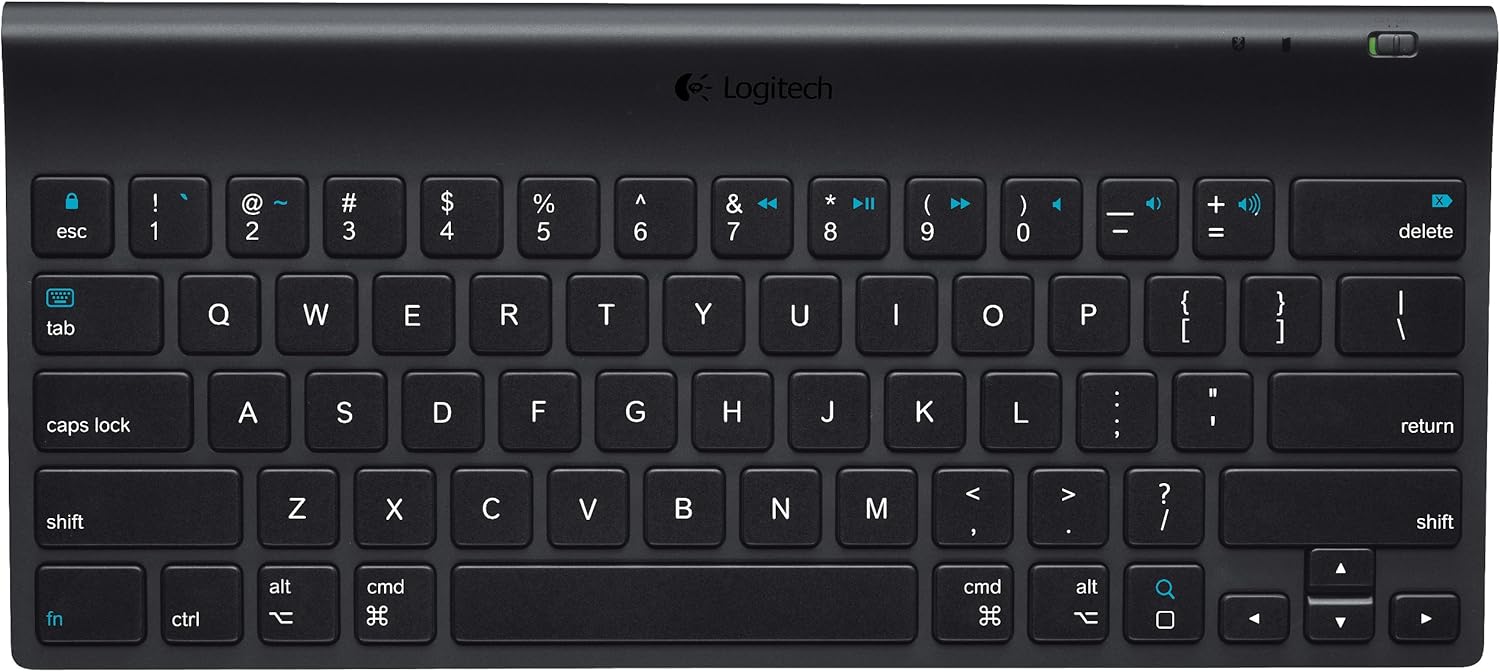
Şekil 1: Yukarıdan aşağıya view of the Logitech Tablet Keyboard. This image shows the full QWERTY layout with function keys and media controls.
Paket İçeriği
Lütfen pakette tüm öğelerin mevcut olduğundan emin olun:
- Logitech Tablet Keyboard
- 4 adet AAA pil (önceden takılmış)
- Kullanıcı dokümantasyonu (bu kılavuz)
Kurmak
1. Pil Kurulumu
The keyboard comes with 4 AAA batteries pre-installed. Before first use, locate and remove the plastic pull tabs from the battery compartment to activate the batteries. If replacing batteries, ensure correct polarity.
2. Açma
Locate the power switch on the keyboard. Slide the switch to the "ON" position. An indicator light may briefly illuminate.
3. Bluetooth Eşleştirme
- Ensure your iPad (or other compatible iOS device) has Bluetooth enabled. Navigate to Ayarlar > Bluetooth Cihazınızda.
- On the Logitech Tablet Keyboard, locate the Bağlamak button, typically on the bottom or side of the keyboard. Press and hold this button for a few seconds until the Bluetooth indicator light on the keyboard begins to blink, indicating it is in pairing mode.
- On your iPad, the "Logitech Tablet Keyboard" should appear in the list of available Bluetooth devices. Tap on it to select.
- Your iPad may display a passkey. Type this passkey on the Logitech Tablet Keyboard and press Girmek.
- Once paired, the Bluetooth indicator light on the keyboard will stop blinking and remain solid, and your iPad will show the keyboard as "Connected".

Şekil 2: Açısal view of the Logitech Tablet Keyboard, highlighting its slim profile ve tuş düzeni.
Klavyenin Kullanımı
Temel Yazma
The Logitech Tablet Keyboard functions like a standard QWERTY keyboard. Simply open any application on your iPad that requires text input (e.g., Notes, Mail, Safari) and begin typing. The on-screen keyboard will automatically disappear when the physical keyboard is connected and active.
Medya Kontrol Tuşları
The keyboard features dedicated media control keys for convenient management of your audio and video playback. These keys are typically located in the top row of the keyboard and include:
- Oynat/Duraklat: To start or pause media playback.
- Önceki parça: To go to the beginning of the current track or the previous track.
- Sonraki Parça: Bir sonraki parçaya geçmek için.
- Sesi Aç/Kapat: Ses seviyesini ayarlamak için.
- Sesini kapatmak: To mute or unmute audio.
kablosuz Menzil
The keyboard operates wirelessly via Bluetooth with a range of up to 30 feet (approximately 10 meters) from your iOS device. Actual wireless range may vary depending on environmental conditions, obstacles, and device settings.

Şekil 3: Perspektif view of the Logitech Tablet Keyboard, showing the full key layout and compact design.
Bakım
To ensure the longevity and optimal performance of your Logitech Tablet Keyboard, follow these maintenance guidelines:
- Temizlik: Use a soft, lint-free cloth to wipe the surface of the keyboard. For stubborn dirt, slightly dampBezi su veya aşındırıcı olmayan yumuşak bir temizleyici ile silin. Aşırı nemden kaçının.
- Pil Değişimi: When the keyboard's performance degrades or the battery indicator (if present) signals low power, replace all 4 AAA batteries with new ones.
- Depolamak: Uzun süre kullanılmadığında pil ömrünü korumak için klavyeyi kapatın. Serin, kuru ve doğrudan güneş ışığından ve aşırı sıcaklıklardan uzak bir yerde saklayın.
- Sıvılardan Kaçının: Do not expose the keyboard to liquids. Spills can cause permanent damage.
Sorun giderme
If you encounter issues with your Logitech Tablet Keyboard, try the following solutions:
Keyboard Not Connecting/Typing
- Gücü Kontrol Edin: Klavyenin açık olduğundan emin olun.
- Pilleri Kontrol Edin: Verify that the batteries are correctly installed and have sufficient charge. Replace if necessary.
- Bluetooth'u yeniden eşleştir:
- iPad'inizde şuraya gidin: Ayarlar > Bluetooth. Tap the "i" icon next to "Logitech Tablet Keyboard" and select "Forget This Device".
- Turn the keyboard off, then on again.
- Put the keyboard back into pairing mode by pressing the Bağlamak düğme.
- Re-pair the keyboard with your iPad as described in the "Bluetooth Pairing" section.
- Mesafe: Ensure the keyboard is within the 30-foot wireless range of your iPad.
- Parazit yapmak: Parazite neden olabilecek diğer kablosuz cihazlardan uzaklaşın.
Tuşlar Yanıt Vermiyor
- Temiz Anahtarlar: Check for any debris or foreign objects lodged under the keys. Gently clean around the affected keys.
- Pil Seviyesi: Low battery can sometimes cause intermittent key response. Replace batteries.
- Software Glitch: Restart your iPad to resolve potential software issues.

Şekil 4: Yan profile view of the Logitech Tablet Keyboard, illustrating its ergonomic curve.
Özellikler
| Marka | Logitech |
| Model Numarası | 920-004440 |
| Bağlantı Teknolojisi | Bluetooth |
| Uyumlu Cihazlar | iPad mini, iPad (3rd/4th generation), iPad 2, iPad |
| İşletim Sistemi Uyumluluğu | iOS, Android |
| Güç Kaynağı | Pille Çalışır (4 adet AAA pil dahildir) |
| Ürün Ağırlığı | 1.25 pound (yaklaşık 0.57 kg) |
| Ürün Boyutları (UxGxY) | 12.3 x 5.5 x 1.18 inç (yaklaşık 31.2 x 14 x 3 cm) |
| Renk | Siyah |
| Malzeme | Plastik |

Figure 5: The Logitech Tablet Keyboard shown alongside an iPad and iPhone, demonstrating its compact size relative to mobile devices.
Garanti ve Destek
For detailed warranty information, please refer to the official Logitech website or the warranty card included with your product. Logitech provides customer support for product inquiries, technical assistance, and warranty claims.
Resmi Ürün Videoları
Satıcının resmi ürün videoları şu anda yerleştirilmeye hazır değil.


