1. Giriş ve Üzeriview
The Alpine VIE-X007-WS-E is a dedicated in-dash car navigation system designed for specific vehicle models, featuring a high-definition 7-inch wide VGA LED LCD display. This unit provides clear and detailed maps, high-quality video playback, and integrates advanced features for an enhanced driving experience. It includes a 32GB SDHC memory for map and music data, a built-in terrestrial digital TV tuner, and Bluetooth connectivity for hands-free calling and audio streaming. The system is 'Tuned by Alpine' to ensure optimal acoustic settings and vehicle-specific functionalities.
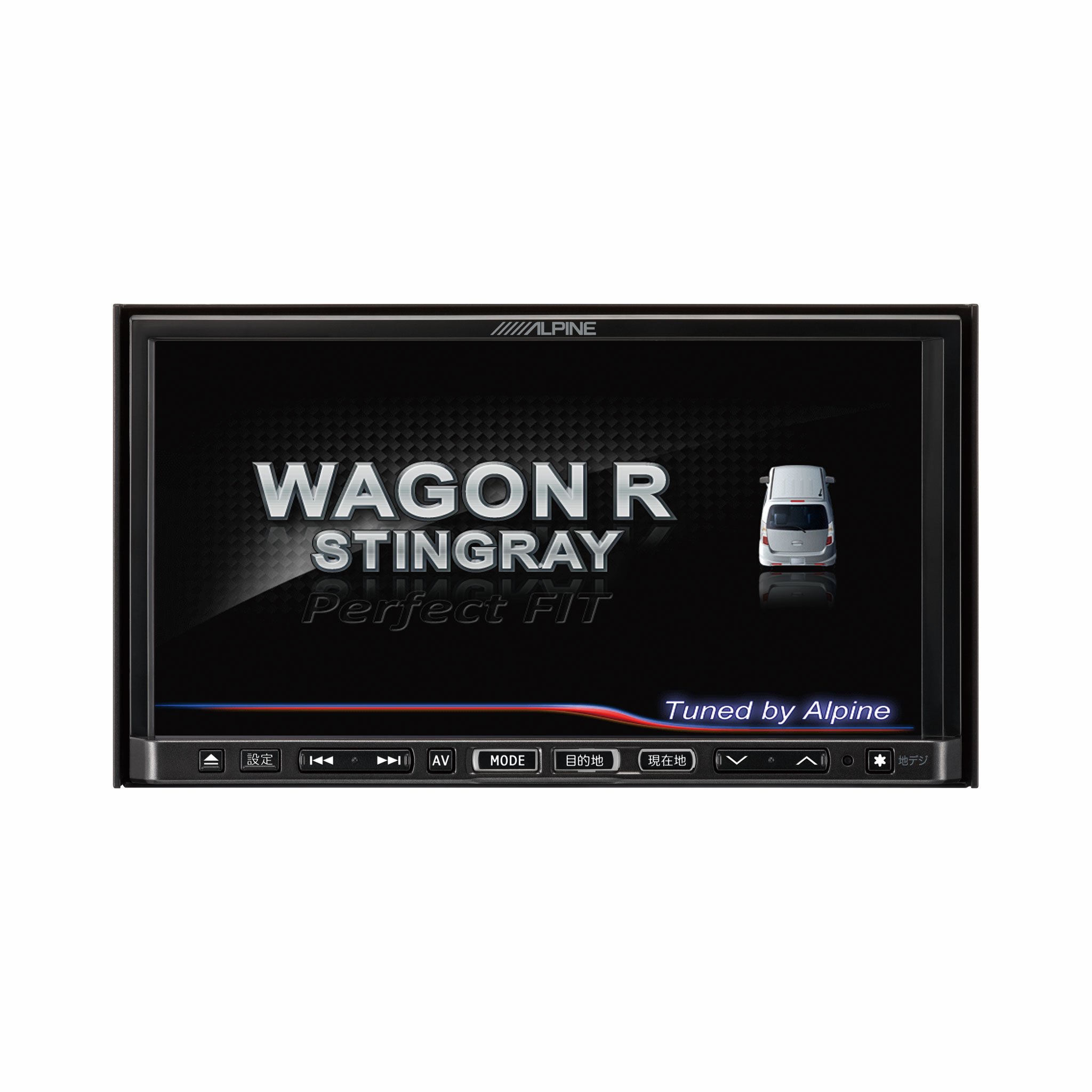
Resim 1.1: Ön view of the Alpine VIE-X007-WS-E In-Dash Car Navigation System, showcasing its 7-inch display and control interface.
2. Temel Özellikler
- Görüntülemek: 7-inch LED / WVGA Touch Panel Monitor for clear visuals and intuitive control.
- Depolamak: 32GB SD memory (16GB for Map Data + 16GB for Music Data).
- Ayarlayıcı: Built-in Terrestrial Digital TV Tuner (12 Segments/One Segment) for broadcast reception.
- Bağlantı: Built-in Bluetooth for hands-free calling and Bluetooth audio support.
- Medya Oynatma: Supports DVD/CD, FM/AM radio, SD Memory Card, iPod/iPhone, USB, and Walkman (connection cable not included).
- Araç Entegrasyonu: Alpine system link functions for rear vision camera and vehicle-specific settings.
3. Kurulum Talimatları
Proper installation is crucial for optimal performance and safety. It is highly recommended that this unit be installed by a qualified professional car audio technician.
3.1. Kurulum Öncesi Kontroller
- Montaj işlemine başlamadan önce aracın aküsünün bağlantısının kesildiğinden emin olun.
- Verify all necessary mounting hardware and wiring harnesses are present.
- Confirm compatibility with your specific vehicle model (Wagon R MH23 Stingray).
3.2. Kablo Bağlantıları
- Güç Bağlantısı: Ana güç kablosunu aracın güç kaynağına bağlayın ve topraklamanın düzgün yapıldığından emin olun.
- Hoparlör Bağlantıları: Connect the speaker wires to the corresponding vehicle speakers, observing polarity.
- Anten Bağlantıları: Connect the GPS antenna and the terrestrial digital TV antenna to their respective inputs on the unit. Position antennas in locations with clear line of sight.
- Harici Cihaz Bağlantıları: Connect any optional devices such as a rear-view camera, USB devices, or iPod/iPhone using the appropriate cables (sold separately).
3.3. Ünitenin Montajı
- Carefully insert the unit into the vehicle's dashboard opening.
- Ürünle birlikte verilen montaj braketleri ve vidaları kullanarak ürünü sabitleyin.
- Re-connect the vehicle's battery.
3.4. İlk Açılış
- Turn on the vehicle's ignition. The unit should power on and display the Alpine logo.
- Dil seçimi ve saat dilimi gibi ilk kurulum için ekranda beliren yönergeleri izleyin.
4. Kullanım Talimatları
This section provides general guidance on operating your Alpine navigation system.
4.1. Güç Açma/Kapatma
- The unit typically powers on automatically with the vehicle's ignition.
- To manually turn off or put the unit into standby, press and hold the power button (location may vary, refer to specific vehicle integration manual).
4.2. Dokunmatik Ekran İşlemi
- Navigate menus and select functions by lightly touching the screen icons.
- Use swipe gestures for scrolling through lists or maps.
4.3. Navigation Functions
- Accessing Navigation: Tap the 'Navigation' or 'Map' icon on the main menu.
- Varış Noktasına Giriliyor: Use the on-screen keyboard to input an address, point of interest (POI), or select from recent destinations.
- Rota Rehberi: Once a destination is set, the system will calculate a route and provide turn-by-turn voice guidance and visual cues.
- Harita View: Switch between 2D, 3D, and various zoom levels using the on-screen controls.
4.4. Medya Oynatma
- Radyo: Select 'FM' or 'AM' from the main menu. Use the tuner controls to scan for stations or select presets.
- CD/DVD: Insert a disc into the slot. Playback should begin automatically or can be selected from the 'Disc' source.
- SD Kart/USB: Insert an SD card or USB device. Select 'SD' or 'USB' as the source and browse for media files.
- Bluetooth Sesi: Pair your Bluetooth device (see section 4.5) and select 'Bluetooth Audio' as the source to stream music.
- Karasal Dijital TV: Select 'TV' from the main menu. The system will scan for available channels.
4.5. Bluetooth Eşleştirme
- On the unit, go to the 'Bluetooth' menu.
- Mobil cihazınızda Bluetooth'u etkinleştirin ve mevcut cihazları arayın.
- Select 'Alpine VIE-X007-WS-E' (or similar name) from your device's list.
- İstenirse her iki cihazda da eşleştirme kodunu onaylayın.
- Eşleştirme tamamlandıktan sonra arama yapabilir/alabilir ve ses akışı gerçekleştirebilirsiniz.
5. Bakım
Regular maintenance ensures the longevity and optimal performance of your navigation system.
5.1. Ünitenin Temizlenmesi
- Ekranı ve kontrol panelini silmek için yumuşak, kuru bir bez kullanın.
- Ekrandaki inatçı lekeler için, hafifçe silin.ampen the cloth with a screen cleaner specifically designed for electronics. Do not spray cleaner directly onto the unit.
- Aşındırıcı temizleyiciler, çözücüler veya sert kimyasallar kullanmaktan kaçının.
5.2. Yazılım ve Harita Güncellemeleri
- Periodically check the Alpine official website for available software and map updates.
- Follow the instructions provided with the update package carefully to ensure proper installation. Updates typically involve downloading files to an SD card or USB drive and inserting it into the unit.
5.3. SD Card Handling
- Always eject the SD card safely through the unit's menu before physically removing it.
- Store the SD card in a protective case when not in use to prevent damage.
6. Sorun Giderme
Bu bölümde karşılaşabileceğiniz yaygın sorunlar ve bunların olası çözümleri ele alınmaktadır.
| Sorun | Olası Neden | Çözüm |
|---|---|---|
| Ünite açılmıyor. | Gevşek güç bağlantısı, atmış sigorta, araç aküsü sorunu. | Check power wiring and fuse. Ensure vehicle battery is charged. Consult a professional if issues persist. |
| GPS sinyali yok veya konumlandırma hatalı. | GPS antenna obstructed or improperly connected, unit in an area with poor satellite reception. | GPS anteninin net bir görüşe sahip olduğundan emin olun view Gökyüzü. Anten bağlantısını kontrol edin. Açık bir alana geçin. |
| Bluetooth device fails to pair. | Bluetooth not enabled on device, incorrect pairing mode, interference. | Ensure Bluetooth is active on your device. Put the unit in pairing mode. Try re-pairing. Move closer to the unit. |
| Dokunmatik ekran çalışmıyor. | Temporary software glitch, screen calibration issue. | Restart the unit (turn vehicle ignition off and on). If available, perform screen calibration via settings. |
| Hoparlörlerden ses gelmiyor. | Ses seviyesi çok düşük, sessize alma özelliği aktif, hoparlör kablolarında sorun var. | Sesi artırın. Sessiz modun etkin olup olmadığını kontrol edin. Hoparlör bağlantılarını doğrulayın. |
If you encounter problems not listed here or if the suggested solutions do not resolve the issue, please contact Alpine customer support or a certified service center.
7. Özellikler
| Özellik | Şartname |
|---|---|
| Marka | Alp dağları |
| Örnek | VIE-X007-WS-E |
| Ekran Boyutu | 7 inç |
| Görüntü Türü | WVGA LED LCD Touch Panel Monitor |
| Bellek Depolama Kapasitesi | 16 GB (for Map Data, total 32GB SDHC) |
| Özel Özellikler | Hands Free (Bluetooth) |
| Bağlantı Teknolojisi | Bluetooth, USB |
| İnsan Arayüzü Girişi | Dokunmatik ekran |
| Desteklenen Medya Türü | Memory, DVD, CD, FM/AM, SD Card, iPod/iPhone, USB, Walkman |
| Dahili Tuner | Terrestrial Digital TV Tuner (12 Segments/One Segment) |
| Piller Dahil | HAYIR |
| Ürün Boyutları | 18.66x17.8x10 cm |
| Ürün Ağırlığı | 6.44 kilo |
8. Garanti ve Destek
Warranty information for the Alpine VIE-X007-WS-E is typically provided with the product packaging or at the point of purchase. Please refer to these documents for details regarding warranty coverage, terms, and conditions.
For technical support, service inquiries, or to find authorized service centers, please visit the official Alpine website or contact Alpine customer service directly. Ensure you have your product model number (VIE-X007-WS-E) and proof of purchase available when seeking support.
Alp Resmi Görevlisi Webalan: www.alpine.com


