giriiş
Thank you for choosing the Zebronics ZEB-SW2800RUCF Hero 2.1 Speaker System. This manual provides essential information for the proper setup, operation, and maintenance of your speaker system. Please read this manual thoroughly before using the product to ensure optimal performance and longevity.
Ürün Bittiview
The Zebronics ZEB-SW2800RUCF Hero is a 2.1 channel multimedia speaker system designed to deliver clear and powerful audio. It features a subwoofer for deep bass and two satellite speakers for balanced sound. The system includes multiple connectivity options and an integrated FM radio.
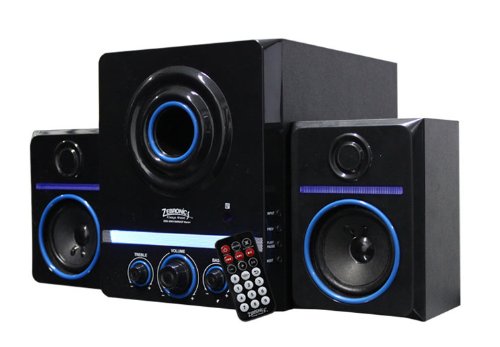
This image displays the Zebronics ZEB-SW2800RUCF Hero 2.1 speaker system. It features a central subwoofer unit with a large speaker and control knobs for treble, volume, and bass. Two satellite speakers are positioned on either side of the subwoofer. A remote control is also visible in the foreground.
Temel Özellikler
- 2.1 Kanal Ses: Provides a balanced sound experience with a dedicated subwoofer and two satellite speakers.
- Güçlü Çıkış: Total output power of 38 Watts (18W Subwoofer + 10W x 2 Satellites).
- Entegre FM Radyo: Enjoy your favorite radio stations directly through the speaker system.
- Multimedya Desteği: Supports USB pen drives and SD/MMC memory cards for direct playback of MP3 and WMA audio files.
- Kullanıcı Denetimleri: Features on/off switch, volume, bass, and treble controls for personalized audio.
- Uzaktan kumanda: Uzaktan rahat kullanım.
- Sürücü Üniteleri: 4-inch magnetically shielded subwoofer driver and 3 x 2-inch full-range magnetically shielded satellite drivers.
- Yüksek Sinyal-Gürültü Oranı: ≥80dB for clear audio.
- Düşük Bozulma: ≤0.3% at 1W output @1KHz.
Kurulum Talimatları
- Paketin açılması: Carefully remove all components from the packaging. Ensure all parts are present: one subwoofer unit, two satellite speakers, and a remote control.
- Atama: Position the subwoofer on a stable surface, preferably on the floor for optimal bass. Place the satellite speakers on either side of your listening area, ensuring they are facing towards you for the best stereo effect.
- Uydu Hoparlörlerini Bağlayın: Connect the cables from the two satellite speakers to the corresponding output ports on the rear panel of the subwoofer unit. Ensure a secure connection.
- Connect Audio Source (Optional): If connecting an external audio device (e.g., computer, smartphone, TV), use an appropriate audio cable (not included) to connect its audio output to the input port on the subwoofer.
- Güç Bağlantısı: Plug the power cord of the subwoofer unit into a standard electrical outlet.
- Güç Açık: Turn on the main power switch, usually located on the rear or front panel of the subwoofer.
Kullanım Talimatları
Temel İşlemler
- Güç Açma/Kapatma: Use the power switch on the subwoofer or the remote control to turn the system on or off.
- Ses Kontrolü: Adjust the main volume knob on the subwoofer or use the volume buttons on the remote control.
- Bas Kontrolü: Use the bass knob on the subwoofer to adjust the level of low-frequency sound.
- Tiz Kontrolü: Use the treble knob on the subwoofer to adjust the level of high-frequency sound.
Giriş Modları
The speaker system supports various input sources. Use the "Mode" button on the subwoofer or remote control to switch between them.
- USB Modu: Insert a USB pen drive into the USB port on the subwoofer. The system will automatically detect and play supported audio file(MP3, WMA).
- SD/MMC Card Mode: Insert an SD or MMC memory card into the card slot on the subwoofer. The system will automatically detect and play supported audio file(MP3, WMA).
- FM Radyo Modu: Switch to FM mode. The system will automatically scan and store available radio stations. Use the previous/next track buttons on the remote or subwoofer to navigate between stations.
- AUX Modu: If an external device is connected via the AUX input, switch to AUX mode to play audio from that device.
Uzaktan Kumanda Fonksiyonları
The remote control provides convenient access to all major functions:
- Güç: Sistemi açın/kapatın.
- Mod: Switch between USB, SD/MMC, FM, and AUX inputs.
- Hacim +/-: Ana ses seviyesini ayarlayın.
- Oynat/Duraklat: Play or pause audio playback in USB/SD mode.
- Önceki Sonraki: Skip tracks in USB/SD mode or change FM stations.
- Sesini kapatmak: Ses çıkışını sessize alın veya açın.
- EQ: (If available) Cycle through equalizer presets.
Bakım
- Temizlik: Hoparlör yüzeylerini temizlemek için yumuşak ve kuru bir bez kullanın. Sıvı temizleyiciler veya aşındırıcı malzemeler kullanmayın, çünkü bunlar yüzeye zarar verebilir.
- Havalandırma: Subwoofer ve uydu hoparlörlerin yeterli havalandırmaya sahip olduğundan emin olun. Havalandırma deliklerini asla kapatmayın.
- Çevre: Avoid exposing the speakers to direct sunlight, high temperatures, humidity, or dusty environments.
- Kapat: Always turn off and unplug the speaker system from the power outlet when not in use for extended periods or during electrical storms.
Sorun giderme
| Sorun | Olası Neden | Çözüm |
|---|---|---|
| Güç yok | Güç kablosu bağlı değil; Güç anahtarı kapalı; Elektrik prizi arızalı. | Ensure power cord is securely plugged in; Turn on the power switch; Test the power outlet with another device. |
| Ses yok | Volume too low; Mute function active; Incorrect input mode; Audio cables not connected properly. | Increase volume; Deactivate mute; Select the correct input mode (USB, SD, FM, AUX); Check all audio cable connections. |
| Bozuk ses | Ses seviyesi çok yüksek; Ses kaynağının kalitesi düşük; Hoparlör yerleşiminde sorunlar. | Sesi kısın; Farklı bir ses kaynağı deneyin; Hoparlörlerin yerini ayarlayın. |
| USB/SD kart oynatılmıyor | Yanlış file Biçimlendirme; USB/SD kart doğru takılmamış; Bozuk files. | Emin olmak files are MP3 or WMA format; Reinsert USB/SD card; Try a different USB/SD card or files. |
| FM radyo alımı zayıf | Zayıf sinyal; Anten uzatılmamış. | Adjust the position of the speaker system; Extend the FM antenna fully; Perform an auto-scan for stations again. |
Özellikler
| Özellik | Detay |
|---|---|
| Hoparlör Tipi | Uydu, Subwoofer |
| Çevresel Ses Kanalı Yapılandırması | 2.1 |
| Çıkış Gücü (RMS) | 38 Watts (Subwoofer: 18W, Satellites: 10W x 2) |
| Subwoofer Driver Unit | 4-inches, magnetically shielded |
| Satellite Driver Unit | 3 x 2-inches full range, magnetically shielded |
| Sinyal Gürültü Oranı (S/N) | ≥80dB |
| Çarpıtma | ≤0.3% at 1W output @1KHz |
| Kontroller | On/Off switch, Volume, Bass, Treble |
| Bağlantı Teknolojisi | USB |
| Desteklenen Medya | USB pen drive, SD/MMC memory cards |
| Desteklenen Ses Biçimleri | MP3, WMA |
| Özel Özellikler | Built-in FM radio, Remote controller |
| Uyumlu Cihazlar | FM Radio, MP3 Player, Smartphone, Tablet, Television |
| Önerilen Kullanımlar | For Smartphones or Tablets, For Televisions, Home Entertainment, Portable Audio |
| Üretici | Zebronikler |
| Model Numarası | ZEB-SW2800RUCF Hero |
| İlk Mevcut Tarih | 2 Kasım 2012 |
Garanti ve Destek
For warranty information and technical support, please refer to the warranty card included with your product or visit the official Zebronics webalan. Garanti talepleri için satın alma makbuzunuzu saklayın.
For further assistance, you may contact Zebronics customer service through their official channels.


