giriiş
This manual provides comprehensive instructions for the safe and efficient use of your Marmitek BoomBoom 560 Bluetooth Over-Ear Headphones. These headphones offer excellent digital sound quality with clear mid-tones and deep bass, along with passive noise reduction for an immersive audio experience. Please read this manual thoroughly before operating the device.

Image: Marmitek BoomBoom 560 Bluetooth Over-Ear Headphones, black, shown from a slight angle.
Paket İçeriği
Lütfen aşağıda listelenen tüm öğelerin paketinizde mevcut olup olmadığını kontrol edin:
- 1x Marmitek BoomBoom 560 Bluetooth Over-Ear Headphones
- 1x Micro USB to USB charging cable
- 1x 3.5mm Mini-jack audio cable (160 cm)
- 1x Kullanım kılavuzu (bu belge)

Image: Visual representation of the Marmitek BoomBoom 560 package contents, including the headphones, charging cable, audio cable, and user manual.
Ürün BittiviewKontroller ve Bağlantı Noktaları
Familiarize yourself with the controls and ports on your BoomBoom 560 headphones:
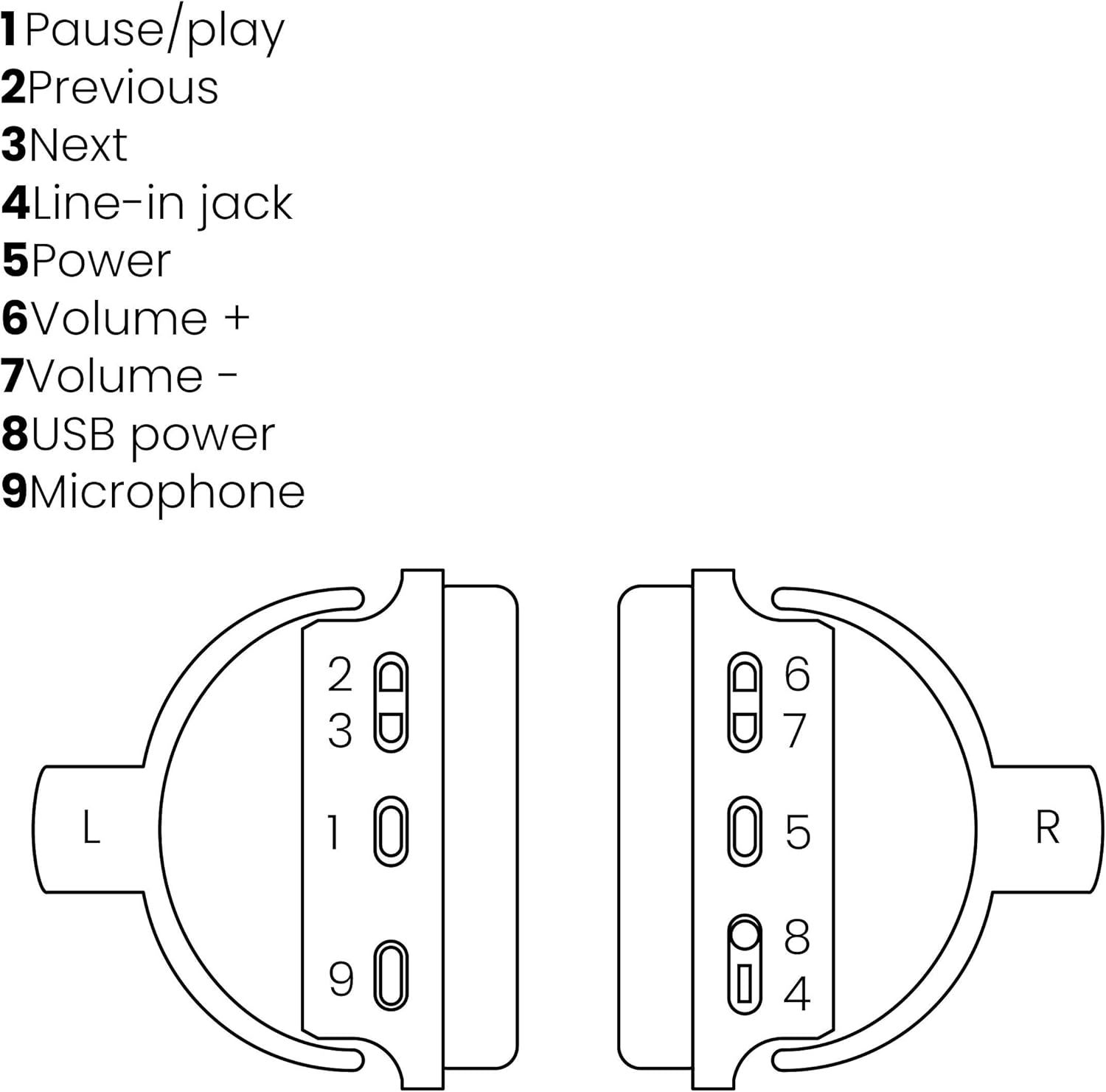
Image: A line drawing illustrating the left and right ear cup controls and ports, numbered for identification.
- Duraklat/Oynat Düğmesi: Müzik çalmayı kontrol eder.
- Önceki Parça Düğmesi: Önceki şarkıya atlar.
- Sonraki Parça Düğmesi: Sonraki şarkıya geçiyor.
- Hat Giriş Jakı: For wired audio connection using the 3.5mm cable.
- Güç Düğmesi: Turns the headphones on/off and initiates Bluetooth pairing.
- Ses Seviyesi + Düğmesi: Sesi yükseltir.
- Ses Seviyesi Düğmesi: Sesi azaltır.
- USB Güç Bağlantı Noktası: For charging the headphones using the Micro USB cable.
- Mikrofon: Eller serbest aramalar için dahili mikrofon.
Kurmak
1. Kulaklıkları Şarj Etme
Before first use, fully charge your headphones. Connect the Micro USB end of the charging cable to the USB Power Port (8) on the headphones and the standard USB end to a USB power adapter (not included) or a computer's USB port. The LED indicator will show charging status. A full charge provides over 8 hours of playback time.
2. Bluetooth Eşleştirme
Kulaklıklarınızı Bluetooth özellikli bir cihaza kablosuz olarak bağlamak için:
- Kulaklıkların kapalı olduğundan emin olun.
- Basılı tutun Güç Düğmesi (5) until the LED indicator flashes blue and red, indicating pairing mode.
- Akıllı telefonunuzda, tabletinizde veya diğer Bluetooth cihazınızda Bluetooth'u etkinleştirin ve kullanılabilir cihazları arayın.
- Select "BoomBoom 560" from the list of found devices.
- Bağlandıktan sonra LED göstergesi yavaşça mavi renkte yanıp sönecektir.

Image: Illustration depicting various Bluetooth-enabled devices (laptop, smartphone, tablet) wirelessly transmitting audio to the headphones.
3. Kablolu Bağlantı
If Bluetooth is not available or the battery is depleted, you can use the included 3.5mm audio cable. Connect one end of the cable to the Line-in Jack (4) on the headphones and the other end to the audio output of your device.
Kullanım Talimatları
Güç Açık/Kapalı
- Açmak İçin: Basılı tutun Güç Düğmesi (5) for approximately 3 seconds until the LED indicator flashes blue.
- Kapatmak İçin: Basılı tutun Güç Düğmesi (5) for approximately 3 seconds until the LED indicator turns off.
Müzik Çalma
- Oynat/Duraklat: Basın Pause/Play Button (1) bir kere.
- Sonraki Parça: Basın Next Track Button (3) bir kere.
- Önceki parça: Basın Previous Track Button (2) bir kere.
Yönetim Çağrı
When connected via Bluetooth, you can manage phone calls using the built-in microphone (9):
- Çağrıyı Cevapla/Sonlandır: Basın Pause/Play Button (1) bir kere.
- Çağrıyı Reddet: Basılı tutun Pause/Play Button (1) yaklaşık 2 saniye.
Ses Kontrolü
- Sesi arttır: Basın Volume + Button (6).
- Sesi Azalt: Basın Volume - Button (7).

Image: A user enjoying music or media with the Marmitek BoomBoom 560 headphones while relaxing at home.
Bakım
Kulaklığınızın uzun ömürlü ve optimum performans göstermesini sağlamak için:
- Kulaklığınızı yumuşak ve kuru bir bezle temizleyin. Aşındırıcı temizleyiciler veya çözücüler kullanmayın.
- Kulaklıklarınızı aşırı sıcaklıklara, neme veya doğrudan güneş ışığına maruz bırakmaktan kaçının.
- Kulaklıkları kullanmadığınız zamanlarda serin ve kuru bir yerde saklayın.
- Kulaklığı kendiniz sökmeye veya onarmaya çalışmayın, aksi takdirde garanti geçersiz olur.
Sorun giderme
If you encounter issues with your BoomBoom 560 headphones, refer to the following common solutions:
- Güç Yok: Kulaklıkların tamamen şarj olduğundan emin olun. USB şarj kablosunu kullanarak kulaklıkları bir güç kaynağına bağlayın.
- Bluetooth ile Eşleştirilemiyor:
- Kulaklığın eşleştirme modunda olduğundan emin olun (LED mavi ve kırmızı renkte yanıp sönüyor).
- Ensure your Bluetooth device's Bluetooth function is enabled and within range (typically 10 meters).
- Try turning off and on both the headphones and your Bluetooth device.
- Delete "BoomBoom 560" from your device's Bluetooth list and attempt to pair again.
- Ses Yok:
- Hem kulaklığınızdaki hem de bağlı cihazınızdaki ses seviyelerini kontrol edin.
- Ensure the headphones are properly paired or the 3.5mm audio cable is securely connected.
- Bluetooth kullanıyorsanız bağlantıyı kesip tekrar bağlanmayı deneyin.
- Kötü Ses Kalitesi:
- Paraziti azaltmak için Bluetooth cihazınıza daha yakın durun.
- Ensure there are no obstacles between the headphones and the device.
- Ses kaynağında kalite sorunları olup olmadığını kontrol edin.
- Loose Earcup Bracket: If the earcup bracket feels loose, handle the headphones with care. Avoid excessive force when adjusting or folding. If the issue persists and affects functionality, contact customer support.
Özellikler
| Model Adı | BoomBom 560 |
| Model Numarası | 8122 |
| Marka | Marmitek |
| Bağlantı Teknolojisi | Kablosuz (Bluetooth), Kablolu (3.5 mm jak) |
| Bluetooth Uyumluluğu | Evet |
| Form Faktörü | Kulak üstü |
| Malzeme | Deri (kulaklık kapakları) |
| Özel Özellikler | Gürültü Azaltma |
| Mikrofon Teknolojisi | Omni (Built-in) |
| Pil Açıklaması | Lityum-İyon (Li-İyon) |
| Pil Ömrü | Over 8 hours (approx.) |
| Sinyal-Gürültü Oranı (SNR) | 82 dB |
| Ürün Boyutları | 23 x 5 x 18 cm; 100 g |
Garanti ve Destek
Marmitek products are designed and manufactured to high quality standards. For information regarding warranty terms and conditions, please refer to the documentation provided with your purchase or visit the official Marmitek webalan.
Daha fazla yardım veya teknik destek için lütfen şu adresi ziyaret edin: Marmitek Store on Amazon or the official Marmitek support channels.

Image: Logo indicating "Dutch Quality" and compliance with "EU European Standards".


