giriiş
This user manual provides comprehensive instructions for the installation, operation, and maintenance of your RCA RTS736W 30-Inch Streaming Soundbar. Please read this manual thoroughly before using the product to ensure proper functionality and to prevent damage.
The RCA RTS736W is designed to enhance your home audio experience with its 3.0 channel sound and integrated Wi-Fi for streaming online content.
Temel Özellikler
- Wi-Fi Built-In for streaming video content to a TV.
- 3.0 Channel Left/Center/Right audio configuration.
- HDMI 1080p Output for high-definition connectivity.
- Includes 1 Rear Analog Audio-in Jack and 1 Side Line-in Jack for various audio sources.
- Flexible placement options: includes table or wall mounting brackets.
Paket İçeriği
Paketin içinde tüm öğelerin mevcut olduğundan emin olun:
- RCA RTS736W 30-Inch Streaming Soundbar
- Uzaktan kumanda
- Güç Adaptörü
- Table or Wall Mounting Brackets
- Kullanım Kılavuzu (bu belge)
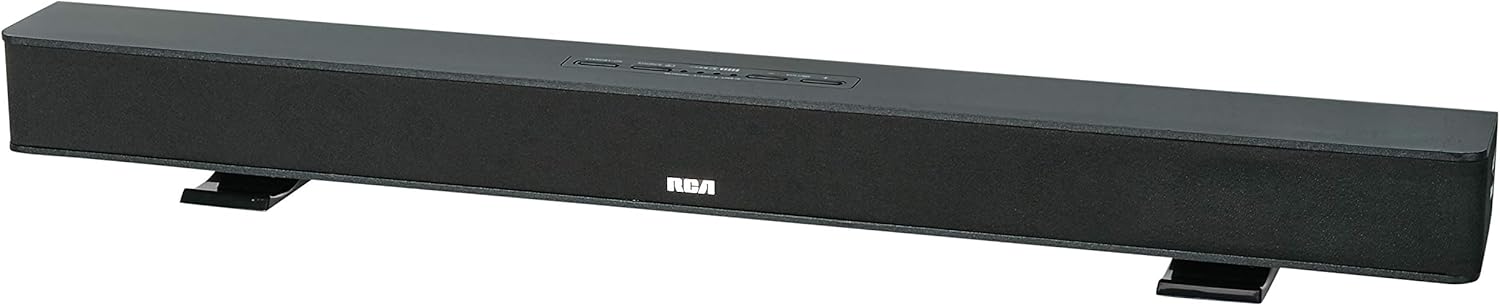
Image: The RCA RTS736W 30-Inch Streaming Soundbar, shown with its sleek black design and integrated controls.
Kurmak
1. Yerleştirme Seçenekleri
The soundbar offers flexible placement:
- Masaüstü Yerleşimi: Place the soundbar on a flat, stable surface in front of your television. Ensure there is adequate ventilation around the unit.
- Duvara Montaj: Use the included wall mounting brackets to secure the soundbar to a wall. Refer to the separate wall mounting template (if provided) for detailed instructions. Ensure the wall can support the weight of the soundbar.

Image: The RCA RTS736W soundbar positioned on a TV stand, demonstrating a typical home theater setup with various streaming service icons displayed on the television screen.
2. Güce Bağlanmak
- Connect the power adapter to the DC IN 13.5V port on the back of the soundbar.
- Güç adaptörünün diğer ucunu duvar prizine takın.
3. Ses Bağlantıları
Choose one of the following methods to connect the soundbar to your audio source:
- HDMI Çıkışı: Connect an HDMI cable from the HDMI OUT port on the soundbar to an HDMI input on your television. This connection supports 1080p video output from the soundbar's streaming functions.
- Analog Audio-in (AUX 1 / AUX 2): Use RCA audio cables to connect your TV or other audio devices to the AUX 1 or AUX 2 input jacks on the back of the soundbar. Match the red and white connectors.
- Side Line-in Jack: For portable devices like smartphones or tablets, connect a 3.5mm audio cable from your device's headphone jack to the Line-in jack located on the side of the soundbar.

Resim: Yakın çekim view of the rear panel of the RCA RTS736W soundbar, highlighting the AUX 1, AUX 2, DC IN 13.5V, HDMI OUT, and VIDEO OUT ports for various connections.
4. Ağ Bağlantısı (Wi-Fi)
To utilize the streaming features, connect the soundbar to your home Wi-Fi network. This process is typically guided by on-screen prompts when the soundbar is first powered on and connected to a TV via HDMI.
- Ensure your TV is connected to the soundbar via HDMI and powered on.
- Ekranda gösterilen yönergeleri izleyerek Wi-Fi ağınızı seçin ve şifreyi girin.
Kullanım Talimatları
1. Güç Açma/Kapatma
Basın Güç Ses çubuğundaki veya uzaktan kumandadaki düğmeyi kullanarak cihazı açıp kapatabilirsiniz.
2. Giriş Seçimi
Basın Giriş button on the remote control or the soundbar to cycle through available audio sources: HDMI, AUX 1, AUX 2, Line-in, and Wi-Fi streaming.
3. Ses Kontrolü
Kullanın Cilt + Ve Hacim - buttons on the remote control or the soundbar to adjust the audio level.
Basın Sesini kapatmak Sesi geçici olarak susturmak için kullanılan düğme.
4. Akış İçeriği
Once connected to Wi-Fi and your TV via HDMI, you can access various streaming applications. Navigate using the directional buttons and OK Uzaktan kumandadaki düğmeye basın.
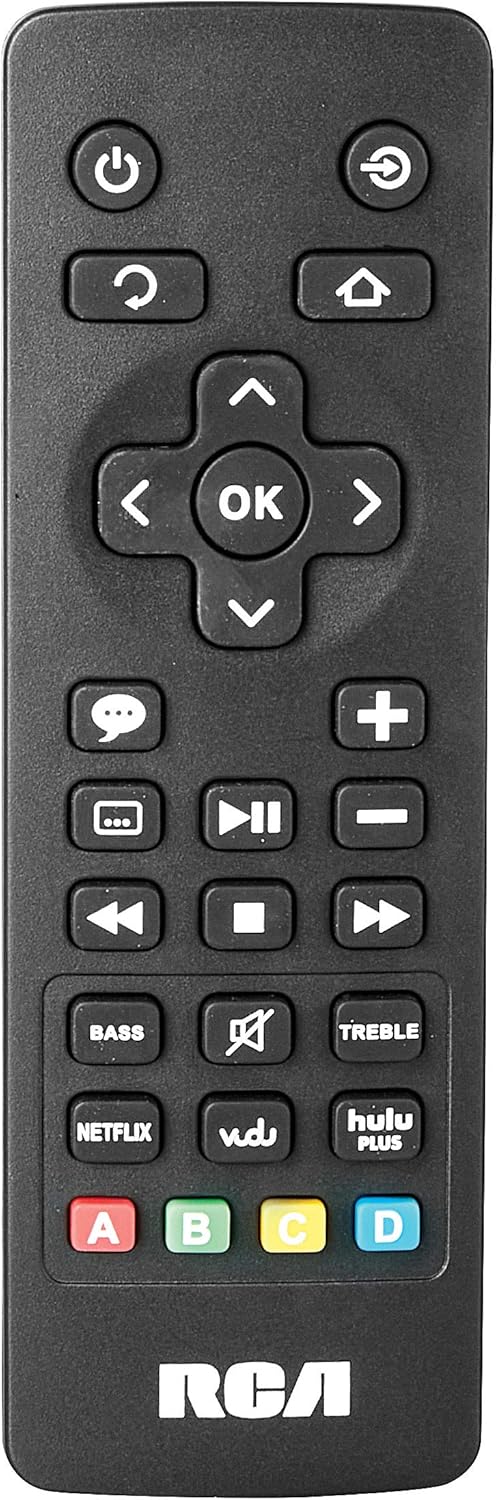
Image: The remote control for the RCA RTS736W soundbar, featuring dedicated buttons for power, volume, input selection, navigation, and direct access to streaming services like Netflix, Vudu, and Hulu Plus.
Dedicated buttons for services like Netflix, Vudu, and Hulu Plus may be available on the remote for direct access.
5. Ses Ayarlamaları
Kullanın BAS Ve TİZ Uzaktan kumandadaki düğmeleri kullanarak ses çıkışını kendi tercihinize göre ince ayar yapabilirsiniz.
Bakım
- Temizlik: Disconnect the soundbar from the power outlet before cleaning. Use a soft, dry cloth to wipe the exterior surfaces. Do not use liquid cleaners or abrasive materials.
- Havalandırma: Ses çubuğundaki havalandırma açıklıklarının tıkanmadığından emin olun. Doğru hava akışı aşırı ısınmayı önler.
- Depolamak: Ses çubuğunu uzun süre saklayacaksanız, güç kaynağından ayırın ve doğrudan güneş ışığından ve aşırı sıcaklıklardan uzak, serin ve kuru bir yerde saklayın.
Sorun giderme
Güç Yok
- Check if the power adapter is securely connected to the soundbar and a working wall outlet.
- Ensure the power outlet is active by testing it with another device.
Ses Yok
- Ses çubuğunda doğru giriş kaynağının seçili olduğundan emin olun.
- Check all audio cable connections between the soundbar and your audio source (TV, etc.).
- Ensure the volume on both the soundbar and the connected audio source is turned up and not muted.
- If using HDMI, confirm that your TV's audio output settings are configured to send audio to the soundbar.
Streaming Issues (Buffering, Freezing)
- Check your Wi-Fi network connection. Ensure the signal strength is adequate.
- Restart your home router and modem.
- Restart the soundbar by unplugging it from the power outlet for a few minutes, then plugging it back in.
- Ensure your internet service is active and performing correctly.
Uzaktan Kumanda Çalışmıyor
- Uzaktan kumandanın pillerini değiştirin.
- Uzaktan kumanda ile ses çubuğunun sensörü arasında herhangi bir engel bulunmadığından emin olun.
- Uzaktan kumandayı doğrudan soundbar'a doğrultun.
Özellikler
| Model Numarası | RTS736W |
| Hoparlör Tipi | Ses çubuğu |
| Kanallar | 3.0 (Left/Center/Right) |
| Bağlantı | HDMI, RCA, Wi-Fi |
| Kablosuz Teknoloji | Wifi |
| HDMI Çıkışı | 1080p |
| Ses girişleri | 2x Analog Audio-in (RCA), 1x Side Line-in (3.5mm) |
| Hoparlör Boyutu | 30 inç |
| Maksimum Çıkış Gücü | 150 Watt |
| Empedans | 8 Ohm |
| Güç Kaynağı | Kablolu Elektrik |
| Ürün Boyutları (U x G x Y) | 33.5 x 6.5 x 5.5 inç |
| Ürün Ağırlığı | 5.55 pound |
| Üretici | Alco Electronics Ltd. |
Garanti Bilgileri
Specific warranty details for the RCA RTS736W Soundbar are typically provided with the product packaging or can be found on the official RCA webLütfen garanti talepleriniz için satın alma belgenizi saklayın.
For warranty service, contact RCA customer support with your model number and purchase date.
Müşteri Desteği
For further assistance, technical support, or service inquiries, please refer to the contact information provided in your product's original documentation or visit the official RCA support webalan.
Çevrimiçi Kaynaklar: Amazon'daki RCA Mağazasını ziyaret edin.
İlgili Belgeler - RTS736W
 |
RCA Ultra HD Akıllı TV Güvenlik Önlemleri ve Başlangıç Kılavuzu Uzaktan kumanda ve pil bilgileri de dahil olmak üzere RCA Ultra HD Akıllı TV'ler için kapsamlı güvenlik önlemleri, önemli talimatlar, aksesuar listesi ve başlangıç kılavuzu. |
 |
RCA RNSMU5836 58 inç 4K UHD Akıllı TV Kullanım Kılavuzu RCA RNSMU5836 58 inç 4K UHD Akıllı TV için kapsamlı kullanım kılavuzu. En iyi kullanıcı deneyimi için kurulum, bağlantılar, akıllı özellikler, menü seçenekleri ve sorun giderme konularını kapsar. |
 |
RCA SBT17015B Ses Çubuğu Kullanım Kılavuzu ve Kurulum Rehberi RCA SBT17015B Soundbar için kapsamlı kullanım kılavuzu; kurulum, bağlantılar, Bluetooth eşleştirme, ses ayarları, güvenlik önlemleri ve garanti bilgilerini ayrıntılı olarak açıklamaktadır. |
 |
RCA RPJ135 Standart HD Projeksiyon Cihazı ve Roku Streaming Stick - Kullanım Kılavuzu RCA RPJ135 Standart HD Projeksiyon Cihazı için kurulum, çalıştırma, sorun giderme ve garanti bilgilerini içeren kullanım kılavuzu. |
 |
RCA RS32H2-EU 32 İnç LED HD LCD TV Kullanım Kılavuzu RCA RS32H2-EU 32 inç LED HD LCD TV için kapsamlı kullanım kılavuzu; güvenlik talimatları, kurulum, çalıştırma, teknik özellikler ve sorun giderme konularını kapsamaktadır. |
 |
RCA RENO Kullanım Kılavuzu Android 10 (Go sürümü) için RCA RENO akıllı telefona yönelik kurulum, özellikler, iletişim, araçlar, güvenlik ve bakım konularını ayrıntılı olarak açıklayan kapsamlı kullanıcı kılavuzu. |