giriiş
This user manual provides comprehensive instructions for the DISH Network 40.0 UHF 2G Remote, designed specifically for use with DISH Hopper and Joey Receivers. This remote offers reliable control over your entertainment system, utilizing a UHF signal for enhanced range and performance.
Kurmak
1. Pil Kurulumu
The DISH Network 40.0 remote requires two (2) AA batteries for operation. Follow these steps to install them:
- Uzaktan kumandanın arkasındaki pil bölmesini bulun.
- Pil kapağını aşağı doğru kaydırın ve kaldırın.
- İki adet AA pil takın ve pozitif (+) ve negatif (-) kutupların bölmenin içindeki göstergelerle doğru şekilde hizalandığından emin olun.
- Pil kapağını yerine güvenli bir şekilde oturana kadar kaydırarak yerine takın.
2. Pairing the Remote with Your Receiver
The 40.0 remote operates using a UHF signal, which requires pairing with your Hopper or Joey receiver. This allows the remote to control the receiver without needing a direct line of sight.
- Ensure your Hopper or Joey receiver is powered on.
- Uzaktan kumandada, SİSTEM BİLGİSİ düğme (veya MENÜ then navigate to Ayarlar > Uzaktan kumanda > Uzaktan Çift).
- Follow the on-screen prompts to complete the pairing process. This typically involves pressing a specific button combination on the remote or confirming a code displayed on the screen.
- Once successfully paired, a confirmation message will appear on your TV screen.
For detailed pairing instructions specific to your receiver model, refer to your receiver's user manual or the DISH Network support webalan.
Kullanım Talimatları
The DISH Network 40.0 remote provides intuitive control over your Hopper or Joey receiver. Below is an overview Tuşların ve işlevlerinin açıklaması.
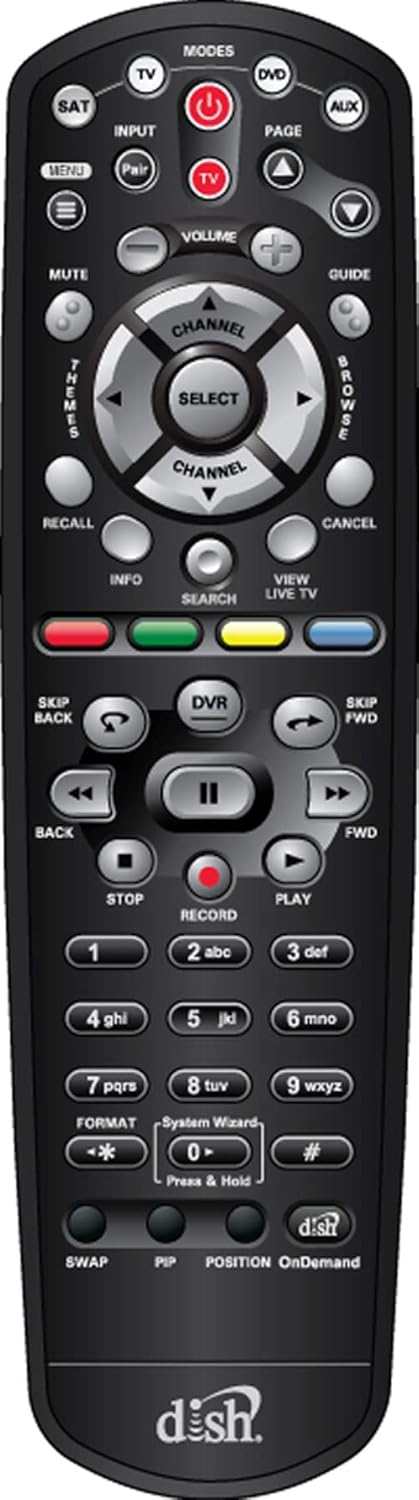
Şekil 1: Ön view of the DISH Network 40.0 UHF 2G Remote, showing all buttons and their layout.
Uzaktan Düğme İşlevleri
| Düğme | İşlev |
|---|---|
| GÜÇ | Turns the receiver and TV on/off. |
| MODES (TV, DVD, AUX, SAT) | Selects the device the remote controls. Ensure SAT mode is selected for receiver control. |
| GİRİŞ | Changes the input source on your TV. |
| MENÜ | Accesses the main menu of the DISH receiver. |
| REHBER | Program rehberini görüntüler. |
| SES (+/-) | TV'nin ses düzeyini ayarlar. |
| CHANNEL (+/-) | Kanalı değiştirir. |
| SELECT / Navigation Arrows | Menülerde gezinir ve seçenekleri seçer. |
| DVR | Accesses your Digital Video Recorder (DVR) recordings. |
| PLAY, PAUSE, STOP, FWD, BACK, SKIP FWD, SKIP BACK | Controls playback of live TV and recorded content. |
| KAYIT | Mevcut programın kaydını başlatır. |
| BİLGİ | Program bilgilerini görüntüler. |
| ARAMAK | Opens the search function for programs and content. |
| VIEW CANLI TV | Returns to live television. |
| Renkli Düğmeler (Kırmızı, Yeşil, Sarı, Mavi) | Functions vary depending on the on-screen menu or application. For Hopper 3, these buttons may offer enhanced features like one-click Closed Captioning (Green button). |
| Sayısal Tuş Takımı (0-9) | Doğrudan kanal girişi ve metin girişi. |
| TAKAS | Geçerli ve önceki kanal arasında geçiş yapar. |
| PİP | Picture-in-Picture function (if supported by receiver/TV). |
| Talep üzerine | Accesses On Demand content. |
For specific programming of the TV, DVD, or AUX modes, refer to the programming instructions provided with your receiver or on the DISH Network support website. The remote may come with a label sheet for custom input programming, as shown in Figure 2.

Figure 2: DISH Network 40.0 UHF 2G Remote shown with an accompanying sheet of input labels, which can be used to customize the remote's functions for various devices.
Bakım
To ensure the longevity and optimal performance of your DISH Network 40.0 remote, follow these maintenance guidelines:
- Temizlik: Kumandayı silmek için yumuşak, kuru bir bez kullanın. İnatçı kirler için hafifçe kurulayın.ampBezi su veya hafif, aşındırıcı olmayan bir temizleyiciyle silin. Aşırı nemden ve sert kimyasallardan kaçının.
- Pil Değişimi: Replace batteries when the remote's response becomes sluggish or if the indicator light (if present) signals low battery. Always replace both batteries at the same time with new ones of the same type (AA).
- Depolamak: Uzaktan kumandayı serin, kuru ve doğrudan güneş ışığından, aşırı sıcaklıklardan ve yüksek nemden uzak bir yerde saklayın.
- Damlalardan Kaçının: Uzaktan kumandayı fiziksel darbelere karşı koruyun, çünkü düşmeler iç bileşenlere zarar verebilir.
Sorun giderme
If you encounter issues with your DISH Network 40.0 remote, try the following solutions:
| Sorun | Olası Neden / Çözüm |
|---|---|
| Uzaktan kumanda yanıt vermiyor. |
|
| Remote controls TV but not receiver. |
|
| Remote controls receiver but not TV (e.g., volume, power). |
|
| Tuşlar yapışkan veya tepkisiz. |
|
If these steps do not resolve the issue, contact DISH Network customer support for further assistance.
Özellikler
| Özellik | Detay |
|---|---|
| Model Numarası | EL-UDON-81457 (DISH Network 40.0) |
| Uyumluluk | DISH Hopper and Joey Receivers only |
| İletişim türü | UHF (Ultra High Frequency) 2G Signal |
| Güç Kaynağı | 2 x AA Batteries (required) |
| Boyutlar (U x G x Y) | 8.5 x 1.2 x 4.1 inç (yaklaşık) |
| Ürün Ağırlığı | 4 ons (yaklaşık, piller hariç) |
| Renk | Siyah |
| Maksimum Desteklenen Cihaz Sayısı | 4 (SAT, TV, DVD, AUX) |
Garanti ve Destek
Garanti Bilgileri
This product is typically covered by a limited warranty provided by DISH Network or the retailer from whom it was purchased. Warranty terms and conditions may vary. Please retain your proof of purchase for warranty claims.
Note: The provided product information includes a legal disclaimer from a specific seller regarding returns. For official product warranty, please refer to DISH Network's official documentation.
Müşteri Desteği
For further assistance, technical support, or to inquire about replacement parts, please contact DISH Network customer service:
- DISH Network Official Webalan: www.dish.com/support
- Telefon Desteği: Refer to the DISH Network webGüncel iletişim numaraları için siteyi ziyaret edin.
When contacting support, please have your receiver model number and the remote's model number (EL-UDON-81457) readily available.


