1. Giriş
This manual provides instructions for the Perixx PX-1000 Backlit Gaming Keyboard. It covers setup, operation, maintenance, and troubleshooting to ensure optimal performance and user experience. The PX-1000 is designed for various environments, including office, home, and gaming, featuring adjustable backlighting and a Windows key lock function.
2. Ürün Bittiview
2.1 Temel Özellikler
- Arkadan Aydınlatmalı Tuşlar: Three-level adjustable backlighting for visibility in low-light conditions.
- Renk Seçenekleri: Switch between blue, red, and purple backlight colors.
- Windows Lock Function: Disable the Windows key to prevent accidental interruptions during gaming.
- USB Bağlantısı: Standard USB connection for broad compatibility.
2.2 Klavye Düzeni
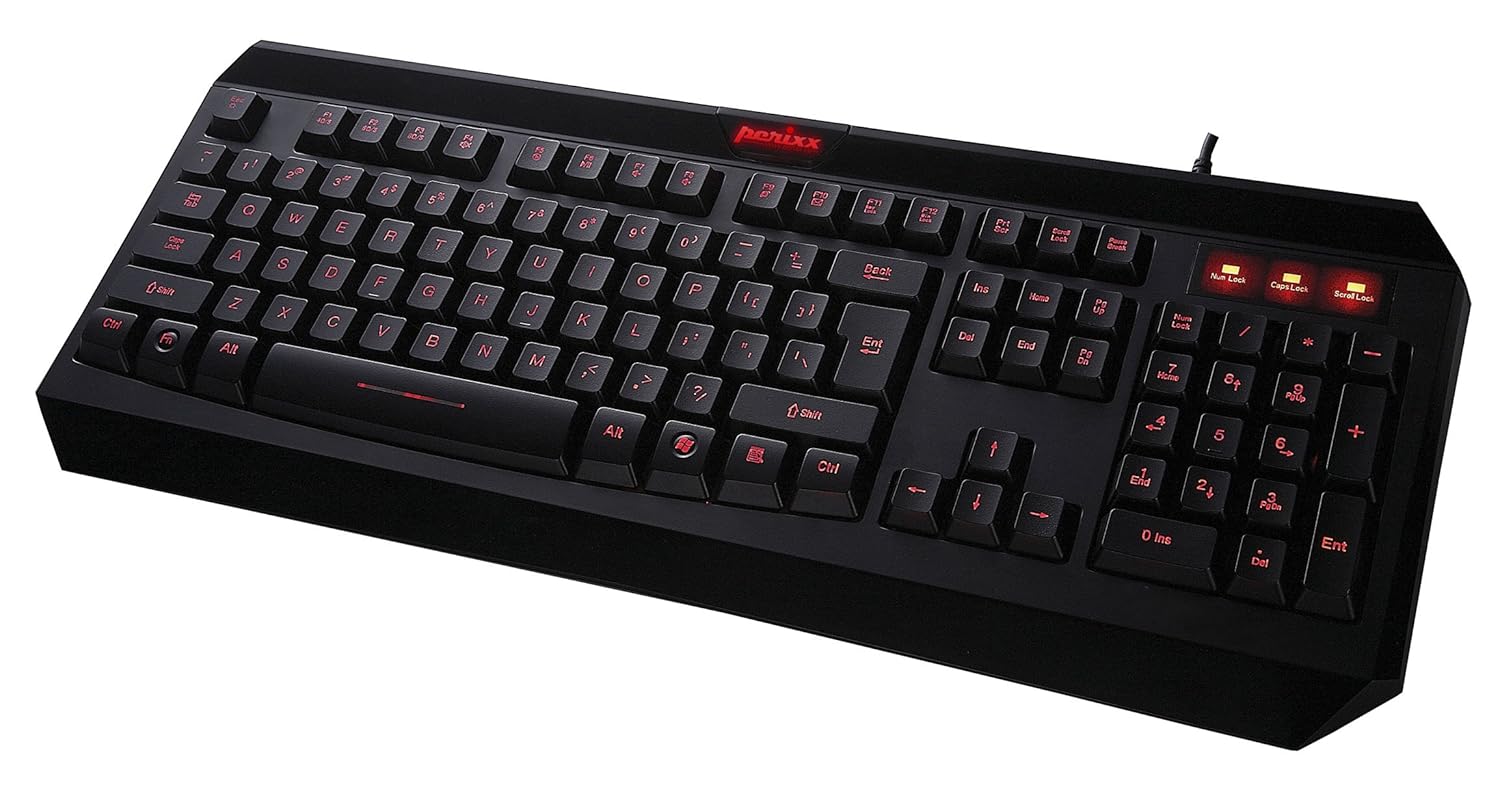
Şekil 2.1: Yukarıdan aşağıya view of the Perixx PX-1000 keyboard with red backlighting activated. This image displays the full QWERTY layout, numeric keypad, and function keys.

Figure 2.2: Technical diagram illustrating the key layout and dimensions of the Perixx PX-1000 keyboard.
3. Kurulum
- Paketin açılması: Carefully remove the keyboard from its packaging. Ensure all components, including the USB cable, are present.
- Bağlantı: Klavyenin USB bağlantısını bilgisayarınızdaki boş bir USB portuna takın.
- Sürücü Kurulumu: The Perixx PX-1000 is a plug-and-play device. Your operating system (Windows) should automatically detect and install the necessary drivers. No additional software installation is typically required.
- Atama: Klavyeyi masanızın üzerine rahat bir şekilde yerleştirin.
4. Kullanım Talimatları
4.1 Arka Işık Kontrolü
The PX-1000 features adjustable backlighting with multiple color options.
- Arka ışık rengini değiştirme: Basın Fn anahtar + Kaydırma Kilidi key simultaneously to cycle through the available backlight colors: Blue, Red, and Purple.
- Arka Işık Parlaklığını Ayarlama: Basın Fn anahtar + Sayfa Yukarı key to increase brightness, and Fn anahtar + Sayfa Aşağı key to decrease brightness. There are three brightness levels.
- Turning Backlight On/Off: To turn off the backlight, cycle through the brightness levels until it is off, or press Fn anahtar + Kaydırma Kilidi until the backlight is off.
4.2 Windows Key Lock Function
To prevent accidental activation of the Windows Start menu during intensive tasks or gaming, the Windows key can be disabled.
- Activating/Deactivating Windows Key Lock: Basın Fn anahtar + Windows Tuşu simultaneously. An indicator light (usually near the Num Lock/Caps Lock indicators) will illuminate when the Windows key is locked. Repeat the combination to unlock.
5. Bakım
Doğru bakım, klavyenizin uzun ömürlü olmasını ve yüksek performans göstermesini sağlar.
- Temizlik: Use a soft, dry cloth to wipe the surface of the keyboard. For deeper cleaning, use a can of compressed air to remove dust and debris from between the keys. Avoid using harsh chemicals or abrasive materials.
- Dökülmeler: In case of liquid spills, immediately disconnect the keyboard from your computer. Turn it upside down to drain any liquid and allow it to dry completely before reconnecting. Do not attempt to use the keyboard while it is wet.
- Depolamak: When not in use for extended periods, store the keyboard in a clean, dry environment away from extreme temperatures.
6. Sorun Giderme
| Sorun | Olası Neden | Çözüm |
|---|---|---|
| Klavye yanıt vermiyor. | Gevşek USB bağlantısı, arızalı USB portu, sürücü sorunu. |
|
| Backlight not working or stuck on one color. | Backlight function not activated, incorrect settings. |
|
| Windows key not functioning. | Windows key lock is active. | Basmak Fn + Windows Tuşu to toggle the lock function. Check the indicator light. |
| Tuşlar yapışmış veya tepkisiz. | Tuşların altında döküntü, sıvı hasarı. |
|
7. Özellikler

Figure 7.1: Detailed dimensions of the Perixx PX-1000 keyboard.
| Özellik | Detay |
|---|---|
| Marka | Perixx |
| Model Numarası | PX-1000 (Item model number: 10992) |
| Renk | Black, Red (Backlight colors: Blue, Red, Purple) |
| Bağlantı Teknolojisi | USB |
| Uyumlu Cihazlar | PC |
| İşletim Sistemi | Pencereler |
| Ürün Boyutları (UxGxY) | 46 x 19.2 x 3 cm (18.11 x 7.56 x 1.18 inç) |
| Ürün Ağırlığı | 812 gr (1.79 lb) |
| Dahil Bileşenler | USB kablosu |
| Özel Özellik | Arkadan aydınlatmalı |
8. Garanti ve Destek
For warranty information and technical support, please refer to the documentation included with your product or visit the official Perixx website. Perixx provides customer support for product-related inquiries and assistance with troubleshooting.
Çevrimiçi Kaynaklar: Ek destek ve ürün bilgisi için şu adresi ziyaret edebilirsiniz: Amazon'da Perixx Mağazası.


