1. Giriş
The Genius GX-Gaming SW-G2.1 3000 is a 2.1 channel speaker system designed to enhance audio experiences for gaming, music, and movies. It features a powerful subwoofer for deep bass and two satellite speakers for clear mid and high-range sounds. The system includes a dedicated control box for convenient adjustments and multiple input options for various devices.
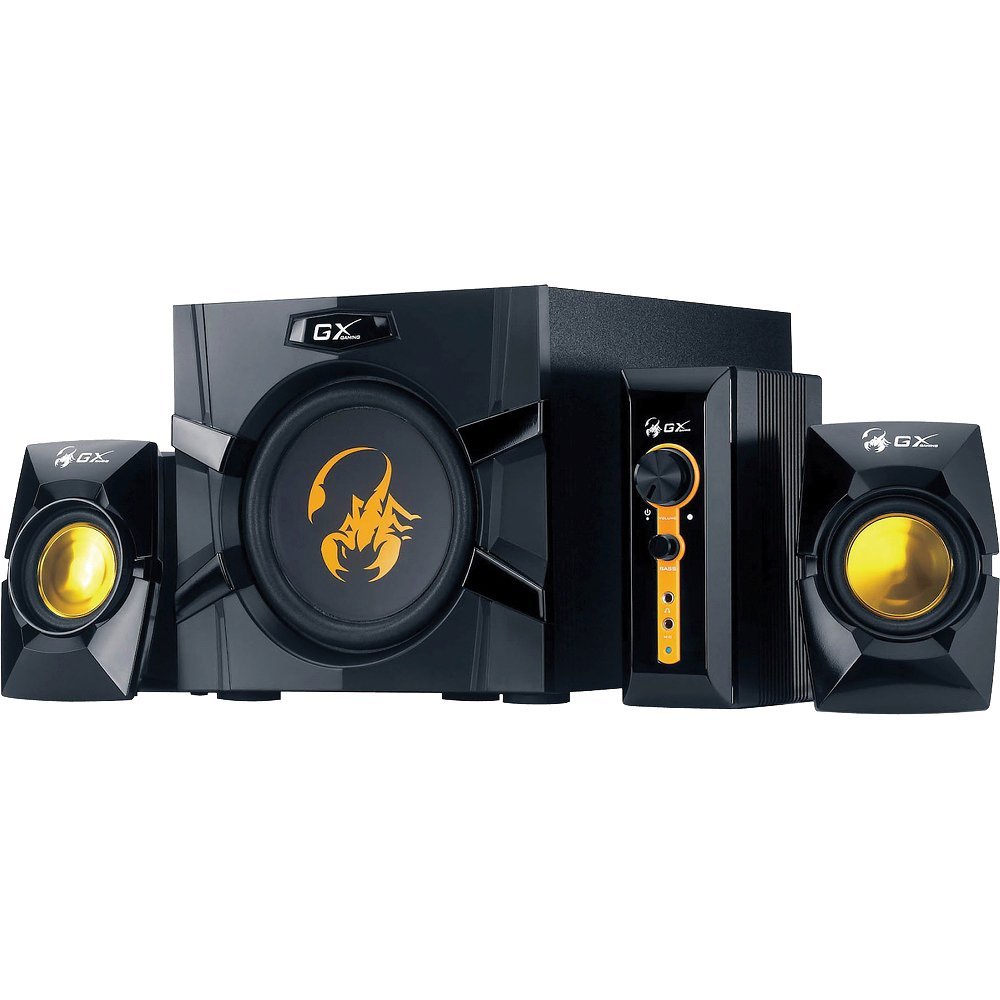
An image showing the Genius GX-Gaming SW-G2.1 3000 speaker system, featuring the subwoofer, two satellite speakers, and the control unit.
2. Paket İçeriği
Lütfen aşağıda listelenen tüm öğelerin paketinizde yer aldığından emin olun:
- One (1) Wooden Cabinet Subwoofer
- İki (2) Uydu Hoparlör
- One (1) Control Box
- One (1) Stereo RCA to 3.5mm Audio Cable
- One (1) 3.5mm Plug Audio Cable
- One (1) Microphone Jack Cable
- One (1) Headphone Jack Cable
- One (1) Multi-language User Manual
3. Ürün Özellikleri
- Toplam Çıkış Gücü: 70 Watt (RMS)
- Subwoofer: Wooden cabinet with a 6.5-inch driver for deep bass
- Uydu Hoparlörler: Two curvaceous speakers with 3-inch metal drivers for clear mid and high tones
- Kontrol kutusu: Independent controls for volume and bass adjustment
- Bağlantı: Two input jacks (3.5mm standard and two RCA) for PC, TV, DVD, and game devices
- Ses Jakları: Dedicated microphone jack for online communication and headphone jack for private listening
- Frekans Tepkisi: 35 Hz ~ 20K Hz
- Sinyal gürültü oranı: 85 dB
- Enerji tasarrufu modu: Automatically enters sleep mode after 1 minute of inactivity. To resume, ensure audio input device volume is at least 50%.
4. Kurulum Talimatları
- Hoparlörlerin Konumlandırılması: Place the subwoofer on a stable surface, preferably on the floor, for optimal bass. Position the satellite speakers on either side of your listening area, facing you.
- Uydu Hoparlörlerini Bağlayın: Connect the cables from the two satellite speakers to the corresponding output ports on the subwoofer.
- Connect Control Box: Plug the control box cable into the designated port on the subwoofer.
- Ses Kaynağını Bağlayın:
- For PC, MP3/CD players: Use the 3.5mm audio cable to connect your device's audio output to the 3.5mm input on the control box.
- For Game Consoles, DVD Players, TV: Use the stereo RCA to 3.5mm cable. Connect the RCA ends to your device's audio output and the 3.5mm end to the corresponding input on the control box.
- Gücü bağlayın: Plug the subwoofer's power cord into a standard electrical outlet (110V or 220V AC, depending on your region).
- Güç Açık: Turn on the power switch, usually located on the subwoofer. The system is now ready for use.
5. Kullanım Talimatları
- Ses Kontrolü: Use the large knob on the control box to adjust the overall volume of the speaker system.
- Bas Kontrolü: Use the dedicated bass knob on the control box to increase or decrease the subwoofer's bass output.
- Mikrofon Kullanımı: Connect a microphone to the MIC jack on the control box for online communication.
- Kulaklık Kullanımı: Plug your headphones into the headphone jack on the control box for private listening. This will mute the speakers.
- Enerji tasarrufu modu: If the system enters sleep mode due to inactivity, ensure your audio input device's volume is set to 50% or higher, then adjust the system's volume using the control box to resume audio.
6. Bakım
- Temizlik: Use a soft, dry cloth to clean the surfaces of the speakers and control box. Avoid using liquid cleaners or abrasive materials.
- Atama: Hoparlörleri doğrudan güneş ışığından, ısı kaynaklarından ve aşırı nemden uzak tutun. Subwoofer çevresinde yeterli havalandırma olduğundan emin olun.
- Kablo yönetimi: Hasar oluşmasını önlemek için tüm kabloların güvenli bir şekilde bağlı olduğundan ve birbirine dolanmadığından veya sıkışmadığından emin olun.
- Depolamak: Sistemi uzun süre saklayacaksanız, güç kaynağından ayırın ve serin, kuru bir yerde muhafaza edin.
7. Sorun Giderme
- Ses Yok:
- Ensure the power cable is securely plugged in and the power switch is on.
- Check all audio cables are correctly connected between the source device, control box, and subwoofer.
- Verify the volume knob on the control box is turned up.
- Ensure the audio source device (PC, TV, etc.) is playing audio and its volume is not muted or too low.
- If in Power Saving Mode, increase the audio source device's volume to at least 50%.
- Bozuk Ses:
- Reduce the volume on both the speaker system and the audio source device.
- Adjust the bass level on the control box.
- Ensure speaker cables are not damaged or loosely connected.
- Bir Hoparlör Çalışmıyor:
- Check the connection of the non-working satellite speaker to the subwoofer.
- Test with another audio source or swap the satellite speaker connections (if possible) to isolate the issue.
8. Teknik Özellikler
| Toplam Çıkış Gücü | 70 Watt (RMS) |
| Uydu Gücü | 2 x 15 Watt |
| Subwoofer Gücü | 40 Watt |
| Sürücü Üniteleri | Satellites: 2 x 3 inches, Subwoofer: 1 x 6.5 inches |
| Frekans Tepkisi | 35 Hz ~ 20K Hz |
| Sinyal-Gürültü Oranı | 85 dB |
| Subwoofer Boyutları (GxYxD) | 230 x 314 x 215 mm (yaklaşık 9 x 12.4 x 8.5 inç) |
| Uydu Boyutları (GxYxD) | 99x115x143 mm |
| Controller Dimensions (WxHxD) | 60x154x170 mm |
| Sistem Ağırlığı | 4.66 kg (yaklaşık 10.27 lbs) |
| Güç Kaynağı | 110V veya 220V AC |
| Uyumlu Cihazlar | Personal Computer, Television, DVD Players, Game Consoles, MP3/CD players |
| Giriş Jakları | 3.5mm standard input, two RCA jacks |
| Kontrol Yöntemi | Knobs/Buttons (listed as 'Touch' in some specifications) |
9. Garanti ve Destek
This Genius GX-Gaming SW-G2.1 3000 speaker system comes with a Sınırlı Garanti. For specific details regarding warranty coverage, duration, and terms, please refer to the warranty card included in your product packaging or visit the official Genius webalan.
For technical support, troubleshooting assistance, or service inquiries, please contact Genius customer support through their official website or the contact information provided in your product documentation. When contacting support, please have your product model number (SW-G2.1 3000) and purchase information readily available.


