1. Giriş
This manual provides comprehensive instructions for the installation, operation, and maintenance of your ZENEC ZE-NC620DMH 2-DIN Navigation Receiver. Designed specifically for motorhomes and caravans, this device integrates advanced navigation with multimedia functionalities. Please read this manual thoroughly before using the product to ensure correct operation and to prevent damage.
2. Güvenlik Bilgileri
- Kurulum: Ensure installation is performed by a qualified technician to avoid damage to the vehicle or the device. Incorrect installation can lead to malfunction or accidents.
- Güç Kaynağı: Connect the device only to a 12V DC vehicle power supply with a negative ground.
- Sürüş Sırasında Operasyon: Cihazı sürüş sırasında dikkatinizi dağıtacak şekilde kullanmayın. Yol güvenliğini her zaman ön planda tutun.
- Temizlik: Temizlik için yumuşak, kuru bir bez kullanın. Aşındırıcı temizleyiciler veya çözücüler kullanmayın.
- Sıcaklık: Cihazı uzun süre aşırı sıcaklıklara veya doğrudan güneş ışığına maruz bırakmaktan kaçının.
3. Ürün Bittiview
The ZENEC ZE-NC620DMH is a versatile 2-DIN navigation and multimedia system. It features a 6.2-inch touchscreen display and various input/output options.
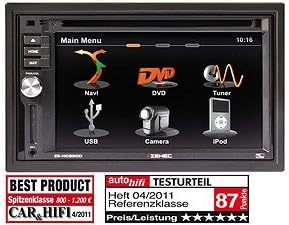
Figure 3.1: Main Menu Interface. This image displays the primary menu screen of the ZENEC ZE-NC620DMH. Key functions are accessible via touch icons, including Navigation (Navi), DVD playback, Radio Tuner, USB media, Camera input, and iPod connectivity. The top right corner shows the current time (10:16).
3.1 Ana Menü İşlevleri
- Navi: Access the integrated navigation system with specialized POIs for campers.
- DVD: Play DVDs and CDs via the built-in optical drive.
- Ayarlayıcı: Select and listen to radio stations.
- USB BAĞLANTI: Medya oynatmak için USB depolama aygıtlarını bağlayın.
- Kamera: View input from a connected rearview or front camera.
- iPod'lar: Connect and control compatible iPod/iPhone devices for audio playback.
4. Kurulum
4.1 Kurulum
The ZE-NC620DMH is designed for dashboard mounting in vehicles with a 2-DIN slot. Professional installation is highly recommended. Ensure all wiring connections (power, ground, speakers, antenna, GPS antenna, external microphone, camera inputs, USB) are secure and correctly polarized according to the wiring diagram provided in the separate installation guide.
4.2 İlk Yapılandırma
- Güç Açık: Turn on your vehicle's ignition. The device should power on automatically.
- Dil Seçimi: Tercih ettiğiniz dili seçmek için ekrandaki talimatları izleyin.
- Saat ve Tarih: Doğru saat dilimini, tarihi ve saati ayarlayın.
- GPS Kurulumu: GPS anteninin açık bir yere kurulduğundan emin olun view of the sky. The system will acquire satellite signals automatically.
- Bluetooth Eşleştirme: To pair your mobile phone, navigate to the Bluetooth menu, enable pairing mode on your phone, and select the ZE-NC620DMH from the list of available devices.
5. Kullanım Talimatları
5.1 Navigasyon Sistemi
- Tap the "Navi" icon on the main menu to launch the navigation software.
- Ekran klavyesini kullanarak varış noktanızı girin.
- Select route preferences (e.g., fastest, shortest, avoid tolls).
- The system provides turn-by-turn voice guidance and visual map display.
- Access specialized POIs (Points of Interest) for campers, such as campsites, service stations, and parking areas.
5.2 Multimedia Playback (DVD/CD, USB, iPod)
- DVD/CD: Insert a disc into the slot. The device will automatically switch to DVD/CD mode. Use the on-screen controls for playback.
- USB BAĞLANTI: Connect a USB flash drive to the designated USB port. Tap the "USB" icon to browse and play media files (audio, video, images).
- iPod'lar: Connect your iPod/iPhone using a compatible cable. Tap the "iPod" icon to access your music library and control playback.
5.3 Radyo Tuner
- Tap the "Tuner" icon to access the radio.
- Mevcut istasyonları bulmak için tarama işlevini kullanın veya manuel olarak bir frekansa ayarlayın.
- Favori radyo istasyonlarınızı hızlı erişim için ön ayar olarak kaydedin.
5.4 Kamera Girişi
- Eğer arkada birview Kamera bağlandığında, ekran otomatik olarak kameraya geçecektir. view Araç geri vitese alındığında.
- Tap the "Camera" icon to manually view the camera feed (if supported by your camera setup).
6. Bakım
- Ekran Temizleme: Gently wipe the touchscreen with a soft, lint-free cloth. For stubborn smudges, slightly dampen the cloth with water or a screen-safe cleaner. Do not spray liquids directly onto the screen.
- Yazılım Güncellemeleri: Periodically check the ZENEC website for available software and map updates to ensure optimal performance and the latest navigation data.
- Disc Drive: Keep the disc slot free from dust and debris. Avoid inserting damaged or dirty discs.
7. Sorun Giderme
| Sorun | Olası Neden | Çözüm |
|---|---|---|
| Güç yok | Sigorta atmış, kablolama yanlış, bağlantı gevşek. | Check vehicle fuses. Verify power and ground connections. Consult an installer. |
| GPS sinyali yok | GPS anteni engellenmiş veya bağlantısı kesilmiş. | Ensure antenna has a clear view Gökyüzünün. Anten bağlantısını kontrol edin. |
| Ses yok | Ses seviyesi çok düşük, sessize alma özelliği aktif, hoparlör kablolarında sorun var. | Increase volume. Check mute status. Verify speaker connections. |
| Dokunmatik ekran yanıt vermiyor | Geçici yazılım hatası. | Perform a soft reset (refer to installation guide for reset button location, usually a small pinhole). |
If problems persist after attempting these solutions, please contact ZENEC customer support or a qualified service center.
8. Özellikler
- Marka: Zenek
- Model Adı: ZENEC ZE-NC620DMH
- Araç Hizmet Tipi: kamyon (Note: Optimized for Motorhome/Caravan use)
- Ekran Boyutu: 6.2 inç
- Özellik: Adaptation for motorhomes and caravans
- Bağlantı Teknolojisi: Bluetooth, USB
- Harita türü: Avrupa
- Dahil Bileşenler: CD/DVD player, external microphone
- Ses Çıkış Modu: Stereo
- Montaj Tipi: Kontrol Paneli Montajı
9. Garanti ve Destek
For warranty information, please refer to the warranty card included with your product or visit the official ZENEC website. Technical support and service inquiries should be directed to your authorized ZENEC dealer or the ZENEC customer service department.
Garanti talepleri için lütfen satın alma belgenizi saklayın.


