giriiş
Celestron PentaView LCD Digital Microscope is a versatile biological microscope designed for educational, laboratory, and hobbyist use. It features a 4.3-inch full-color LCD screen, a 5MP digital camera, and offers magnification up to 2400x. This manual provides essential information for setting up, operating, and maintaining your microscope.

Image: The Celestron PentaView LCD Digital Microscope, a comprehensive tool for microscopic observation.
Paket İçeriği
Aşağıda listelenen tüm öğelerin paketinizde mevcut olduğundan emin olun:
- Celestron PentaView LCD Dijital Mikroskop
- 8 GB SD Kart
- USB 2.0 Cable (for data transfer)
- 10 Hazır Slayt
- 4-plug, multi-country AC Adapter
- Toz Kapağı
- Taşıma Çantası
- Dokunmatik kalem
- AV Cable (for TV output)

Image: All components included with the Celestron PentaView LCD Digital Microscope, neatly arranged.
Ürün Bileşenleri
Familiarize yourself with the various parts of your microscope:
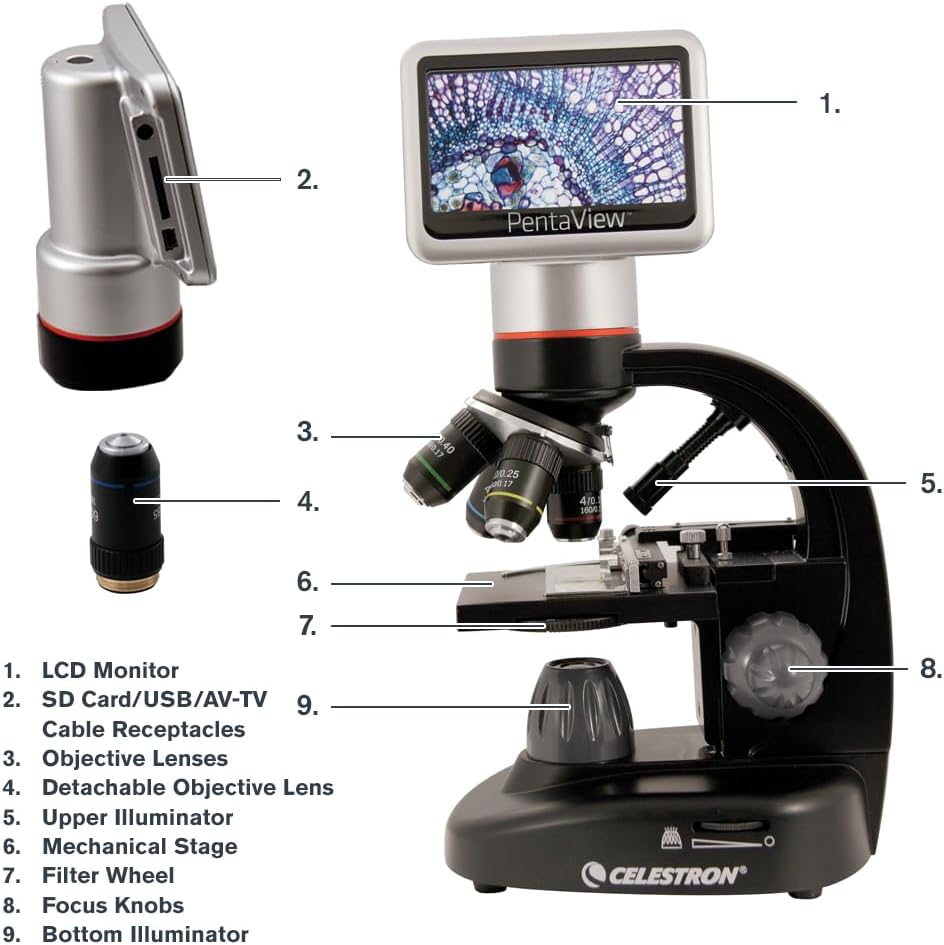
Image: A detailed diagram labeling the key components of the PentaView LCD Digital Microscope for easy identification.
- LCD ekran: 4.3-inch full-color screen for viewing specimens.
- SD Card/USB/AV-TV Cable Receptacles: Ports for memory card, USB connection, and AV output.
- Objektif Mercekler: Rotating turret with 4x, 10x, 20x, 40x lenses.
- Detachable Objective Lens: A separate 60x objective lens for higher magnification.
- Upper Illuminator: Top LED light source for opaque specimens.
- Mekanik Stage: Adjustable platform for precise slide positioning.
- Filtre Tekerleği: 6-position wheel with color and aperture filters to enhance contrast.
- Odak Düğmeleri: Coarse and fine adjustment knobs for sharp imaging.
- Bottom Illuminator: Adjustable LED light source beneath the stage for translucent specimens.
Temel Özellikler
- 4.3" LCD Screen with 180° Rotating Head: Rahat bir kullanım sağlar. viewing and sharing of observations.
- 5MP Digital Camera with Video Recording: Captures high-resolution still images and 20 fps video directly to an SD card.
- Magnification up to 2400x: Optical magnification up to 600x with 4x digital zoom for a total of 2400x.
- Adjustable Mechanical Stage with Illumination: Provides precise control over slide movement and optimal lighting.
- Çift Güç Seçenekleri: Operates with the included AC adapter or 4 AA batteries (not included) for portability.
- TV Çıkışı: Connects to a TV or monitor via AV output for large-scale viewIng.
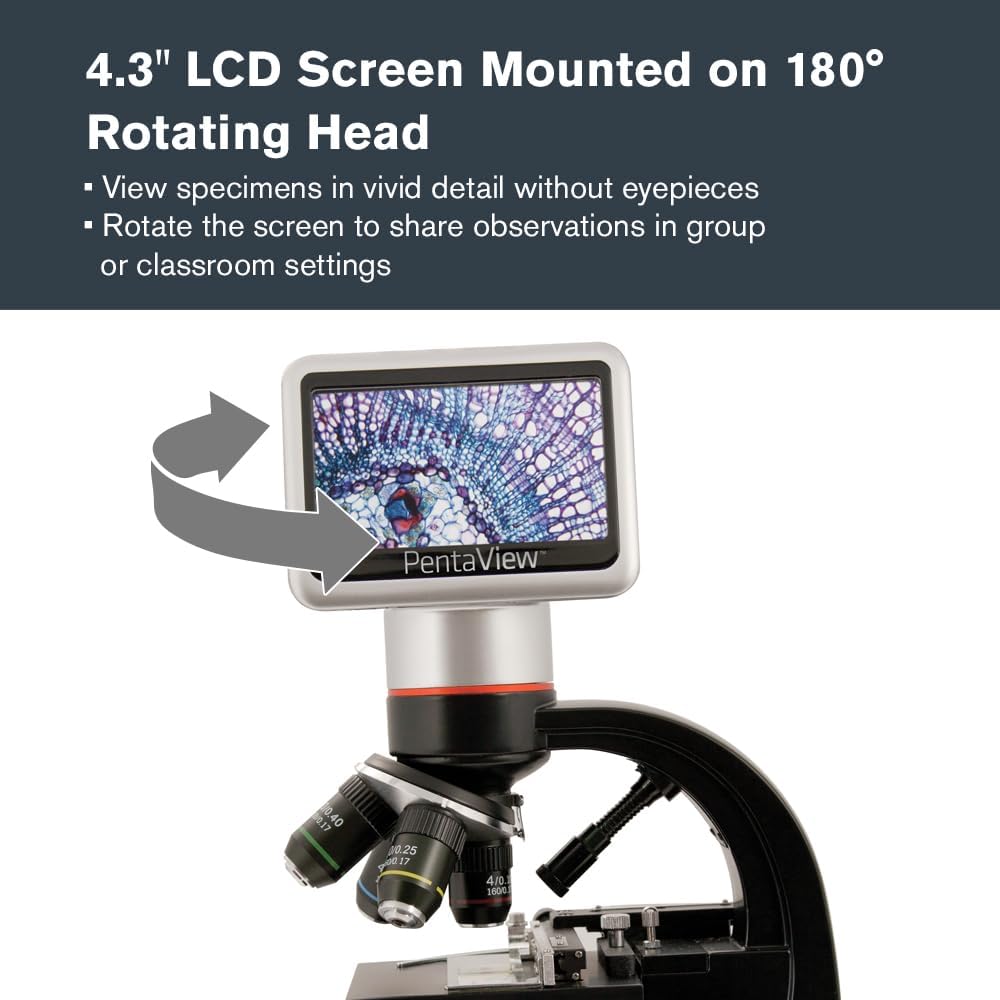
Image: The microscope's LCD screen rotated to demonstrate its flexibility for group viewIng.
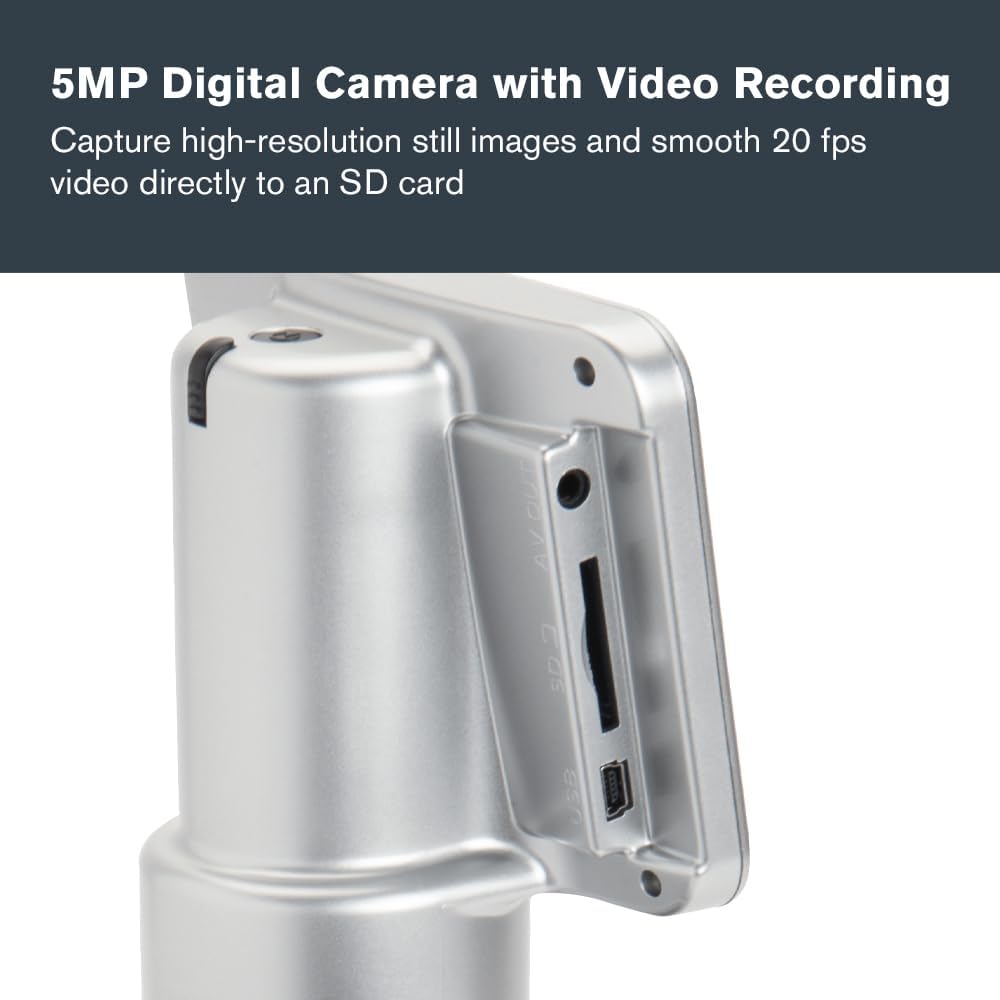
Resim: Yakın çekim view of the microscope's side panel, highlighting the SD card slot and other connectivity ports.

Resim: Ayrıntılı view of the microscope's objective lenses, indicating the various magnification options.

Image: The mechanical stage and focus knobs of the microscope, designed for precise specimen manipulation.

Image: The microscope connected to its AC power adapter, demonstrating one of its power options.

Image: The microscope displaying a specimen on an external television screen via its AV output.
Kurmak
Powering the Microscope
- AC Gücü: Connect the included AC adapter to the microscope's power input and plug it into a wall outlet.
- Pil Gücü: For portable use, insert 4 AA batteries (not included) into the battery compartment located at the base of the microscope.
SD Kartın Takılması
Locate the SD card slot on the side of the LCD monitor. Insert the included 8GB SD card until it clicks into place. This card is used for saving images and videos.
Placing a Specimen Slide
- Gently open the stage clips on the mechanical stage.
- Place a prepared slide (or your own specimen slide) under the clips, ensuring the specimen is centered over the aperture.
- S'yi serbest bıraktage clips to secure the slide.
Operasyon
Açma/Kapatma
Press and hold the power button located on the microscope's base until the LCD screen illuminates (or turns off).
Büyütmenin Ayarlanması
- Rotate the objective lens turret to select the desired magnification (4x, 10x, 20x, or 40x).
- For 60x magnification, attach the detachable 60x objective lens.
- Use the digital zoom function on the LCD screen (up to 4x) to achieve higher magnifications, up to 2400x total.
Görüntüyü Odaklama
- Use the coarse focus knob for initial, large adjustments to bring the specimen into approximate focus.
- Then, use the fine focus knob for precise adjustments to achieve a sharp, clear image.
Adjusting Illumination and Filters
- Bottom LED Illuminator: Adjust the brightness using the control dial for translucent specimens.
- Upper Illuminator: Turn on the top LED for opaque specimens.
- Filtre Tekerleği: Rotate the 6-position filter wheel to select different color or aperture filters to enhance contrast and control light intensity for various specimens.
Görüntü ve Video Yakalama
Use the controls on the LCD monitor to capture still images or record videos. Saved files are stored directly on the inserted SD card.
Harici Ekrana Bağlanma
Use the included AV cable to connect the microscope to a television or monitor for larger-scale viewing. Ensure the external display is set to the correct input source (e.g., AV, Video 1).
Bakım
- Lens Temizliği: Optik yüzeyler için özel olarak tasarlanmış, yumuşak ve tüy bırakmayan bir bez kullanın. Sert kimyasallardan kaçının.
- Genel Temizlik: Mikroskop gövdesini yumuşak bir bezle silin.amp bezle silin. Aşındırıcı temizleyiciler kullanmayın.
- Depolamak: When not in use, cover the microscope with the provided dust cover and store it in its carrying case in a dry, clean environment.
- Pil Değişimi: Replace AA batteries when the low battery indicator appears on the LCD screen or when performance diminishes.
Sorun giderme
| Sorun | Olası Neden | Çözüm |
|---|---|---|
| No image on LCD screen | Microscope not powered on; insufficient illumination; objective lens not properly aligned. | Ensure power is connected or batteries are installed. Turn on illuminators and adjust brightness. Rotate objective turret until it clicks into place. |
| Görüntü bulanık | Incorrect focus; objective lens dirty; slide not flat. | Adjust coarse and fine focus knobs. Clean objective lenses. Ensure slide is properly seated on the stage. |
| Cannot save images/videos | SD card full or not inserted correctly; SD card corrupted. | SD kartın takılı olduğundan emin olun. Gereksiz olanları silin. files or use a new SD card. Format the SD card if necessary (this will erase all data). |
| No image on external TV | AV cable not connected properly; TV input not selected correctly. | Ensure AV cable is securely connected to both microscope and TV. Select the correct AV input on your television. |
Özellikler
| Özellik | Detay |
|---|---|
| Model Adı | PentaView LCD Dijital Mikroskop |
| Ürün Model Numarası | 44348 |
| Büyütme Aralığı | 40x - 2400x (Optical up to 600x, Digital up to 4x) |
| Kamera Çözünürlüğü | 5MP (Still Images), 20 fps (Video) |
| LCD Ekran | 4.3 inch, 180 Degrees Rotating |
| Objektif Mercekler | 4x, 10x, 20x, 40x, Detachable 60x |
| Aydınlatma | Adjustable Bottom LED, Upper LED |
| Filtre Çarkı | 6-position (Color and Aperture Filters) |
| Depolamak | SD Kart (8 GB dahil) |
| Bağlantı | USB 2.0, AV Output |
| Güç Kaynağı | AC adaptör (dahil), 4 adet AA pil (dahil değil) |
| Ürün Boyutları | 7 x 5.5 x 13 inç (17.8 x 14 x 33 cm) |
| Ürün Ağırlığı | 4.18 pound (1.9 kg) |
| Malzeme | LCD Masaüstü |
| Renk | Siyah |
Garanti ve Destek
Celestron provides a 2-Year US Warranty for this product. For technical assistance or warranty claims, please contact Celestron customer support. Detailed contact information can be found on the official Celestron webGaranti belgesine veya ürünle birlikte gelen garanti kartına bakabilirsiniz.
Ek kaynaklar ve sık sorulan sorular için şu adresi ziyaret edin: Celestron webalan.