1. Giriş
This manual provides detailed instructions for the installation, operation, and maintenance of the SDC CB402-B Communicating Bathroom Control and Emergency Access Switch. Please read this manual thoroughly before installation and use to ensure proper function and safety.
2. Ürün Bittiview
The SDC CB402-B is a panel-mounted control switch designed for bathroom lock systems, providing both locking/unlocking functionality and emergency access. It features a clear indicator light for lock status.
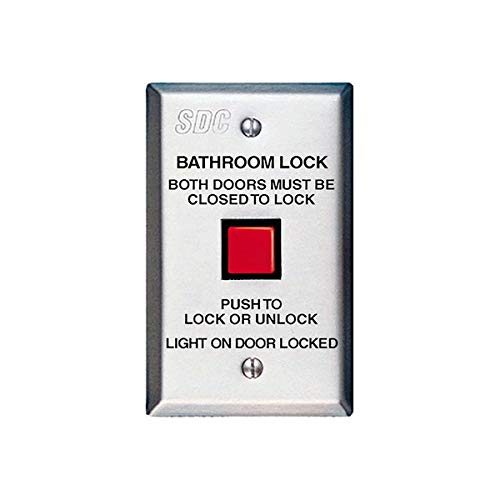
Figure 1: SDC CB402-B Control Panel
This image displays the SDC CB402-B control panel. The panel is rectangular, silver-colored, and features the "SDC" logo at the top. Below the logo, text reads "BATHROOM LOCK" and "BOTH DOORS MUST BE CLOSED TO LOCK". A prominent red square button is located in the center. Below the button, text indicates "PUSH TO LOCK OR UNLOCK" and "LIGHT ON DOOR LOCKED". There are also two visible screws for mounting.
Temel Özellikler:
- Integrated lock/unlock button.
- Visual indicator for door lock status.
- Designed for bathroom lock applications requiring two doors to be closed for locking.
- Panel mount design for secure installation.
3. Kurulum ve Kurulum
Önemli Güvenlik Bilgileri: Installation should only be performed by qualified personnel in accordance with all local electrical codes and regulations. Disconnect power before beginning installation.
- Montaj Yeri: Select a suitable indoor location for panel mounting, typically adjacent to the door frame or on a wall within easy reach.
- Kablolama: The CB402-B requires electrical connections for power and communication with the locking mechanism. Refer to the wiring diagram provided with your specific lock system for correct connections. Ensure all connections are secure and insulated. The unit utilizes an X-10 connectivity protocol for communication, which must be integrated with a compatible system.
- Panel Montajı:
- Prepare the wall opening according to the dimensions specified in the product packaging.
- Feed the necessary wiring through the opening.
- Secure the CB402-B panel to the wall using appropriate screws (as shown in Figure 1). Do not overtighten.
- Sistem Entegrasyonu: Connect the CB402-B to your bathroom lock system and power supply as per the system's instructions. Verify all connections before restoring power.
- İlk Test: After installation, restore power and perform a functional test to ensure the lock/unlock button and status indicator light operate correctly.
4. Operasyon
The SDC CB402-B is designed for straightforward operation:
- Kapıyı Kilitlemek: To lock the bathroom door(s), ensure "BOTH DOORS MUST BE CLOSED TO LOCK" as indicated on the panel. Press the red square button labeled "PUSH TO LOCK OR UNLOCK".
- Kapının Kilidini Açmak: To unlock the bathroom door(s), press the red square button again.
- Durum Göstergesi: The panel includes a light indicator. When the "LIGHT ON DOOR LOCKED" is illuminated, it signifies that the door(s) are securely locked.
5. Bakım
The SDC CB402-B requires minimal maintenance to ensure continued reliable operation:
- Temizlik: Periodically wipe the surface of the control panel with a soft, dry cloth. Avoid using abrasive cleaners or solvents, which can damage the finish or internal components.
- Denetleme: Paneli düzenli olarak fiziksel hasar, gevşek bağlantı veya aşınma belirtileri açısından kontrol edin.
- İşlevsellik Kontrolü: Periodically test the lock/unlock function and the status indicator light to ensure they are working correctly.
6. Sorun Giderme
If you encounter issues with your SDC CB402-B, consider the following:
- Düğme Yanıt Vermiyor:
- Check if the power supply to the unit and the associated lock system is active.
- Verify all wiring connections are secure and correct according to the installation diagram.
- Ensure both doors are fully closed if the system requires this condition for locking.
- Status Light Not Illuminating:
- Confirm the door is actually locked.
- Check power supply and wiring.
- If the light is still not working, the indicator bulb or LED may need replacement, or there might be an internal fault. Contact SDC support.
- Aralıklı operasyon: This could indicate loose wiring or an issue with the X-10 communication. Re-check all connections and ensure there is no interference with the X-10 signal.
For persistent issues, contact SDC technical support.
7. Özellikler
| Şartname | Detay |
|---|---|
| Örnek | CB402-B |
| Marka | SDC (Security Door Controls) |
| Ürün Ağırlığı | 1 Pound |
| Montaj Tipi | Panel montaj |
| Bağlantı Protokolü | X-10 |
| Birim Sayısı | 1 Sayım |
| Boyutlar | 2-7/8 inches W (Width) - Other dimensions not specified. |
8. Garanti ve Destek
For information regarding the product warranty, please refer to the official SDC (Security Door Controls) webSite üzerinden bilgi alabilir veya doğrudan müşteri hizmetleriyle iletişime geçebilirsiniz. Garanti şartları ve koşulları değişiklik gösterebilir.
Teknik destek veya daha fazla yardım için lütfen şu adresi ziyaret edin: SDC Security webalan veya yetkili distribütörleriyle iletişime geçin.


