1. Giriş
This manual provides comprehensive instructions for the safe and effective use of the PeakTech True RMS P 3131 Clamp Meter with Multimeter. This device is designed for measuring AC/DC currents without circuit interruption, as well as AC/DC voltage and resistance, with continuity testing capabilities. It features a 3 3/4 digit LCD display with True RMS measurement for accurate readings.
Lütfen cihazı çalıştırmadan önce bu kılavuzu dikkatlice okuyun ve ileride başvurmak üzere saklayın.
2. Güvenlik Bilgileri
WARNING: Improper use of this meter can cause damage, shock, injury, or death. Always follow all safety precautions.
- Daima yerel ve ulusal güvenlik kurallarına uyun.
- Do not use the meter if it appears damaged or if the insulation on test leads is compromised.
- Ölçüm yapmadan önce ölçüm cihazının doğru fonksiyona ve aralığa ayarlandığından emin olun.
- Canlı devrelere temastan kaçının. Uygun kişisel koruyucu ekipman (KKD) kullanın.
- The device is rated for CAT II 600V. Do not exceed these limits.
- Pil seviyesi düşük göstergesi göründüğünde pilleri derhal değiştirin.
- Do not operate the meter in explosive atmospheres.
3. Ürün Bittiview ve Bileşenler
The PeakTech P 3131 is a robust and reliable clamp meter. Familiarize yourself with its main components:

Şekil 1: Ön view of the PeakTech P 3131 Clamp Metre, cl'yi gösteriyoramp jaw, function selector, LCD display, and input terminals.
- Clamp Çene: For non-contact AC/DC current measurement.
- Fonksiyon Seçici Kadranı: To select measurement modes (A~, A=, V~, V=, Ω/Continuity, OFF).
- LCD Ekran: Ölçüm değerlerini, birimleri ve göstergeleri gösterir.
- Düğmeler: AC/DC, ZERO, H/MAX (Data Hold/Max Hold).
- Giriş Terminalleri: COM (common) and VΩ (voltage/resistance) for test leads.
- El Koruyucusu: Provides protection against accidental contact.
4. Kurulum
4.1 Pil Kurulumu
The PeakTech P 3131 requires two 1.5V AAA batteries (included). To install or replace batteries:
- Cihazın KAPALI olduğundan emin olun.
- Ölçüm cihazının arka tarafındaki pil bölmesi kapağını bulun.
- Bölmeyi açmak için bir tornavida kullanın.
- Insert the two AAA batteries, observing correct polarity (+ and -).
- Pil bölmesi kapağını yerine takın ve vidayla sabitleyin.
When the low battery indicator appears on the display, replace the batteries immediately to ensure accurate measurements.
4.2 Test Uçlarının Bağlanması
cilt içintage, resistance, and continuity measurements, connect the supplied test leads:
- Siyah test kablosunu Bİlgİ (common) input terminal.
- Kırmızı test ucunu, VΩ giriş terminali.

Figure 2: PeakTech P 3131 Clamp Meter shown with its carrying case, test leads, batteries, and user manual.
5. Kullanım Talimatları
5.1 Güç Açma/Kapatma
Rotate the function selector dial from the "OFF" position to any desired measurement function to power on the meter. To power off, rotate the dial back to "OFF". The meter features an automatic power-off function (can be deactivated) to conserve battery life.
5.2 AC/DC Akım Ölçümü (Clamp)
To measure current without breaking the circuit:
- Fonksiyon seçme kadranını konumuna çevirin A~ (AC Akım) veya A= (DC Akım) konumu.
- Basın AC/DC button if you need to switch between AC and DC current modes (if the dial position combines them).
- Basın SIFIR button to zero the display before measuring DC current, especially for small currents, to compensate for residual magnetism.
- Cl'yi açamp Tetiğe basarak çeneyi hareket ettirin.
- Enclose only bir conductor with the clamp Çene. Çenenin tamamen kapalı olduğundan emin olun.
- LCD ekranda mevcut değeri okuyun.
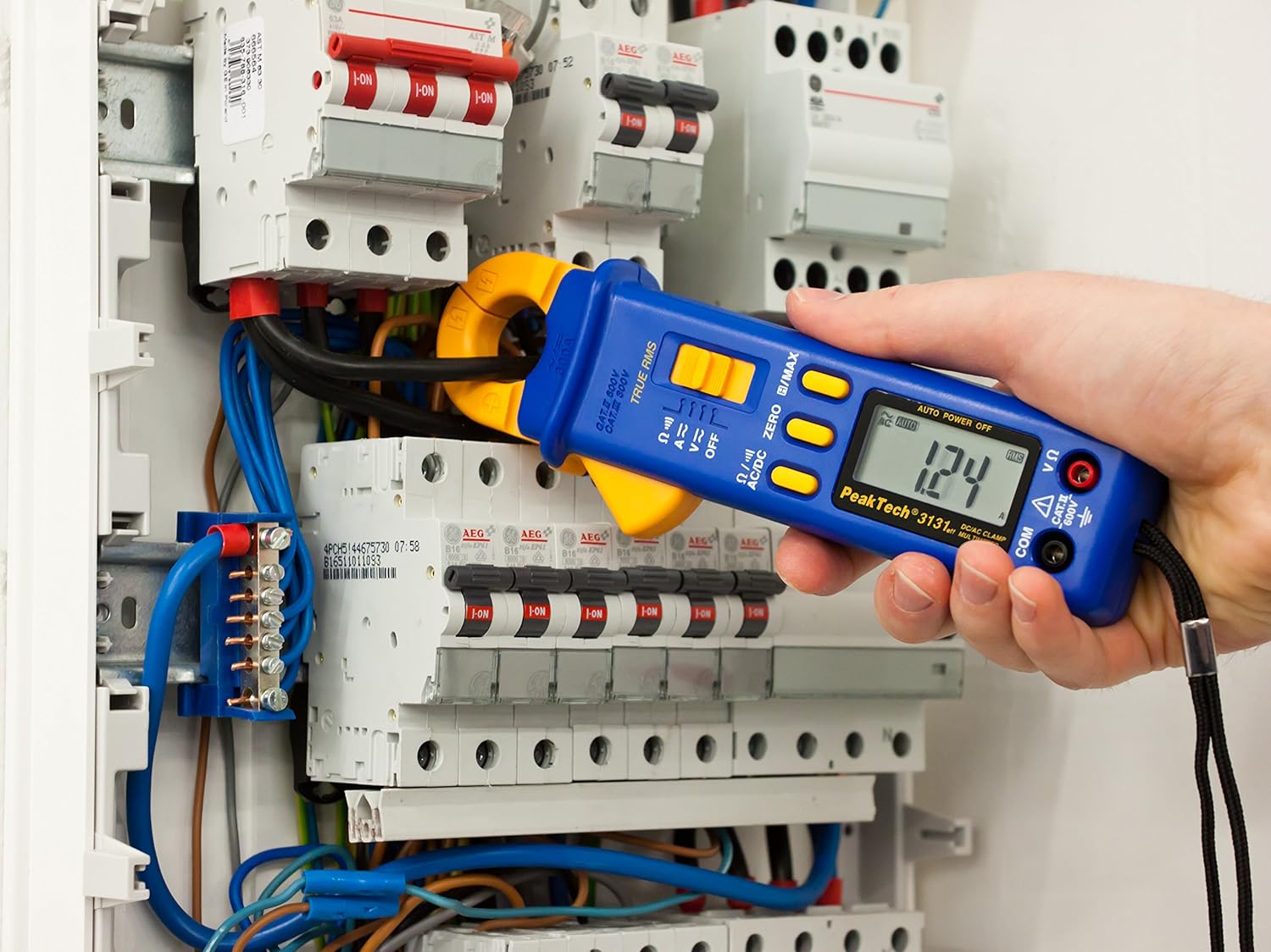
Figure 3: The PeakTech P 3131 Clamp Meter in use, measuring current on a single conductor within an electrical panel.
5.3 AC/DC Cilttage Ölçüm
Hacmi ölçmek içintage:
- Test uçlarını Bölüm 4.2'te açıklandığı gibi bağlayın.
- Fonksiyon seçme kadranını konumuna çevirin V~ (AC Cilttage) veya V= (DC Cilttage) konum.
- Ölçüm problarını ölçmek istediğiniz devreye veya bileşene paralel olarak bağlayın.
- Cildi okutagLCD ekranda e değeri.
5.4 Direnç ve Süreklilik Ölçümü
To measure resistance or check for continuity:
- Test uçlarını Bölüm 4.2'te açıklandığı gibi bağlayın.
- Fonksiyon seçme kadranını konumuna çevirin Ω/))) (Resistance/Continuity) position.
- For resistance: Connect the test probes across the component. Ensure the circuit is de-energized.
- For continuity: Touch the test probes to the two points you want to check. A continuous beep indicates a low-resistance path (continuity).
- LCD ekranda direnç değerini okuyun.
5.5 Özel Fonksiyonlar
- Gerçek RMS: The meter measures True Root Mean Square values for AC voltage and current, providing accurate readings for non-sinusoidal waveforms.
- Data Hold (H): Basın H/MAX Ekrandaki mevcut değeri dondurmak için düğmeye kısa süre basın. Serbest bırakmak için tekrar basın.
- Maximum Value Hold (MAX): Basılı tutun H/MAX button to capture and display the maximum measured value. Press again to exit.
- ZERO Function: Used to zero the display for DC current measurements to eliminate offset errors.
- Otomatik Mesafe Belirleme: Ölçüm cihazı uygun ölçüm aralığını otomatik olarak seçer.
- Otomatik Kapanma: The meter automatically turns off after a period of inactivity to save battery. This feature can typically be disabled by holding a specific button during power-on (refer to the device's on-screen indicators or a more detailed manual if available).
6. Bakım
6.1 Temizlik
Sayacın kasasını reklamla silinamp Bir bez ve hafif bir deterjan kullanın. Aşındırıcı veya çözücü maddeler kullanmayın. Kullanmadan önce ölçüm cihazının tamamen kuru olduğundan emin olun.
6.2 Pil Değişimi
Refer to Section 4.1 for instructions on battery replacement. Always use two fresh 1.5V AAA batteries. Remove batteries if the meter is not used for an extended period to prevent leakage.
6.3 Depolama
Store the meter in a cool, dry place, away from direct sunlight and extreme temperatures. Use the provided carrying case for protection.
7. Sorun Giderme
| Sorun | Olası Neden | Çözüm |
|---|---|---|
| Sayaç açılmıyor. | Piller bitmiş veya yanlış takılmış. | Pil kutuplarını kontrol edin; pilleri değiştirin. |
| "OL" veya "OVER" görüntülenir. | Measurement exceeds selected range or meter's maximum capacity. | Select a higher range (if manual ranging) or ensure measurement is within meter's limits. |
| Inaccurate DC current reading. | Residual magnetism in clamp çene. | Basın SIFIR button before measurement. |
| Devamlılık bip sesi yok. | Açık devre veya yüksek direnç. | Check connections; ensure circuit is complete. |
If problems persist, contact PeakTech customer support or a qualified service technician.
8. Teknik Özellikler
| Parametre | Şartname |
|---|---|
| Görüntülemek | 3 3/4 digit LCD, max. 3999 counts |
| DC Hacmitage (DCV) | 0.1 mV to 600 V (Accuracy: 0.5% + 2 digits) |
| AC Hacmitage (ACV) | 1 mV to 600 V (Accuracy: 1.5% + 5 digits) |
| DC Akımı (DCA) | 10 mA to 300 A (Accuracy: 1% + 2 digits) |
| AC Akımı (ACA) | 10 mA to 300 A (Accuracy: 1% + 3 digits) |
| Direnç (Ω) | 0.1 Ω to 40 MΩ (Accuracy: 0.9% + 2 digits) |
| Süreklilik Testi | Zil işlevi |
| Gerçek RMS | Yes, for AC measurements |
| Çene Açma | 22 mm max. conductor diameter |
| Güvenlik Derecelendirmesi | EN 61010-1, CAT II 600 V |
| Güç Kaynağı | 2 x 1.5V AAA pil |
| Boyutlar (U x G x Y) | 192 x 66 x 27 mm (yaklaşık 7.56 x 2.6 x 1.06 inç) |
| Ağırlık | 205 g (yaklaşık 0.45 lbs) |
9. Garanti ve Destek
PeakTech products are manufactured under strict quality control. This product is covered by a standard manufacturer's warranty against defects in materials and workmanship. Please refer to the warranty card included with your product or visit the official PeakTech webAyrıntılı garanti şartları ve koşulları için siteyi ziyaret edin.
For technical support, service, or calibration inquiries, please contact your local PeakTech distributor or the PeakTech customer service department. Contact information can typically be found on the PeakTech webSitede veya ürün ambalajında.


