1. Giriş
The Zenith DTT900 Digital TV Tuner Converter Box allows you to receive digital television broadcasts on your analog television set. This device converts over-the-air digital signals (ATSC) into an analog format (NTSC) that older televisions can display, providing access to digital channels and improved picture quality without a subscription. This manual provides essential information for setting up, operating, and maintaining your converter box.
2. Paket İçeriği
Başlamadan önce lütfen pakette tüm öğelerin mevcut olduğundan emin olun:
- Zenith DTT900 Digital TV Tuner Converter Box
- Uzaktan Kumanda (pilli)
- RF Kablo
- Ses/Video Kabloları (RCA tipi)
- Kurulum Kılavuzu
Note: An antenna is NOT included and must be purchased separately to receive digital broadcasts.

Figure 2.1: Zenith DTT900 Converter Box, remote control, and included cables.
3. Kurulum
3.1 Connecting the Converter Box
Follow these steps to connect your Zenith DTT900 to your television:
- Anteni bağlayın: Connect your outdoor or indoor antenna to the KARINCA İÇİNDE port on the back of the converter box.
- Connect to TV (Option 1 - RF Cable): If your TV has an RF input (coaxial), connect one end of the RF cable to the Karınca Çıkışı port on the converter box and the other end to the KARINCA İÇİNDE or KABLO GİRİŞİ port on your TV. Tune your TV to Channel 3 or 4.
- Connect to TV (Option 2 - Audio/Video Cables): If your TV has RCA (yellow, white, red) input jacks, connect the yellow video cable to the VİDEO output on the converter box and the yellow video input on your TV. Connect the white audio cable to the L-SES output on the converter box and the white audio input on your TV. Connect the red audio cable to the R-SES output on the converter box and the red audio input on your TV. Select the corresponding A/V input on your TV.
- Güç Açık: Plug the power adapter into the converter box and then into a wall outlet. Turn on your television and the converter box.

Şekil 3.1: Arka view of the Zenith DTT900 showing connection ports.
3.2 Initial Channel Scan
After connecting the converter box, you need to scan for available digital channels:
- Basın MENÜ Uzaktan kumandadaki düğmeye basın.
- Navigate to the 'Channel Search' or 'Auto Scan' option using the arrow buttons.
- Select 'Start Scan' or 'Auto Search' and press OK.
- The converter box will now search for all available digital channels. This process may take several minutes. Do not turn off the device during the scan.
- Once the scan is complete, the channels will be saved, and you can begin watching digital TV.
4. Kullanım Talimatları
4.1 Temel İşlemler
- Güç Açma/Kapatma: Basın GÜÇ button on the remote control or the front panel of the converter box.
- Kanal Seçimi: Kullanın +/- Kanalları sırayla değiştirmek için düğmeleri kullanabilir veya sayısal tuş takımını kullanarak doğrudan kanal numarasını girebilirsiniz.
- Ses Kontrolü: Kullanın SES +/- Sesi ayarlamak için düğmeler.
- Sesini kapatmak: Basın SESSİZ Sesi geçici olarak susturmak için kullanılan düğme.
4.2 Uzaktan Kumanda İşlevleri
The remote control provides full functionality for your DTT900 converter box. Familiarize yourself with the buttons for menu navigation, channel selection, volume control, and other features.
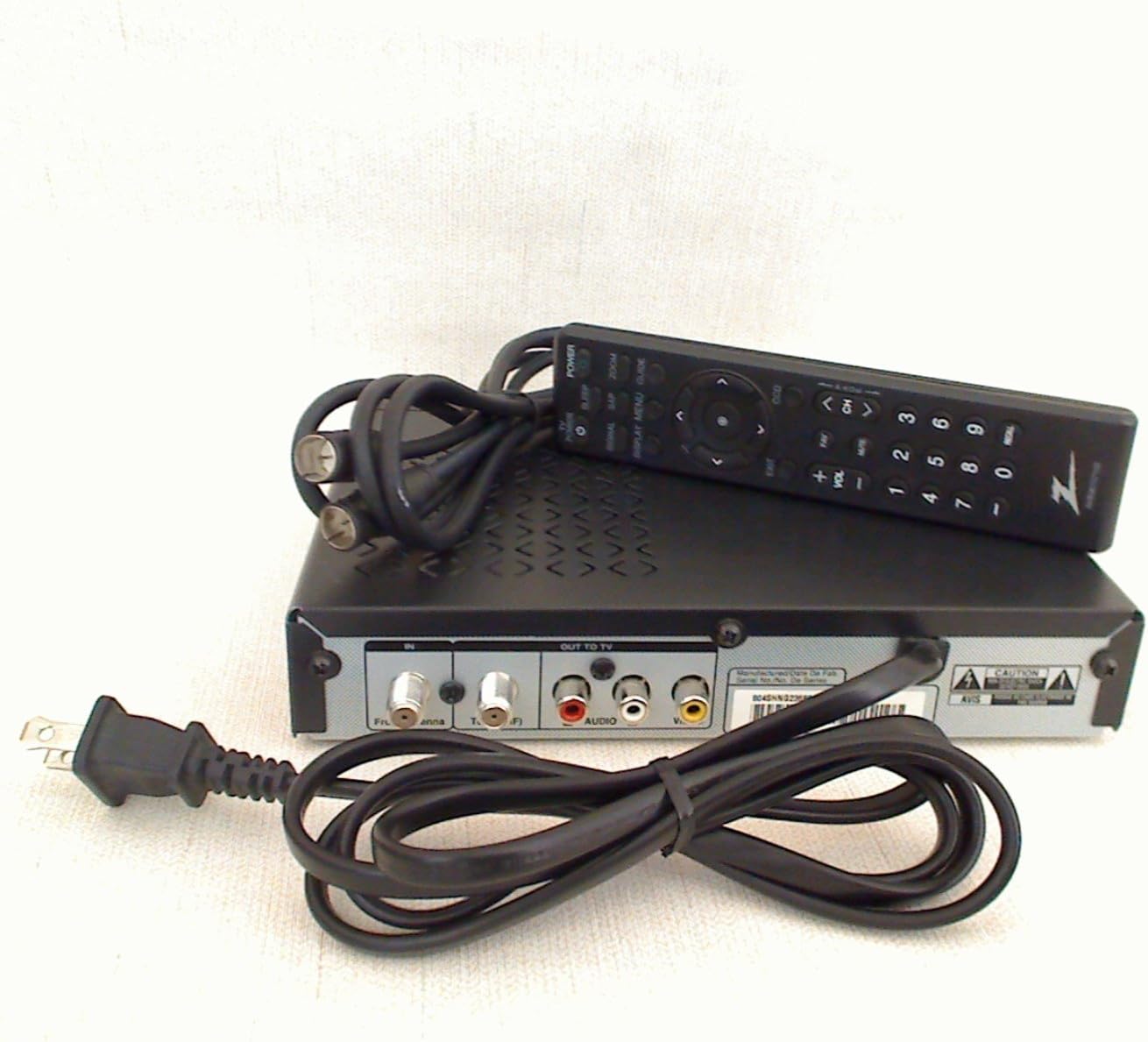
Figure 4.1: Zenith DTT900 remote control.
5. Bakım
To ensure the longevity and optimal performance of your Zenith DTT900 converter box, follow these maintenance guidelines:
- Temizlik: Use a soft, dry cloth to clean the exterior of the converter box. Do not use liquid cleaners or aerosol sprays, as they may damage the device.
- Havalandırma: Ensure the converter box is placed in a well-ventilated area. Do not block any ventilation openings on the device.
- Güç: Disconnect the power cord from the wall outlet during lightning storms or when the device is left unattended for long periods.
- Depolamak: Store the converter box in a cool, dry place away from direct sunlight and extreme temperatures.
6. Sorun Giderme
If you encounter issues with your Zenith DTT900, refer to the following common problems and solutions:
| Sorun | Olası Neden | Çözüm |
|---|---|---|
| Resim veya ses yok | Incorrect TV input selected, loose cable connections, converter box not powered on. | Verify TV input (e.g., AV1, Channel 3/4). Check all cable connections. Ensure converter box is plugged in and powered on. |
| Poor picture quality or missing channels | Weak antenna signal, antenna not positioned correctly, incomplete channel scan. | Adjust antenna position. Perform a new channel scan (refer to Section 3.2). Consider a stronger antenna or signal ampcankurtaran. |
| Uzaktan kumanda çalışmıyor | Dead batteries, obstruction between remote and converter box, remote not pointed correctly. | Replace batteries. Remove any obstructions. Point the remote directly at the converter box's IR sensor. |
| Ses senkronizasyonu bozuk | Temporary signal issue. | Restart the converter box by unplugging it for 30 seconds and plugging it back in. |
7. Özellikler
Key technical specifications for the Zenith DTT900 Digital TV Tuner Converter Box:
- Marka Adı: Zirve
- Ürün Ağırlığı: 2.3 pound
- Ürün Ölçüleri: 12.8 x 9.9 x 2.8 inç
- Ürün Model Numarası: DTT900
- Piller: 2 adet AA pil gereklidir (uzaktan kumanda için)
- Renk: Siyah
- Uyumlu Cihazlar: Televizyon
- Bağlantı Tipi: RF Konnektörü
- Bağlantı Teknolojisi: Elektrik hattı

Figure 7.1: Product label displaying model and compliance information.
8. Garanti ve Destek
8.1 Garanti Bilgileri
This product is covered by a limited manufacturer's warranty. Please refer to the included Basic Warranty Statement in your package for specific terms, conditions, and duration of coverage. Keep your proof of purchase for warranty claims.
8.2 Müşteri Desteği
For technical assistance, troubleshooting, or general inquiries, please contact Zenith customer support. Contact information can typically be found in the included Setup Guide or on the official Zenith webalan.


